All Missing DLC Without Bioware Social Network
DLC Bonus Pack Items
The reason why the bonus pack items do not appear is because of a incorrect .xml file that was packaged with the Steam version of the game, but not the Origin version. To get the correct .xml do the following.
-Download the correct file here[drive.google.com] (download button is in the top right).
-Once downloaded, navigate to Documents/BioWare/Dragon Age/Settings and paste the addIns.xml file from the link in here, making sure to confirm overwriting the file that is already in the folder
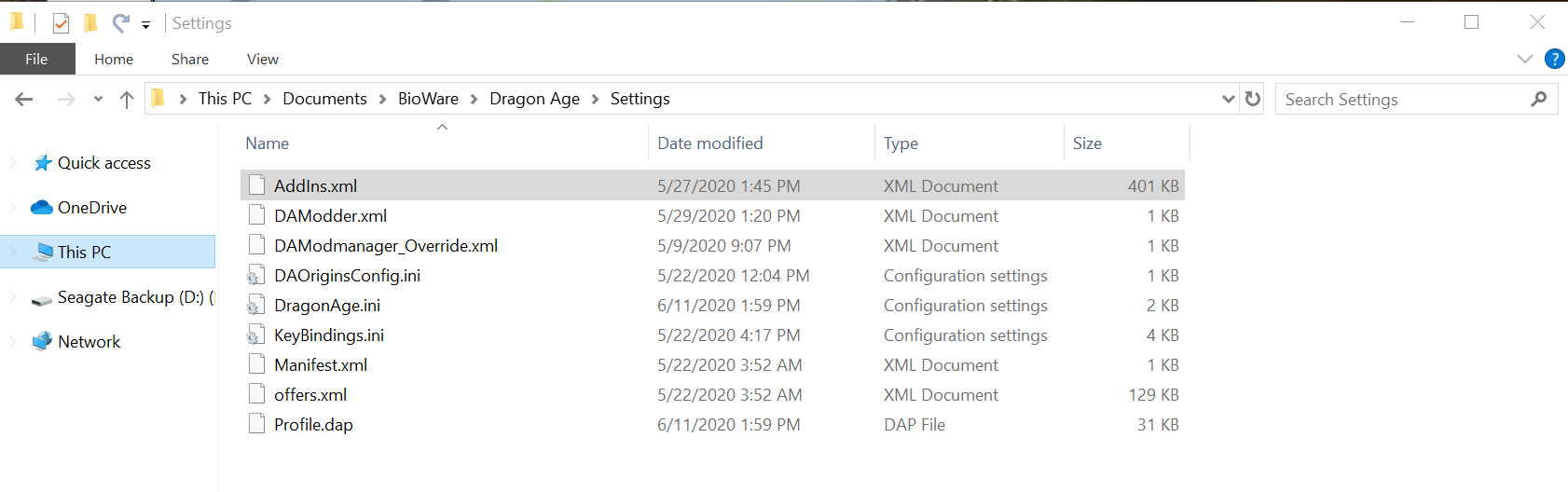
-Download the correct file here[drive.google.com] (download button is in the top right).
-Once downloaded, navigate to Documents/BioWare/Dragon Age/Settings and paste the addIns.xml file from the link in here, making sure to confirm overwriting the file that is already in the folder
Remaining DLC
Activating the remaining DLC is as easy as running some files included with the game
-Navigate to Steam/steamapps/common/Dragon Age Ultimate Edition/redist and run the following two files in the following order:
DAUServiceSetup_Steam.exe
DAOU_UpdateAddinsXML_Steam.exe
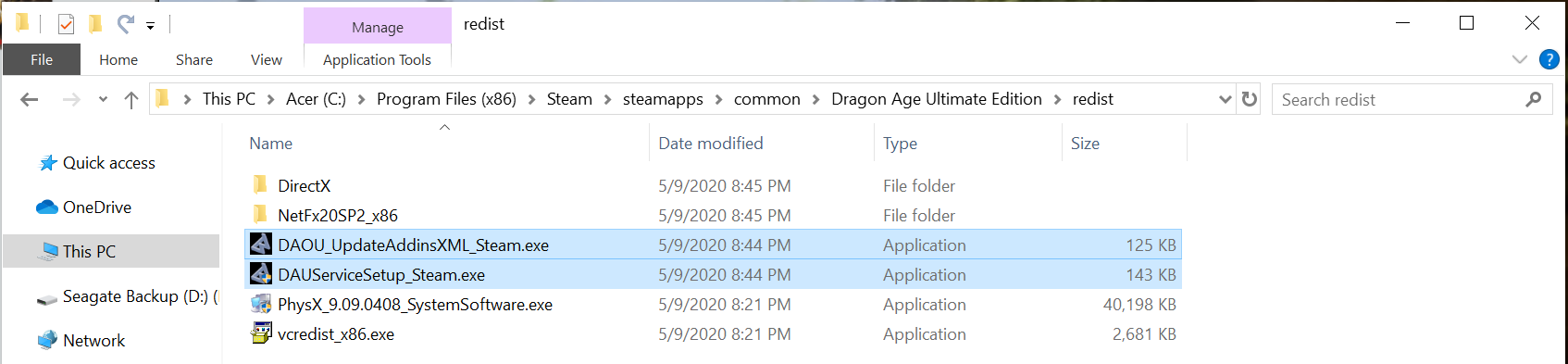
If the program gets stuck when you try to run it, try running the program with the launcher open and it should fix it. Shout out to Salted Buttery Corn for the tip.
After that next time you go into the game all the DLC should be present!
-Navigate to Steam/steamapps/common/Dragon Age Ultimate Edition/redist and run the following two files in the following order:
DAUServiceSetup_Steam.exe
DAOU_UpdateAddinsXML_Steam.exe
If the program gets stuck when you try to run it, try running the program with the launcher open and it should fix it. Shout out to Salted Buttery Corn for the tip.
After that next time you go into the game all the DLC should be present!
More Dragon Age: Origins - Ultimate Edition guides
- How to Fix Dragon Age: Origins (Ultimate Fix Guide)★ 5 (1.2k)171k views2.7k ♥9 minUpdated Jan 4, 2015
- Making DA: Origins LAA (Steam)★ 5 (1.4k)145k views1.9k ♥1 minUpdated Sep 15, 2016
- Getting a smooth experience in 2024 - LAA, DLC Updates, Bugfixes and Modifications.★ 5 (430)45k views1.1k ♥8 minUpdated Nov 9, 2024
- Русификатор текста и звука Dragon Age: Origins - Ultimate Edition★ 5 (1.5k)44k views1.4k ♥1 minRussian
- The right gifts for your companions★ 5 (890)39k views2.1k ♥4 minUpdated Mar 26, 2014
- Dragon Age: Origins - Griffon Essential Mods★ 5 (606)39k views1.6k ♥17 minUpdated Feb 10


This guide was created by its original author on the Steam Community. Are you the author and want it removed? Request removal.