All The Mods That I Use For The Witcher II
Graphics

⚫ AI Upscale Textures[www.nexusmods.com]by hub997 hiuuz Wednesday17 BrutalationX
(I also use the below mods, that you can find on the same page as the mod from above)
⚫ AI Upscale Characters Textures X4 VERSION EXTREME
⚫ AI Upscale Environmental Textures X4 VERSION EXTREME
⚫ AI Upscale Weapons Textures X4 VERSION
⚫ AI Upscale Hiuuz's The Witcher III shaved Geralt for The Witcher 2
⚫ All Movies Uspcale 1440p[www.nexusmods.com]by Anarsil69
⚫ The Witcher 2 Tweaker[www.nexusmods.com]by fallenzeraphine
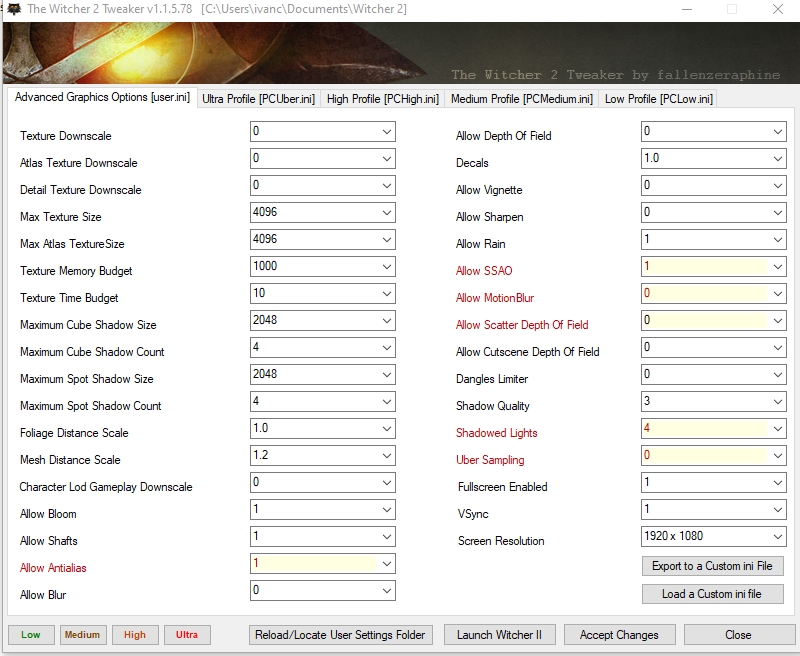
⚫ If your textures load slowly, or don't load at all, it is because of the Uspcaled Textures mod. With the W2 tweaker, you can increase the size of the textures and shadows.
These are my settings:
⚫ Aen Seidhe Eyes[www.nexusmods.com]by flixster
Characters
⚫ The Witcher 2 Character Collection[www.nexusmods.com]by warrenwarrpath
(I use Triss, Letho, Dandelion and Zoltan)
⚫ Force Hairstyle Change[www.nexusmods.com]by Khasim
⚫ Blue Eyes For Triss[www.nexusmods.com]by pypeaf
⚫ EE Vran Armor BB Fixed[www.nexusmods.com]by Supamic
(This mod will replace the more HD files from the AI Upscale Mod, though not by much)
⚫ Pearly Whites Of Rivia[www.nexusmods.com]by Johnysandels
⚫ Witcher 3 Style Geralt - Irregular Pale Custom[www.nexusmods.com]by Don_Kain
(I only use this mod for the eyes, go to Characters>player>model>head and copy geralt_eye/geralt_eye_s.xbm and paste them to
the witcher 2\CookedPC\characters\player\model\head
⚫ The Blue Stripes[www.nexusmods.com]by warrenwarrpath
⚫ The Nilfgaardians[www.nexusmods.com]by warrenwarrpath
⚫ The Scoia'tael[www.nexusmods.com]by warrenwarrpath
Gameplay
⚫ Comfy Couch + Dynamic HUD[www.nexusmods.com]by Presskohle
⚫ FOV Mod[www.nexusmods.com]by DenVdmj
⚫ ALL Items From the Game[www.nexusmods.com]by EvilSpenZer
⚫ All Passive Abilities[www.nexusmods.com]by BaHTsIzBEdEvi
(Use "I Want Them All - Alternative - Changed File", the other versions use base_script, and you don't want to use that, because it will break other mods)
⚫ Double Potion and Oil Durations[www.nexusmods.com]by Dansgaming
⚫ Better Gamepad Controls[www.nexusmods.com]by Massycraft
⚫ Zero Weight Mod[www.nexusmods.com]by raven4444
⚫ Better Imported Items[www.nexusmods.com]by Pezza
⚫ Extended Sex Scenes[www.nexusmods.com]by eliseeff
(Because why not)
⚫ Witcher 3 Icons[www.nexusmods.com]by TheLastWitcher
(Not compatible with Dynamic HUD, can still use both, but the HUD mod won't work)
⚫ Classic Dice Set[www.nexusmods.com]by Majestic123
⚫ OP Basescripts X Poker Camera Fix Compatibilty Patch[www.nexusmods.com]by AlinGeorgian Infintini cyd0nia akalinelif shiki00 Prosthetics XZINED
(Makes the OP Basescripts mod obselete)
Bug Fixes
⚫ Project Mersey - The Witcher 2 Unofficial Patch[www.nexusmods.com]by MerseyRockoff
(This mod is a MUST, it contains every fix ever released + a lot of other things. The mod will conflict with OP Basescript, but the creator of the patch has told me that his mod will work fine without the Base_script one, so install every file of this mod, besides the Base_script file)
⚫ Radovid Persuasion Fix[www.nexusmods.com]by Tgirgis
⚫ Circles of Power - Vigor Bug Fix[www.nexusmods.com]by WutTheMelon
Installation
Most mods go directly to "SteamLibrary\steamapps\common\the witcher 2\CookedPC", some go to "Documents\Witcher 2\UserContent". In any case, each mod will have a description with the installation details on Nexus.
Screenshots
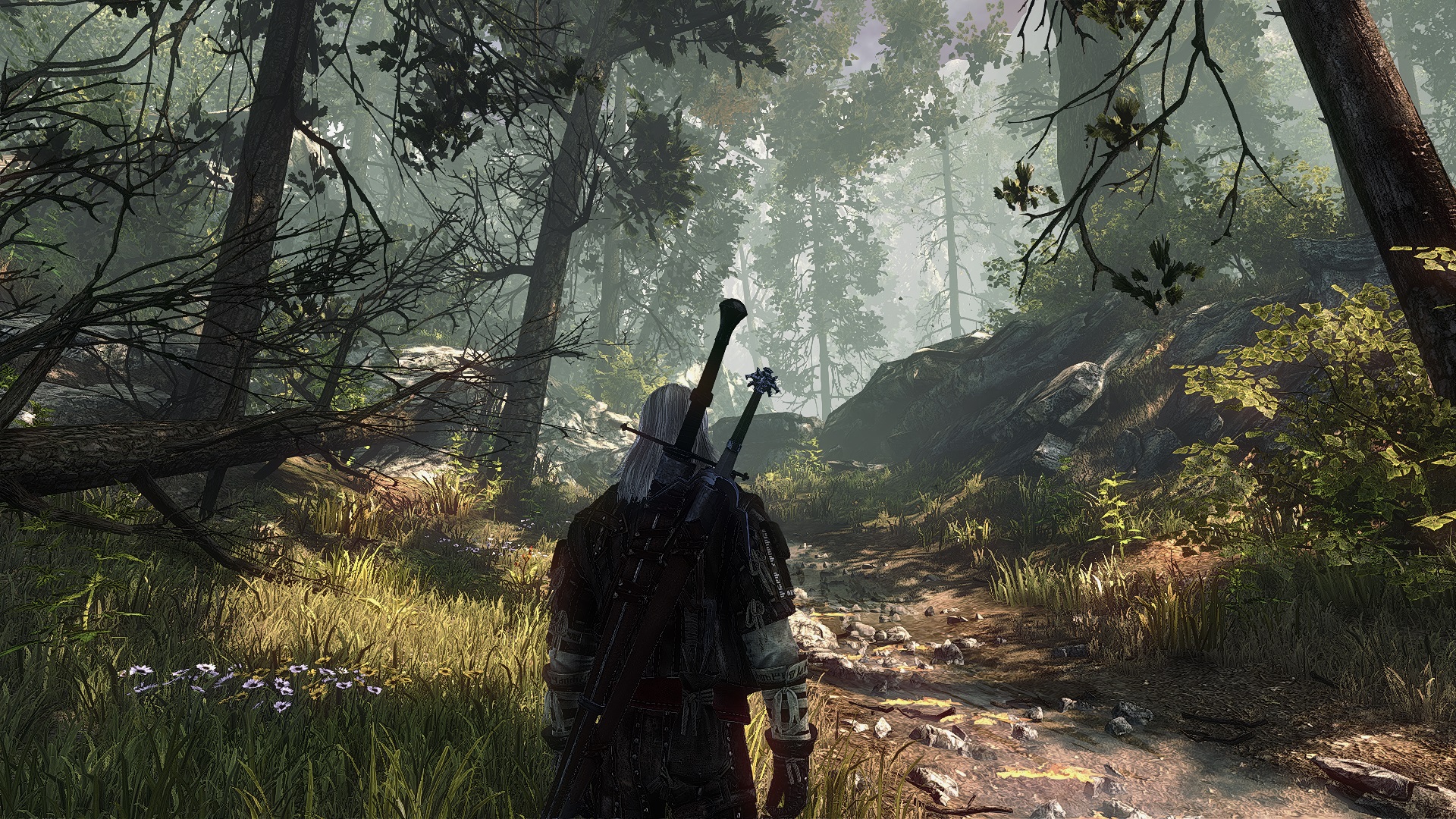
I would like to showcase a few of the great shots i got with these mods installed.


Credits
Again, all the credit for EACH and EVERY mod goes to the authors. I do not take any credit for any of them.
Please do show them some love and endorse their mods at least, because the modders do this out of passion, and love for games, so they do deserve some respect.

Please do show them some love and endorse their mods at least, because the modders do this out of passion, and love for games, so they do deserve some respect.
Closing Words
This would be all. By default, all these mods are compatible to work with eachother. As long as you do not break anything and install everything as it should be installed. Please let me know in the comments if you have any problems, but bear in mind, that you will get better help from the authors of the mods themselves. If i do stumble upon another mod that i like, i will add it to the guide.
If you are one of the modders who's mod i have showcased in this guide, and you want it removed for whatever reason you may have, just let me know. I don't want to give the impression that i wanted to steal one's hard work.
And as you may have noticed, this guide, unlike the one i made for the Witcher 1, has less mods, and no reshade. The reason for that is very simple, it is easier to merge mods in the Witcher 1. Like with textures. You could use a texture body from a different mod, and a face texture from a different mod. In the Witcher 2, it is not as easy as a drag and drop, and rename. So, the Upscale Textures mod is not compatible with any other mod that replaces the textures, and i'd rather use this one, because i prefer the sharper, higher texture quality.
Another reason is because recently a HUGE mod was released, the Mersey Project. Before that one, you had to install 4 or 6 more mods in order to fix certain bugs.
In essence, i think there are more mods for the Witcher 1 than 2. But regardless, the ones that are made, are well made, and i do recommend using them. And as for Reshade, i personally play without a reshade, because i like how the game looks.
Hope you found this guide useful, and have fun.
If you are one of the modders who's mod i have showcased in this guide, and you want it removed for whatever reason you may have, just let me know. I don't want to give the impression that i wanted to steal one's hard work.
And as you may have noticed, this guide, unlike the one i made for the Witcher 1, has less mods, and no reshade. The reason for that is very simple, it is easier to merge mods in the Witcher 1. Like with textures. You could use a texture body from a different mod, and a face texture from a different mod. In the Witcher 2, it is not as easy as a drag and drop, and rename. So, the Upscale Textures mod is not compatible with any other mod that replaces the textures, and i'd rather use this one, because i prefer the sharper, higher texture quality.
Another reason is because recently a HUGE mod was released, the Mersey Project. Before that one, you had to install 4 or 6 more mods in order to fix certain bugs.
In essence, i think there are more mods for the Witcher 1 than 2. But regardless, the ones that are made, are well made, and i do recommend using them. And as for Reshade, i personally play without a reshade, because i like how the game looks.
Hope you found this guide useful, and have fun.
Changelogs
Here I will write any update or new mod that I added to the guide, so you will know if you are missing anything.
(Guide Updated 23/06/ 2022)
Added:
⚫ Added Witcher 3 Style Geralt - Irregular Pale Custom
⚫ Added Pearly Whites of Rivia - Teeth Re-texture
⚫ Added The Witcher 2 Character Collection
⚫ Added EE Vran Armor BB fixed
⚫ Added Circles of Power - Vigor Bug Fix
⚫ Added OP Basescripts X Poker Camera Fix Compatibilty Patch
⚫ Added The Blue Stripes
⚫ Added The Nilfgaardians
⚫ Added The Scoia'tael
⚫ Added Witcher 3 Icons
⚫ Added Classic Dice Set
⚫ Removed OP Basescripts
More The Witcher 2: Assassins of Kings Enhanced Edition guides
- How to get all of Geral'ts secret passive abilities★ 5 (1.6k)53k views3.5k ♥6 minUpdated Mar 17, 2021
- Получаем достижения★ 5 (3.6k)48k views4.2k ♥7 minRussianUpdated Apr 24, 2017
- Моды на The Witcher 2: Assassins of Kings Enhanced Edition★ 5 (563)32k views1.2k ♥5 minRussianUpdated Mar 15, 2020
- The Witcher 2: Assassins of Kings на 100%★ 5 (1.1k)29k views2.6k ♥7 minRussianUpdated Sep 2, 2021
- The Witcher 2 Insane Difficulty Walkthrough★ 5 (634)27k views1k ♥22 minUpdated Apr 20, 2017
- Особые умения Геральта★ 5 (1.3k)27k views1.9k ♥5 minRussianUpdated Mar 9, 2014





This guide was created by its original author on the Steam Community. Are you the author and want it removed? Request removal.