Bioshock FOV Fix (SUPER EASY)
FOV FIX :)
From your desktop home screen press Windows + R
type %appdata%
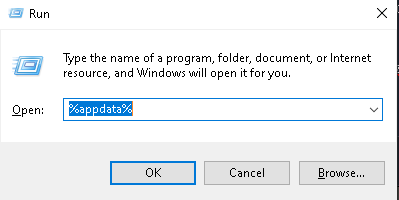
Select Ok
Select Bioshock2Steam Folder
Scroll/Find UserMP.ini [Will most likely be at the bottom]
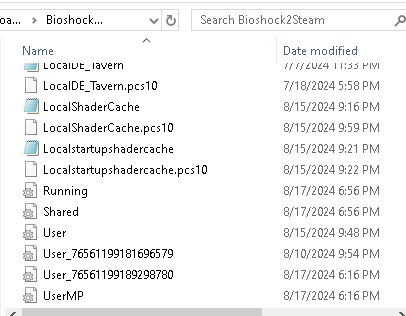
On your keyboard press Ctrl + F
Type in M= [This will search for the first M= in the document]
Search for it
On The very first M= on your page copy and paste the following line:
set Engine.PlayerController DefaultFOV 73.0 | set Engine.PlayerController DefaultForegroundFOV 91.0
Should look like this [Extra spaces will make it not work]

NOTE: If you want a different bind than the number M, feel free to do so, any bind will work.
When you are done, Press the red x in the top left and then SAVE
Now CLOSE Bioshock 2 if it was running and relaunch it
NOTE: FOR THIS TO WORK IN GAME YOU MUST PRESS THE BIND FOR IT TO ACTIVATE. ADDITIONALLY YOU MUST DIE ONCE IN GAME FOR IT TO ACTIVATE OR SPAM THE BUTTON AS YOU SPAWN IN!!!!
If you want to adjust to whatever FOV you want, then change the number values until you find a perfect match!
IMPORTANT NOTE: Each time you want to try a new FOV value, you MUST restart your game for it to take effect
type %appdata%
Select Ok
Select Bioshock2Steam Folder
Scroll/Find UserMP.ini [Will most likely be at the bottom]
On your keyboard press Ctrl + F
Type in M= [This will search for the first M= in the document]
Search for it
On The very first M= on your page copy and paste the following line:
set Engine.PlayerController DefaultFOV 73.0 | set Engine.PlayerController DefaultForegroundFOV 91.0
Should look like this [Extra spaces will make it not work]
NOTE: If you want a different bind than the number M, feel free to do so, any bind will work.
When you are done, Press the red x in the top left and then SAVE
Now CLOSE Bioshock 2 if it was running and relaunch it
NOTE: FOR THIS TO WORK IN GAME YOU MUST PRESS THE BIND FOR IT TO ACTIVATE. ADDITIONALLY YOU MUST DIE ONCE IN GAME FOR IT TO ACTIVATE OR SPAM THE BUTTON AS YOU SPAWN IN!!!!
If you want to adjust to whatever FOV you want, then change the number values until you find a perfect match!
IMPORTANT NOTE: Each time you want to try a new FOV value, you MUST restart your game for it to take effect
More BioShock 2 guides
- Crashing of Bioshock 2 Solved★ 5 (1.4k)63k views1.6k ♥5 minUpdated Jun 8, 2020
- Руководство по достижениям в игре BioShock 2 + КОНЦОВКИ★ 5 (1.4k)18k views1.4k ♥12 minRussianUpdated Oct 22, 2015
- [RUS]/[ENG], Как получить достижение "9-Ирония"/ How to make the rare achievement - "9-Irony"★ 5 (333)12k views154 ♥1 minUpdated Oct 15, 2015
- Codes to all doors★ 512k views722 ♥1 minUpdated Apr 11, 2022
- Long Grind Multiplayer Achievements via Solo Play (Bioshock 2)★ 5 (461)11k views535 ♥3 minUpdated Apr 19, 2023
- Scheme guide to all 6 endings★ 4 (167)9.1k views149 ♥1 min


This guide was created by its original author on the Steam Community. Are you the author and want it removed? Request removal.