Camera not following Gomez-How to fix
The problem
Essentially, the problem is this; you interact with something, close the game, and when you reload it, the camera is fixed to a certain position. I'm not really sure how this works exactly, so if it happens, sorry. In my case, it happened after reloading the game in the observatory, but its not limited to this. Luckily, it's not hard to fix. The fix will be in the next section.
This is the room it happened to me in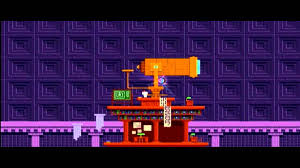 . Try to not exit the game in this room.
This is the room it happened to me in
. Try to not exit the game in this room.
The fix
The fix has to do with your settings.
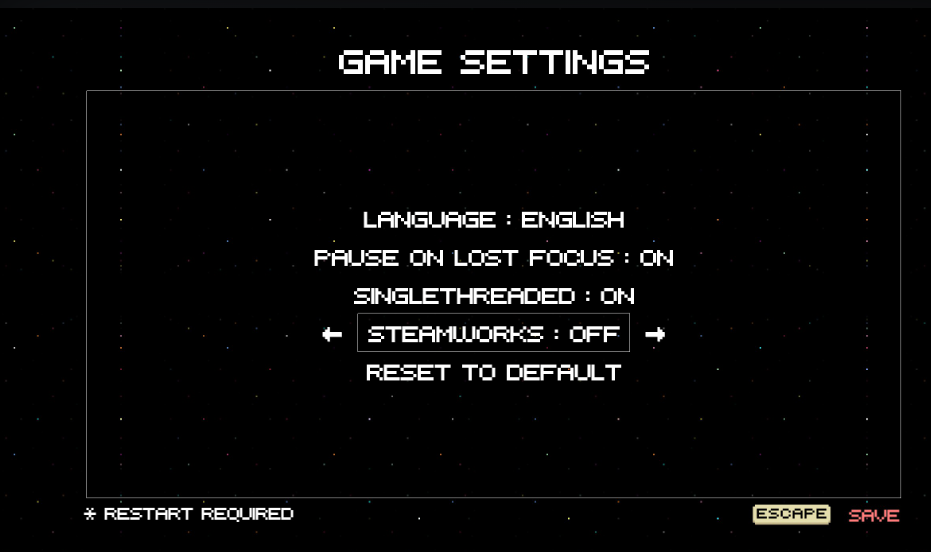
First, go into Game Settings in the menu. The two options you'll be messing with here are Singlethreaded and Steamworks. Steamworks enables achievements and leaderboards, but I'm not exactly sure what Singlethreaded does. Anyway, by default Steamworks will be on, and Singlethreaded will be off. Make it so that Singlethreaded is on, and Steamworks is off.
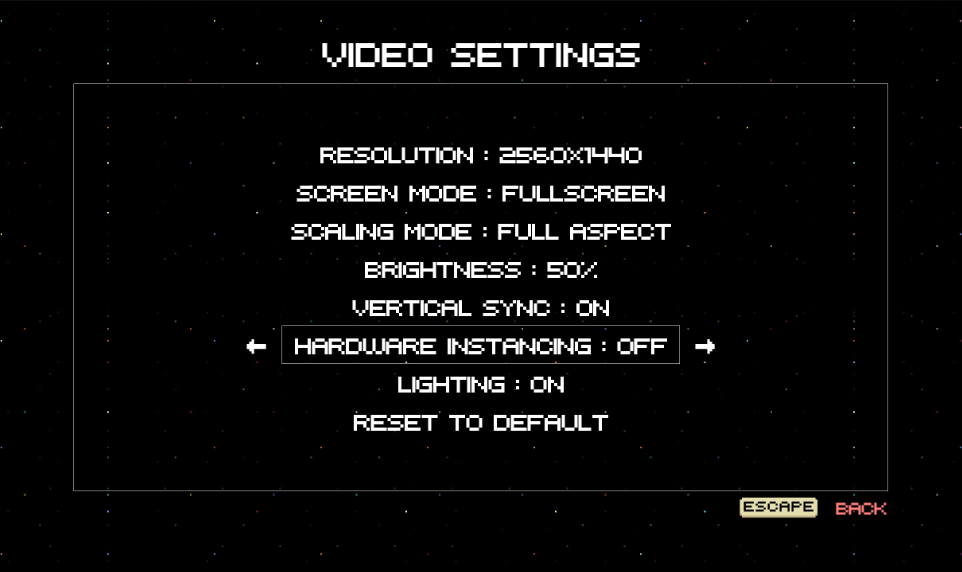
Next, you have to go into your Video Settings. The only setting you need to change here is Hardware Instancing. I also have no idea what this does. By default, it's set to on, so you'll have to switch it to off.
For the Game Settings you changed to take affect, you have to exit the game. So, close the game. It doesn't matter what room you're in. When you load the game up again, the camera should follow Gomez once more.
Here, you can change the settings again to what they were before; the only one I re-enabled was Steamworks because I want those achievements, but that's it.
This steam thread is where I found this solution.
https://steamcommunity.com/app/224760/discussions/0/3156454576358835520/
First, go into Game Settings in the menu. The two options you'll be messing with here are Singlethreaded and Steamworks. Steamworks enables achievements and leaderboards, but I'm not exactly sure what Singlethreaded does. Anyway, by default Steamworks will be on, and Singlethreaded will be off. Make it so that Singlethreaded is on, and Steamworks is off.
Next, you have to go into your Video Settings. The only setting you need to change here is Hardware Instancing. I also have no idea what this does. By default, it's set to on, so you'll have to switch it to off.
For the Game Settings you changed to take affect, you have to exit the game. So, close the game. It doesn't matter what room you're in. When you load the game up again, the camera should follow Gomez once more.
Here, you can change the settings again to what they were before; the only one I re-enabled was Steamworks because I want those achievements, but that's it.
This steam thread is where I found this solution.
https://steamcommunity.com/app/224760/discussions/0/3156454576358835520/
More FEZ guides
- A Complete Guide to FEZ!!!★ 5 (2.1k)64k views2.3k ♥37 minUpdated Jan 30, 2014
- The Ultimate Guide to FEZ★ 5 (1.5k)40k views1.9k ♥64 minUpdated Mar 1, 2016
- Alphabets, Numbers & Tetrominos★ 5 (539)19k views649 ♥1 minUpdated Nov 14, 2015
- SOLUTION-FREE Guide to Avoid....Guides. And Frustration.★ 5 (611)19k views745 ♥9 minUpdated Feb 21, 2018
- Cube meet translation.★ 5 (223)16k views93 ♥1 min
- You Need Help, Not Answers!★ 4 (174)12k views282 ♥5 min



This guide was created by its original author on the Steam Community. Are you the author and want it removed? Request removal.