Car Duplication Tutorial
How to
1. Download Bag Decompress[github.com] and extract it anywhere;
2. Go to your saves folder at C:\Steam\userdata\xxxxxxxx\228380\local\wreckfest (or whatever drive Steam is installed on);
3. Take cars5.ccrs and drag it over BagDecompress.exe;
4. The tool will create cars5.raw.ccrs - Open it with HxD or any Hex Editor of your choice;
5. Follow the image guide (click to enlarge):
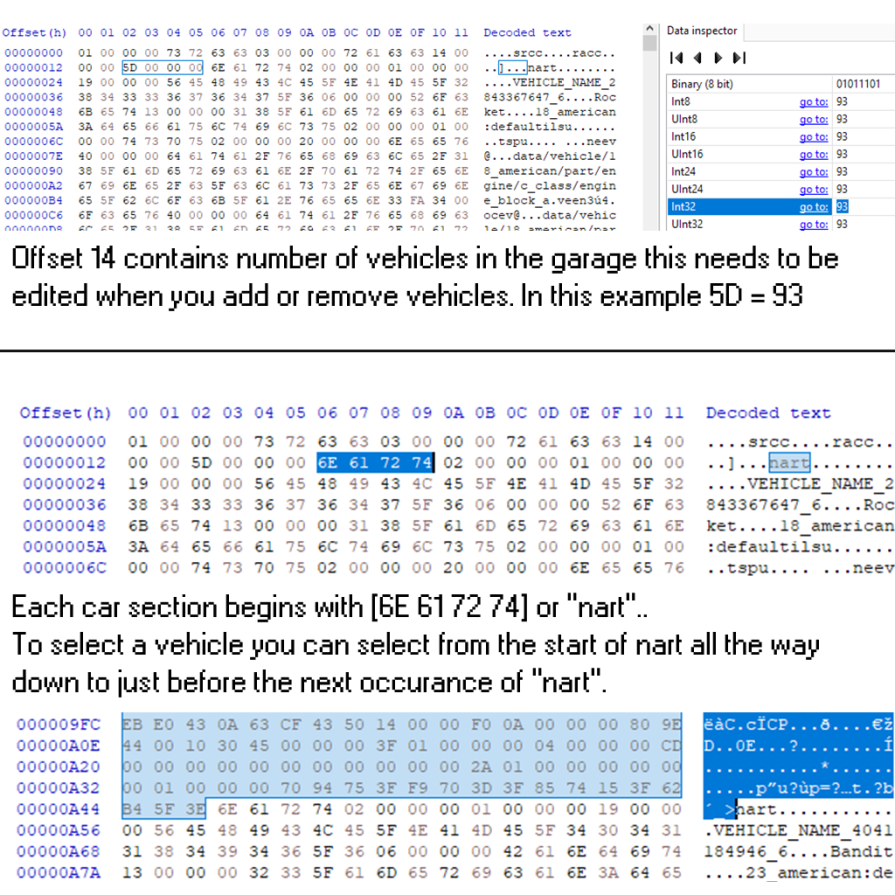
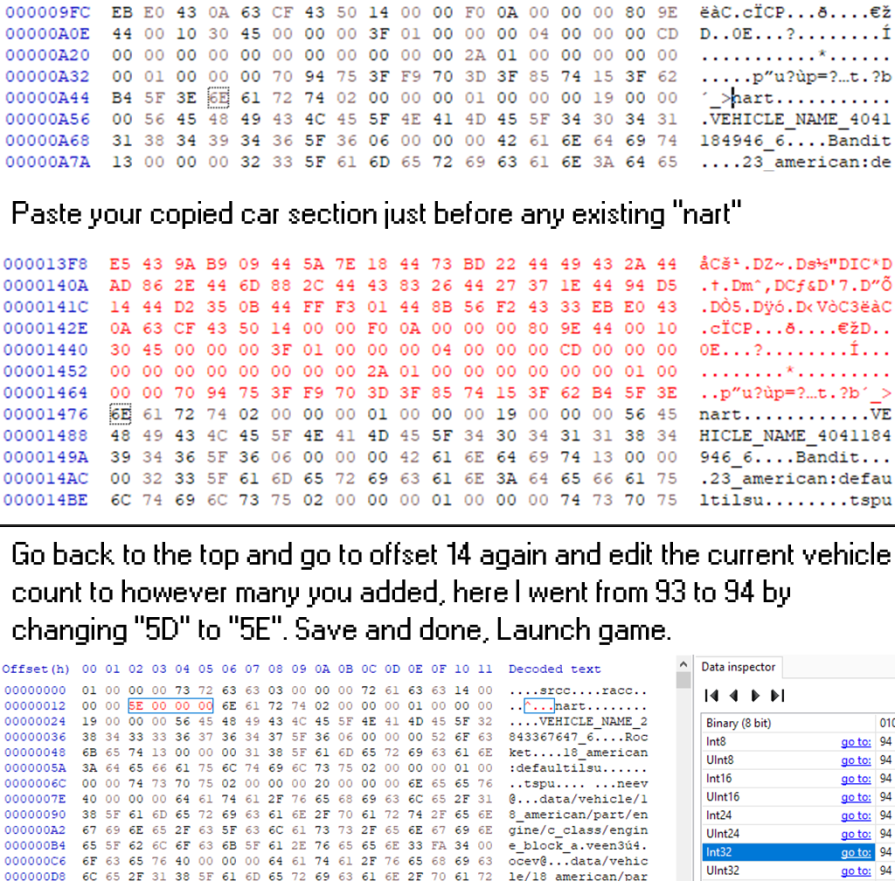
Use the Decimal to hex conversion table[www.rapidtables.com] if you are not sure what value you need to use for the number of vehicles in your garage.
6. Once done, rename your file back to cars5.ccrs and put it back in the saves folder;
7. Launch the game. If done correctly, game won't crash, will automatically compress the edited save file and you will have your extra vehicles in your garage.
2. Go to your saves folder at C:\Steam\userdata\xxxxxxxx\228380\local\wreckfest (or whatever drive Steam is installed on);
3. Take cars5.ccrs and drag it over BagDecompress.exe;
4. The tool will create cars5.raw.ccrs - Open it with HxD or any Hex Editor of your choice;
5. Follow the image guide (click to enlarge):
Use the Decimal to hex conversion table[www.rapidtables.com] if you are not sure what value you need to use for the number of vehicles in your garage.
6. Once done, rename your file back to cars5.ccrs and put it back in the saves folder;
7. Launch the game. If done correctly, game won't crash, will automatically compress the edited save file and you will have your extra vehicles in your garage.
Credits
STRmods for showing me how to do this.
More Wreckfest guides
- Using the tune page so you can win races and get dolla★ 5 (397)17k views533 ♥9 minUpdated Jun 19, 2018
- Wreckfest: Car Customisation★ 5 (286)16k views364 ♥41 minUpdated Jul 29, 2022
- Wreckfest Server Manager★ 4 (110)13k views189 ♥8 minUpdated Dec 22, 2024
- Wreckfest Community Car Guide★ 5 (330)12k views479 ♥59 minUpdated Jun 1, 2025
- Easy credits/money/XP 48K Credits/190K XP per run approx. (Nov 2021)★ 5 (196)9k views241 ♥6 minUpdated Nov 3, 2021
- Damage modes explained★ 5 (170)8.1k views97 ♥2 minUpdated Jan 16, 2025


This guide was created by its original author on the Steam Community. Are you the author and want it removed? Request removal.