Colored text in chat for Online Lobbies
Welcome
I have been getting back into Wreckfest lately. As an "old timer" having purchased the game way way back in extreme early access (2014) I have seen my share of useful tidbit, but the one that always gets forgotten is... TEXT COLOR!
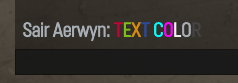
How To:
In order to get your text to color up, it's quite easy. While in an online lobby, click into the chat (or press your defined key to open it while in a race or spectating) and type the following:
^#Your Text Goes Here
Note: The ^ is required and starts the color code, and the # indicates what NUMBER you choose (1-9) and when done properly you won't see that section when you start typing in what you want:
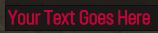
In this case here I typed in:
^1Your Text Goes Here
That's it. Very straight forward. You can use multiple colors per line or even per word.
^#Your Text Goes Here
Note: The ^ is required and starts the color code, and the # indicates what NUMBER you choose (1-9) and when done properly you won't see that section when you start typing in what you want:
In this case here I typed in:
^1Your Text Goes Here
That's it. Very straight forward. You can use multiple colors per line or even per word.
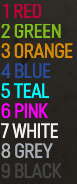
Key / Legend
More Wreckfest guides
- Using the tune page so you can win races and get dolla★ 5 (397)17k views533 ♥9 minUpdated Jun 19, 2018
- Wreckfest: Car Customisation★ 5 (286)16k views364 ♥41 minUpdated Jul 29, 2022
- Wreckfest Server Manager★ 4 (110)13k views189 ♥8 minUpdated Dec 22, 2024
- Wreckfest Community Car Guide★ 5 (330)12k views479 ♥59 minUpdated Jun 1, 2025
- Easy credits/money/XP 48K Credits/190K XP per run approx. (Nov 2021)★ 5 (196)9k views241 ♥6 minUpdated Nov 3, 2021
- Damage modes explained★ 5 (170)8.1k views97 ♥2 minUpdated Jan 16, 2025


This guide was created by its original author on the Steam Community. Are you the author and want it removed? Request removal.