CTD fix 64 bit system 90%
Intro. Why the Crashes?
Because Orcs Must Die! 2 is an older 32-bit application, it cannot naturally utilize more than 4GB of RAM. When complex physics, endless gibs, or co-op data overload the engine, it runs out of memory (OOM) and collapses at the end-of-round transition.
Basics: Install DX9 and VCredist from the game directory.
Make a config file that forces your game into windowed fullscreen with Vsync, cap it at 60 Frames and deactivate voice chat (this is basic you should already have done that)
Basics: Install DX9 and VCredist from the game directory.
Make a config file that forces your game into windowed fullscreen with Vsync, cap it at 60 Frames and deactivate voice chat (this is basic you should already have done that)
The 3 Big Fixes
i let this explain via Gemini AI because i cant explain you why DLL or Hex edits are so important, i just startet learning coding and found parts of this solution very spread on the internet im just doing it more comprehensive.
ignore that the AI says iGPU, these problems are the same with dedicated ones.
These 2 are easier
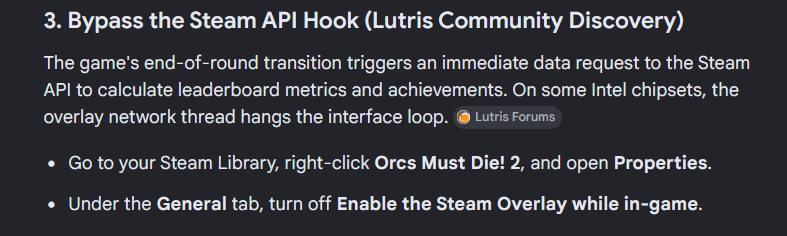
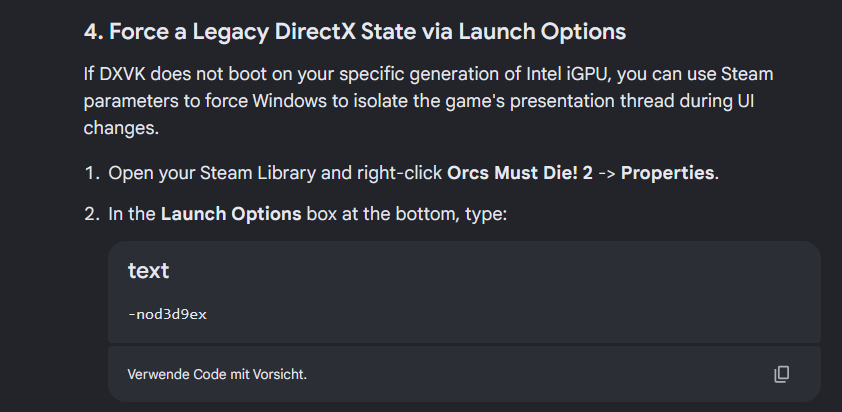
this one is are harder, but reduce the crashes a lot more then anything else
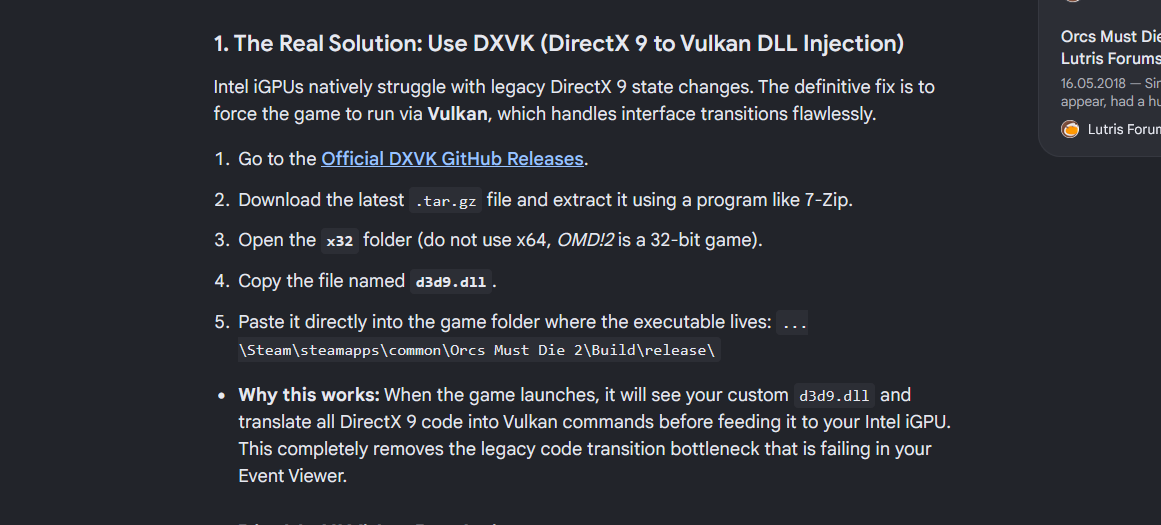
Thanks to NTcore for the automatic HEX editor used in the Guide, and doitsujin for his DX to Vulkan DLL injector
Important: Dont force the Legacy state Dx9 via the Commandline if you already injected Vulkan DLL into DX9, these 2 Fixes are not compatible.
ignore that the AI says iGPU, these problems are the same with dedicated ones.
These 2 are easier
this one is are harder, but reduce the crashes a lot more then anything else
Thanks to NTcore for the automatic HEX editor used in the Guide, and doitsujin for his DX to Vulkan DLL injector
Important: Dont force the Legacy state Dx9 via the Commandline if you already injected Vulkan DLL into DX9, these 2 Fixes are not compatible.
Still CTD? look here.
1. Install Net.framework 3.5(includes 2) and directplay via windows feature installer.
2. Disable UI Video Rendering(Shiner)
The end-of-round summary screen uses an overlay system that renders text and numbers dynamically over a blurred, moving background. Cutting the background video rendering stabilizes the UI interface.
Open your Windows File Explorer and navigate to: Documents\Shiner\
Open video settings.xml with Notepad.
Look for the following lines and change their values to 0 or false if they exist:
Change UI animations or video backgrounds to off.
If there is a DisableMenuVideo prompt, set it to 1.
Save and close the file.
3. In your in-game Video Options, turn Gibs / Blood completely Off.
in your selfmade user.cfg add:
-voice
EnableBloodMapToggle
Save and close the file.
2. Disable UI Video Rendering(Shiner)
The end-of-round summary screen uses an overlay system that renders text and numbers dynamically over a blurred, moving background. Cutting the background video rendering stabilizes the UI interface.
Open your Windows File Explorer and navigate to: Documents\Shiner\
Open video settings.xml with Notepad.
Look for the following lines and change their values to 0 or false if they exist:
Change UI animations or video backgrounds to off.
If there is a DisableMenuVideo prompt, set it to 1.
Save and close the file.
3. In your in-game Video Options, turn Gibs / Blood completely Off.
in your selfmade user.cfg add:
-voice
EnableBloodMapToggle
Save and close the file.
I am Leg-End
Only saying that because im problaby the last person on this world, trying to fix an over a decade old game via fixing Windows, if youre PC is strong enough, ignore this whole guide and run an Virtual Machine with Win7, no problems there. for more infos, comment, i answer once a week at least.
If you wanna play Coop, create a VAN via Hamachi or Tuungle, both do the Large Adress awareness(4gb fix), and kill yourself at the start of every round(reset character Memory file)
sadly the game is pre-compiled and a lot is hard-coded. i dont give warranty on any of this because DLL editing and/or HEX edit can also be used to damage your computer.
"I was a Adventurer to, but then a arrow hit me in the knee"
If you wanna play Coop, create a VAN via Hamachi or Tuungle, both do the Large Adress awareness(4gb fix), and kill yourself at the start of every round(reset character Memory file)
sadly the game is pre-compiled and a lot is hard-coded. i dont give warranty on any of this because DLL editing and/or HEX edit can also be used to damage your computer.
"I was a Adventurer to, but then a arrow hit me in the knee"
More Orcs Must Die! 2 guides
- How to get Skulls!★ 5 (616)42k views361 ♥5 minUpdated Jan 24, 2013
- The Combo Bible★ 5 (327)27k views319 ♥24 minUpdated Dec 4, 2018
- The Order's Spellbook (Skull Farming, Traps, Weapons, Trinkets, Enemies)★ 5 (753)21k views646 ♥191 minUpdated Nov 3, 2024
- How to farm skulls in Orcs Must Die! 2, 15 skulls every 5 minutes! (Only need 2 traps!)★ 5 (236)18k views206 ♥1 minUpdated Jan 29, 2016
- [RUS] Выполнение достижений на русском★ 5 (529)12k views443 ♥4 minRussianUpdated Mar 15, 2018
- Pot of Gold (10x Combo)★ 4 (194)8.9k views90 ♥1 minUpdated Aug 31, 2015


This guide was created by its original author on the Steam Community. Are you the author and want it removed? Request removal.