Fallout 3 (2026 Edition)
First and foremost
A clean install is necessary for these fixes to work.
Make sure to delete the game, then delete these folders:
Make sure to delete the game, then delete these folders:
- C:\Users\*username*\Documents\My Games\Fallout3
- C:\Users\*username*\AppData\Local\Fallout3
- *Steam folder location*\Steam\steamapps\common\Fallout 3 goty
Setting the game up
After installing the game, run it for the first time so that we have .ini files set-up.
Launch the game from Steam and you'll see the Launcher. Go to Options and change these options to the ones seen on the image below (resolution depends on your monitor):
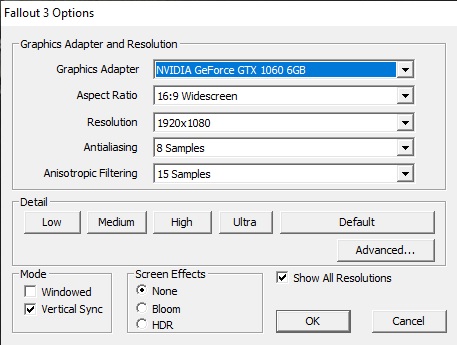
After doing these, load the game and get into the main menu, then exit the game.
We now have .ini files set-up.
Launch the game from Steam and you'll see the Launcher. Go to Options and change these options to the ones seen on the image below (resolution depends on your monitor):
After doing these, load the game and get into the main menu, then exit the game.
We now have .ini files set-up.
Patches
Make sure to do these IN ORDER.
- Mod Organizer 2[github.com]
What is this?- An easy way to have your mods/patches organized.
- Extract the zip file and put the folder wherever you want.
- Launch it through "ModOrganizer.exe"
- Select "Create a portable instance".
- Select "Fallout 3".
- Select "Game of the Year" as the game edition.
- Leave "Configure your profile settings" as is and click "Next".
- Click "Next" on "Select a folder where the data should be stored".
- Click "Next" on "Link Mod Organizer with your Nexus account".
- Click "Finish".
- Click "Don't Do Anything" on the first pop-up.
- Click "No, don't ask again" on NXM pop-up.
- Fallout Anniversary Patcher[www.nexusmods.com]
What is this?- Downgrades the game after the Anniversary Update for FOSE support and more. Makes the game 4GB aware and fixes the mod limit bug.
- Download the file and extract the files into where your "Fallout3.exe" is.
- Launch "Patcher.exe" and it will install.
- After it is done, press any key to close the prompt.
- Updated Unofficial Fallout 3 Patch[www.nexusmods.com]
What is this?- This is an unofficial patch with bunch of fixes.
- Download the file.
- Launch Mod Organizer 2.
- Click "File" and then "Install Mod" and then select the downloaded .zip file.
- Make sure "Vanilla UI Bug Fixes" is selected.
- Click "Install".
- After the install, check the box next to "Updated Unofficial Fallout 3 Patch".
- Fallout Script Extender (FOSE)[fose.silverlock.org]
What is this?- The Fallout Script Extender, or FOSE for short, is a modder's resource that expands the scripting capabilities of Fallout 3.
- Make sure you have 7Zip installed.
- Download the file.
- Extract its contents to Fallout 3 game directory.
- Command Extender[www.nexusmods.com]
What is this?- Required because of Updated Unofficial Fallout 3 Patch. Provides game patches to fix engine bugs.
- Download the file.
- Launch Mod Organizer 2.
- Go to "File" and "Install Mod".
- Select the downloaded file.
- Click "OK" on the pop-up.
- After the install, check the box next to "Command Extender".
- ButcherPete FOSE[www.nexusmods.com]
What is this?- ButcherPete FOSE is an extender plugin. Required for Updated Unofficial Fallout 3 patch.
- Download the file.
- Launch Mod Organizer 2.
- Go to "File" and "Install Mod".
- Select the downloaded file.
- Click "OK" on the pop-up.
- After the install, check the box next to "ButcherPete FOSE".
- Ogg Vorbis Libraries[www.nexusmods.com]
What is this?- Updated sound libraries that optimize the game's audio decoding, fixes an audio memory leak, sound related stuttering and boosts performance while reducing CPU strain.
- Download the file.
- Extract its contents to Fallout 3 game directory.
- Replace the existing files when asked.
- Fallout 3 Tick Fix[www.nexusmods.com]
What is this?- Removes the lag from the game.
- Download the file.
- Launch Mod Organizer 2.
- Go to "File" and "Install Mod".
- Select the downloaded file.
- Click "OK" on the pop-up.
- After the install, check the box next to "Fallout 3 Tick Fix".
Mod Organizer 2 - Load Order
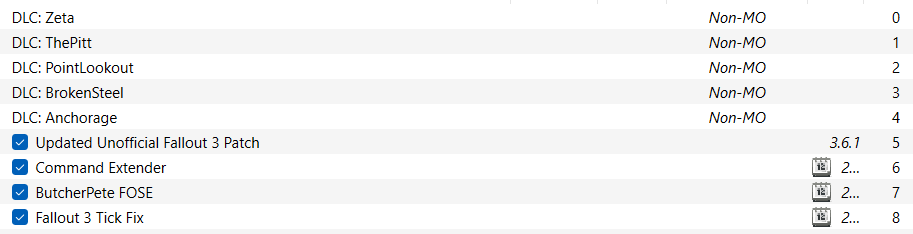
Make sure the load order is like in the image below:
Configuration Fixes
Here, I will tell you some of the important config fixes. Make sure to do all of it.
- Field of View (FOV)
- Go to Documents\My Games\Fallout 3
- Open FALLOUT.ini
- Under the [Display] section, find this line and change it to whatever you like:
- fDefaultFOV=75.0000
- Go to Documents\My Games\Fallout 3
- Disabling Mouse Acceleration
- Go to Documents\My Games\Fallout 3
- Open FALLOUT.ini
- Find the section: [Controls]
- Add these lines:
- fForegroundMouseAccelBase=0
- fForegroundMouseAccelTop=0
- fForegroundMouseBase=0
- fForegroundMouseMult=0
- fForegroundMouseAccelBase=0
- Make sure there is space behind [Water], which is right under what has been pasted.
- Go to Documents\My Games\Fallout 3
Limiting the FPS (must-do)
In this section, I will show you how to limit your FPS so that problems such as lip-sync and other physics related problems are gone.
For NVIDIA:
For AMD:
For NVIDIA:
- Go to NVIDIA Control Panel.
- In the section on the left, go to “Manage 3D settings”.
- From that window, choose the “Program Settings” section.
- On the “Program Settings” section, choose "Fallout 3 (fallout3.exe)"
- If it doesn't exist, add it by clicking on "Add", go to "Browse", go to your Fallout 3 directory and select Fallout3.exe. Then click on Add Selected Program. Make sure it is also selected on "Program Settings" section afterwards.
- Find “Max Frame Rate”, change it from "Use Global Setting" to “On” and make it “100 FPS”.
For AMD:
To do framerate limiting on AMD, you can turn on a feature called "Chill" on a per-game basis in the driver software. I went to Gaming > Fallout 3 and turned on the switch for Chill, then set the framerate sliders to minimum 60 and maximum 100.
Launching the game!
For Steam to count your hours and to play the game through Steam with MO2:
- Right-click Fallout 3 on your library.
- Go to Properties.
- Add this to the launch options:
- "D:\MO2\ModOrganizer.exe" "moshortcut://:Fallout 3" %command%
- Keep all quotes. The path to the Mod Organizer 2 executable is just an example, adjust it accordingly.
More Fallout 3 - Game of the Year Edition guides
- The (almost) Perfect Start to a New Game★ 5 (1.5k)102k views3.8k ♥30 minUpdated Mar 2, 2017
- Fallout 3 GOTY Edition: Русификатор★ 5 (3.8k)93k views5.1k ♥1 minRussianUpdated Jan 16, 2024
- Fallout 3 GOTY Edition: Полный Русификатор★ 5 (1.8k)74k views3.4k ♥2 minRussianUpdated Mar 2, 2024
- Perfect Character Guide★ 5 (1.3k)59k views3.6k ♥6 minUpdated Aug 23, 2023
- Fallout 3 GOTY instant crash fix after patch 1.7.0.4★ 5 (700)53k views809 ♥1 minUpdated Dec 5, 2021
- Fallout 3 -- Mods for Better Gameplay★ 5 (875)43k views1.8k ♥8 minUpdated Jun 8, 2016


This guide was created by its original author on the Steam Community. Are you the author and want it removed? Request removal.