Far Cry 2 Multi Fixer (ENG)
Description
Эта статья на русском:
https://steamcommunity.com/sharedfiles/filedetails/?id=1620560934
Applying fixes for Far Cry 2 is usually associated with editing the executable files of the game (in particular, the game engine Dunia.dll). The disadvantages of this approach are obvious: the changes are fixed in the file, various mod makers change the files at their discretion and offer to overwrite them, it is difficult to track which patches you have now applied, and, in the end, they can simply disappear after the overwriting, for example, after checking the integrity of the local files of the game on Steam or reinstalling. The solution to this problem is not to change the files themselves, but to make changes to the process memory at runtime.
This utility is just designed to run the game and make modifications on the fly without physically changing the game files. In addition to patches, there are also options for command line parameters, for example, to skip intro movies or to restrict FPS or enable cheats.
https://steamcommunity.com/sharedfiles/filedetails/?id=1620560934
Applying fixes for Far Cry 2 is usually associated with editing the executable files of the game (in particular, the game engine Dunia.dll). The disadvantages of this approach are obvious: the changes are fixed in the file, various mod makers change the files at their discretion and offer to overwrite them, it is difficult to track which patches you have now applied, and, in the end, they can simply disappear after the overwriting, for example, after checking the integrity of the local files of the game on Steam or reinstalling. The solution to this problem is not to change the files themselves, but to make changes to the process memory at runtime.
This utility is just designed to run the game and make modifications on the fly without physically changing the game files. In addition to patches, there are also options for command line parameters, for example, to skip intro movies or to restrict FPS or enable cheats.
Features
- Jackal Tapes FixPatch for Jackal tapes glitch when all tapes in the Southern map would play the same record - #09. Stealing Boots.
https://steamcommunity.com/sharedfiles/filedetails/?id=1563578739 - Bonus Predecessor Tapes UnlockPredecessor tapes are recordings made by the player's predecessor. The first time you enter the central town, you’ll receive a phone call from an anonymous source. After the phone call concludes, an envelope icon appears on your in-game map. When you pick-up the envelope, your objective will appear as a white icon on the map. To open the next mission you need to return to the central town every time.
https://farcry.fandom.com/wiki/Predecessor_tapes
https://steamcommunity.com/sharedfiles/filedetails/?id=1565561687 - Bonus Machetes UnlockTwo more variations of machete can be selected in Main menu: Options - Game - Machete Type. However, they only change the skin of the standard machete:
Primitive Machete - Hand-crafted by the locals, this machete is ornate while rugged and functional at the same time.
Homemade Machete — As the name suggests, it is home-made. Its blade is mangled and rusted, this crude weapon functions nevertheless.
https://farcry.fandom.com/wiki/Machete - No Blinking ItemsAll interactable items like guns, beds, boxes and other no longer blink bringing more realism.
- FOVSet desired first person Field of View other than default 75. That does not affect aiming (Iron Sights) FOV.
- Launch OptionsLaunch options added to the command line
Stability:- Skip Intro MoviesSkip Intro Movies for faster game starting.
- Max FPSLimit Maximum FPS to avoid game's physical engine glitches like jumping NPCs and others. If you see screen-tearing try using MaxFps = 62 instead of 60.
In addition, the use of DX9 is highly recommended.
- All Weapons UnlockUnlock all weapons at the bazaar, depending on what part of the map you are in at the time.
- Unlimited ReliabilitySets the unlimited reliability cheat.
- Unlimited AmmoSets the unlimited ammo cheat.
- God ModeSets the god mode cheat.
- Zombie AINPC will just freeze ignoring the player.
- ExecRuns a console command 'batchfile'. This text file can contain list of console commands and will autorun at game start. Unless full path specified, the file must be located at:
'C:\Users\USERNAME\Documents\My Games\Far Cry 2' - Processor affinityLimits the use of cores by the game process. Can help run the game on modern fast systems with lots of cores.
The integer value represents the mask. So the value is:
1 to use only CPU0
2 to use only CPU1
3 to use both CPU0 and CPU1
...
15 to use CPU0 + CPU1 + CPU2 + CPU3
and so on.
-
Usage
As always the project is published on GitHub. Download the ZIP archive from the release section.
https://github.com/FoxAhead/Far-Cry-2-Multi-Fixer/releases/latest
Unpack two files somewhere: FarCry2MFLauncher.exe and FarCry2MF.dll - into a separate folder or directly into the folder with the game, as long as these two files are together in one folder. Run FarCry2MFLauncher.exe:
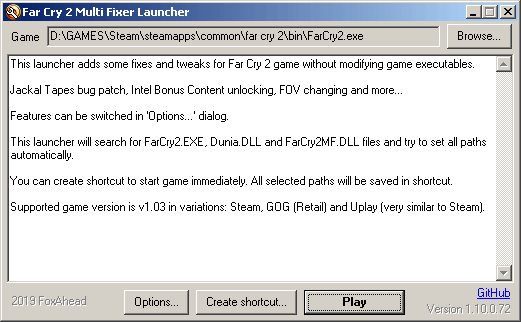
The program will automatically determine the location of the game and display it on top. Just press the Play button.
By clicking the Options button, all options with a description are available for configuration:
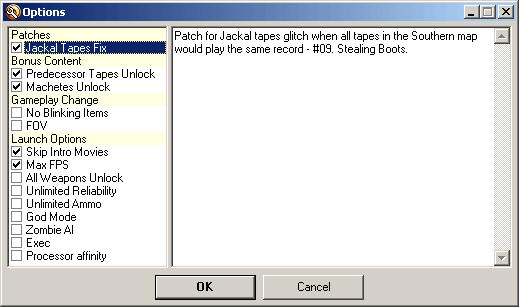
By default, only the most necessary options are enabled.
In order not to run the utility each time, you can create a shortcut to launch it. To do this, click the Create shortcut... and save the shortcut in a convenient place for you.

Through this shortcut, the game will start immediately without having to press Play.
https://github.com/FoxAhead/Far-Cry-2-Multi-Fixer/releases/latest
Unpack two files somewhere: FarCry2MFLauncher.exe and FarCry2MF.dll - into a separate folder or directly into the folder with the game, as long as these two files are together in one folder. Run FarCry2MFLauncher.exe:
The program will automatically determine the location of the game and display it on top. Just press the Play button.
By clicking the Options button, all options with a description are available for configuration:
By default, only the most necessary options are enabled.
In order not to run the utility each time, you can create a shortcut to launch it. To do this, click the Create shortcut... and save the shortcut in a convenient place for you.
Through this shortcut, the game will start immediately without having to press Play.
Compatibility
The utility is suitable for version 1.03 of the game in all variations: Steam, GOG (Retail), Uplay (very similar to Steam).
Steam Overlay
Starting the game through this launcher bypass Steam, so Steam Overlay becomes unavailable. However, you can add the launcher itself to the library as a non-Steam game.
To do this, select Games - Add a Non-Steam Game to My Library from the menu. Using the Browse... button, select and add either the FarCry2MFLauncher.exe itself or the shortcut created using it.
Next find a new item in the games library list and right-click to edit the properties.
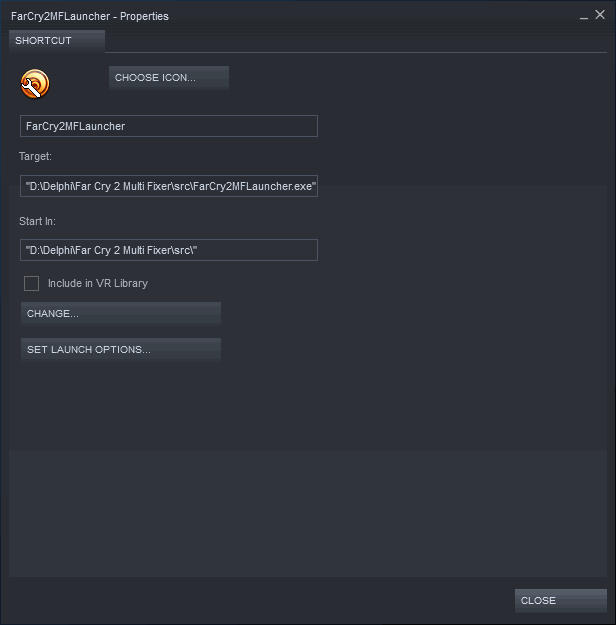
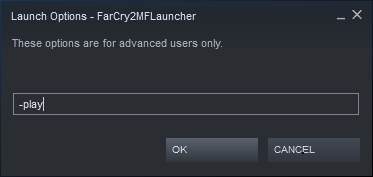
Here press the SET LAUNCH OPTIONS... button and add the parameter:
-play
To do this, select Games - Add a Non-Steam Game to My Library from the menu. Using the Browse... button, select and add either the FarCry2MFLauncher.exe itself or the shortcut created using it.
Next find a new item in the games library list and right-click to edit the properties.
Here press the SET LAUNCH OPTIONS... button and add the parameter:
-play
Steam Overlay and playtime (alternative method)
If you don't want to have alternative non-steam game in your library and want the playtime to be counted on your main Far Cry 2 game, then there is some smart trick suggested on Steam forums:
After that, when you start Far Cry 2 through you Steam library, the launcher should be started instead. Launcher should automatically detect the renamed game executable file and display it in the field at the top. If it has not, and the field is empty, then you have messed up something. Please, recheck game files integrity and try this whole process again.
To avoid clicking Play button in the launcher every time, add a command line parameter:
Also note that if you had some command line parameters for Far Cry 2 (like skipping intro movies, setting maxfps) they don't have effect anymore because they were for original FarCry2.exe. But all this could be tuned in launcher instead.
Try renamingAll this should be done in BIN folder. Don't forget also to put FarCry2MF.dll file there.FarCry2.exe -> FarCry2Game.exe FarCry2MFLauncher.exe -> FarCry2.exe
After that, when you start Far Cry 2 through you Steam library, the launcher should be started instead. Launcher should automatically detect the renamed game executable file and display it in the field at the top. If it has not, and the field is empty, then you have messed up something. Please, recheck game files integrity and try this whole process again.
To avoid clicking Play button in the launcher every time, add a command line parameter:
-play
It should start game immediately skipping launcher window.Also note that if you had some command line parameters for Far Cry 2 (like skipping intro movies, setting maxfps) they don't have effect anymore because they were for original FarCry2.exe. But all this could be tuned in launcher instead.
Dev Mode
Since v1.4.0.43 two game console commands were added (press ~ to open console):
devmodeon - turn dev mode on
devmodeoff - turn dev mode off
Both commands are not official so it will always say "Unknown command: ...". But they do have effect.
These allows to enable/disable lots of other console commands: cheats, debugs, domino (script engine) commands not accessible in usual way. Use TAB key while in the console to view them all. Feel free to experiment with Dunia engine at your own risk.
devmodeon - turn dev mode on
devmodeoff - turn dev mode off
Both commands are not official so it will always say "Unknown command: ...". But they do have effect.
These allows to enable/disable lots of other console commands: cheats, debugs, domino (script engine) commands not accessible in usual way. Use TAB key while in the console to view them all. Feel free to experiment with Dunia engine at your own risk.
More Far Cry 2 guides
- Revisiting Farcry 2 [complete / bug-fix]★ 5 (650)35k views1.4k ♥42 minUpdated Feb 13
- Русификатор для "Far Cry 2"★ 5 (2.9k)33k views952 ♥1 minRussianUpdated May 23, 2017
- Far Cry 2 Cheats★ 5 (227)19k views463 ♥1 minUpdated Nov 7, 2017
- Far Cry 2 Cheats: Cheat Codes, Cheats★ 5 (202)19k views359 ♥1 minUpdated Sep 3, 2014
- Know your enemy (stealth mechanics and the tactical approach)★ 5 (425)16k views421 ♥14 minUpdated Jul 20, 2019
- Complete Single Player Weapon Guide★ 5 (403)15k views430 ♥47 minUpdated Aug 21, 2021


This guide was created by its original author on the Steam Community. Are you the author and want it removed? Request removal.