FOV changer for Call of Duty: Ghosts
Getting the right tools
NTAuthority from 4D1 forums made this tool, it's available to download in this topic:
AgentRev from mapmodnews.com, released FOV changer for Call of Duty Ghosts, this one works both for singleplayer and multiplayer.
Direct link to Github, last update is 2019:
https://github.com/AgentRev/CoD-FoV-Changers/tree/master/bin
Here's blog post:
http://www.mapmodnews.com/article.php/Call-of-Duty-Ghosts-FoV-Changer-DL *dead link*
or
(you can still use Fovely by NTAuthority, which is available here: https://mega.co.nz/#!kZllzAqZ!EAFSAzvG2AjI7iIBZzEEICFh4C5pgpYMotmgETsgBwg) *dead link*
This tool has been tested and works without any problems.
FOV changers for COD existed before, non of them created any problems. It's safe to assume that this one will be okay too, however, use it at your own risk.
AgentRev from mapmodnews.com, released FOV changer for Call of Duty Ghosts, this one works both for singleplayer and multiplayer.
Direct link to Github, last update is 2019:
https://github.com/AgentRev/CoD-FoV-Changers/tree/master/bin
Here's blog post:
http://www.mapmodnews.com/article.php/Call-of-Duty-Ghosts-FoV-Changer-DL *dead link*
or
(you can still use Fovely by NTAuthority, which is available here: https://mega.co.nz/#!kZllzAqZ!EAFSAzvG2AjI7iIBZzEEICFh4C5pgpYMotmgETsgBwg) *dead link*
This tool has been tested and works without any problems.
FOV changers for COD existed before, non of them created any problems. It's safe to assume that this one will be okay too, however, use it at your own risk.
Adjusting your mouse sensitivity for your FOV
It's well known fact that IW games translate your mouse sensitivity differently if you change your FOV. To get exactly same sensitivity, use this handy website:
http://www.mouse-sensitivity.com
In the second box bellow will be shown new calculated sensitivity. Mine was calculated 0.967, but your will be different.
Little tip: your config file is located at
...\Steam\SteamApps\common\Call of Duty Ghosts\players2\config_mp.cfg
See image bellow if you're unsure.
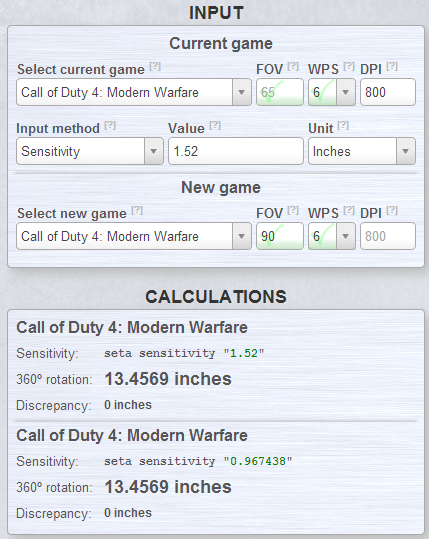
http://www.mouse-sensitivity.com
- Choose Call of Duty 4: Modern warfare
- Type in your ingame fov, default is 65
- Type in your DPI (mine is 800)
- Type in your sensitivity (I'm using 1.52)
- Select second game, make it also Call of Duty 4: Modern warfare
- keep the rest same, just type in your desired fov (I want to use 90°)
In the second box bellow will be shown new calculated sensitivity. Mine was calculated 0.967, but your will be different.
Little tip: your config file is located at
...\Steam\SteamApps\common\Call of Duty Ghosts\players2\config_mp.cfg
See image bellow if you're unsure.
Closing words
You're now true PC Master Race gamer, now go get those kills.
GL&HF
-Tom

GL&HF
-Tom
More Call of Duty: Ghosts guides
- Call of Duty: Ghosts - Rorke File Locations (with images)★ 5 (635)13k views775 ♥5 minUpdated Feb 25, 2014
- Achivement Guide :D Campaign Guide!★ 5 (527)13k views657 ♥17 minUpdated Jan 15, 2014
- Достижение "Аудиофил" Нахождение всех файлов Рорка!★ 5 (380)7.4k views333 ♥1 minRussianUpdated Jan 4
- [RU] Полная русификация Call of Duty: Ghosts★ 4 (92)7.1k views188 ♥1 minRussianUpdated Jan 8, 2020
- Гайд по всем достижениям к CoD:Ghosts★ 5 (479)6.8k views446 ♥5 minRussianUpdated Mar 8, 2016
- Rorke Files Collectible Locations Guide - Single Player★ 4 (175)5.5k views227 ♥4 min


This guide was created by its original author on the Steam Community. Are you the author and want it removed? Request removal.