FPS drops using a Bluetooth controller? Let's fix it!
Issue's description
This issue manifested with the following:
For my specific setup, here's how it manifested:
Please note that your personal values will eventually vary depending on your hardware.
- you're using a Bluetooth controller
- your GPU is not used at its full potential
- your framerate is enjoying roller costing, going up and down for no apparent reason
- even during cutscenes that should be capped at 30fps, you notice stutterings
For my specific setup, here's how it manifested:
- controller: Gulikit KingKong 2 Pro (recognised as an Xbox controller by Steam)
- GPU usage: RTX 4090 barely reaching 30% use with all graphical options maxed out
- framerate: 165fps when idling, but as soon as you move the joystick, it goes between 68 and 75fps for no apparent reason
- cutscences: showing 30fps, but they feel like 15/20-ish
Please note that your personal values will eventually vary depending on your hardware.
The fix
1) Close DMC (if you're running it)
2) Head to your Library
3) Access DMC's Properties
4) Click on the Controller tab
5) Enable Steam Input
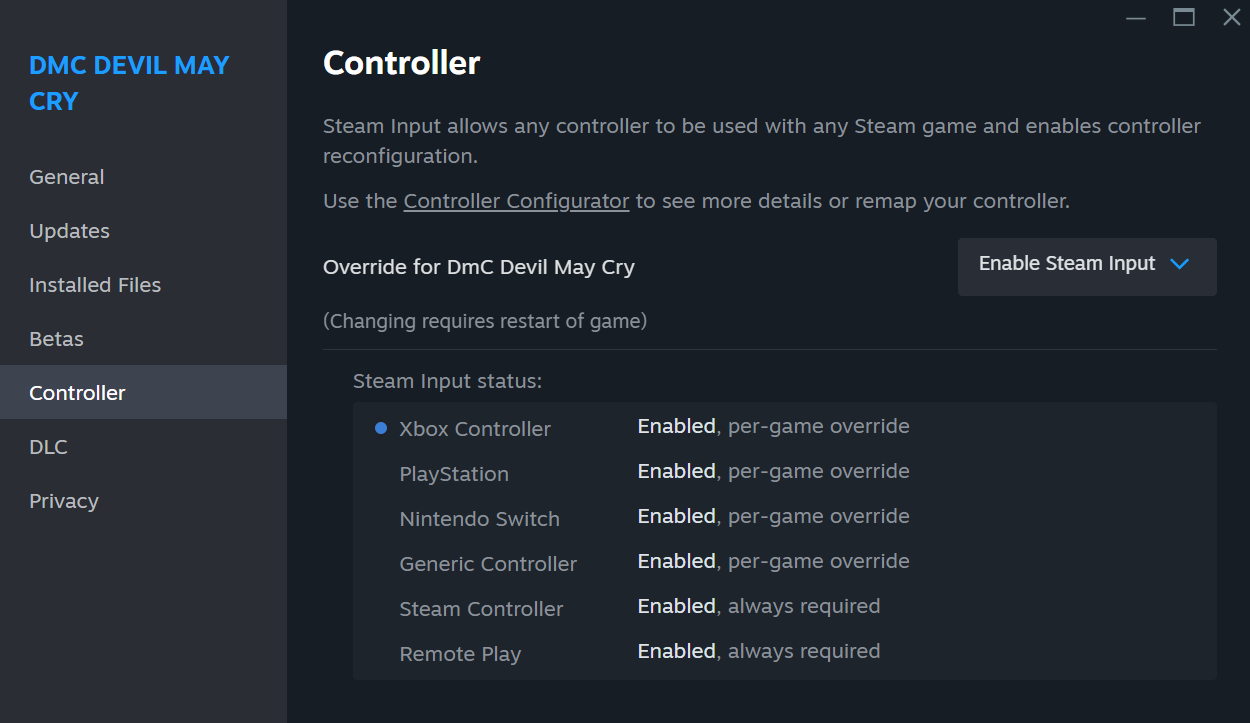 6) Select the official Steam Input layout for DMC (you can do so by clicking on the "Controller Configurator" link in the Controller tab)
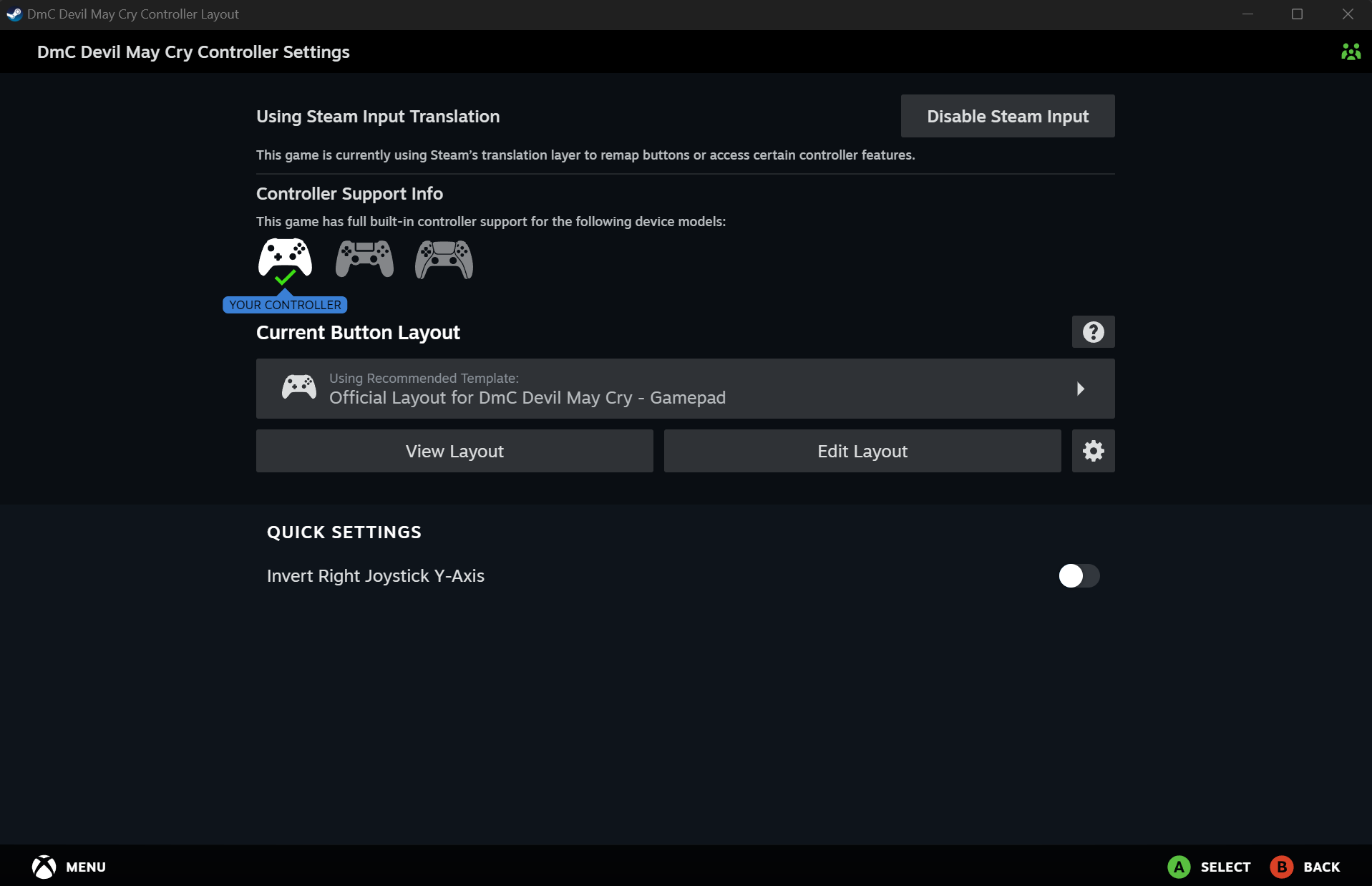 7) Apply it
8) Close the Properties
9) Run DMC
10) Enjoy your framerate
Yeah, I know, pretty easy. 😐
I'm not sure why the game isn't able to properly understand native inputs from some controllers, nor how the heck it's able to impact the framerate, but using Steam Input to translate your controller's inputs into keyboard inputs seems to solve this issue.
I've read on multiple topics here and there that different controllers were having similar issues. Sometimes, re-installing XINPUT drivers solved the issue, sometimes not. It looked pretty random, honestly.
The solution I provide here is the easy trick that solved my situation after I noticed that the game was running stable when I was using my mouse and keyboard to move around in the game, when the framerate was instantly butchered as soon as I was moving my joystick before applying this Steam Input profile.
I hope it will help some people enjoying this blast from the past and Combichrist's OST while dismembering demons at a proper framerate. 😉
2) Head to your Library
3) Access DMC's Properties
4) Click on the Controller tab
5) Enable Steam Input
6) Select the official Steam Input layout for DMC (you can do so by clicking on the "Controller Configurator" link in the Controller tab)7) Apply it8) Close the Properties
9) Run DMC
10) Enjoy your framerate
Yeah, I know, pretty easy. 😐
I'm not sure why the game isn't able to properly understand native inputs from some controllers, nor how the heck it's able to impact the framerate, but using Steam Input to translate your controller's inputs into keyboard inputs seems to solve this issue.
I've read on multiple topics here and there that different controllers were having similar issues. Sometimes, re-installing XINPUT drivers solved the issue, sometimes not. It looked pretty random, honestly.
The solution I provide here is the easy trick that solved my situation after I noticed that the game was running stable when I was using my mouse and keyboard to move around in the game, when the framerate was instantly butchered as soon as I was moving my joystick before applying this Steam Input profile.
I hope it will help some people enjoying this blast from the past and Combichrist's OST while dismembering demons at a proper framerate. 😉
More DmC Devil May Cry guides
- [RUS] Гайд по достижениям (DmC Devil May Cry)★ 5 (1.1k)19k views1.3k ♥8 minRussianUpdated May 8, 2024
- 100% Walkthrough | Guia 100%★ 5 (672)17k views753 ♥1 minUpdated Oct 14, 2013
- How to Disable Intros and modify Devil Trigger Controls★ 5 (262)12k views246 ♥3 minUpdated Dec 28, 2013
- Русификатор DmC: Devil May Cry (18+) Ver. 2.0 от Mechanics VoiceOver★ 5 (173)9.1k views291 ♥1 minRussian
- [RUS] Гайд по достижениям "Vergil's Downfall" ([DLC] к DmC Devil May Cry)★ 5 (393)9k views439 ♥3 minRussianUpdated Mar 14, 2024
- How to skip cutscenes in DmC: Devil May Cry.★ 5 (313)8.8k views45 ♥1 minUpdated Jul 9, 2017


This guide was created by its original author on the Steam Community. Are you the author and want it removed? Request removal.