GO BACK TO THE ORIGINAL SAINTS ROW 4 VERSION
Step One
Right-Click on your game in your Steam game-library on the left of the Steam-Window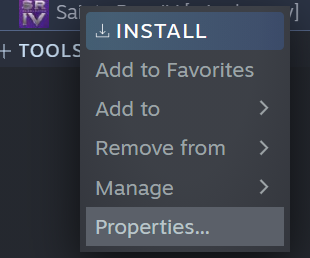
Step Two
In the opened menu click on "PROPERTIES"
Step Three
Now you can see different Options. Click on "BETAS"
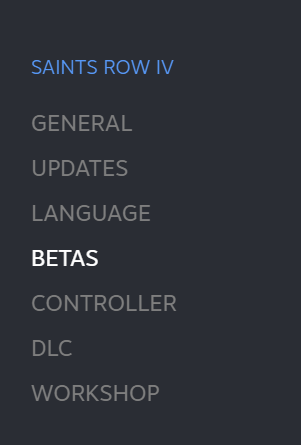
Step Four
Now you can see a drop-down menu and a field for beta-access codes. 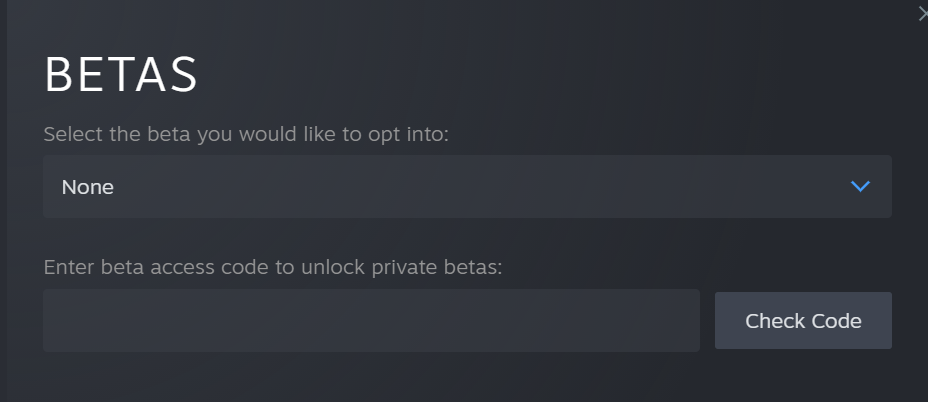
Step Five
In the DROP-DOWN MENU click on the down-arrow and pick "sriv-legacy - Legacy Version of Saints Row IV"
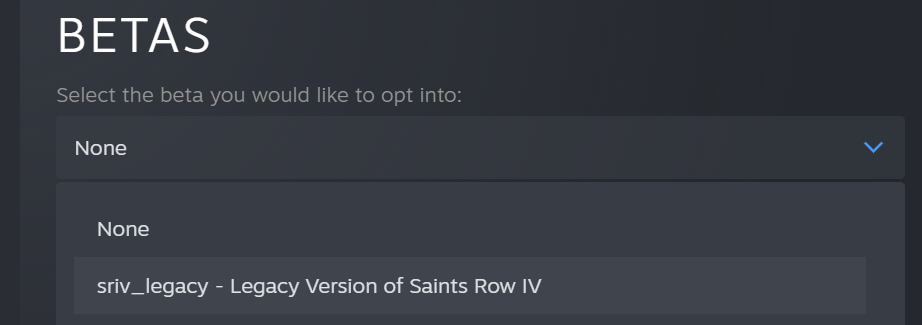
Step Six
Close the menu and refresh your Library-Page (One click on Store then again on Library)
How-to check that you succeeded
Now you should see that the name of your Saints Row 4 game has changed to
Saints Row IV [sriv_legacy]

You are welcome! Have fun with your un-touched SRIV!
Saints Row IV [sriv_legacy]
You are welcome! Have fun with your un-touched SRIV!
More Saints Row IV guides
- Store hacking made easy - ALL 34 hacks inside★ 5 (1.8k)61k views2.2k ♥1 minBulgarianUpdated Aug 24, 2013
- Как убрать цензуру★ 5 (305)39k views528 ♥1 minRussianUpdated Dec 30, 2018
- [RUS] Гайд по достижениям (Saints Row IV)★ 5 (2.2k)29k views2.5k ♥11 minRussianUpdated May 6, 2024
- Всё для создания красотки героини! [Saints Row: The Third / Saints Row IV]★ 5 (976)27k views999 ♥2 minRussianUpdated Nov 9, 2025
- Secret Achievements★ 5 (452)24k views435 ♥2 minUpdated Jun 25, 2016
- How the Saints Save Christmas DLC (100% Guide)★ 5 (693)21k views657 ♥7 minUpdated Mar 6, 2015



This guide was created by its original author on the Steam Community. Are you the author and want it removed? Request removal.