High refresh rate physics fix!
Tutorial
1. Go to C:\Users\yourname\Documents\My Games\Skyrim
2. open "skyrim.ini"
3. Under the display section add "iPresentInterval=0"
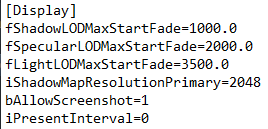
4. at the bottom of skyrim.ini create a new line called [HAVOK]

5. under the Havok section, write the following:
fMaxTime=0.0166 (for 60hz)
fMaxTime=0.0133 (for 75hz)
fMaxTime=0.0083 (for 120hz)
fMaxTime=0.0069 (for 144hz)
fMaxTime=0.0060 (for 165hz)
fMaxTime=0.0041 (for 240hz)
If you have a refresh rate other than the ones above, divide 1 by the HZ you want
Hope it works for you ;)
2. open "skyrim.ini"
3. Under the display section add "iPresentInterval=0"
4. at the bottom of skyrim.ini create a new line called [HAVOK]
5. under the Havok section, write the following:
fMaxTime=0.0166 (for 60hz)
fMaxTime=0.0133 (for 75hz)
fMaxTime=0.0083 (for 120hz)
fMaxTime=0.0069 (for 144hz)
fMaxTime=0.0060 (for 165hz)
fMaxTime=0.0041 (for 240hz)
If you have a refresh rate other than the ones above, divide 1 by the HZ you want
Hope it works for you ;)
More The Elder Scrolls V: Skyrim guides
- How to Complete Broken Quests★ 5 (499)125k views977 ♥6 minUpdated Oct 10, 2023
- All Skills Level 1-100 Fast Guide!★ 5 (2.6k)119k views5.2k ♥13 minBulgarianUpdated Feb 5, 2018
- All Console Commands (Skyrim)★ 5 (1.2k)74k views2.6k ♥29 minUpdated Aug 4, 2016
- Безопасная Сборка для идеального Скайрима★ 5 (3.1k)60k views5.8k ♥10 minRussianUpdated Nov 11, 2022
- Skyrim 100% achievement guide - Walktrough★ 5 (1.7k)51k views2.8k ♥34 minUpdated May 26, 2016
- Long list of console commands.★ 5 (1.4k)39k views3.4k ♥20 minUpdated Nov 17, 2017






This guide was created by its original author on the Steam Community. Are you the author and want it removed? Request removal.