■ How to Configurate "Sniper Ghost Warrior 2" for the best gaming experience! New Upd. 2021
Introduction
The game starts in borderless window, so you must use your native DESKTOP resolution!!
With the settings, it can happen that the first advertising screen hangs briefly at the start, but that doesn't matter, just wait until the menu appears.
To fix this problem just skip the promotional videos.
After "Cryengine 3" get an Update( I think - Update 1.9), the Dx11 finally came:
-----> Please use my cfg and the Nvidia setup, copy each point !!
Info: We switched off AA in the game because it is not very good and therefore use the driver-side AA and supersampling.
at the end read the Chapter
With the settings, it can happen that the first advertising screen hangs briefly at the start, but that doesn't matter, just wait until the menu appears.
To fix this problem just skip the promotional videos.
Skip intro videos • https://www.pcgamingwiki.com/wiki/Sniper:_Ghost_Warrior_2
Disable company logos[citation needed]
Go to <path-to-game>\Game\_FastLoad\.
Rename/move/delete IntroMovies.pak.
After "Cryengine 3" get an Update( I think - Update 1.9), the Dx11 finally came:
- Tessellation,
- Displacement mapping,
- Parallax Occlusion Mapping (POM),
- surrounding obscuring through Screen Space Directional Occlusion (SSDO),
- Real-time reflections on certain surfaces,
- soft shadows (edges = variable penumbra)
-----> Please use my cfg and the Nvidia setup, copy each point !!
- Both are coordinated and are needed to produce the best result
Info: We switched off AA in the game because it is not very good and therefore use the driver-side AA and supersampling.
at the end read the Chapter
Remember
A) autoexec.cfg
Go to: C:\STEAM\steamapps\common\SniperGhostWarrior2
- make new Textfile and name to autoexec.cfg
- copy & paste my configuration values:
-----> 1) You must put in the Values of Your Desktop Resolution!!
-----> 2) You must put in the Values of Your Graphic Card VRAM!!
-----> 3) You must change the Physic Values if you have AMD Graphic Card!!
Ver: 1.02..................................................................................................17.10.2019
- make new Textfile and name to autoexec.cfg
- copy & paste my configuration values:
-----> 1) You must put in the Values of Your Desktop Resolution!!
-----> 2) You must put in the Values of Your Graphic Card VRAM!!
-----> 3) You must change the Physic Values if you have AMD Graphic Card!!
Ver: 1.02..................................................................................................17.10.2019
con_restricted = 0
vt_restart = 1
r_DisplayInfo = 1
g_skipintro = 1
s_soundinfo = 1
net_stats_login = 1
sys_budget_sysmem = 4096
sys_budget_videomem = 3072 //2)----------Your VRAM 2048, 3072....8192..
sys_budget_numdrawcalls = 3000
sys_budget_frametime = 65
e_ShadowsPoolSize = 2048 // Default: 2048 (Low/Medium/High), 4096 (Very High)
e_TexturePoolSize = 2048
e_StreamCgfPoolSize = 1024
e_ShadowsMaxTexRes = 1024 // Default: 512 (Low), 1024 (Medium/High/Very High)
e_TextureMaxTexRes = 1024
r_Driver = DX11
r_ShadersDX11 = 1
r_fullscreen = 0
r_FullscreenWindow = 1
r_Width = 1920 //1)----------Your Resolution................
r_Height = 1080 //1)----------Your Resolution................
sys_highrestex = 1
sys_maxfps = 65
sys_job_system_max_worker = 4 // Sets the number of threads
sys_job_system_enable = 0 // 1 enabled, each job is invoked in one of the worker threads
// 0 disabled, each job is executed in its invoking thread.
r_MultiThreaded = 1
gpu_physics = 1 //3)..........For AMD = 0........................................
gpu_particle_physics = 1 //3).........For AMD = 0.........................................
sys_main_CPU = 0 // Specifies the physical CPU index main will run on
sys_streaming_CPU = 1 // Specifies the physical CPU file IO thread run on
sys_physics_CPU = 2 //-1=none, Specifies the physical CPU index physics will run on
ca_UsePhysics = 1 // [0,1] - If set to 0, disables the physics system for characters.
r_MultiGPU = 0
r_StereoDevice = 0
;-----------------------------------------------
;Texture
;-----------------------------------------------
r_TexturesStreaming = 2
r_TexturesStreamPoolSize = 512 //Default: 192 (Low), 384 (Medium), 512 (High/Very High)
// d3d9_TextureFilter = Trilinear
// d3d11_TextureFilter = Anisotrop
r_Texture_Anisotropic_Level = 16
r_TexMaxAnisotropy = 16
r_TexResolution = 0 // 0 full resolution is used
i_mouse_smooth = 0
i_mouse_accel = 0
i_mouse_accel_max = 1
sys_spec = 4 // 4
sys_spec_full = 4
sys_spec_Light = 4
sys_spec_objectdetail = 4 // 4
sys_spec_particles =2
sys_spec_gameeffects = 4 // 4
sys_spec_physics = 4 // 4
sys_spec_postprocessing = 4 // 4
sys_spec_Quality = 4 // 4
sys_spec_shading = 4
sys_spec_shadows = 4
sys_spec_sound = 4 // 4
sys_spec_texture = 4 // 4
sys_spec_volumetriceffects = 4
sys_spec_water = 4 // 4
-- DX11
e_Tessellation = 1
e_TessellationMaxDistance = 500
r_WaterTessellationHW = 1
r_fogShadowsWater = 1
e_CgfSettingsUseHighLod = 1
e_TessellationInMultiplayer = 1
-- FOV: change xx for your desired FoV value Def:60
cl_fov = 90
r_drawnearfov = 85
pl_movement.power_sprint_targetfov = 90
-- disable/enable snow
r_snow = 1
r_UsePom = 1
r_silhouettePOM = 1
r_UseEdgeAA = 0 //3
r_FSAA = 0 //1
r_FSAA_quality = 0 //16
r_FSAA_samples = 0 //16
r_PostMSAA = 0 //2
r_PostMSAAEdgeFilterNV = 0 //1
r_PostProcessHUD3DCache = 0
r_DepthOfField = 0
r_MotionBlur = 0
g_radialBlur = 0
e_Particles = 1
e_ParticlesMotionBlur = 0
r_Sharpening = 0.0
r_WaterReflections = 1
r_WaterReflectionsQuality = 4
r_refraction = 1
r_sunshafts = 1
r_Beams = 1
e_Clouds = 1
e_Shadows = 1
r_ShadowBlur = 2
q_ShaderWater = 3
q_ShaderTerrain = 4
q_ShaderShadow = 2
q_ShaderFX = 3
q_ShaderPostProcess = 4
q_ShaderHDR = 3
q_ShaderSky = 3
q_ShaderMetal = 4
q_ShaderGlass = 4
q_ShaderVegetation = 2
q_ShaderIce = 3
q_Renderer = 4
e_GI = 1
r_HDRBloomMul = 1
r_HDRRendering = 2
r_HDRBlueShift = 1.0
r_HDRBrightLevel = 0.65
r_HDRBrightOffset = 5
r_HDRBrightThreshold = 6
r_HDRLevel = 6
r_HDROffset = 10
r_SSAO = 1
r_SSAOQuality = 4
r_SSAODownscale = 0
r_SSAO_blur = 0
r_SSAO_downscale_ztarget = 0
r_SSAO_radius = 0
g_enableInitialLoginScreen = 0
sys_PakLogInvalidFileAccess = 0
sys_float_exceptions = 0
;-----------------------------------------------
;Performance
;-----------------------------------------------
r_LodDistRatio = 3000
r_MaxViewDistRatio = 3000
r_terrainMaxViewDistance = 3000
e_GIMaxDistance = 1000
e_ViewDistRatio = 3000 // Default: 25 (Low), 35 (Medium) 100 (High/Very High)
e_ViewDistRatioVegetation = 1000
e_ViewDistRatioDetail = 1000
e_ViewDistRatioLights = 1500
r_SSReflections = 0
r_RainMaxViewDist = 1000
r_RainMaxViewDist_Deferred = 0
e_hw_occlusion_culling_objects 1
e_particles_thread 1
e_cbuffer 2
r_GeomInstancing 1
es_ondemandphysics 1
r_CullGeometryForLights 1
e_vegetation_static_instancing 1
e_recursion_occlusion_culling 1
e_hw_occlusion_culling_water 1
e_terrain_occlusion_culling 1
e_terrain_occlusion_culling_version 0
e_terrain_occlusion_culling_max_dist 200
;-----------------------------------------------
;Sound
;-----------------------------------------------
s_FormatType = 3
s_MaxChannels = 128
s_MusicSpeaker = 5
g_useHitSoundFeedback = 1
s_MPEGDecoders = 32
s_Obstruction = 1
s_ObstructionAccuracy = 1
s_ObstructionUpdate = 0.1
s_SoundMoodsDSP = 1
s_VariationLimiter = 1
s_ReverbType = 3
B) Graphic Card Configuration
NVIDIA
Ambient Occlusion / Off
Anisotropic filtering / Override Any Application Setting
Antialiasing - FXAA / Off
Antialiasing - Mode / Override Any Application Setting
Antialiasing - Setting / 4x
Antialiasing - Gamma correction / On
Antialiasing - Transparency / 4x Supersampling
Background Application Max Frame Rate / 65
Max Frame Rate / 65
Triple buffering / On
Power management mode / Prefer maximum performance
Sharpening / Off
Low Latency Mode / Ultra
Texture filtering - Anisotropic sample optimization / On
Texture filtering - Negative LOD bias / Clamp
Texture filtering - Quality / High performance
Texture filtering - Trilinear optimization / On
Threaded optimization / Auto
Vertical sync / Adaptive
This is for 1920x1080 or 2560x1440 with 60 Hz !!
If you want to use 1920x1080 or 2560x1440 with 120 Hz, you need to set the following:
Background application Max. Frame rate / 125 and
Maximum frame rate / 125 in the Nvidia driver setup
and sys_budget_frametime = 125, sys_maxfps = 125 in the configuration file!
-------> BUT 120 Hz is not tested !! But it can also work !!
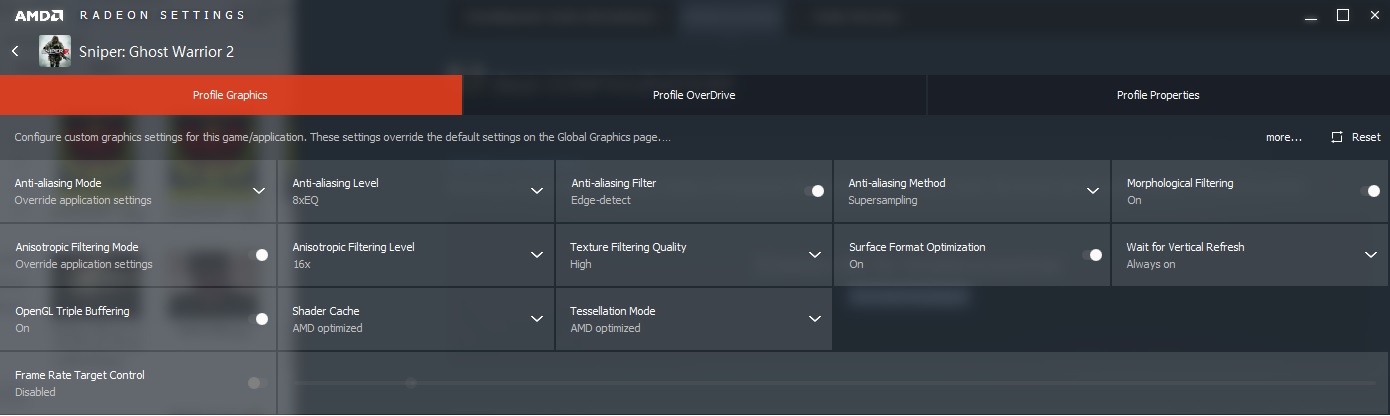
AMD
All Features Max !!
 [/previewimg]
= use AA + AF + VSync from AMD/NVIDIA driver!!
Remember
The game starts in borderless window, so you must use your native DESKTOP resolution!!
At the Moment not needed:
"If you are in the game, always you have to push ESC and ESC first, to get the unbuged GAMEWINDOW!"
At the Moment neede if Game is in 24Hz Modus, but shouldn't be necessary at the moment and shouldn't work if all adjustments have been made according to the guide:
"If you are in the game and your Monitore is in 24Hz Modus, you have to push Alt and Enter first, to get the unbuged GAMEWINDOW!"
More Sniper Ghost Warrior 2 guides
- 10 Commandments of Sniping★ 5 (286)13k views135 ♥3 minUpdated Jul 14, 2013
- Снайпер 2: Воин Призрак 2 | Русификатор (Лицензия!)★ 5 (354)11k views270 ♥1 minUpdated Oct 5, 2023
- 100% Achievements [+All Secrets]★ 5 (543)11k views582 ♥16 minUpdated Jul 7, 2017
- Руководство по достижениям Sniper: Ghost Warrior 2 (RUS)★ 5 (524)9.1k views515 ♥4 minRussianUpdated May 2, 2017
- Sniper: Ghost Warrior 2★ 4 (122)5.6k views44 ♥1 minRussianUpdated Jun 2, 2017
- Русификатор для Sniper Ghost Warrior 2★ 4 (102)3.6k views141 ♥1 minRussianUpdated May 6, 2018


This guide was created by its original author on the Steam Community. Are you the author and want it removed? Request removal.