How to Fix Game not Launching
The Problem
If you browse the local files of Force Unleashed, you're going to find this little gremlin, depicted here in all its shame, circled in red.
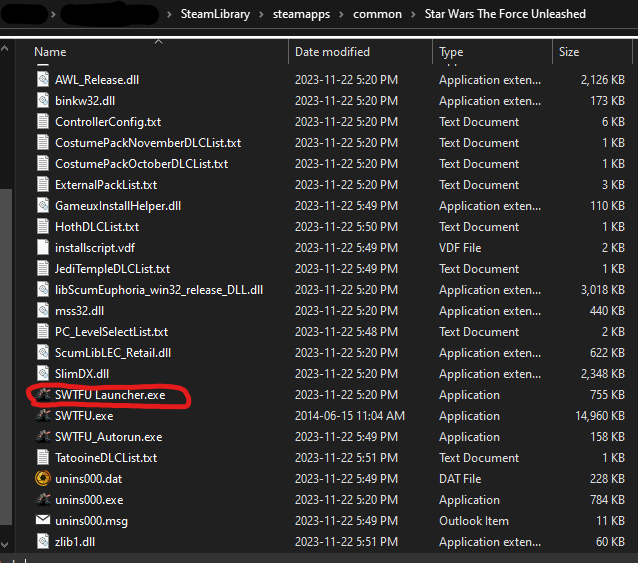 This little saboteur is literally the only reason you can't start through Steam, unless your computer is haunted. If you select SWTFU.exe, your game will actually start! SWTFU Launcher.exe is the definition of a worthless middleman who makes things more complicated than things should be.
What happens here, is Steam tries to launch the game through the Launcher, but the Launcher fails at being a Launcher because the Launcher doesn't Launch the game. So, dear reader, how do we fix this?
This little saboteur is literally the only reason you can't start through Steam, unless your computer is haunted. If you select SWTFU.exe, your game will actually start! SWTFU Launcher.exe is the definition of a worthless middleman who makes things more complicated than things should be.What happens here, is Steam tries to launch the game through the Launcher, but the Launcher fails at being a Launcher because the Launcher doesn't Launch the game. So, dear reader, how do we fix this?
Solution
Throw the launcher into the shadow realm. Rename SWTFU.exe to SWTFU Launcher.exe. It should look like this now
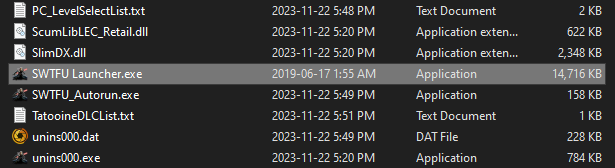 Now you should be able to launch the game through Steam.
Love this game, but this PC port sucks.
Now you should be able to launch the game through Steam.Love this game, but this PC port sucks.
More STAR WARS™: The Force Unleashed™ Ultimate Sith Edition guides
- Star Wars: The Force Unleashed PC Port Fixes★ 5 (1.2k)89k views2.4k ♥1 minUpdated Mar 29, 2023
- Ultimate Sith Edition Input Codes★ 5 (506)38k views1.3k ♥1 minUpdated May 31, 2015
- New 60fps fix★ 5 (166)25k views297 ♥2 minUpdated Jan 11
- The Force Unleashed: Holocron guide★ 5 (701)24k views1.5k ♥28 minUpdated Jun 24, 2020
- Включение русского языка в Star Wars: The Force Unleashed Ultimate Sith Edition★ 5 (921)20k views790 ♥1 minRussianUpdated Jun 1, 2015
- How to get 60 FPS or Unlimited FPS★ 4 (81)18k views174 ♥1 minUpdated Aug 21, 2023





This guide was created by its original author on the Steam Community. Are you the author and want it removed? Request removal.