How to Fix L.A Noire PC (2024 Updated)
Game Crashing / Not launching at all
You are most likely to encounter this problem if you're using a newer edition of Windows. This includes Windows 8, 8.1, Windows 10 and Windows 11 as the game is not optimized for them.
To solve this problem, go to the file location of L.A Noire, right click LANoire.exe and go to properties then run the game in compatibility mode for Windows XP, Vista or 7. This Should fix the problem but if it still persist, exit Steam and Rockstar Games Launcher and run both of them as administrator.
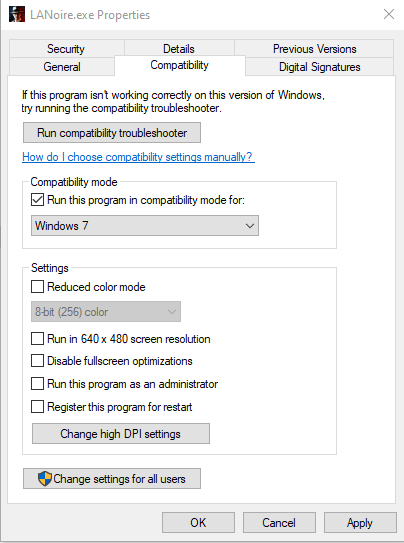
To solve this problem, go to the file location of L.A Noire, right click LANoire.exe and go to properties then run the game in compatibility mode for Windows XP, Vista or 7. This Should fix the problem but if it still persist, exit Steam and Rockstar Games Launcher and run both of them as administrator.
30 FPS Fix/Widescreen Fix
L.A Noire on PC is locked at 30 FPS, which is disappointing. To get the game running at 60 FPS, open LANLauncher.exe and go to options and then type the following command in the command line : -npd -str -nonv . This method only works sometimes. You can also use widescreen fixer but that program is outdated since 2016. You can download Widescreen Fixer here[techsroat-network.com].
- Run Steam as Administrator.
- Open LANlauncher.
- Add "--windowed" without quotes to the command line in the launcher settings (Not Steam) have flawless widescreen program running.
- Open the game via launcher and then when the game launches change resolution in game settings after you're done, then delete "--windowed" from the command line.
Honestly I would not recommend running the game at 60 FPS since many of the game's mechanics and physics are meant to run at 30 FPS and running at 60 can cause problems.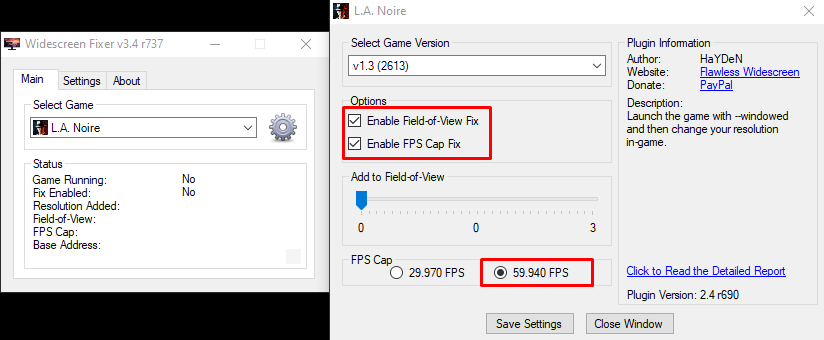
Download Here[github.com]
- Run Steam as Administrator.
- Open LANlauncher.
- Add "--windowed" without quotes to the command line in the launcher settings (Not Steam) have flawless widescreen program running.
- Open the game via launcher and then when the game launches change resolution in game settings after you're done, then delete "--windowed" from the command line.
Honestly I would not recommend running the game at 60 FPS since many of the game's mechanics and physics are meant to run at 30 FPS and running at 60 can cause problems.
Edit:
The Widescreen Fix software mentioned above is extremely oudated so please use this one.Download Here[github.com]
No Sound Fix
If you are encountering a sound problem, go to the file location of LA Noire and run the following applications as administrator:
- dotnetfx35.exe
- DXSETUP.exe
- Social Club Setup.exe
- vcredist_x86.exe
Usually this problem gets fixed automatically when running the game in compatibility mode for Windows XP/Vista/7 but I thought to mention it none the less.
- dotnetfx35.exe
- DXSETUP.exe
- Social Club Setup.exe
- vcredist_x86.exe
Usually this problem gets fixed automatically when running the game in compatibility mode for Windows XP/Vista/7 but I thought to mention it none the less.
More L.A. Noire guides
- L.A. Noire All Interrogation Question's & Answers★ 5 (1.9k)68k views3.5k ♥10 minUpdated Mar 10, 2015
- L.A. Noire 100% Walkthrough★ 5 (3k)63k views5.6k ♥39 minUpdated Oct 5, 2018
- L.A. Noire 60 FPS!★ 5 (539)54k views576 ♥1 minUpdated Jul 1, 2021
- Все улики, допросы, газеты. И местоположение всего что надо найти + DLC★ 5 (3.3k)38k views4.2k ♥27 minRussianUpdated May 18, 2020
- Question/Interrogation Solutions★ 5 (969)33k views1.4k ♥8 minUpdated Jul 1, 2014
- Complete achievements guide★ 5 (850)26k views1.5k ♥19 minUpdated Apr 15, 2020




This guide was created by its original author on the Steam Community. Are you the author and want it removed? Request removal.