How to get ingame audio files
steps (again, so i can upload)
1. get FMod bank tools
2. still have H&G installed for god knows what reason why (If not installed/ is uninstalled skip to step 3)
3. reinstall H&G (if you've failed step 2)
4. open Fmod Bank tools
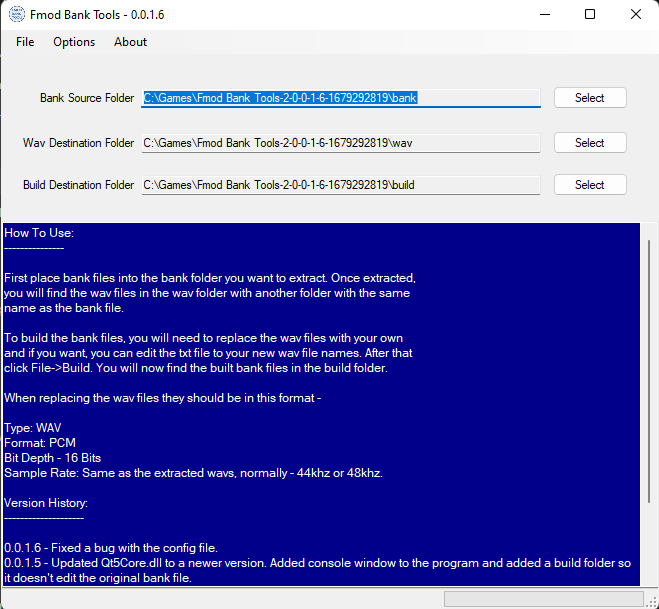 5. set "Bank Source Folder" as Steam\steamapps\common\Heroes & Generals\_packed\_Out\audio2\Desktop\Stereo (regular ol' stereo)
or Steam\steamapps\common\Heroes & Generals\_packed\_Out\audio2\Desktop\5_1 (fancy schmancy 5.1 surround sound)
6. either set "Wav destination folder" as anywhere you'll easily find or leave alone
7. in Fmod bank tools, click "file",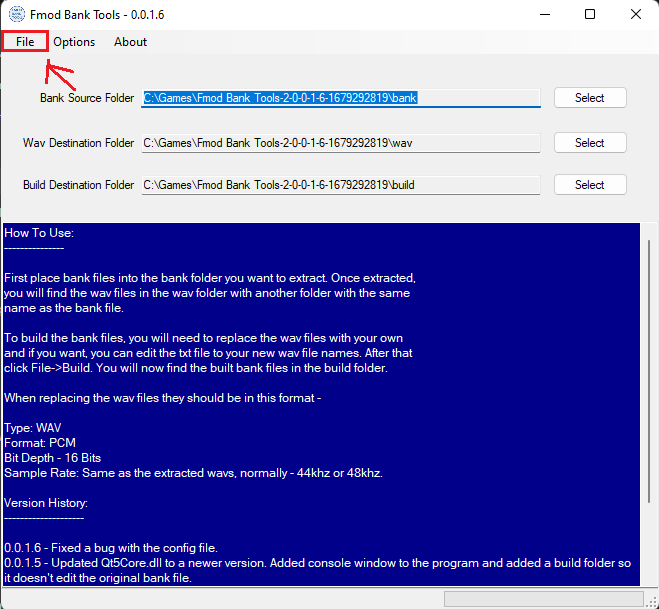 then "extract"
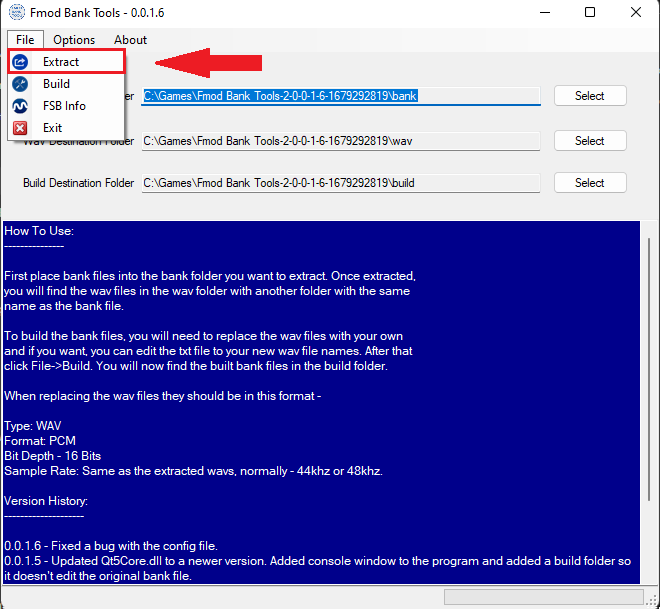
8. wait, a bit,
2. still have H&G installed for god knows what reason why (If not installed/ is uninstalled skip to step 3)
3. reinstall H&G (if you've failed step 2)
4. open Fmod Bank tools
5. set "Bank Source Folder" as Steam\steamapps\common\Heroes & Generals\_packed\_Out\audio2\Desktop\Stereo (regular ol' stereo)or Steam\steamapps\common\Heroes & Generals\_packed\_Out\audio2\Desktop\5_1 (fancy schmancy 5.1 surround sound)
6. either set "Wav destination folder" as anywhere you'll easily find or leave alone
7. in Fmod bank tools, click "file",
then "extract"8. wait, a bit,
More Heroes & Generals guides
- The Art of Camouflaging & Camouflages (V.5.0.0)★ 5 (434)20k views534 ♥90 minUpdated Dec 27, 2019
- Советы по игре для новичков + сборки с улучшениями!★ 5 (203)13k views265 ♥26 minRussianUpdated Apr 12, 2018
- Death from Above: Slim's Guide to Paratrooping★ 5 (305)11k views163 ♥4 minUpdated Oct 10, 2019
- Если бы Вторая Мировая война была бы дракой в баре★ 5 (307)7.9k views161 ♥2 minRussianUpdated Apr 7, 2017
- Сборки на оружие для всех фракций.★ 4 (173)7.3k views301 ♥3 minRussianUpdated May 16, 2019
- Hungarian Faction★ 4 (188)6.8k views75 ♥4 minHungarianUpdated Oct 13, 2020


This guide was created by its original author on the Steam Community. Are you the author and want it removed? Request removal.