How to have custom music for your game's stages and its menu.
*Disclaimer*
I actually really enjoy the soundtrack to this game, this is solely for experimentation and preference, not as a subsitute. Also, this is a pretty simplistic guide, so if you do end up getting stuck, feel free to ask.
If a dev does not encourage this, just say in the comments or simply take the guide down.
ANOTHER EDIT: I have not played this game in a very long time, the system may have changed entirely. If this doesn't work as of today's date then I am sorry, there's little I can do, someone may be able to help in the comments or a new guide
If a dev does not encourage this, just say in the comments or simply take the guide down.
ANOTHER EDIT: I have not played this game in a very long time, the system may have changed entirely. If this doesn't work as of today's date then I am sorry, there's little I can do, someone may be able to help in the comments or a new guide
What you need to do
1. Open up the SpeedRunner's music folder.
Found at: \Steam\steamapps\common\SpeedRunners\Content\Audio\Music
Copy the 5 audio tracks and paste them somewhere else. This is for backup purpouses in case something went wrong or you just want the old music back.
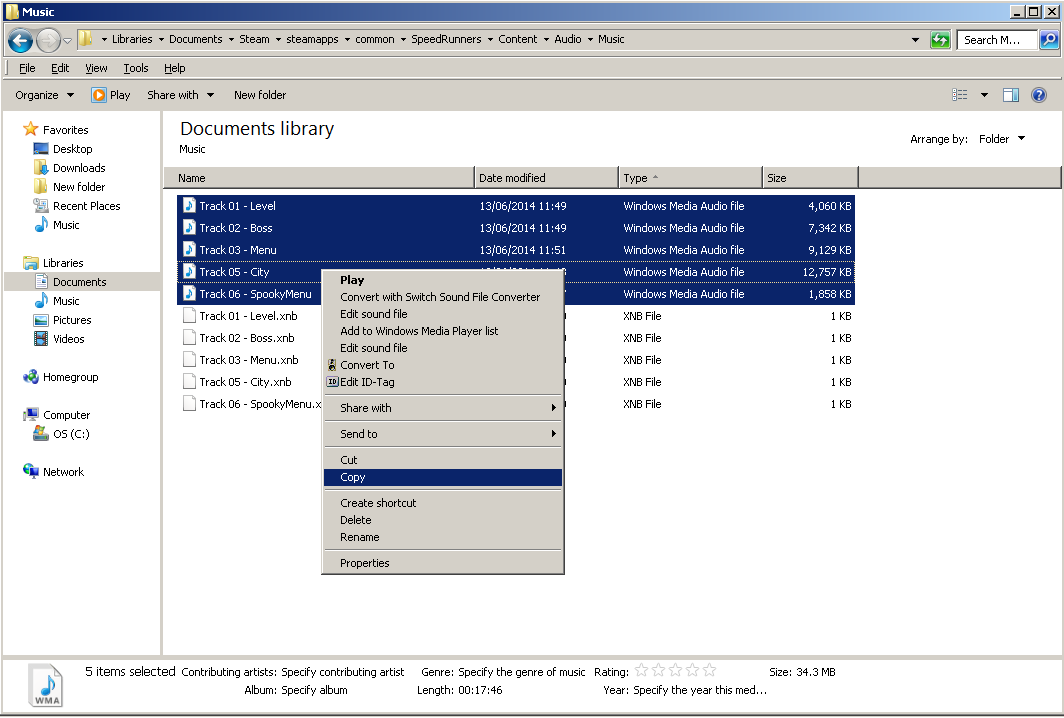
Also note that the tracks are of a WMA format. But we'll come to that later.
2. Find what music you want to use. (MP3 works best, unless you already have WMA)
You can use anything saved on your computer or do what I do. Go onto YouTube, get some music you like and feel is suitable for each of the audio tracks in the game (you may want to listen to them so you understand what each one refers to, e.g. Level = Standard gameplay theme). Then go onto http://www.youtube-mp3.org/ to convert the file.
3. Converting MP3 to WMA.
Very simple as it can be done online.
Go to: http://media.io/ and convert your chosen MP3 files to the WMA format.
Once you have all your tracks, you may want to move them to the SpeedRunners music folder, just to save some time.
4. Replacing the music.
The final step is to re-name your music files in order to replace the existing ones. Your level theme needs to be re-named to Track 01 - Level. Remove the existing Track 01 and your own level theme should take it's place. Do this for the rest of them and you have your own custom soundtrack. Do not mess around with the .xnb files however.
Found at: \Steam\steamapps\common\SpeedRunners\Content\Audio\Music
Copy the 5 audio tracks and paste them somewhere else. This is for backup purpouses in case something went wrong or you just want the old music back.
Also note that the tracks are of a WMA format. But we'll come to that later.
2. Find what music you want to use. (MP3 works best, unless you already have WMA)
You can use anything saved on your computer or do what I do. Go onto YouTube, get some music you like and feel is suitable for each of the audio tracks in the game (you may want to listen to them so you understand what each one refers to, e.g. Level = Standard gameplay theme). Then go onto http://www.youtube-mp3.org/ to convert the file.
3. Converting MP3 to WMA.
Very simple as it can be done online.
Go to: http://media.io/ and convert your chosen MP3 files to the WMA format.
Once you have all your tracks, you may want to move them to the SpeedRunners music folder, just to save some time.
4. Replacing the music.
The final step is to re-name your music files in order to replace the existing ones. Your level theme needs to be re-named to Track 01 - Level. Remove the existing Track 01 and your own level theme should take it's place. Do this for the rest of them and you have your own custom soundtrack. Do not mess around with the .xnb files however.
Custom music in action
Here's my attempt at it. I'll probably end up changing it though.
Recorded using OBS. Wasn't trying so don't expect good gameplay.
Music used:
Menu - Punch Out Wii Theme
Level - Mario Kart 8 - Mario Kart Stadium
Boss - https://www.youtube.com/watch?v=eikUKufNRIw
I also wouldn't have the music this loud, was just to show you that it works.
Have fun, try it out for yourself
Recorded using OBS. Wasn't trying so don't expect good gameplay.
Music used:
Menu - Punch Out Wii Theme
Level - Mario Kart 8 - Mario Kart Stadium
Boss - https://www.youtube.com/watch?v=eikUKufNRIw
I also wouldn't have the music this loud, was just to show you that it works.
Have fun, try it out for yourself
More SpeedRunners guides
- The official SpeedRunners controller guide★ 4 (111)99k views87 ♥5 minUpdated Sep 26, 2019
- SpeedRunners - All Secret Characters★ 5 (555)47k views656 ♥1 minUpdated Jun 19, 2015
- Hidden Characters★ 5 (865)44k views1.1k ♥1 minUpdated Jun 3, 2015
- The Ultimate Guide To Unlockable Characters★ 5 (235)27k views339 ♥2 minUpdated Nov 2, 2015
- Secret Characters★ 5 (378)25k views481 ♥1 minUpdated Dec 26, 2017
- Megamen in SR [UPDATED!]★ 4 (121)15k views66 ♥1 minBulgarianUpdated Aug 5, 2017



This guide was created by its original author on the Steam Community. Are you the author and want it removed? Request removal.