How to increase FPS?
Intro + FAQ
Hello guys.
 This is my first guide and I would love to get some feedback. Guide is meant to be simple and clean.
Basically - this tutorial is about disabling replays. There's no in-game option so we have to improvise ;)
And thank you for voting this guide up!
FAQ
- Q: Can i get banned for it?A: No, you can't. You do not modify game files nor install 3rd party software. It's just folder restriction.
- Q: What is your rig and how this affected your FPS?A: My specs are: AMD Athlon II x4 635, GTX 460 and 4Gigs RAM. Nothing special.
I went from about unplayable 20fps to ~40. For example - Prypiat, game just started, i'm looking at my base: Replays ON = ~40fps | Replays OFF = 60fps.
- Q: Any special info?A: um... Yes. I think you need Administrator account to complete this operation.
System reboot may be needed.- You also should have more IQ than a banana peel.
-
- Q: Can i post this guide on other websites?A: Yes, but You have to attribute me as the author.
If you've made similar guide by yourself - using my guide - be nice and post link to to this site.
- Q: What about SLI/Crossfire?A: There's currently NO support for SLI/Crossfire. Developers are working on it.
- Q: Why screenshots are in Polish?
- A: Because I can't legally change system language in Windows 7 Pro. I bet You can analyze the screenshots and read the instructions.
[/list]
Step 1 - Finding our folder
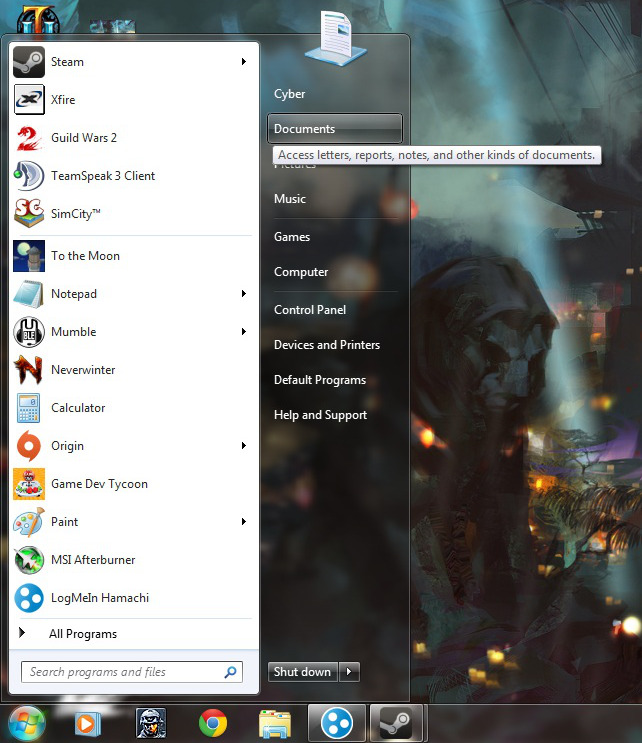
- Go to "My Documents" or "Documents"
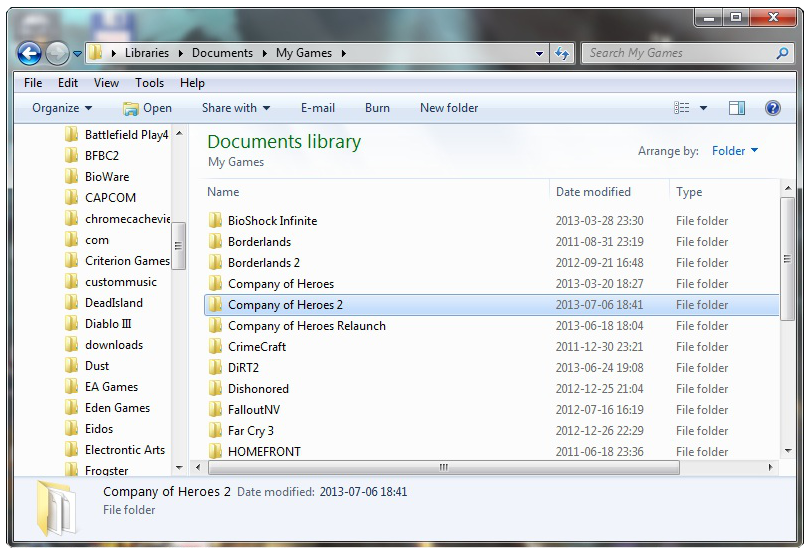
- Now, navigate to "My Games", "Company of Heroes 2"
- Go to Step 2
Step 2 - What's inside?
- Now find "playback" folder and right click it.
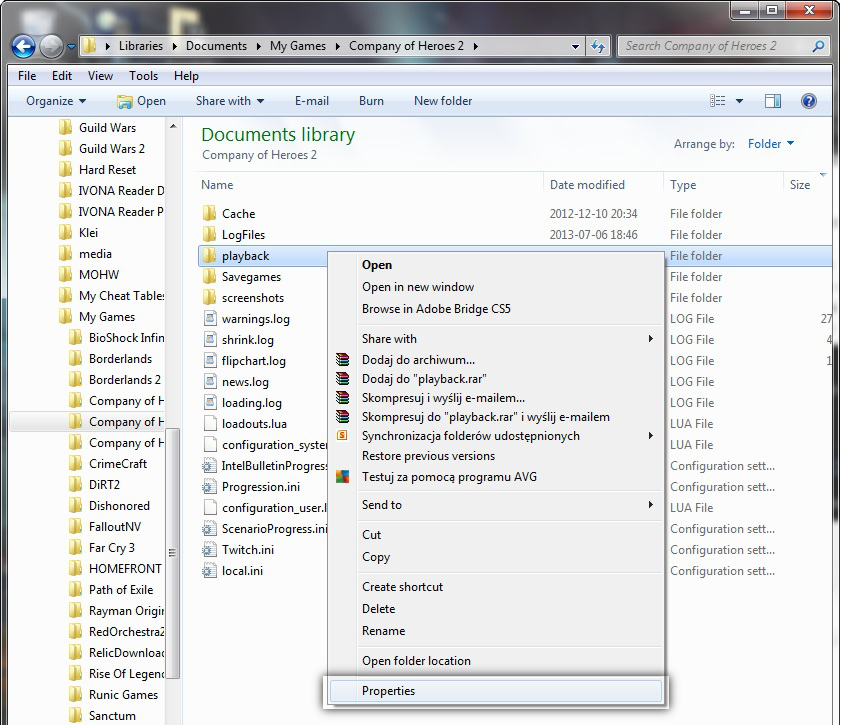
- Go to "Properties" and say hello to the new window.
Hello window!
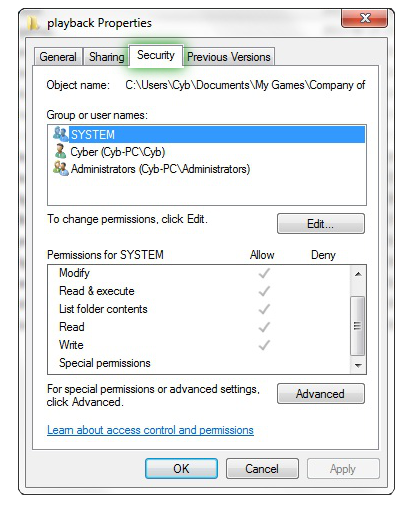
- Go to Third Tab and check out Step 3
Step 3 - Checkin' boxes!
- Now click on that fancy Edit button.
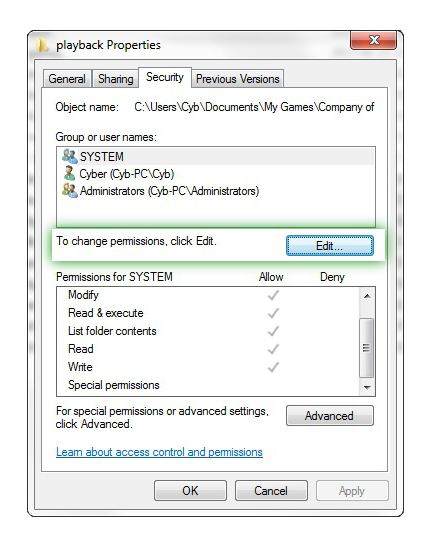
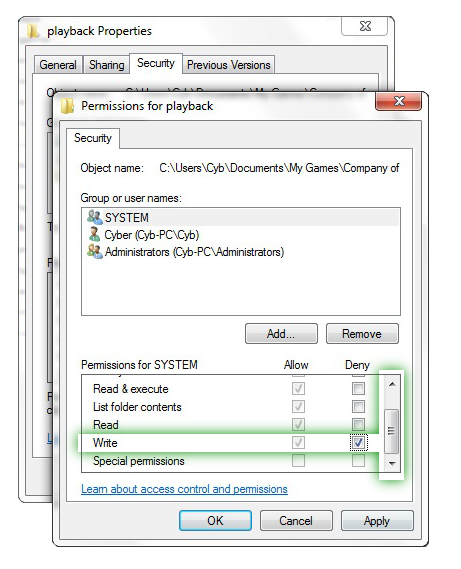
- As you can see: we have a lot of weird stuff there.You have to check Write box
- There are 3 "users" - "Cyber(windows user name)", "SYSTEM" and "Administrator". Don't forget about them.
They all must have "Write/Save" box checked.
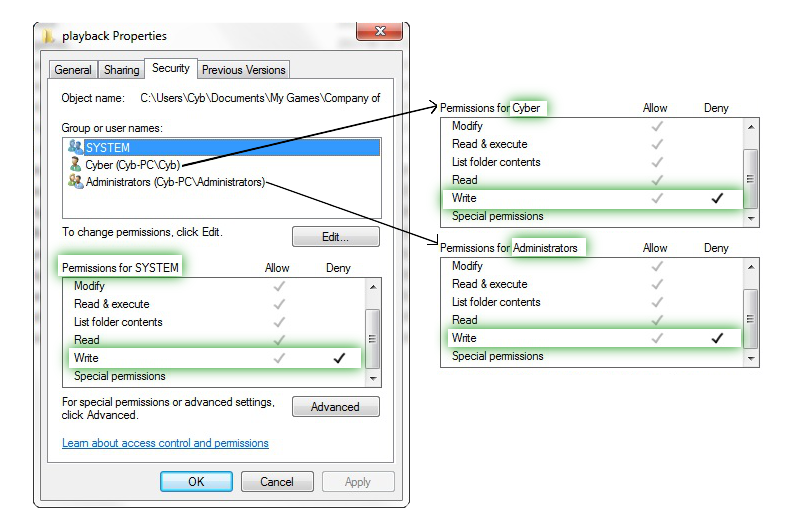
- Now - all you have to do is to click "OK", then "Yes" if any window pops-out and "OK" again.
- Congratulations! You've made it! I am proud. Proceed to the last step if you think you've made a mistake.
I am proud of You!
Step 4 - Is it working now?
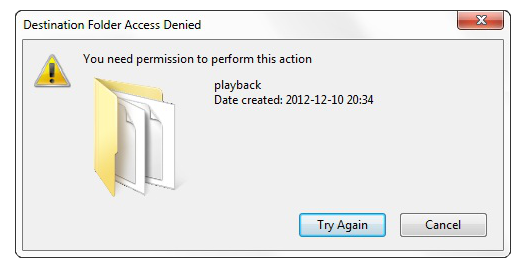
Just try to make a new folder inside "Playback".
[/list]- If the folder is made - you've done something wrong.
- If not - Congratulations! Go and launch your game!
- Don't forget to rate this guide and leave a comment, thanks :)
How can I turn it off?
It's simple, just unckeck "Write" field, and then delete "playback" folder.
That's all. Game will create new one, without any restrictions.
Aaaand If that doesn't work: MikeO527 found another way to do so.
That's all. Game will create new one, without any restrictions.
Aaaand If that doesn't work: MikeO527 found another way to do so.
fixed it today, I tried uninstalling and reinstalling the game and it didnt work at first so I searched my PC for Company of Heroes 2 and completely deleted any files that had anything to do wih the game. Then permanently deleted them in the recycle bin. Turns out the old files were corrupting the download of the new ones. Game works for me now.
What is this all about?
- Seriously? What is this all about?
This feature demands a lot of your processor, hard drive and as I belive - RAM.
Disabling it may give you huge FPS boost.
- Tested on 2 PC's (amd cpu+nvidia and intel+amd gpu)
The second one belongs to my friend - it's very good but FPS increase was very low.
Changelog
- 1 Jul 2013
+ minor translation fixes,
+ added new images,
+ changed some text (now it's easier to understand some things)
- 2 Jul 2013
+ translation fixes,
- 3 Jul 2013
+ minor design updates,
- 5 Jul 2013
- 7 Jul 2013
+ few design edits,
- 8 Jul 2013
+ Screenshots are now in ENGLISH - thanks to Cyber!
+ minor design fixes,
- 20 Jul 2013
- 20 Jun 2015
My other guides:
Any problems with Sony Movie Studio 13?
http://steamcommunity.com/sharedfiles/filedetails/?id=465320960
More Company of Heroes 2 guides
- COH2 Console cheats/commands★ 4 (181)23k views412 ♥2 min
- Руководство по всем юнитам и постройкам Company of Heroes 2★ 5 (1.1k)23k views1.2k ♥77 minRussianUpdated Dec 15, 2024
- How to use and apply military strategy in COH2 (All factions/commanders) #REVISED EDITION# BASICS & EARLY GAME★ 5 (521)21k views742 ♥9 minDutchUpdated Jul 13, 2015
- Все, что вы хотели знать об этой игре, но боялись спросить★ 5 (331)13k views390 ♥14 minRussianUpdated Dec 10, 2021
- Compilation of broken achievements & solutions★ 5 (288)13k views471 ♥2 minUpdated Aug 8, 2022
- A Weeb's guide to Soviets.★ 5 (232)12k views437 ♥34 minUpdated Apr 11, 2022


This guide was created by its original author on the Steam Community. Are you the author and want it removed? Request removal.