How to: Increase the population cap
Follow these steps:
1.) Locate to your Steam Rise of Nations directory 'C:\Program Files (x86)\Steam\steamapps\common\Rise of Nations\Data\'
2.) Create a copy of 'rules.xml' file first then edit it with Notepad++
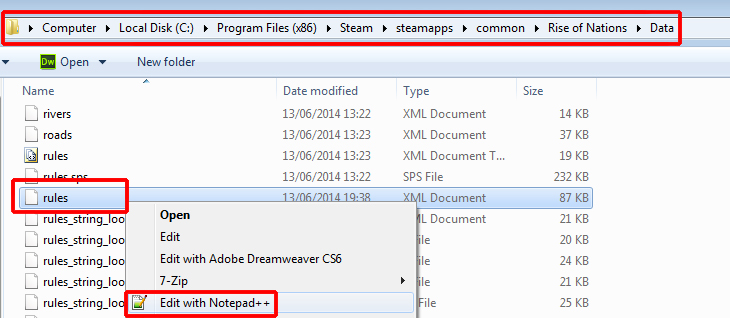 3.) Ctrl +F and find '<POP_CAP entry0'
4.) Change 'entry7="200 pop cap"/>' to 'entry7="450 pop cap"/>' **(This needs to be 100 less than the new popcap you are setting)!**
 5.) Ctrl +F or find 'MAX_POP_LIMIT'
6.) Change '<MAX_POP_LIMIT value="300 pop cap"/>' to 'MAX_POP_LIMIT value="550 pop cap"/>'
 7.) Ctrl +F or find '<CATEGORIES id="poplimits" title="Population:">'
8.) Change '<CATEGORY name="200"><DATA>200</DATA></CATEGORY>' to '<CATEGORY name="550"><DATA>550</DATA></CATEGORY>'.
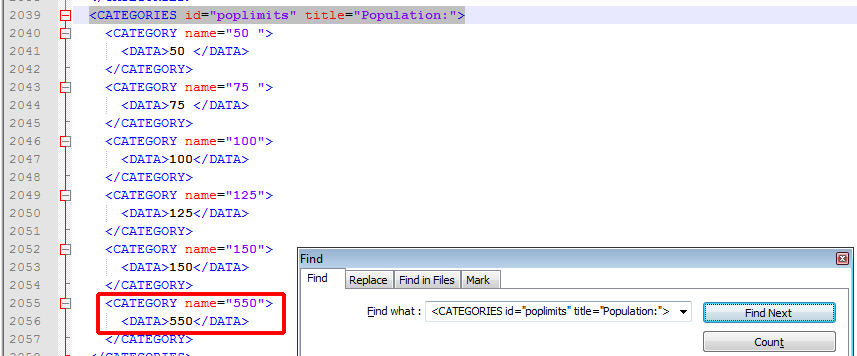 9.) Save the file.
10.) Launch the game, upon reaching the Military Tech Level 7 you will now have 550 population cap instead of the default 200.
2.) Create a copy of 'rules.xml' file first then edit it with Notepad++
3.) Ctrl +F and find '<POP_CAP entry0'4.) Change 'entry7="200 pop cap"/>' to 'entry7="450 pop cap"/>' **(This needs to be 100 less than the new popcap you are setting)!**
5.) Ctrl +F or find 'MAX_POP_LIMIT' 6.) Change '<MAX_POP_LIMIT value="300 pop cap"/>' to 'MAX_POP_LIMIT value="550 pop cap"/>'
7.) Ctrl +F or find '<CATEGORIES id="poplimits" title="Population:">' 8.) Change '<CATEGORY name="200"><DATA>200</DATA></CATEGORY>' to '<CATEGORY name="550"><DATA>550</DATA></CATEGORY>'.
9.) Save the file.10.) Launch the game, upon reaching the Military Tech Level 7 you will now have 550 population cap instead of the default 200.
FAQ:
Q1.) How do I play online with my friends?
A1.) Your friend must have the same rules.xml configuration as yours otherwise you will recieve a sync error.
Q2.) How do I revert everything back to default?
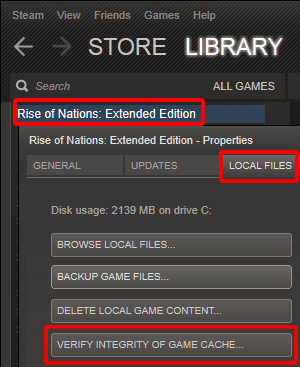
A2.) If you didn't save a copy orginally, go to the Steam Library and right click Rise Of Nations > Properties > Local Files > Verify integrity of game cache...
A1.) Your friend must have the same rules.xml configuration as yours otherwise you will recieve a sync error.
Q2.) How do I revert everything back to default?
A2.) If you didn't save a copy orginally, go to the Steam Library and right click Rise Of Nations > Properties > Local Files > Verify integrity of game cache...
More Rise of Nations: Extended Edition guides
- Rise of Nations Русификатор 1.20★ 5 (316)19k views370 ♥1 minRussianUpdated Apr 30, 2020
- Efficiency and Hot Key Guide★ 5 (625)19k views822 ♥26 minUpdated Apr 10, 2015
- Taunt Guide★ 5 (288)15k views331 ♥3 minUpdated Jul 16, 2014
- Rise of Nations : Extended Edition - To Achieve 100%★ 5 (533)13k views686 ♥15 minUpdated Jan 1, 2018
- Economic goals for a good base start for a decent mid game★ 5 (212)11k views336 ♥3 minUpdated Jun 16, 2014
- Rise of Nations Русификатор[RUS] 1.20★ 4 (216)10k views219 ♥1 minRussianUpdated Jul 28, 2018



This guide was created by its original author on the Steam Community. Are you the author and want it removed? Request removal.