How to install the Call of Duty Ghosts Safety patch and have offline progression
Premise
In this guide I'm going to show you how to install IW6-Mod client.
With this client you are safer to play Call of Duty: Ghosts, you gain the ability to unlock, you can level up in multiplayer while playing against bots, can level up and progress (level, camo, ect.) offline/disconnected from the internet.
With this client you are safer to play Call of Duty: Ghosts, you gain the ability to unlock, you can level up in multiplayer while playing against bots, can level up and progress (level, camo, ect.) offline/disconnected from the internet.
Install IW6-Mod
- First make sure you installed Call of Duty: Ghosts on your PC.
- Now go to https://alterware.dev/# and click download on the top right.
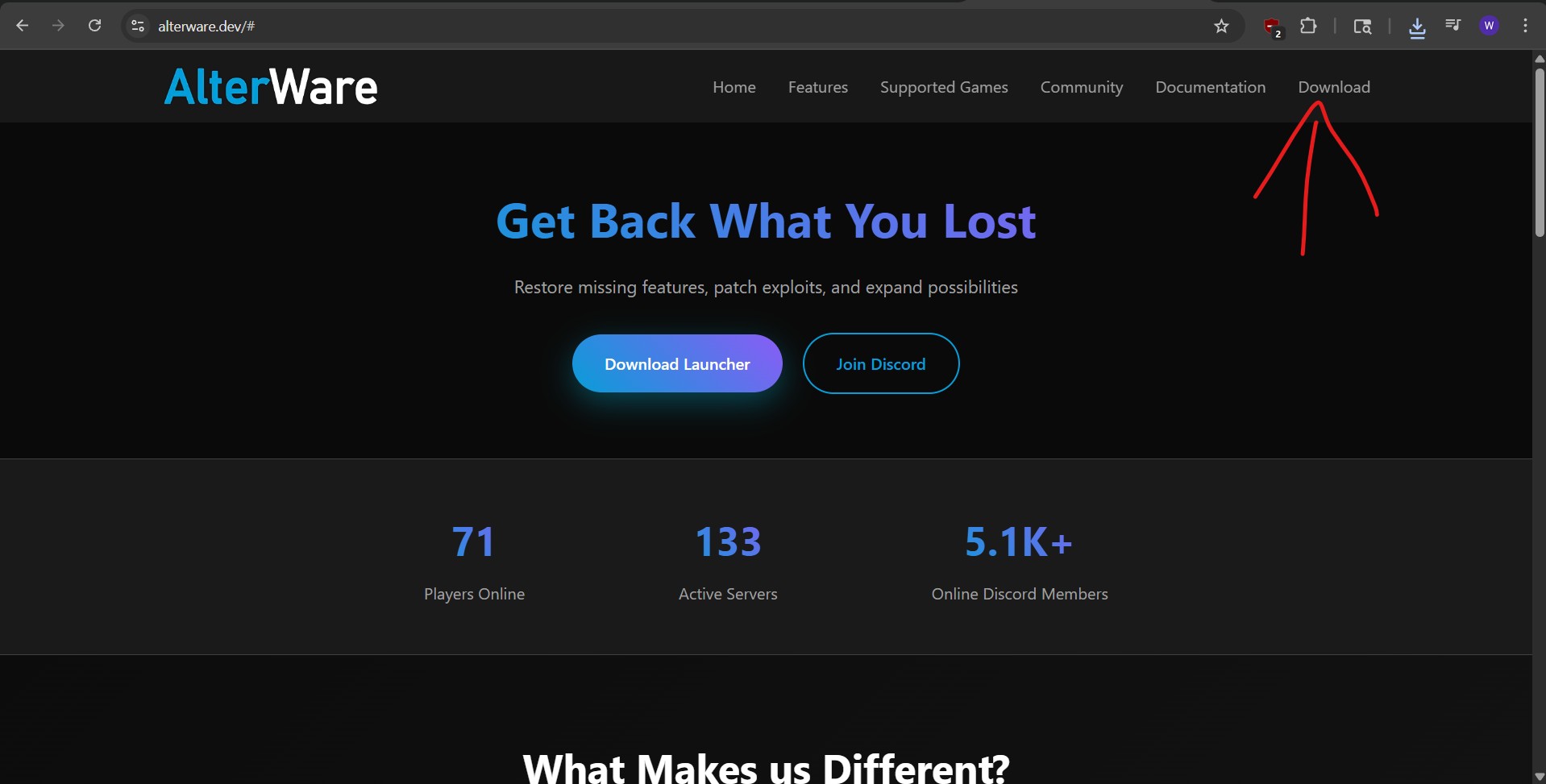 - Download the AlterWare Launcher.
- Go to your Steam library.
- Right click on Call of Duty: Ghosts.
- Click browse files.
- This will open the root folder for Call of Duty: Ghosts, simply drag the AlterWare Launcher to your root folder.
- Click the AlterWare Launcher to start the Client, first time might need to be ran as an administrator and will install all necessary files for Call of Duty: Ghosts.
- Now use the IW6-mod that is added as your standard launch program.
- When you launch it it should launch the client and from there a little console.
it will also ask you what you want to play, Singleplayer or Multiplayer.
To know you are using the program correctly, look in game to the left top corner, there it should say the version of the mod you are using.
The Client also works fully offline and in the game you can find options to unlock everything or specific levels.
- Now go to https://alterware.dev/# and click download on the top right.
- Download the AlterWare Launcher.- Go to your Steam library.
- Right click on Call of Duty: Ghosts.
- Click browse files.
- This will open the root folder for Call of Duty: Ghosts, simply drag the AlterWare Launcher to your root folder.
- Click the AlterWare Launcher to start the Client, first time might need to be ran as an administrator and will install all necessary files for Call of Duty: Ghosts.
- Now use the IW6-mod that is added as your standard launch program.
- When you launch it it should launch the client and from there a little console.
it will also ask you what you want to play, Singleplayer or Multiplayer.
To know you are using the program correctly, look in game to the left top corner, there it should say the version of the mod you are using.
The Client also works fully offline and in the game you can find options to unlock everything or specific levels.
Leveling with Bots
In game you can use ''Combat Training'' to play against bots and still level up and unlock challenges/camo's like you would online.
Easier way to start the game
Lets make it easier to start Ghosts with the IW6 client.
First go to where we have the client installed.
Right click the IW6 client and create a shortcut.
Now right click the shortcut and go to properties.
Copy the location behind the target, for me that is:
"C:\Program Files (x86)\Steam\steamapps\common\Call of Duty Ghosts\iw6-mod.exe"
Now head back to your Steam library and click on Ghosts.
Click on the COG on the right and click properties.
You should see an empty bar under Launch options.
Paste what you copied here and type behind it %command%
The result should look like this if you have your game installed in the standard location.
"C:\Program Files (x86)\Steam\steamapps\common\Call of Duty Ghosts\iw6-mod.exe" %command%
Now when we click play, it should start the IW6 client instead of normal Ghosts.
First go to where we have the client installed.
Right click the IW6 client and create a shortcut.
Now right click the shortcut and go to properties.
Copy the location behind the target, for me that is:
"C:\Program Files (x86)\Steam\steamapps\common\Call of Duty Ghosts\iw6-mod.exe"
Now head back to your Steam library and click on Ghosts.
Click on the COG on the right and click properties.
You should see an empty bar under Launch options.
Paste what you copied here and type behind it %command%
The result should look like this if you have your game installed in the standard location.
"C:\Program Files (x86)\Steam\steamapps\common\Call of Duty Ghosts\iw6-mod.exe" %command%
Now when we click play, it should start the IW6 client instead of normal Ghosts.
Video Guide
Customizing bots
Now in the match it will use random names for the bot players, the same as in private matches normally.
You can change the names by going to C:\Program Files
"C:\Program Files (x86)\Steam\steamapps\common\Call of Duty Ghosts\data"
if that is your standard install location and adding a textfile named ''Bots''
Here you can type in names you want to see in the match, each name can be a maximum of 15 letters/numbers/symbols before being cutoff, also these names wont have the trademark bot clan tag in game.
You can change the names by going to C:\Program Files
"C:\Program Files (x86)\Steam\steamapps\common\Call of Duty Ghosts\data"
if that is your standard install location and adding a textfile named ''Bots''
Here you can type in names you want to see in the match, each name can be a maximum of 15 letters/numbers/symbols before being cutoff, also these names wont have the trademark bot clan tag in game.
Like and Favorite

More Call of Duty: Ghosts - Multiplayer guides
- Game Optimization Guide★ 5 (358)31k views348 ♥14 minUpdated Nov 13, 2013
- Русификатор для "Call of Duty: Ghosts"★ 5 (976)16k views575 ♥1 minRussianUpdated May 23, 2017
- Как убрать фоновую музыку в MP / How to delete background music in MP★ 4 (216)8.2k views80 ♥1 minBulgarianUpdated Nov 21, 2013
- How to move forward on CoD: Ghosts★ 4 (339)6.3k views39 ♥1 minUpdated Dec 11, 2013
- Extinction: Point of Contact. An extensive guide.★ 4 (96)6k views59 ♥18 minUpdated Jan 22, 2014
- Типичные ошибки в сетевой игре.★ 4 (188)5.8k views72 ♥3 minRussianUpdated Jan 16, 2014


This guide was created by its original author on the Steam Community. Are you the author and want it removed? Request removal.