How to : Kv6 Modding [Official]
Introduction - What is Kv6 Modding?
Kv6 Modding involves changing the models that the client uses. This means that you can customise what almost the entire game looks like. Anything from the Miner's Shotgun to the Zombie's Head can be changed, and the possibilities are endless!
Only you can see any changes that you make to the game, meaning that each player can create a unique game experience by having slightly different-looking models to play with.
Only you can see any changes that you make to the game, meaning that each player can create a unique game experience by having slightly different-looking models to play with.
Restrictions
There are a few restrictions that you'll need to know about before you can start modding your Kv6 models, these are :
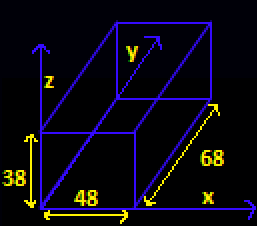
These dimensions form a box that each model must fit inside. Below is an image that shows how this works :
If you either modify a prefab, or your models are too large, the game will run, but show an error message, and you will have to restore the original file.
- You cannot modify prefab models.
- All models must fit within a certain area, the dimensions are as follows :X-SizeY-SizeZ-Size486838
These dimensions form a box that each model must fit inside. Below is an image that shows how this works :
If you either modify a prefab, or your models are too large, the game will run, but show an error message, and you will have to restore the original file.
Before You Start
Before proceeding, please note that Kv6 Modding is currently only enabled in the Beta version of the game. To access this, Right-Click Ace of Spades, click "Properties" , Then click "Betas", and use the drop-down menu to select "community - Pre-Release Preview".
Before you start, ensure to keep a backup of ALL of the original Kv6 files. To do this, follow the steps below :
1.) Go into your steam library, and right-click Ace of Spades.
2.) Click "Properties".
3.) Click "Local Files".
4.) Click "Browse Local FIles".
5.) You should now see a folder named "Kv6". Right click this, and click "Copy".
6.) Right click elsewhere in the aceofspades folder, click "Paste".
7.) There should now be a 2nd folder called "Kv6 - Copy". If anything goes wrong, you can just rename this to "Kv6", which will restore the original files.
Before you start, ensure to keep a backup of ALL of the original Kv6 files. To do this, follow the steps below :
1.) Go into your steam library, and right-click Ace of Spades.
2.) Click "Properties".
3.) Click "Local Files".
4.) Click "Browse Local FIles".
5.) You should now see a folder named "Kv6". Right click this, and click "Copy".
6.) Right click elsewhere in the aceofspades folder, click "Paste".
7.) There should now be a 2nd folder called "Kv6 - Copy". If anything goes wrong, you can just rename this to "Kv6", which will restore the original files.
Modding the Files
In order to mod your files, follow the steps below:
1.) Find a model that you would like to use in the game - Maybe a new skin for the miner, or a different gun model.
2.) Work out what item you need to replace - Eg. If you wanted to change the Marksman's Head, you will see that you'll need to change the "Character_Scout_Head.kv6" File. *
*Note : Commando = Soldier ; Marksman = Scout.
3.) Rename the model that you just downloaded to the exact same as the model you want to replace (in this case, "Character_Scout_Head").
4.) Copy and Paste (or drag) the new model into the Kv6 Folder, and select "Copy and Replace".
5.) Start up your game, and you should now see different models (depending on what you modded).
6.) Have fun with your new model(s)!
1.) Find a model that you would like to use in the game - Maybe a new skin for the miner, or a different gun model.
2.) Work out what item you need to replace - Eg. If you wanted to change the Marksman's Head, you will see that you'll need to change the "Character_Scout_Head.kv6" File. *
*Note : Commando = Soldier ; Marksman = Scout.
3.) Rename the model that you just downloaded to the exact same as the model you want to replace (in this case, "Character_Scout_Head").
4.) Copy and Paste (or drag) the new model into the Kv6 Folder, and select "Copy and Replace".
5.) Start up your game, and you should now see different models (depending on what you modded).
6.) Have fun with your new model(s)!
More Ace of Spades guides
- Ace of Spades Achievement Guide★ 5 (381)9.5k views275 ♥30 minUpdated May 22, 2015
- Кто такой Зомби и с чем его едят ?★ 4 (236)6.3k views23 ♥1 minRussianUpdated Aug 15, 2017
- [PATCHED] How to get the server browser option back★ 4 (118)5.5k views51 ♥1 minUpdated Dec 8, 2022
- Ace of Spades - Achievement Guide [RUS] UPDATE 02.06.14★ 4 (137)3k views59 ♥5 minRussianUpdated Dec 15, 2014
- How to be a good engineer★ 4 (28)2.4k views9 ♥6 minUpdated Mar 2, 2014
- How to play Ace of Spades★ 3 (56)2.4k views11 ♥1 minBulgarianUpdated Dec 22, 2015



This guide was created by its original author on the Steam Community. Are you the author and want it removed? Request removal.