How to make Your Own Server?
Execution
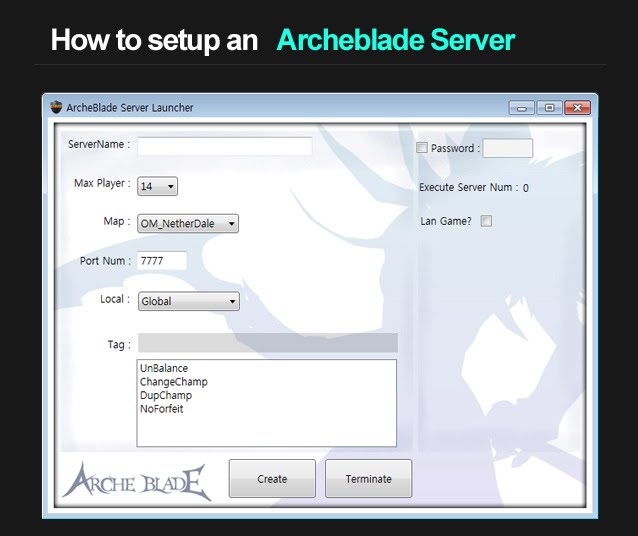
Go to the steam installation folder. The folder is generally at
C:\Program Files (x86)\Steam\steamapps\common\ArcheBlade\Binaries\Win32
(or your Steam installation folder)
Execute "serverlauncher.exe" in the folder.
Configuration
ServerName : Name of your server
*Note: Try not to include special characters in the name of server:
Max Player : Set up a maximum number of players in a map (2~14)
(each map has different capacity)
Map : Choose a map you want to play
NetherDale - 7 vs 7 Capture and Hold
UnderSiege - 3 vs 3 Team Death Match
NagasPit - 8 Players Free-for-all Death Match
SteamCanal - 4 vs 4, Round Match
Local : Display where your server is located
- Global
- US-East
- US-West
- South America
- Europe
- Asia
- Oceania
- Middle East
- Africa
Tag :
UnBalance - auto-balance disabled
ChangeChamp - can change a character during the game
DupChamp - allow to choose dupicate characters
NoForfeit - The game won't end even if opponent
Password : Set a password for a private server
Lan Game? : Check a checkbox for lan game mode, uncheck for internet game.
Click "Create" button to create a server
Click "Terminate" button to terminate a server
*Note: Try not to include special characters in the name of server:
#, ?, :, /, and space
between words. Use under bar ( _ ) instead. Max Player : Set up a maximum number of players in a map (2~14)
(each map has different capacity)
Map : Choose a map you want to play
NetherDale - 7 vs 7 Capture and Hold
UnderSiege - 3 vs 3 Team Death Match
NagasPit - 8 Players Free-for-all Death Match
SteamCanal - 4 vs 4, Round Match
Local : Display where your server is located
- Global
- US-East
- US-West
- South America
- Europe
- Asia
- Oceania
- Middle East
- Africa
Tag :
UnBalance - auto-balance disabled
ChangeChamp - can change a character during the game
DupChamp - allow to choose dupicate characters
NoForfeit - The game won't end even if opponent
Password : Set a password for a private server
Lan Game? : Check a checkbox for lan game mode, uncheck for internet game.
Click "Create" button to create a server
Click "Terminate" button to terminate a server
Portforward setting
*This is important.
Go to your internet router setting.
Set it TCP/UDP, and change the range of port to 7777 - 7780
(Archeblade uses a port #7777 by default)
It's Done!
(please wait for few mins until your server shows up in the server browser)
Go to your internet router setting.
Set it TCP/UDP, and change the range of port to 7777 - 7780
(Archeblade uses a port #7777 by default)
It's Done!
(please wait for few mins until your server shows up in the server browser)
User Video
More Archeblade guides
- Play more and better to get Meceta, Buy Recipies for Consumables★ 4 (114)9.9k views27 ♥1 minUpdated Nov 7, 2013
- Comprehensive Basics Guide★ 4 (145)6.1k views141 ♥95 minUpdated Aug 7, 2013
- ArcheBlade - The Original Novel in English★ 4 (92)4.8k views146 ♥9 minUpdated Mar 25, 2014
- All characters stats★ 4 (38)2k views13 ♥1 minUpdated May 10, 2014
- Beginners guide to Ridika★ 3 (28)1.9k views24 ♥4 minUpdated Apr 30, 2014
- ArcheBlade - The Original Novel in English 2★ 4 (57)1.7k views48 ♥15 minUpdated May 12, 2014






This guide was created by its original author on the Steam Community. Are you the author and want it removed? Request removal.