How to run the game in a Borderless Window and stop your Cursor from leaving the screen + Huge Performance Boost
Locking the Cursor to you screen.
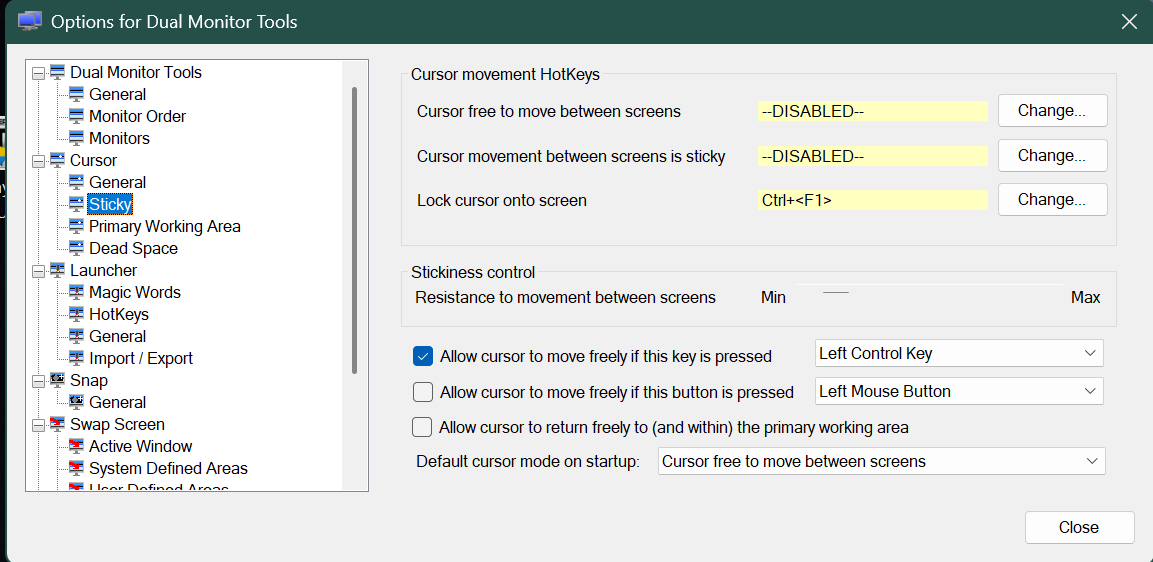
To stop your cursor from leaving the screen, you will need to download Dual Monitor Tools from Sourceforge, install it, and open the config from your system tray. Then enable a keybind in the "sticky" section under "Cursor" to lock the cursor to the current screen. This will stop your cursor from leaving the spiral knights window on your primary monitor.
Running the game in a Borderless Window
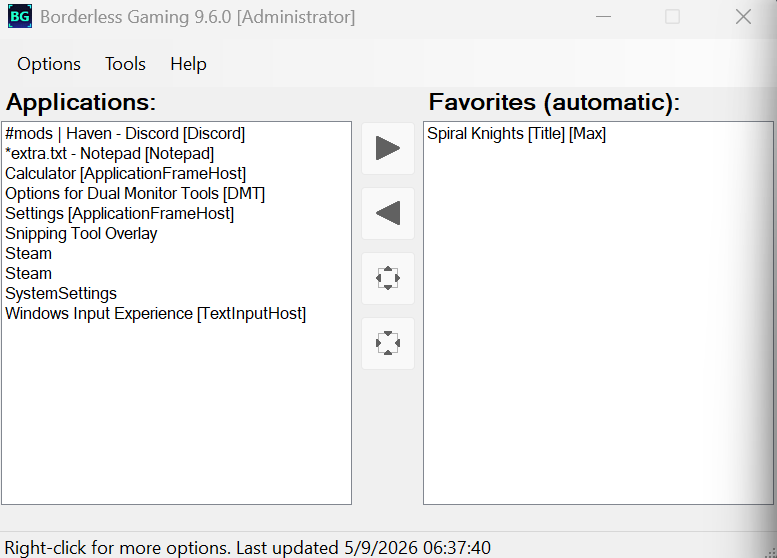
Next, install the free version of Borderless Gaming (9.6.0) by andrewmd5 from Github. After launching Spiral Knights move the javaw.exe located in (C:\Program Files (x86)\Steam\steamapps\common\Spiral Knights\java_vm\bin) from the left side of the window over to the favorites tab on the right, this will force the window to run in a borderless fullscreen mode.
Performance Tweaks
Last, to fix the awful performance of the game and stop the memory leak from turning your client into a slideshow after a couple of hours, you will have to add java launch tweaks to the program. This is very easy.
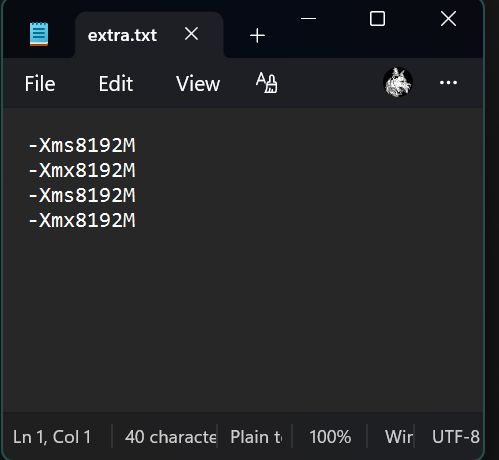
Navigate to your spiral knights install folder (C:\Program Files (x86)\Steam\steamapps\common\Spiral Knights) and create a text file called "extra.txt". Open the new file and add these lines:
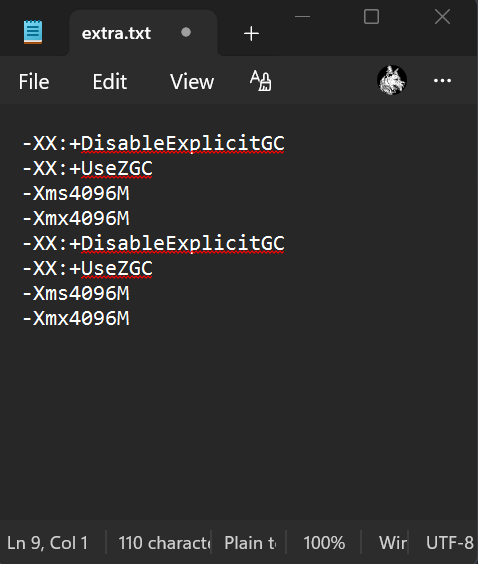
-XX:+DisableExplicitGC #this may make the game run worse in certain situations
-XX:+UseZGC #Only use this if you have 2gb or less available ram, causes issues in heavy scenes, but helps a lot with keeping performance stable over longer play sessions
-Xms8192M
-Xmx8192M
-XX:+DisableExplicitGC #this may make the game run worse in certain situations
-XX:+UseZGC #Only use this if you have 2gb or less available ram, causes issues in heavy scenes, but helps a lot with keeping performance stable over longer play sessions
-Xms8192M
-Xmx8192M
Why do they need to be added twice you ask? I have no idea, but it works.
"-XX:+DisableExplicitGC" "-XX:+UseZGC" Changes the behavior and type of "garbage collection" for the java program which will clean up all the garbage that is no longer necessary in the running application that is bogging down the game process and filling up the limited ram the game uses.
"Xmx4096M" & "Xms4096M" or "Xms8192" & "Xmx8192M" Forces the game to use 4gb or 8gb of memory instead of 1.3gb which is default and makes it run much more smoothly while eliminating stutters from the games' memory leak.
You can automatically add these tweaks with the open source Knight Launcher from github which is an alternative fan made launcher for the game.
I recommend the extra.txt config in the first image with 8gb of ram if you have enough. Dont bother with the other settings if you have plenty of ram.
Navigate to your spiral knights install folder (C:\Program Files (x86)\Steam\steamapps\common\Spiral Knights) and create a text file called "extra.txt". Open the new file and add these lines:
-XX:+DisableExplicitGC #this may make the game run worse in certain situations
-XX:+UseZGC #Only use this if you have 2gb or less available ram, causes issues in heavy scenes, but helps a lot with keeping performance stable over longer play sessions
-Xms8192M
-Xmx8192M
-XX:+DisableExplicitGC #this may make the game run worse in certain situations
-XX:+UseZGC #Only use this if you have 2gb or less available ram, causes issues in heavy scenes, but helps a lot with keeping performance stable over longer play sessions
-Xms8192M
-Xmx8192M
Why do they need to be added twice you ask? I have no idea, but it works.
"-XX:+DisableExplicitGC" "-XX:+UseZGC" Changes the behavior and type of "garbage collection" for the java program which will clean up all the garbage that is no longer necessary in the running application that is bogging down the game process and filling up the limited ram the game uses.
"Xmx4096M" & "Xms4096M" or "Xms8192" & "Xmx8192M" Forces the game to use 4gb or 8gb of memory instead of 1.3gb which is default and makes it run much more smoothly while eliminating stutters from the games' memory leak.
You can automatically add these tweaks with the open source Knight Launcher from github which is an alternative fan made launcher for the game.
I recommend the extra.txt config in the first image with 8gb of ram if you have enough. Dont bother with the other settings if you have plenty of ram.
More Spiral Knights guides
- Do not fear! Orb hunting tips are here!★ 5 (1.8k)27k views2.7k ♥5 minUpdated Jun 17
- Getting Cash - Ways To Make Money★ 5 (537)25k views561 ♥7 minUpdated Aug 1, 2013
- Spiral Knights - The Complete Guide!★ 5 (1.2k)21k views1.4k ♥106 minUpdated Mar 29, 2022
- Don't be a Derp: 10 things to know in Spiral Knights★ 5 (323)18k views304 ♥16 minUpdated Feb 4, 2025
- The Spiral Sallet★ 4 (171)14k views143 ♥7 minUpdated Dec 30, 2023
- Expert Guide on Maximizing Your Power --- Equipment Sets and More★ 5 (468)13k views622 ♥12 minUpdated Mar 11




This guide was created by its original author on the Steam Community. Are you the author and want it removed? Request removal.