Online Profile FIX (2023)
Codkey, What it is, and How to get one
A "Codkey" is the key used to connect online to ( Call of Duty World at War ) and to create an online profile.
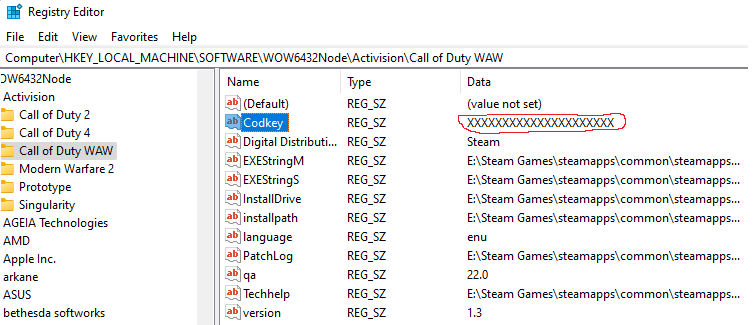
You can Get one Online, by Buying the Retail Version of ( Call of Duty : World at War ) online at Amazon or Ebay, And after activating and Running it, Go retrieve its Registry key from the registry editor and proceed to the proper directory listed in the tutorial. if you have a Friend with an ALT Steam Account that has ( World at War ) Activated, Or if you have an ALT account with ( World at War ) activated and running online, you can then swap your registry keys. The Key will only be working if its OLD and came from the box game or if the person is selling his steam registry key was bought before 2021.
If you choose to buy the Retail Version of Call of Duty : World at War online from the list of Retailers, setup your Game and Run it, make an online profile, close the game, and then proceed with the Tutorial. And to be very clear, a CD Key is NOT a registry key, not even close, if you have any real questions, post them below,
You can Get one Online, by Buying the Retail Version of ( Call of Duty : World at War ) online at Amazon or Ebay, And after activating and Running it, Go retrieve its Registry key from the registry editor and proceed to the proper directory listed in the tutorial. if you have a Friend with an ALT Steam Account that has ( World at War ) Activated, Or if you have an ALT account with ( World at War ) activated and running online, you can then swap your registry keys. The Key will only be working if its OLD and came from the box game or if the person is selling his steam registry key was bought before 2021.
If you choose to buy the Retail Version of Call of Duty : World at War online from the list of Retailers, setup your Game and Run it, make an online profile, close the game, and then proceed with the Tutorial. And to be very clear, a CD Key is NOT a registry key, not even close, if you have any real questions, post them below,
How to edit your registry Codkey and Save it
When you have the working key you need to copy and paste it in the Registry Editor, So go Ahead and go your search bar on your desktop and type in Registry Editor,
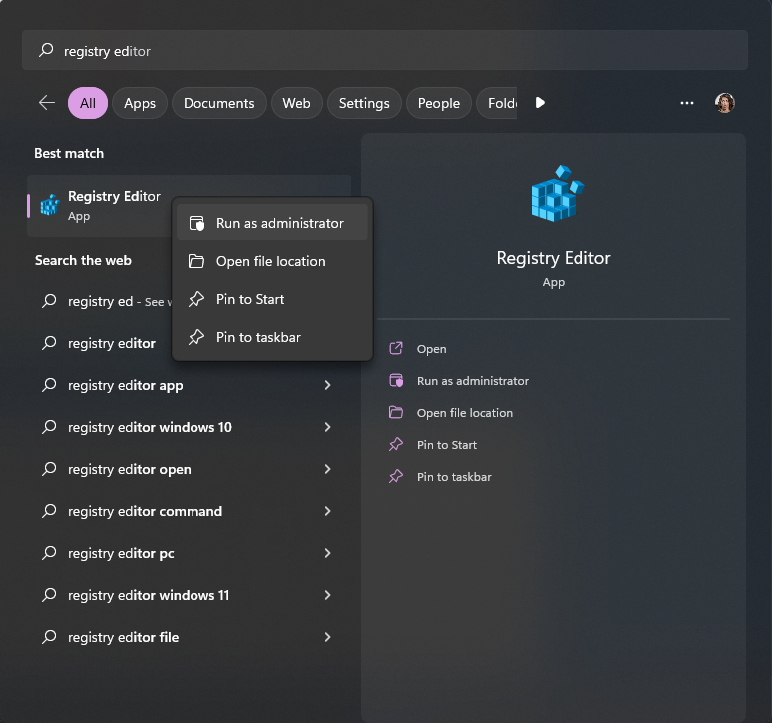
and find your way to this Directory at
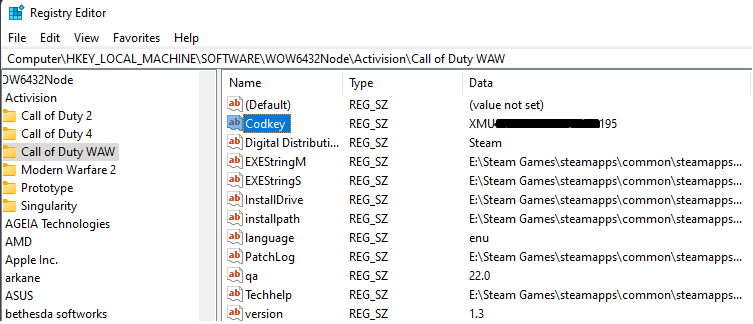
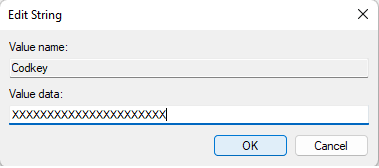
The key to change is "Codkey". Right click on "Codkey" in the Call of Duty WAW folder in the registry editor and click Modify, Paste or Type your working Codkey code in the Value Data box.
After that you need Right Click the Call of Duty WAW folder on the Left side and Click Permissions.. and uncheck every permissions of all users except Read.
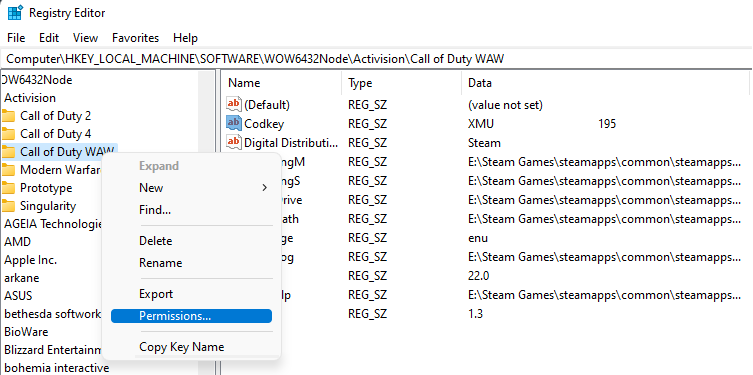
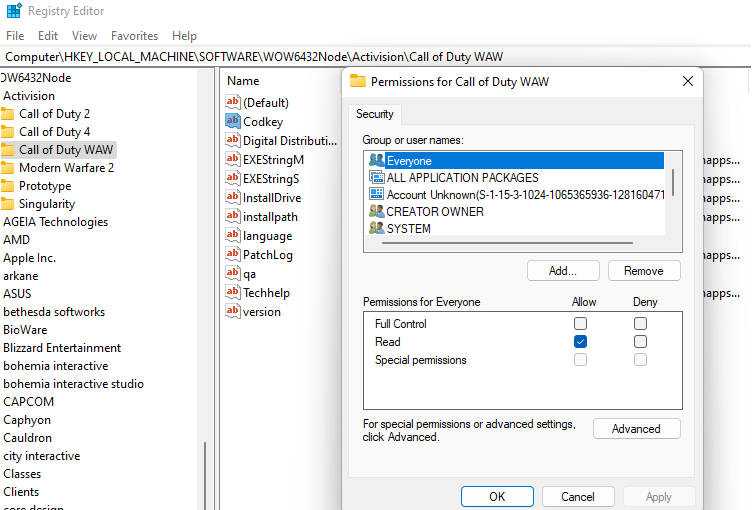
Apply the settings and launch the game and you will be able create a working ( World at War ) online profile if you did it correctly. if you still cant Create an Online Profile, check your Registry Editor it should open up right where you left off in the proper Directory and see if it keeps reverting back to the original Registry key with full access Read & Write permissions, Click advanced and (Disable inheritance) and click (Convert inherited permissions into explicit permissions on this object) and then uncheck everything on ALL PROFILES but READ. You will need to have Administrator access, so if you're still having trouble, run the Registry Editor as an Administrator.
Right-click the WAW folder on the left, and select Permissions.
Click Advanced, and then click Add. If the Add button is disabled (grayed out), you’ll have to be the Administrator user, close the Permissions window, and then reopen it before you can make any changes to the Permissions.
In the Enter the object names to select field, type " Everyone " , and then click OK. (The “Everyone” user encompasses all user accounts, including those used by Windows processes and individual applications when they access the Registry.)
In the next window below, “Permission for Everyone...”, click the Allow Read Checkbox, and uncheck everything else under "Allow" and "Deny".
When you’re done, click OK in each of the three open dialog windows. And then Apply. The change will take effect immediately
and find your way to this Directory at
( HKEY_LOCAL_MACHINE\SOFTWARE\WOW6432Node\Activision\Call of Duty WAW )
The key to change is "Codkey". Right click on "Codkey" in the Call of Duty WAW folder in the registry editor and click Modify, Paste or Type your working Codkey code in the Value Data box.
After that you need Right Click the Call of Duty WAW folder on the Left side and Click Permissions.. and uncheck every permissions of all users except Read.
Apply the settings and launch the game and you will be able create a working ( World at War ) online profile if you did it correctly. if you still cant Create an Online Profile, check your Registry Editor it should open up right where you left off in the proper Directory and see if it keeps reverting back to the original Registry key with full access Read & Write permissions, Click advanced and (Disable inheritance) and click (Convert inherited permissions into explicit permissions on this object) and then uncheck everything on ALL PROFILES but READ. You will need to have Administrator access, so if you're still having trouble, run the Registry Editor as an Administrator.
Right-click the WAW folder on the left, and select Permissions.
Click Advanced, and then click Add. If the Add button is disabled (grayed out), you’ll have to be the Administrator user, close the Permissions window, and then reopen it before you can make any changes to the Permissions.
In the Enter the object names to select field, type " Everyone " , and then click OK. (The “Everyone” user encompasses all user accounts, including those used by Windows processes and individual applications when they access the Registry.)
In the next window below, “Permission for Everyone...”, click the Allow Read Checkbox, and uncheck everything else under "Allow" and "Deny".
When you’re done, click OK in each of the three open dialog windows. And then Apply. The change will take effect immediately
Why your World at War isn't Connecting Online / Can't Create an Online profile
So you've bought ( World at War ) recently and you go to play zombies with your friends or jump into Multiplayer for nostalgia or to have some fun, or maybe you're new to the game and are just trying it out for the first time, but you can't Create an Online Profile and you can't Play Online,
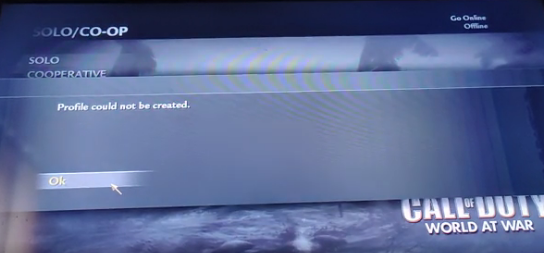
that's because any ( World at War ) Key's Activated or sold after Q4 of 2020 isn't Activated on the server side, our guess is they didn't expect this game to still be selling this well for this long, or they didn't anticipate needing to Activate this many, or maybe they just didn't care. Regardless, Your Key can't be used online. However i have found a Permanent Solution, and its Fairly Simple.
that's because any ( World at War ) Key's Activated or sold after Q4 of 2020 isn't Activated on the server side, our guess is they didn't expect this game to still be selling this well for this long, or they didn't anticipate needing to Activate this many, or maybe they just didn't care. Regardless, Your Key can't be used online. However i have found a Permanent Solution, and its Fairly Simple.
More Call of Duty: World at War guides
- How to install and play custom zombie maps + other tips.★ 5 (927)101k views1.9k ♥3 minUpdated May 17, 2021
- Call of Duty: World at War Zombies Console Commands★ 5 (1.3k)77k views2.4k ♥2 minUpdated Jan 27, 2016
- Call of Duty: World at War Custom Zombies Map Links★ 5 (1.5k)60k views3.1k ♥5 minUpdated Feb 13, 2018
- CoD: WaW Commands.★ 5 (810)52k views1.6k ♥2 minUpdated Jun 24, 2016
- How to survive in round 2.★ 5 (1.1k)48k views297 ♥1 min
- How to get a Ray Gun in the campaign★ 5 (311)33k views444 ♥1 minUpdated Feb 11, 2016


This guide was created by its original author on the Steam Community. Are you the author and want it removed? Request removal.