Quality of Life Improvements
Start the game directly from Steam
You can launch the game directly from Steam, rather than have to choose your DirectX version on this popup:
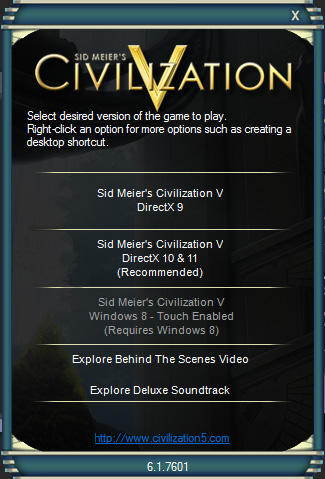
All you need to do is right-click Civilization V and select Properties.
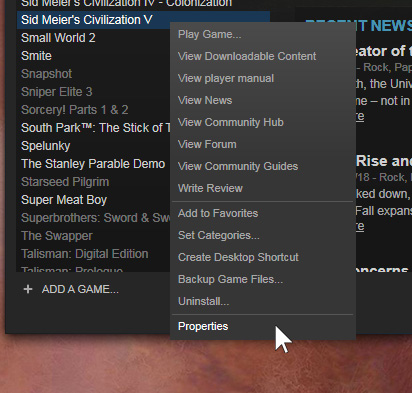
Then click Set Launch Options
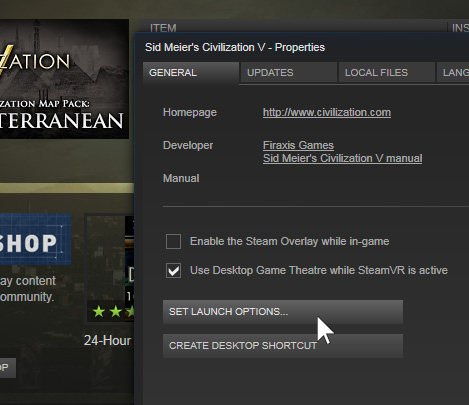
and enter \dx11 to launch the game in DirectX11 or \dx9 to use DirectX9, then click OK
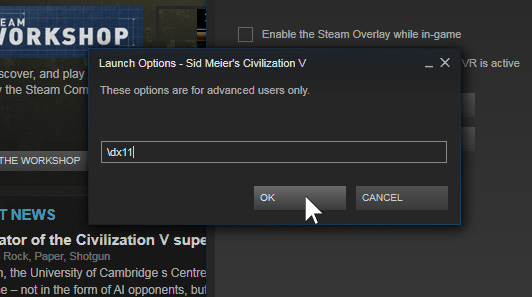
Now the game will start directly, when you run the game from Steam.
Source: https://gaming.stackexchange.com/a/12908
All you need to do is right-click Civilization V and select Properties.
Then click Set Launch Options
and enter \dx11 to launch the game in DirectX11 or \dx9 to use DirectX9, then click OK
Now the game will start directly, when you run the game from Steam.
Source: https://gaming.stackexchange.com/a/12908
Remove Splash Videos
Civ 5 allows you to disable the intro video, but it will still show the logos of the companies involved in the making of the game.
If you want to disable these, you can rename the five intro videos in the main Civ 5 installation folder: [Steam Games Folder]\steamapps\common\Civilization V\
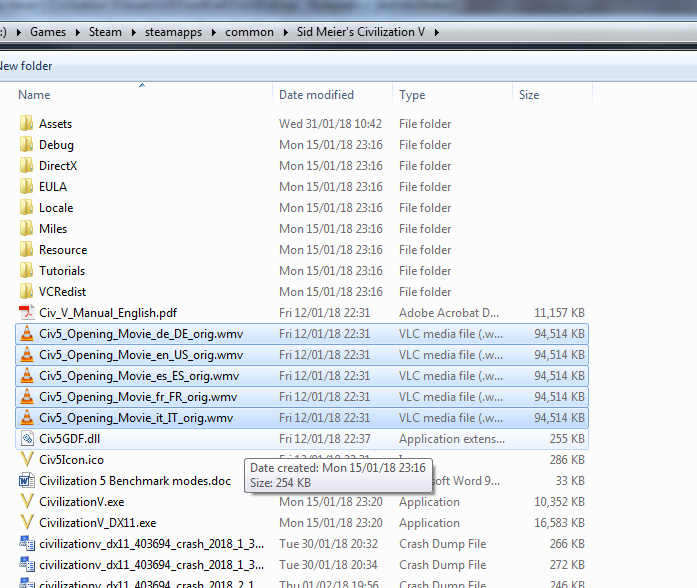
I just added _orig to the end of the filename.
Note: this will disable the main intro video too, although if you are trying to get in to the game faster, you probably want this disabled.
Source: https://steamcommunity.com/app/8930/discussions/0/864973123856814317/#c648817378165897075
If you want to disable these, you can rename the five intro videos in the main Civ 5 installation folder: [Steam Games Folder]\steamapps\common\Civilization V\
- Civ5_Opening_Movie_de_DE.wmv
- Civ5_Opening_Movie_en_US.wmv
- Civ5_Opening_Movie_es_ES.wmv
- Civ5_Opening_Movie_fr_FR.wmv
- Civ5_Opening_Movie_it_IT.wmv
I just added _orig to the end of the filename.
Note: this will disable the main intro video too, although if you are trying to get in to the game faster, you probably want this disabled.
Source: https://steamcommunity.com/app/8930/discussions/0/864973123856814317/#c648817378165897075
Remove EULA popups
There are a couple of EULA warnings, that are not too intrusive, but if you want to save some clicks, you can disable them.
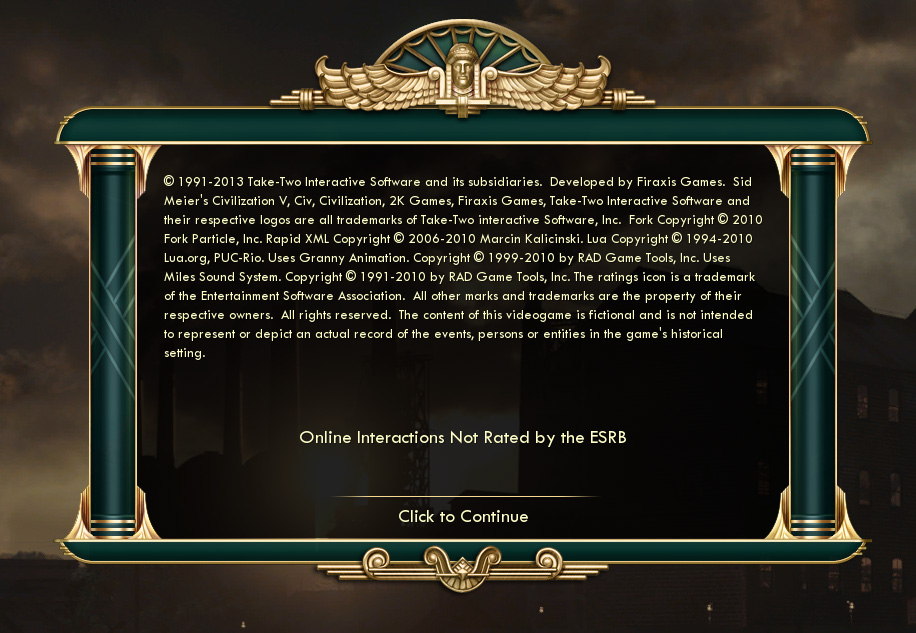
To disable the main EULA warning that appears every time you start the game, you need to make a change to the file FrontEnd.lua in [Steam Games Folder]\steamapps\common\Civilization V\Assets\UI\FrontEnd\
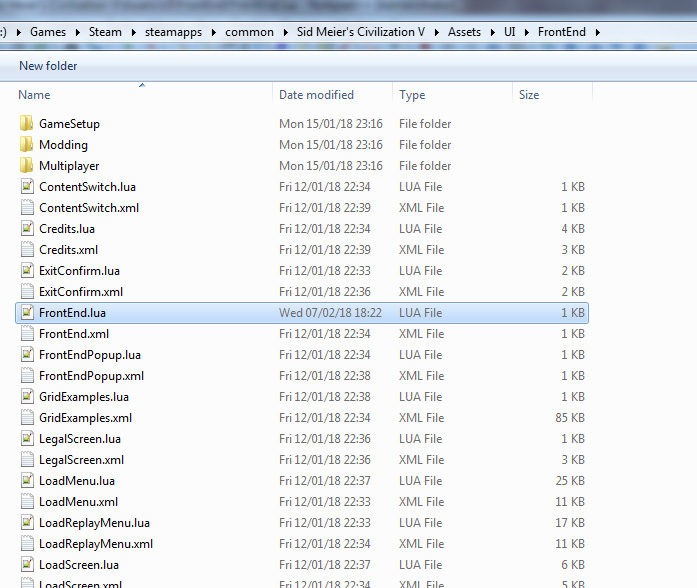
Open the file in a text editor, and find the section that says:
UIManager:QueuePopup( Controls.LegalScreen, PopupPriority.LegalScreen );
(You can comment out a line of code in Lua by adding "--" to the start of the line)
The section should now look like this:
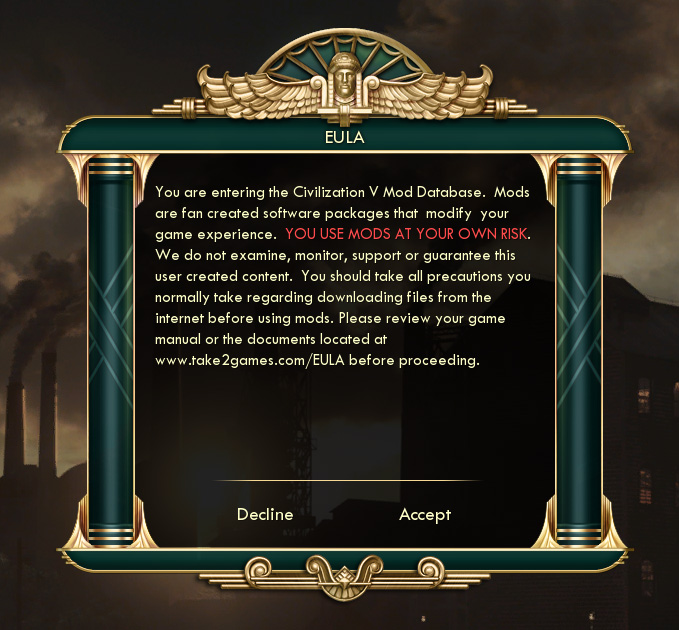
To disable the EULA warning that appears every time you open the Mods menu, you need to make a change to the file EULA.lua in [Steam Games Folder]\steamapps\common\Civilization V\Assets\UI\FrontEnd\Modding\
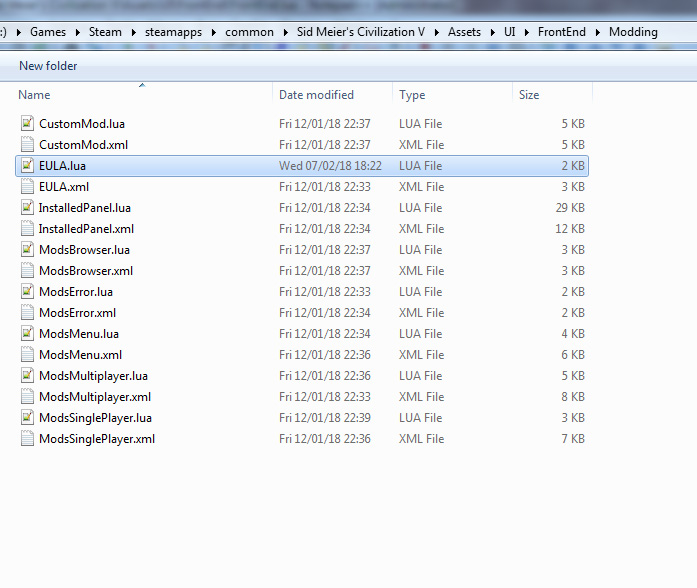
Open the file in a text editor, and the section that says:
That section should now look like this:
Now you will not be bothered by these popups :)
Source: https://forums.civfanatics.com/threads/a-method-to-disable-nagging-popups.401152/
To disable the main EULA warning that appears every time you start the game, you need to make a change to the file FrontEnd.lua in [Steam Games Folder]\steamapps\common\Civilization V\Assets\UI\FrontEnd\
Open the file in a text editor, and find the section that says:
if( not UI:HasShownLegal() ) then
UIManager:QueuePopup( Controls.LegalScreen, PopupPriority.LegalScreen );
end
and comment out the line: UIManager:QueuePopup( Controls.LegalScreen, PopupPriority.LegalScreen );
(You can comment out a line of code in Lua by adding "--" to the start of the line)
The section should now look like this:
if( not UI:HasShownLegal() ) then
--UIManager:QueuePopup( Controls.LegalScreen, PopupPriority.LegalScreen );
end
To disable the EULA warning that appears every time you open the Mods menu, you need to make a change to the file EULA.lua in [Steam Games Folder]\steamapps\common\Civilization V\Assets\UI\FrontEnd\Modding\
Open the file in a text editor, and the section that says:
ContextPtr:SetShowHideHandler(function(isHide)
--UNCOMMENT THIS BLOCK IF YOU WISH TO ONLY
--SHOW THE EULA ONCE PER APPLICATION RUN
--if not isHide and g_HasAcceptedEULA then
--NavigateForward();
--end
--if(not isHide and g_QueueEulaToHide) then
--NavigateBack();
--end
end);
Then add the following at the bottom of the method:if not isHide then
NavigateForward();
end
That section should now look like this:
ContextPtr:SetShowHideHandler(function(isHide)
--UNCOMMENT THIS BLOCK IF YOU WISH TO ONLY
--SHOW THE EULA ONCE PER APPLICATION RUN
--if not isHide and g_HasAcceptedEULA then
--NavigateForward();
--end
--if(not isHide and g_QueueEulaToHide) then
--NavigateBack();
--end
if not isHide then
NavigateForward();
end
end);
Now you will not be bothered by these popups :)
Source: https://forums.civfanatics.com/threads/a-method-to-disable-nagging-popups.401152/
Lua engine replacement (LuaJIT)
Lua is an interpreted programming language, which is generally not as fast as a compiled language. LuaJIT (a Just-In-Time Compiler for Lua) has been around for a while, and increases performance over the standard Lua.
Some bright spark (Antman Mike) created a dll of LuaJIT, compatible with Civ 5, that can be swapped in for the standard Lua dll. This has since been updated by a few different people (as newer version of LuaJIt have been released) and is currently at version 2.0.5.
This should speed up general loading times, and waiting time for CPU turns. I haven't tested the impact myself, but others have in the threads listed below.
Download (Latest available version): https://www.reddit.com/r/civ/comments/6a0j6l/civ_v_luajit_newer_version/dhbhdxf/
Download the LuaJIT dll and replace the original one in the base Civ 5 folder:
[Steam Games Folder]\steamapps\common\Civilization V\
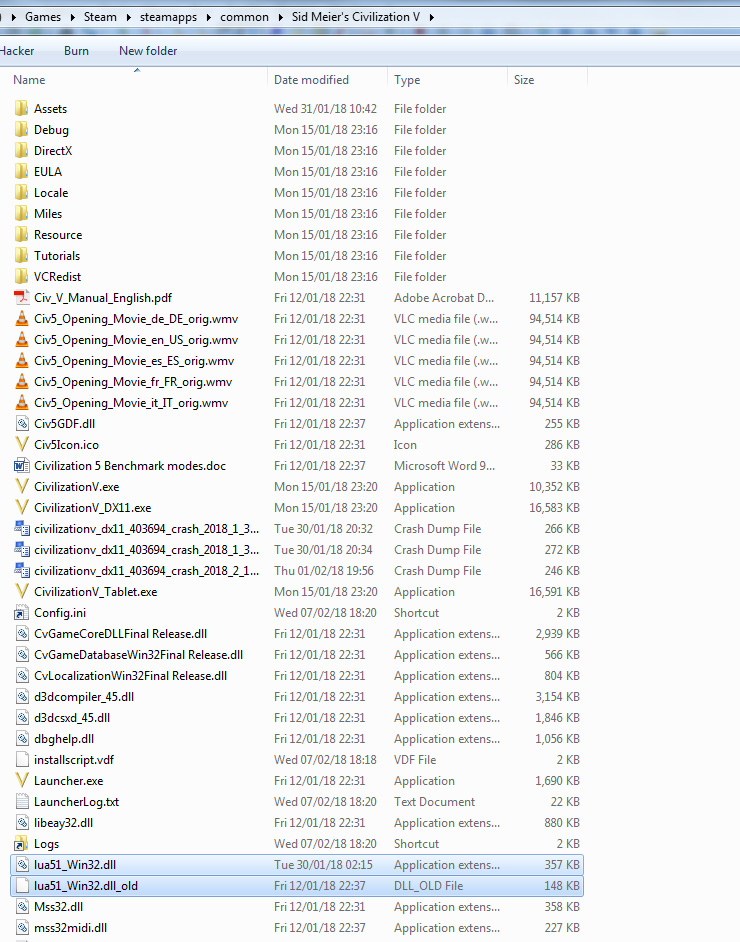
I renamed the original one to: lua51_Win32.dll_old so I could change back if needed.
I would recommend that all players in a multiplayer game use the same version of the dll, if you are joining random games, stick to the original version. I say this because: I was in a game with the LuaJIT dll, the other player didn't have it, on turn 2 we desynced, and when the game reloaded - my city's area had moved to a different location, and a road was placed in the centre, my city was outside its "area".
LuaJIT homepage:
http://luajit.org/
Further reading:
https://forums.civfanatics.com/threads/luajit-for-civilization-v-faster-turns.399635/
https://www.reddit.com/r/civ/comments/1e0vgc/psa_speed_up_civ_5s_performance_between_turns/
https://www.reddit.com/r/civ/comments/6a0j6l/civ_v_luajit_newer_version/
Some bright spark (Antman Mike) created a dll of LuaJIT, compatible with Civ 5, that can be swapped in for the standard Lua dll. This has since been updated by a few different people (as newer version of LuaJIt have been released) and is currently at version 2.0.5.
This should speed up general loading times, and waiting time for CPU turns. I haven't tested the impact myself, but others have in the threads listed below.
Download (Latest available version): https://www.reddit.com/r/civ/comments/6a0j6l/civ_v_luajit_newer_version/dhbhdxf/
Download the LuaJIT dll and replace the original one in the base Civ 5 folder:
[Steam Games Folder]\steamapps\common\Civilization V\
I renamed the original one to: lua51_Win32.dll_old so I could change back if needed.
I would recommend that all players in a multiplayer game use the same version of the dll, if you are joining random games, stick to the original version. I say this because: I was in a game with the LuaJIT dll, the other player didn't have it, on turn 2 we desynced, and when the game reloaded - my city's area had moved to a different location, and a road was placed in the centre, my city was outside its "area".
LuaJIT homepage:
http://luajit.org/
Further reading:
https://forums.civfanatics.com/threads/luajit-for-civilization-v-faster-turns.399635/
https://www.reddit.com/r/civ/comments/1e0vgc/psa_speed_up_civ_5s_performance_between_turns/
https://www.reddit.com/r/civ/comments/6a0j6l/civ_v_luajit_newer_version/
Make a mod compatible with Multiplayer/Achievements
The idea behind this is to convert a mod, or selection of mods in to a DLC pack. This will allow you to play multiplayer games and unlock achievements in singleplayer games.
The process is not easy, but the hard work has been done for you. Check out the mod on Steam that has been created to aid in this conversion process.
The Steam Workshop mod (with instructions in the pictures sections):
http://steamcommunity.com/sharedfiles/filedetails/?id=361391109
The CivFanatics forum post for instructions and troubleshooting:
https://forums.civfanatics.com/threads/mpmpm-multiplayer-mod-dlc-hack-updated.533238/
The process is not easy, but the hard work has been done for you. Check out the mod on Steam that has been created to aid in this conversion process.
The Steam Workshop mod (with instructions in the pictures sections):
http://steamcommunity.com/sharedfiles/filedetails/?id=361391109
The CivFanatics forum post for instructions and troubleshooting:
https://forums.civfanatics.com/threads/mpmpm-multiplayer-mod-dlc-hack-updated.533238/
More Sid Meier's Civilization V guides
- Real Populations★ 5 (1.2k)79k views1.2k ♥2 minBulgarianUpdated Aug 31, 2017
- Civ-specific tricks, secrets and clarifications (BNW)★ 5 (1k)53k views2.2k ♥96 minUpdated Jun 30, 2019
- Zigzagzigal's Civ Summaries (BNW)★ 5 (1.5k)49k views3.9k ♥134 minUpdated Jun 30, 2019
- Who to Trust and Who to Avoid in Civ V★ 5 (570)41k views802 ♥12 minUpdated Jul 8, 2016
- How to win the Korea Scenario as Korea on Deity in 16 turns★ 5 (532)41k views828 ♥15 minUpdated Apr 1, 2016
- Civilization V Achievement guide★ 5 (2.4k)39k views4.2k ♥134 minUpdated Jun 13, 2014




This guide was created by its original author on the Steam Community. Are you the author and want it removed? Request removal.