Remaster Graphics/Remasterizar Gráficos (+Tradução e Dublagem PT-BR)
Tutorial English
Graphics Improvement Guide – Resident Evil 5 (HD Textures + ReShade)
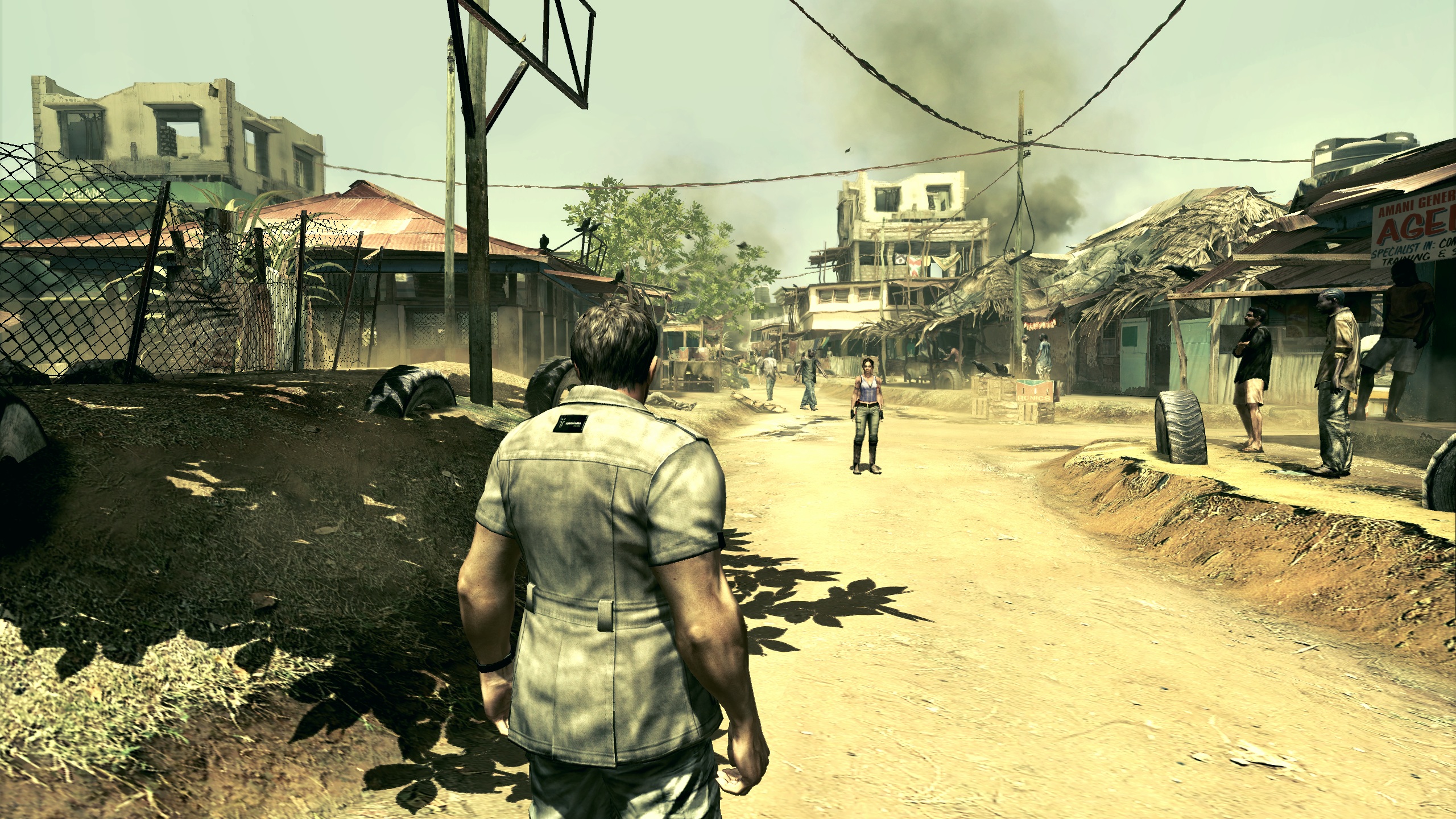
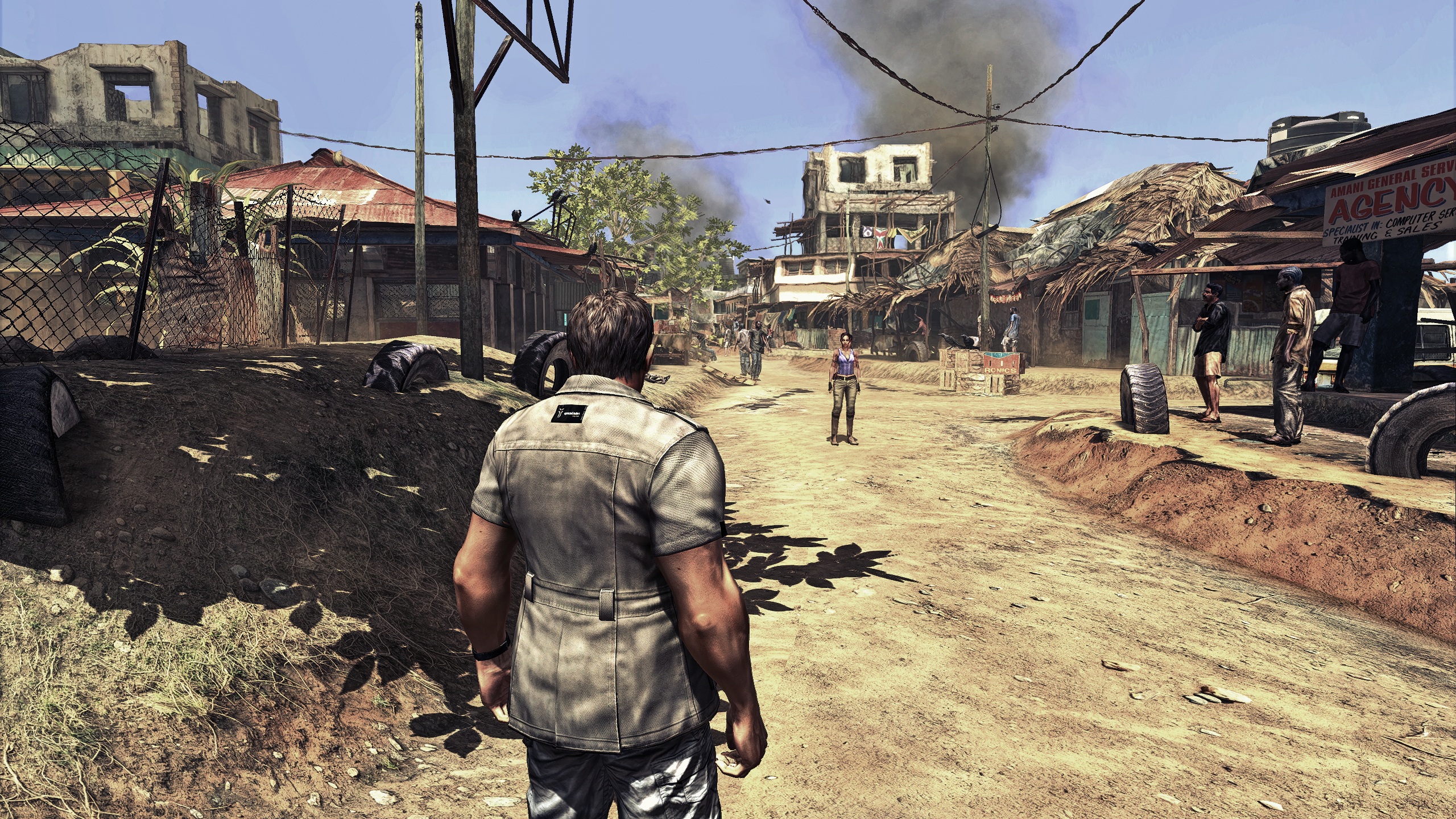
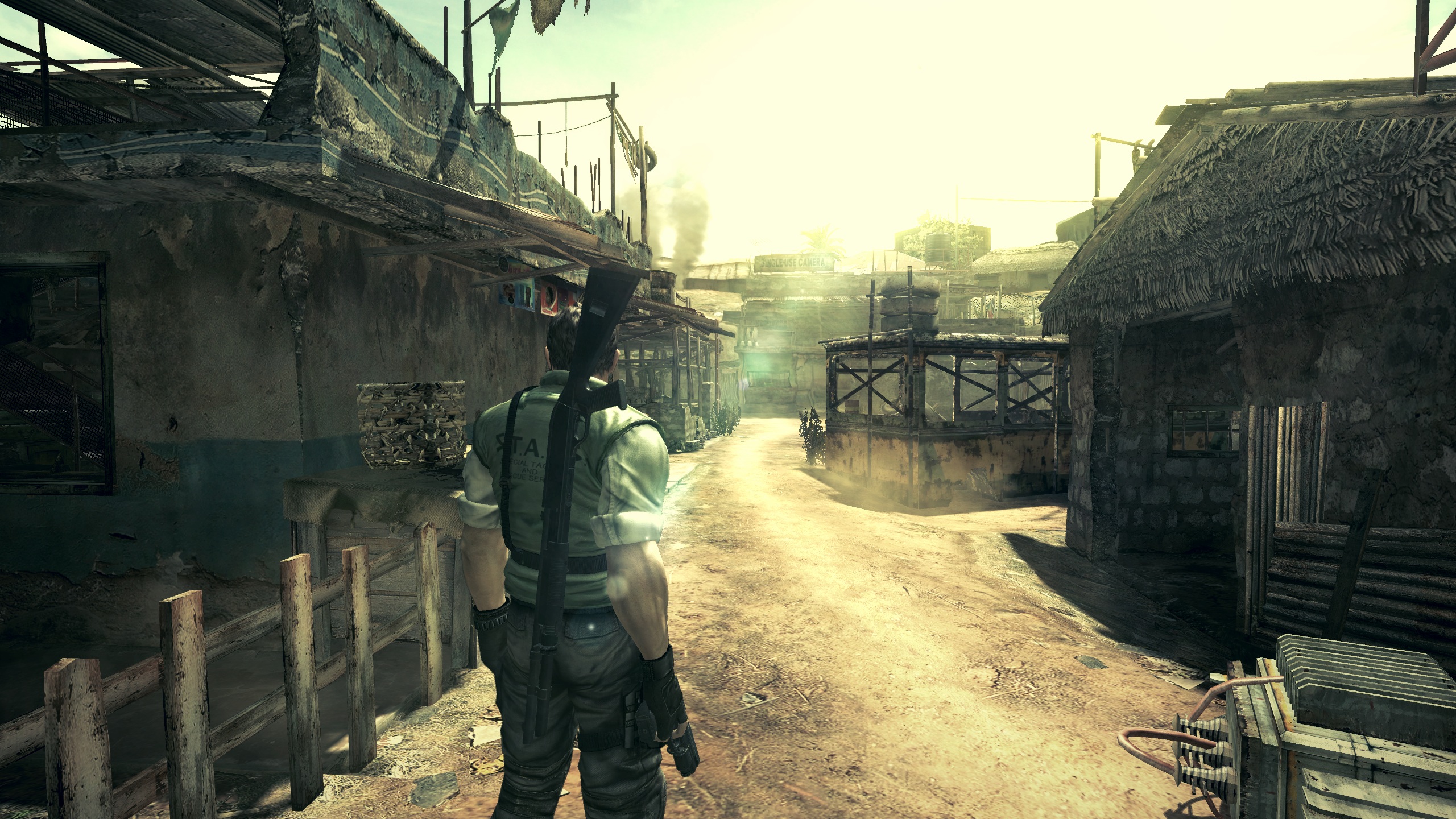
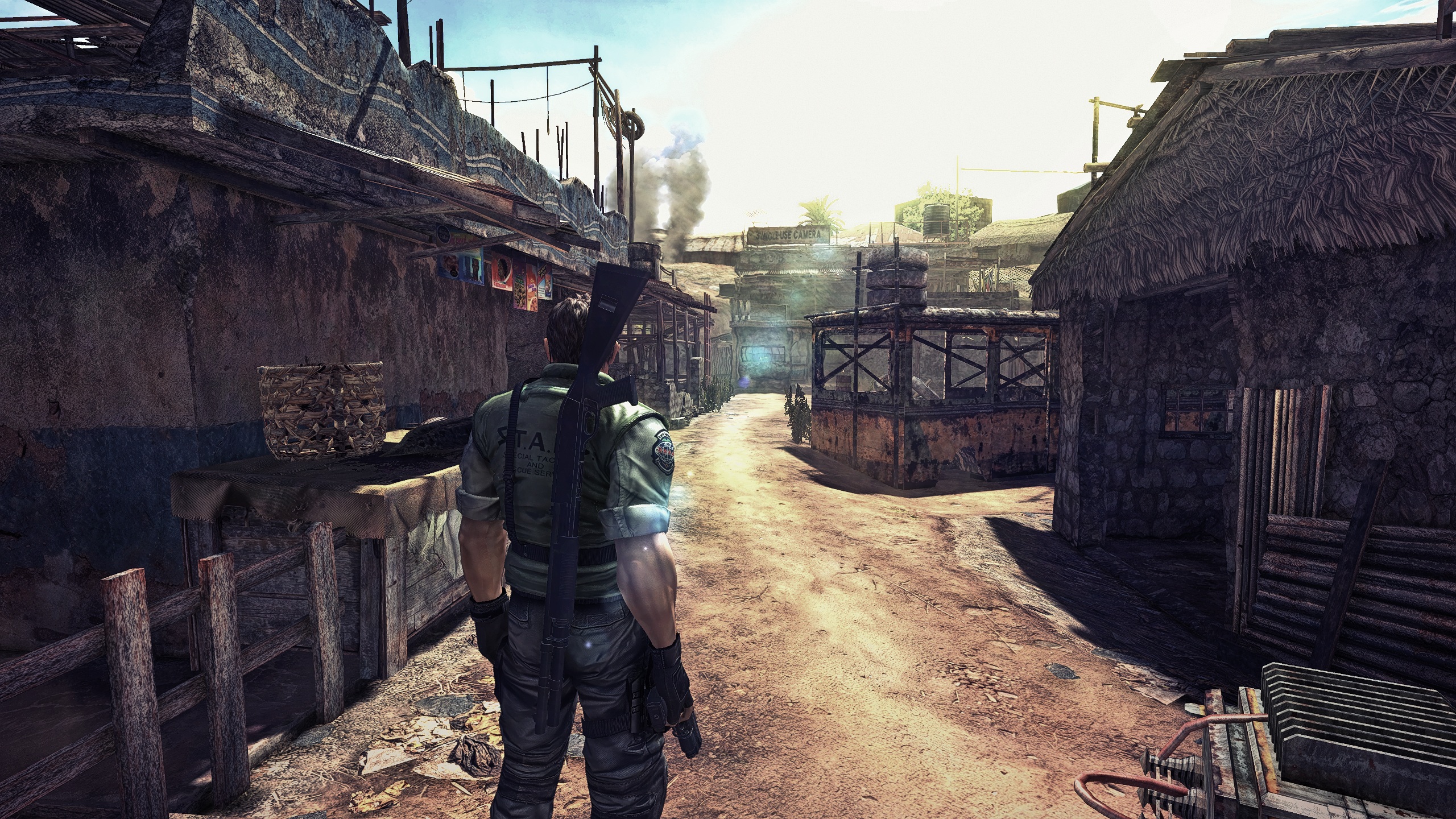
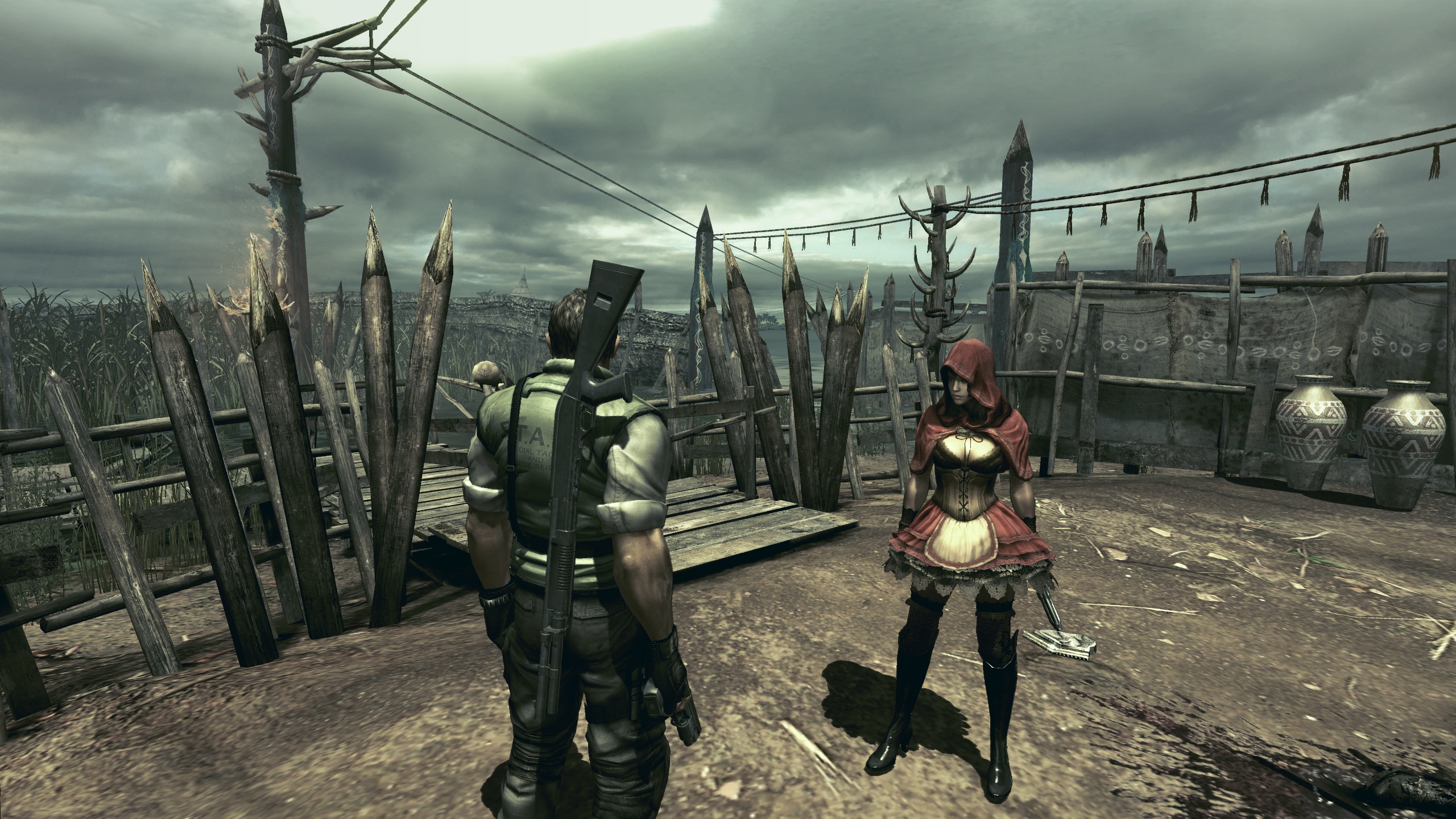
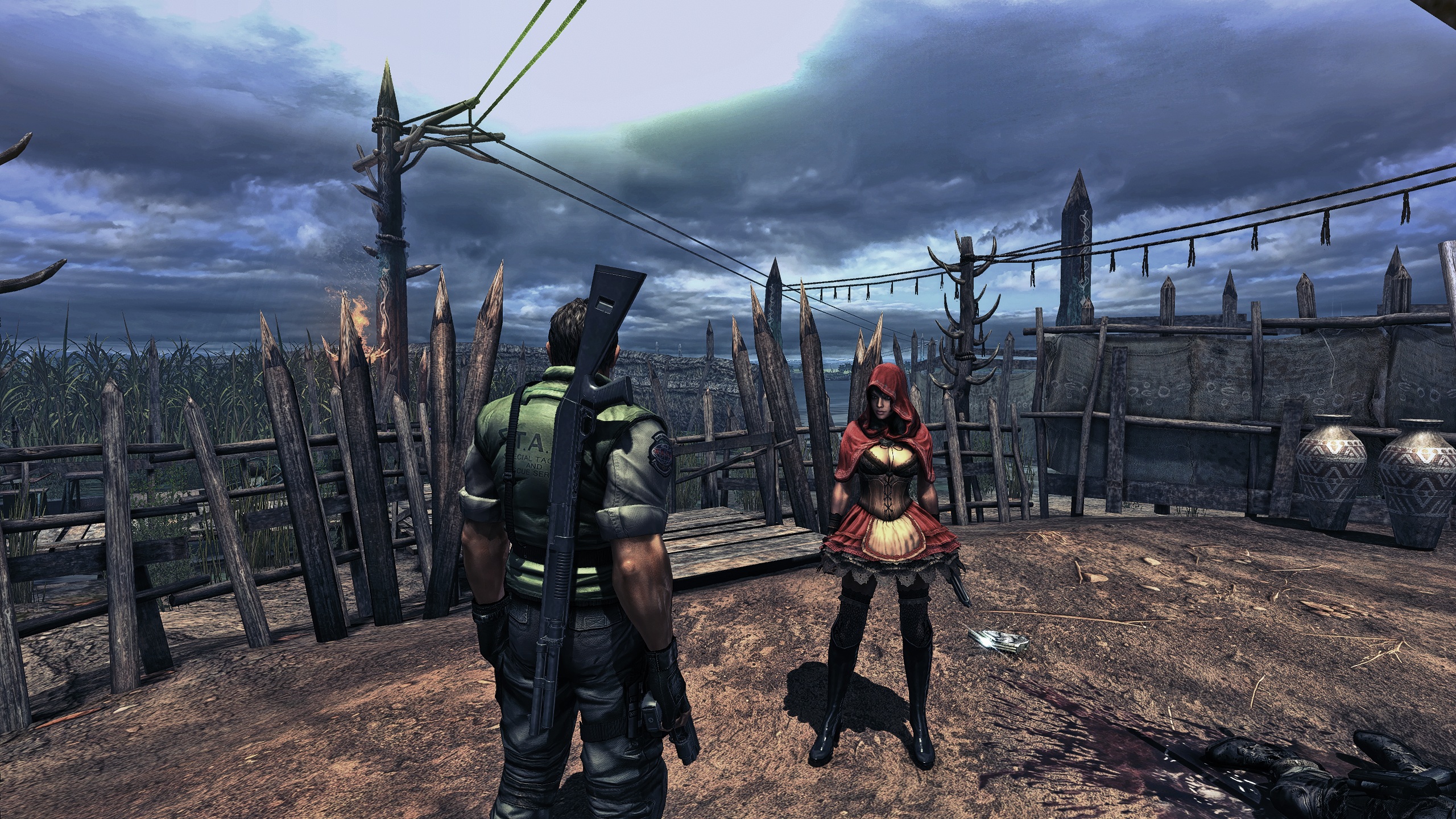
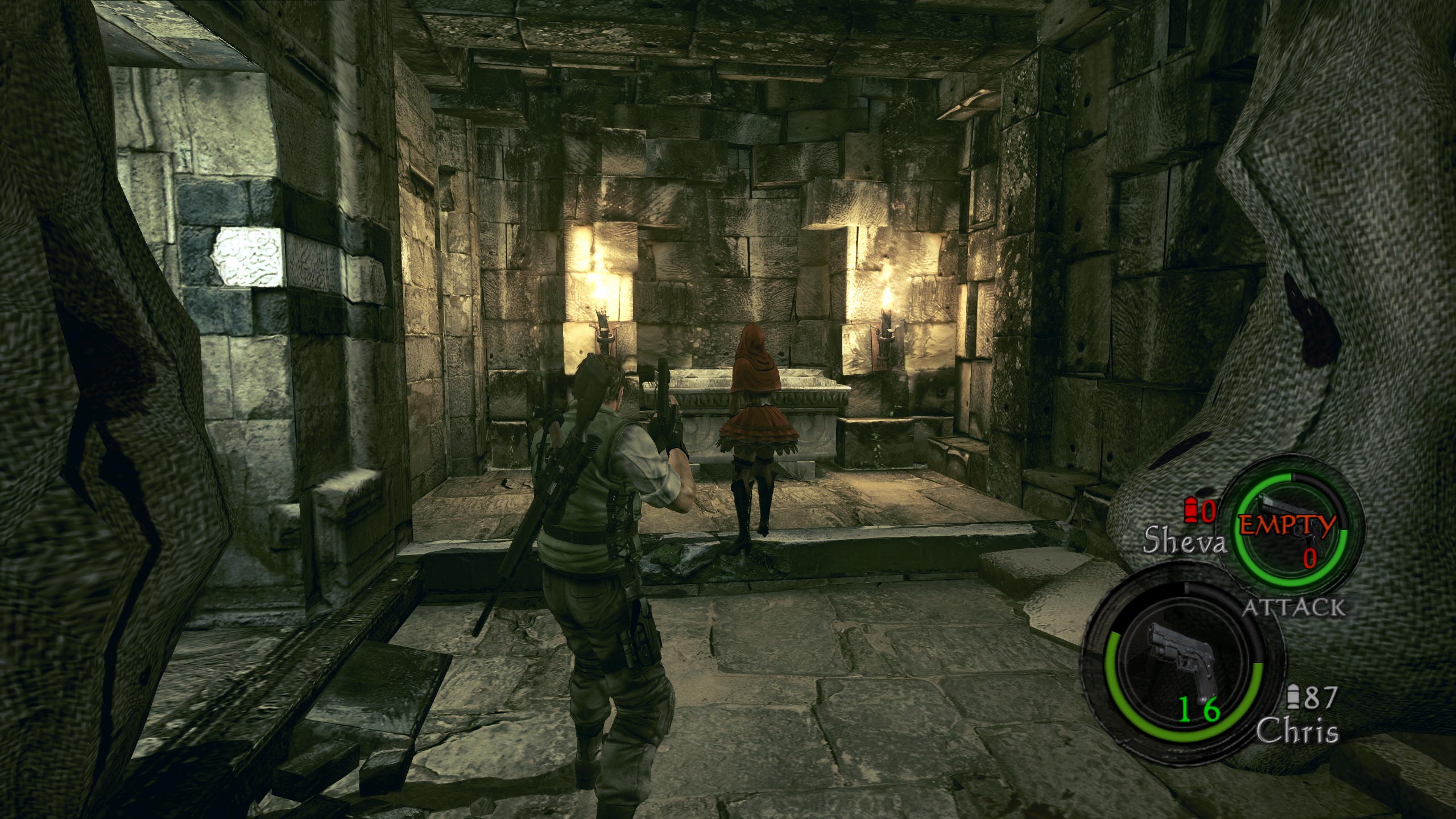
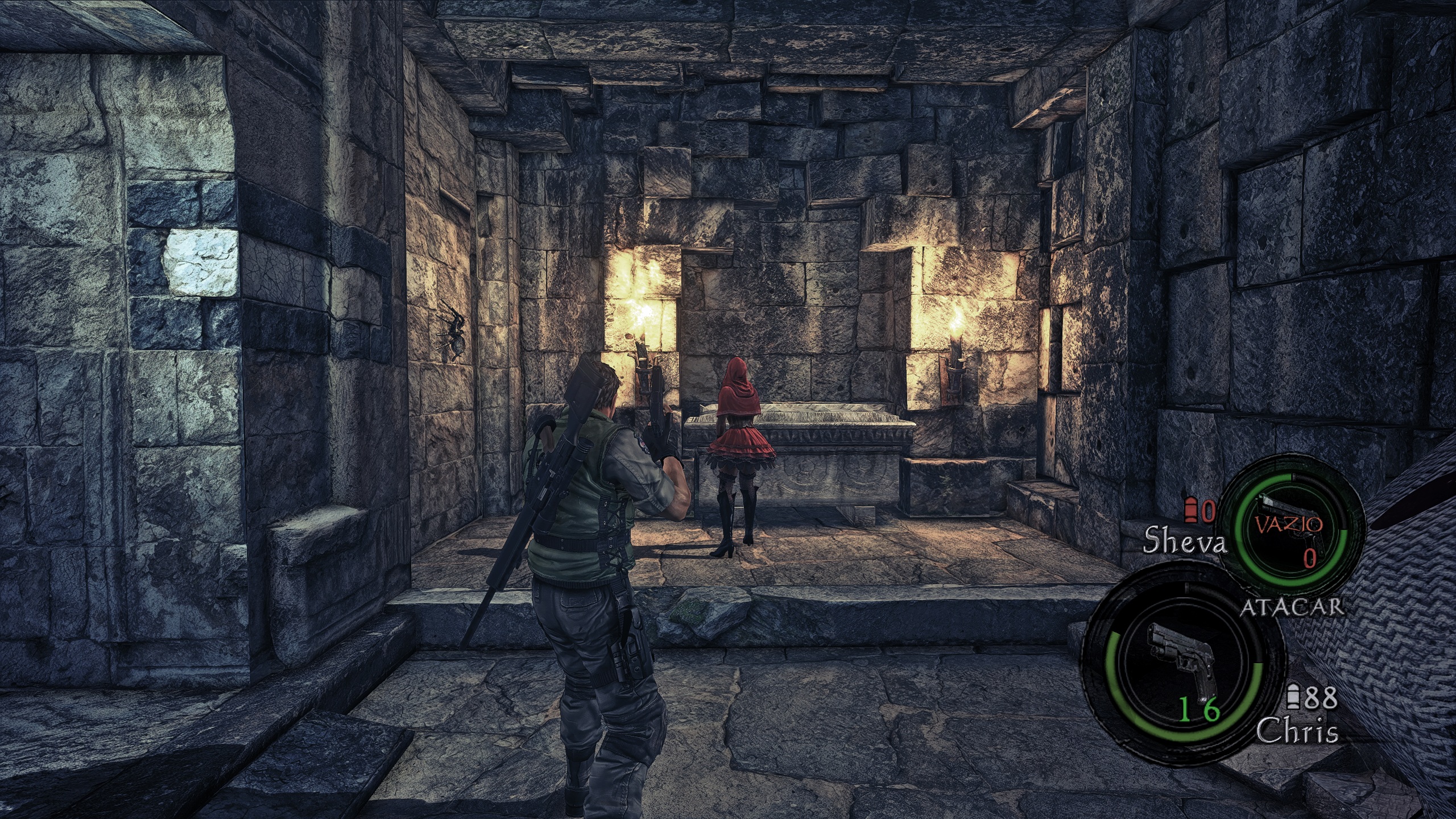
In this guide you will significantly improve the graphics of Resident Evil 5 by adding AI upscaled 4K textures, removing the green filter from the game, and applying visual enhancements using ReShade.
Before starting, make sure to perform a clean installation of the game to avoid any bugs.
Follow the exact order below — it has been tested and works 100% correctly.
Step 1 – HD Textures (AI 4K)
This texture pack improves environments, characters, and objects with 4K quality.
Download HD Textures[www.nexusmods.com]
Inside the link, download the 3 files:
• part1
• part2
• Fixed incorrect knife texture at the beginning
After downloading:
• Extract all files
• A folder named nativePC_MT will be created
Now copy to the game folder in the following order:
First part1
Then part2
Finally fixed
Game directory path:
C:\Program Files (x86)\Steam\steamapps\common\Resident Evil 5
Done! Your game will now be using 4K textures.
Step 2 – ReShade and Color Correction
Here we will remove the green filter and improve colors, shadows, and sharpness.
You can choose between two versions:
Light version (basic correction and better performance)
Download ReShade Light[mega.nz]
Full version (more realistic visuals, heavier)
Download ReShade Full[mega.nz]
After downloading:
• Extract the file
• Copy the PRESET folder to the game root directory
C:\Program Files (x86)\Steam\steamapps\common\Resident Evil 5
Extra – Adjust FOV (Field of View)
If you want a wider field of view (like shown in the guide images):
Open the file RE5Fix.ini in the game folder and edit:
[Increase FOV]
Enabled = true
Value = 13
You can adjust the value (15, 20, etc.) until you find what feels best.
Finalization
Your Resident Evil 5 will now have:
✔ AI upscaled 4K textures
✔ Color correction (green filter removed)
✔ Improved lighting and shadows
✔ Adjusted FOV
If this guide helped you, please rate it so other users can find it too!
If you have any questions, leave a comment and I’ll gladly help
Tutorial Português
Guia de Melhoria Gráfica – Resident Evil 5 (Texturas HD + ReShade)
Neste guia você vai melhorar significativamente os gráficos do Resident Evil 5, adicionando texturas em 4K por IA, removendo o filtro verde do jogo e aplicando melhorias visuais com ReShade.
Antes de iniciar, faça uma instalação limpa do jogo para evitar bugs.
Siga exatamente a ordem abaixo — foi testado e funciona 100% corretamente.
Passo 1 – Texturas HD (4K por IA)
O pack de texturas melhora cenários, personagens e objetos com qualidade 4K.
Download das Texturas HD[www.nexusmods.com]
Dentro do link, baixe os 3 arquivos:
• part1
• part2
• Fixed incorrect knife texture at the beginning
Após baixar:
• Extraia todos os arquivos
• Será gerada uma pasta chamada nativePC_MT
Agora copie para a pasta do jogo na seguinte ordem:
Primeiro o part1
Depois o part2
Por último o fixed
Caminho da pasta do jogo:
C:\Program Files (x86)\Steam\steamapps\common\Resident Evil 5
Pronto! Seu jogo já estará com texturas em 4K.
Passo 2 – ReShade e Correção de Cores
Aqui vamos remover o filtro verde do jogo e melhorar cores, sombras e nitidez.
Você pode escolher entre duas versões:
Versão leve (correção básica e melhor desempenho)
Download ReShade Leve[mega.nz]
Versão completa (gráficos mais realistas e pesados)
Download ReShade Completo[mega.nz]
Após baixar:
• Extraia o arquivo
• Copie a pasta PRESET para a pasta raiz do jogo
C:\Program Files (x86)\Steam\steamapps\common\Resident Evil 5
Extra – Ajustar FOV (Campo de Visão)
Se quiser deixar o campo de visão mais aberto (como nas imagens do guia):
Abra o arquivo RE5Fix.ini na pasta do jogo e edite:
[Increase FOV]
Enabled = true
Value = 13
Você pode ajustar o valor (15, 20, etc.) até encontrar o ideal.
Finalização
Agora seu Resident Evil 5 estará com:
✔ Texturas em 4K por IA
✔ Correção de cores (sem filtro verde)
✔ Melhor iluminação e sombras
✔ FOV ajustado
Se este guia te ajudou, avalie para ajudar outros usuários também a encontrar!
Qualquer dúvida, deixe nos comentários que respondo ajudando caso necessário
Bônus: Tradução + Dublagem Atualizada (Português Brasil)
Guia de Tradução PT-BR – Resident Evil 5 (Legendas + Dublagem)
Neste guia você vai instalar a tradução completa em português do Brasil para o Resident Evil 5, incluindo legendas e dublagem.
Compatível e 100% testado com o pack de texturas em HD utilizado no guia gráfico.
Passo 1 – Instalar Tradução (Legendas PT-BR)
Para adicionar legendas e textos em português:
Download Tradução PT-BR[www.baixesoft.com]
Após baixar:
• Execute o instalador
• Clique em Avançar até chegar na parte de selecionar o local do jogo
• Informe o caminho onde o jogo está instalado, por exemplo:
C:\Program Files (x86)\Steam\steamapps\common\Resident Evil 5
ou
D:\SteamLibrary\steamapps\common\Resident Evil 5
• Clique em Instalar
Pronto! Seu jogo já estará com legendas em português.
Passo 2 – Instalar Dublagem PT-BR
Agora vamos adicionar a dublagem em português.
Download Dublagem PT-BR[www.nexusmods.com]
Dentro da página, baixe o arquivo:
Dublagem Resident Evil 5 em PT-BR 1.5~ (versão mais atual)
Após o download:
• Extraia o arquivo
• Será gerada uma pasta chamada nativePC_MT
• Copie essa pasta para a pasta raiz do jogo:
C:\Program Files (x86)\Steam\steamapps\common\Resident Evil 5
Pronto! Seu jogo agora está com dublagem em português.
Finalização
Agora seu Resident Evil 5 estará com:
✔ Interface e legendas em português
✔ Dublagem completa em PT-BR
✔ Compatível com mods gráficos e texturas HD
Comparative / Comparativo
More Resident Evil 5 guides
- Resident Evil 5 - Fixes★ 5 (2k)119k views2.4k ♥9 minUpdated Aug 2, 2025
- Resident Evil 5 Quality of Life Fixes★ 5 (1.5k)78k views2.1k ♥4 minUpdated Mar 9
- Resident Evil 5: Gold Edition 100% Achievement Guide★ 5 (1.3k)42k views2.6k ♥24 min
- getting multiplayer achievements with bots★ 5 (876)33k views1.7k ♥11 minBulgarianUpdated Aug 27, 2023
- Farming Gold (15K), ammo and eggs★ 5 (459)33k views423 ♥1 minBulgarianUpdated Sep 24, 2018
- Полный русификатор (текст+звук) {1C} Gold Edition★ 5 (674)30k views778 ♥1 minRussianUpdated Feb 3, 2024



This guide was created by its original author on the Steam Community. Are you the author and want it removed? Request removal.