RTCW Cheat Guide
First Things First.
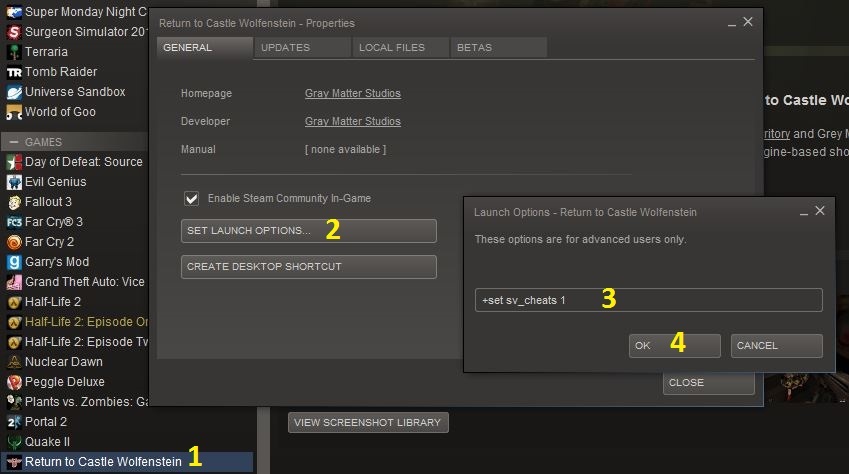
before you can start you have to enable cheats in the game. The easist way to do this in adding the launch option in steam.
Once in the game you will need to open the console, to do this press the '~' key. This is where you'll input all the cheat codes in both single and multiplayer.
UPDATED: In some cases the game will tell you that 'cheat codes are not enabled on this server' when starting a single player game. If this happens simply open the console and type "/spdevmap escape1" to (re)load the first map. Now you should have no problems using the various codes from this point on.
- First go to your Steam Library
- Right click on RTCW and select Properties
- Click on "Set Launch Options..." under the General tab
- Add "+set sv_cheats 1" (without quotes) in the box
- Click 'Ok'
Once in the game you will need to open the console, to do this press the '~' key. This is where you'll input all the cheat codes in both single and multiplayer.
UPDATED: In some cases the game will tell you that 'cheat codes are not enabled on this server' when starting a single player game. If this happens simply open the console and type "/spdevmap escape1" to (re)load the first map. Now you should have no problems using the various codes from this point on.
The Basics
Cheat Code
Action
/god
God Mode
/notarget
Disable Enemy AI
/noclip
Move Through Walls
/give all
All Weapons/Ammo
/give armor
Full Armor
/give ammo
Full Ammo for Current Weapons
/give health
Full Health
/give stamina
Full Stamina
/give *item name*
Gives that item
/nofatigue
Never Get Tired
/mapname
Shows Current Map Name
/dir maps
Lists All Maps
/spdevmap or /devmap *map name*
Loads selected Map
/cmdlist
Lists All Commands
/reconnect
Reconnects To Last Server
/kill
Suicide
/quit
Exits The Game
/serverinfo
Shows Server Information
/toggle r_fullscreen
Switches Windowed/Fullscreen
/toggle cg_drawcompass
Toggle Compass Display
/toggle cg_draw2d
Toggle HUD
/cg_uselessnostalgia *0 or 1*
Old School HUD
/toggle cg_drawfps
Toggles Frame Rate Display
/toggle cg_gibs
Toggles Gibs
/toggle cg_drawteamoverlay
Toggles Team Overlay
/cg_FOV *number*
Set Field of View
/toggle cg_drawtimer
Show Time Left
Servers
Cheat Code
Action
/map reset
Restarts The Map
/kick *player name*
Kicks Player From Server
/g_friendlyFire *0 or 1*
Toggle Friendly Fire
/g_forcebalance
Force Balanced Teams
/sv_maxclients *number*
Set Max Players
/timelimit *number*
Set Time Limit
/g_warmup *number*
Set Warm Up Time (Seconds)
/g_gravity *number*
Set Gravity
/g_speed *number*
Set Movement
Changing Names
In the console type: /name *what you want your name to be*
To change colors, include one of the following entries.
^1: Red
^2: Green
^3: Yellow
^4: Blue
^5: Light Blue
^6: Pink
^7: White
^8: Black
^9: Red
You can also use multiple colors codes in a single name.
To change colors, include one of the following entries.
^1: Red
^2: Green
^3: Yellow
^4: Blue
^5: Light Blue
^6: Pink
^7: White
^8: Black
^9: Red
You can also use multiple colors codes in a single name.
Item Names
A short list of item names to use with the /give command.
- panzerfaust
- thompson
- mp42
- mauser rifle
- flamethrower
- sten
- fg42 paratroop rifle
- grenade
- colt 45
- large health
- medium health
Map List
A list of maps to use with the /spdevmap *map name* or /devmap *map name*
- escape1
- escape2
- tram
- village1
- village2
- crypt1
- crypt2
- church
- boss1
- forest
- rocket
- dam
- chateau
- dark
- dig
- castle
- end
- beach
- village
- boss2
- rocket
- baseout
- assault,mfactory
- trainyard
- norway
- xlabs
- wine
- wine2
- wine3
More Return to Castle Wolfenstein guides
- RtCW Troubleshooting Guide★ 5 (379)29k views491 ♥9 minUpdated Jan 6, 2022
- Guide to ALL SECRET AREAS★ 5 (848)21k views1.2k ♥6 minUpdated Oct 17, 2019
- RtCW with modern graphics (ioRtCW 1.51c, VenomMod 6.5.6, RealRtCW 3.0) - Feb 3, 2020★ 5 (293)21k views566 ♥5 minUpdated Feb 5, 2020
- RTCW HD Graphics Guide★ 5 (268)17k views379 ♥1 minUpdated Mar 24, 2021
- Wide screen resolution★ 4 (174)14k views163 ♥1 min
- Return to 𝕮𝖆𝖘𝖙𝖑𝖊 𝖂𝖔𝖑𝖋𝖊𝖓𝖘𝖙𝖊𝖎𝖓 in 2026★ 4 (131)8.3k views255 ♥6 minUpdated Jan 3



This guide was created by its original author on the Steam Community. Are you the author and want it removed? Request removal.