[RUS/ENG]Увеличение тикрейта в игре/Increase in tickrate in the game
RUS
Начало к работе
вам нужно зайди в путь C:\Users\Имя ПК\Documents\My Games\Sanctum2\SanctumGame\Config, и найти файл SanctumEngine.ini, потом найти разделы ConfiguredInternetSpeed и ConfigConfiguredLanSpeed, поменяйте вместо ConfiguredLanSpeed=****** на 15000 и сделайте так же в ConfiguredInternetSpeed=****** дальше сохраняем файл(Если у вас сбрасываются настройки сделайте режим для чтения). Так же зайдите в корневую папку sanctum 2 (D:\Steam\steamapps\common\Sanctum2\Engine\Config) и найдите файл BaseEngine.ini и проделайте те же манипуляции. Важно: Чтобы всё работало в мультиплеере, должны прописать эти параметры, или можете поиграть в одиночной игре, разница должна быть заметна.
Так же измените параметры на:
AllowDownloads=True
AllowPeerConnections=True
AllowPeerVoice=True
у вас должно получиться вот так
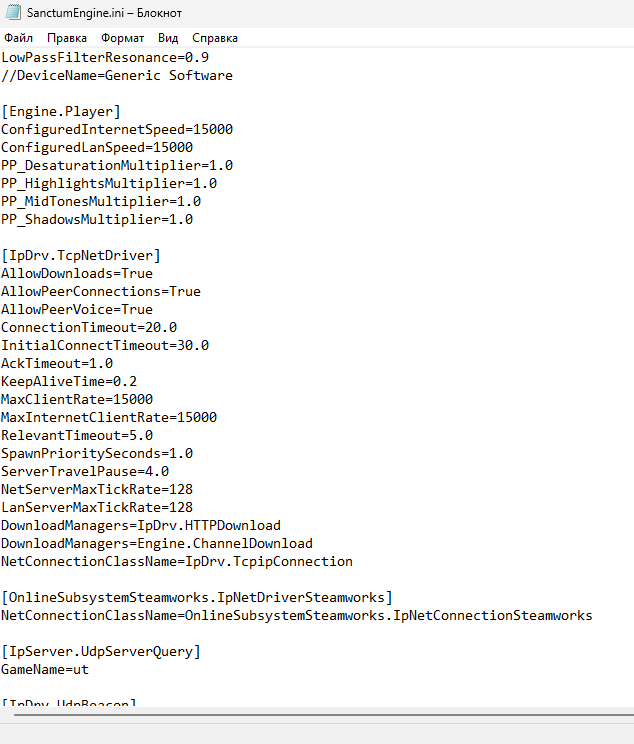
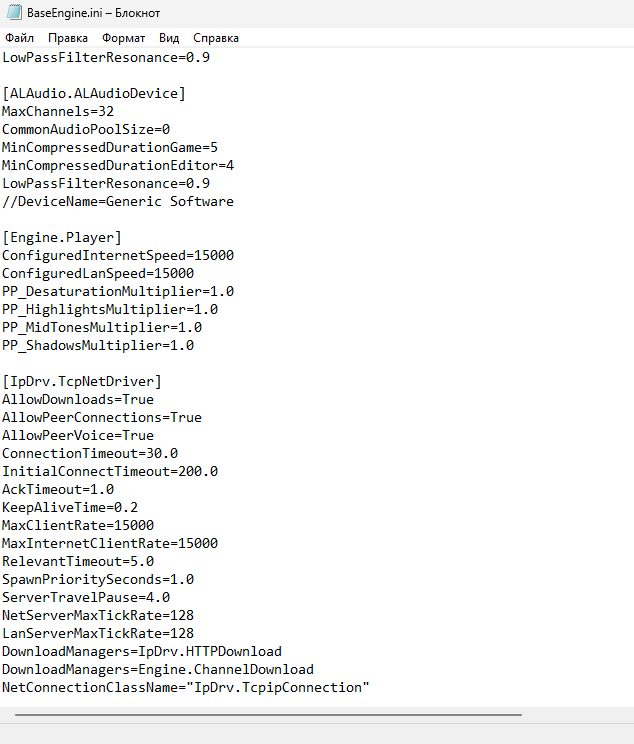
Так же измените параметры на:
AllowDownloads=True
AllowPeerConnections=True
AllowPeerVoice=True
у вас должно получиться вот так
Обновление руководства 03.11.2020
Я покопался в файлах и нашёл ещё некоторые параметры - это тикрейт сервера, измените данные параметры на параметры указанные ниже:
[Engine.DemoRecDriver]
NetServerMaxTickrate=128
LanServerMaxTickrate=128
[IpDrv.TcpNetDriver]
NetServerMaxTickrate=128
LanServerMaxTickrate=128
[Engine.DemoRecDriver]
MaxClientRate=15000
[IpDrv.TcpNetDriver]
MaxClientRate=15000
MaxInternetClientRate=15000
изменить параметр MaxRewindPoints=** на 0 так же в этих самих файлах SanctumEngine.ini и BaseEngine.ini
[Engine.DemoRecDriver]
NetServerMaxTickrate=128
LanServerMaxTickrate=128
[IpDrv.TcpNetDriver]
NetServerMaxTickrate=128
LanServerMaxTickrate=128
[Engine.DemoRecDriver]
MaxClientRate=15000
[IpDrv.TcpNetDriver]
MaxClientRate=15000
MaxInternetClientRate=15000
изменить параметр MaxRewindPoints=** на 0 так же в этих самих файлах SanctumEngine.ini и BaseEngine.ini
ENG
Getting started
you need to go to the path C:\Users\PC name\Documents\My Games\Sanctum2\SanctumGame\Config, and find the file SanctumEngine.ini, then find the sections ConfiguredInternetSpeed and ConfigConfiguredLanSpeed, change instead of ConfiguredLanSpeed=****** to 15000 and do the same in ConfiguredInternetSpeed=****** then save the file (If your settings are reset, make the mode for reading). Also go to the root folder of sanctum 2 (D:\Steam\steamapps\common\Sanctum2\Engine\Config) and find the file BaseEngine.ini and do the same manipulations. Important: For everything to work in multiplayer, you must specify these parameters, or you can play in a single game, the difference should be noticeable.
Also change the parameters to:
AllowDownloads=True
AllowPeerConnections=True
AllowPeerVoice=True
you should get something like this
Also change the parameters to:
AllowDownloads=True
AllowPeerConnections=True
AllowPeerVoice=True
you should get something like this
Manual update 03.11.2020
I dug into the files and found some more parameters - this is the server tickrate, the parameters were changed to the parameters below:
[Engine.DemoRecDriver]
NetServerMaxTickrate = 128
LanServerMaxTickrate = 128
[IpDrv.TcpNetDriver]
NetServerMaxTickrate = 128
LanServerMaxTickrate = 128
[Engine.DemoRecDriver]
MaxClientRate = 15000
[IpDrv.TcpNetDriver]
MaxClientRate = 15000
MaxInternetClientRate = 15000
change the MaxRewindPoints = ** parameter to 0 in the same files SanctumEngine.ini and BaseEngine.ini
[Engine.DemoRecDriver]
NetServerMaxTickrate = 128
LanServerMaxTickrate = 128
[IpDrv.TcpNetDriver]
NetServerMaxTickrate = 128
LanServerMaxTickrate = 128
[Engine.DemoRecDriver]
MaxClientRate = 15000
[IpDrv.TcpNetDriver]
MaxClientRate = 15000
MaxInternetClientRate = 15000
change the MaxRewindPoints = ** parameter to 0 in the same files SanctumEngine.ini and BaseEngine.ini
More Sanctum 2 guides
- Ciara's Sanctum 2 Guide - Ultimate Edition★ 5 (1k)33k views1.2k ♥118 minUpdated Mar 18, 2022
- How To Reach Wave 2000★ 5 (305)20k views245 ♥8 min
- Sanctum 2 Tweaks★ 5 (256)15k views262 ♥6 minUpdated Sep 12, 2013
- Core Guardian's Encyclopedia (Walkthrough, Builds, Enemies, Perks, Towers, Weapons)★ 5 (737)15k views908 ♥233 minUpdated Oct 7, 2024
- Sanctum 2 Experience Farming Guide★ 5 (265)13k views420 ♥12 minUpdated Sep 8, 2014
- The Foff's Awesome Sanctum 2 Guide★ 5 (244)8.1k views323 ♥108 minUpdated Nov 21, 2014


This guide was created by its original author on the Steam Community. Are you the author and want it removed? Request removal.