Skip Intro (Video)
Skip Intro Tutorial
1. Locate Awesomenauts Folder
Open Steam library ➡️ Right click on Awesomenauts ➡️ Manage ➡️ Browse local files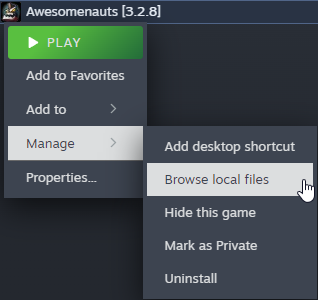
Go to ➡️Data ➡️ Video
2. Rename files
Simply rename both files for example add a 0 to the beginning.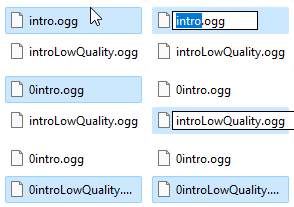
Now the game will not be able to find the video file and skip the intro.
Guide worked? Awesome. Like, favorite, and share it around. See you in the comments!
More guides:
https://steamcommunity.com/sharedfiles/filedetails/?id=3265492721https://steamcommunity.com/sharedfiles/filedetails/?id=3506785873
More Awesomenauts guides
- Pocket Voltar - A Medic's Guide to the Universe (v1.5)★ 5 (529)16k views366 ♥23 minUpdated Aug 4, 2013
- niki's in-depth guide to Awesomenauts (Updated Dizzy Build)★ 5 (887)13k views848 ♥35 minUpdated Mar 16, 2018
- Yummy Time With Gnaw! (v1.2)★ 5 (268)9.2k views205 ♥23 minUpdated Aug 4, 2013
- THE MANLY MAN GUIDE TO SWOLLDIR★ 5 (268)6k views183 ♥5 minUpdated Aug 9, 2014
- GET READY TO RIDE - MANLY MAN CLUNK GUIDE★ 4 (212)5.9k views147 ♥6 minUpdated Jul 12, 2013
- Welcome to Awesomenauts! Everything you need to know to get started!★ 5 (687)5.6k views260 ♥68 minUpdated Jun 1, 2017



This guide was created by its original author on the Steam Community. Are you the author and want it removed? Request removal.