Turning off intro | Отключаем интро
[ENG]
1. Open the folder with the installed game and go to the folder build —> pc —> cache
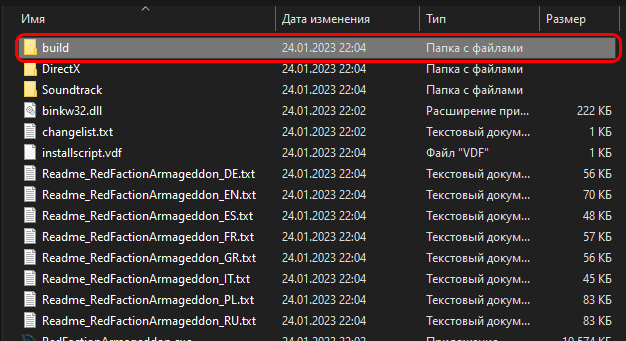
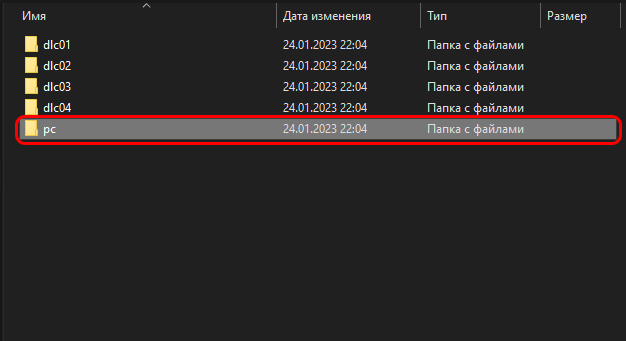
2. Find and delete any .bik files starting with legal_ or logo_ (legal_hd.bik, legal_hd_no_esrb.bik, legal_hd_PS3.bik, legal_hd_PS3_no_esrb.bik, legal_hd_PS3-demo.bik, legal_hd-demo.bik, logo_SPIKE.bik, logo_SyfyGAMES.bik and logo_THQ-V-RFA.bik)
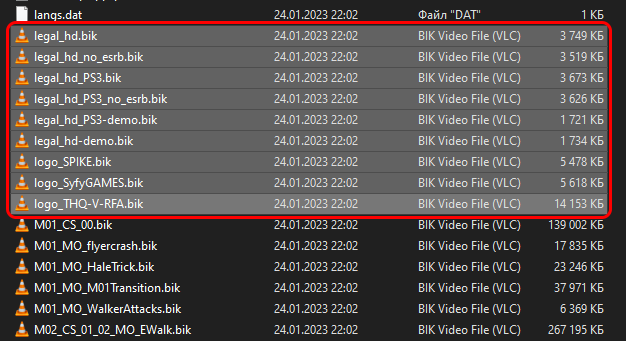
2. Find and delete any .bik files starting with legal_ or logo_ (legal_hd.bik, legal_hd_no_esrb.bik, legal_hd_PS3.bik, legal_hd_PS3_no_esrb.bik, legal_hd_PS3-demo.bik, legal_hd-demo.bik, logo_SPIKE.bik, logo_SyfyGAMES.bik and logo_THQ-V-RFA.bik)
That's it! Enjoy the game without annoying intro
[RUS]
1. Открываем папку с установленной игрой и переходим в папку build —> pc —> cache
2. Удаляем файлы .bik начинающиеся с legal_ или logo_ (legal_hd.bik, legal_hd_no_esrb.bik, legal_hd_PS3.bik, legal_hd_PS3_no_esrb.bik, legal_hd_PS3-demo.bik, legal_hd-demo.bik, logo_SPIKE.bik, logo_SyfyGAMES.bik and logo_THQ-V-RFA.bik)
2. Удаляем файлы .bik начинающиеся с legal_ или logo_ (legal_hd.bik, legal_hd_no_esrb.bik, legal_hd_PS3.bik, legal_hd_PS3_no_esrb.bik, legal_hd_PS3-demo.bik, legal_hd-demo.bik, logo_SPIKE.bik, logo_SyfyGAMES.bik and logo_THQ-V-RFA.bik)
Вот и все! Наслаждаемся игрой без раздражающего интро
![.gif]](https://images.steamusercontent.com/ugc/2055364421035619045/601A3958A585AE109D4A65AEFAC031244720FD37/)
More Red Faction: Armageddon guides
- All Achivements \ Все Достижения★ 5 (414)6.7k views326 ♥13 minUpdated Dec 8, 2014
- Mr.toots easter egg★ 4 (61)4.6k views27 ♥1 min
- Mr. Toots in RF: Armagedon★ 4 (46)3.5k views29 ♥1 minUpdated Jan 28, 2015
- Чинилка★ 3 (171)3.4k views5 ♥1 minRussianUpdated Dec 3, 2015
- Path to War Achievements★ 4 (116)3.2k views90 ♥2 minUpdated Jan 4, 2014
- Red Faction: Armageddon: All Audio logs (Chronicler)★ 4 (102)1.5k views116 ♥10 minUpdated Feb 15, 2018





This guide was created by its original author on the Steam Community. Are you the author and want it removed? Request removal.