Ultimate Fallout High Resolution/Modding Guide
Do you want a Purist or Advanced Experience?
Purist Experience: Vanilla Patch
→ Download Fallout Vanilla Patch v4.1.7[www.dropbox.com] (~ 3 MiB)
Choose the good old Vanilla Patch (in the latest Steam version of the game it should be already installed) if you want almost a 1:1 original game experience plus:
- The most important bugfixes to make the game more stable.
- High Resolution Patch with the original Fallout 1 game engine.
This solution does not requires Fallout 2 installed on your system.
Advanced Experience: Fallout 1 in 2
→ Download the Latest Fallout1in2[github.com] (~ 380 MiB)
Fallout 1 in 2 (also known as Fallout Et Tu) brings Fallout 1 into the engine of Fallout 2.
Notable features:
- Play Fallout 1 with Fallout 2 game engine.
- Customizable High Resolution mod integrated (f2_res.ini file).
- Many bugfixes: game more stable than the original with patches.
- Automatic door opening and closing (Optional).
- Party members can be controlled in combat (Optional).
- Continue playing after the main story has been completed (Optional).
This solution requires Fallout 2 installed on the system besides Fallout 1.
More info about Fallout Et Tu: Official GitHub Repo[github.com].
How to install the VANILLA patch
- Go to Fallout installation folder
{STEAM_DIR}\steamapps\common\Fallout - Check if the file "f1_res_Config.exe" is there. If not, download the Vanilla Patch from the link above and extract the archive to your main Fallout directory. If asked, overwrite all files.
High Resolution Patch
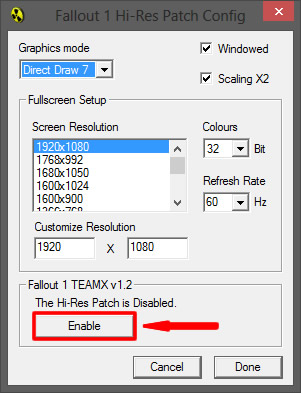
Please follow these simple steps to make the game working in high resolution.- Run "f1_res_Config.exe" from your Fallout folder.
- Choose your preferred options like in the example below.
- Uncheck "Windowed" if you wanna run the game in Full Screen.
In Windowed mode the game will automatically use the 640x480 resolution, but you can double the size choosing "Scaling X2". (Warning: Enable X2 scaling sometimes could cause issues with the mouse pointer or random crashes) - Click on "ENABLE" to activate the HD patch.
Text will change to: The Hi-Res Patch is Enabled. - Click on "Done".
Screen Settings
On Game's main menu, go to "Options > Screen Settings", to change screen settings on-the-fly, or some other things like the side bar art.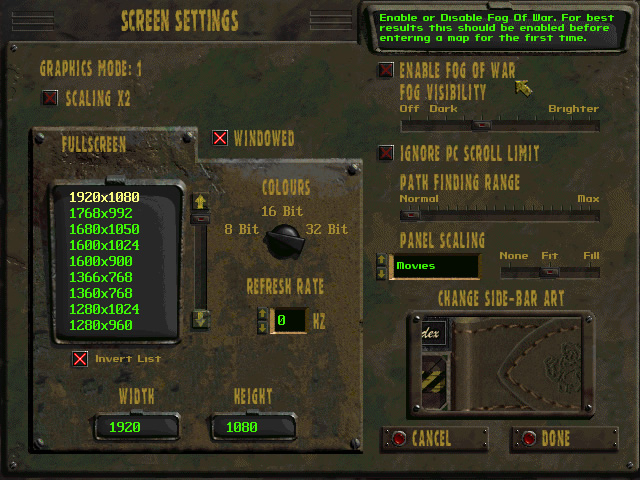
How to install Fallout 1 in 2
- Install Fallout 1 anywhere (usually "{STEAM_DIR}\steamapps\common\Fallout").
- Install Fallout 2 anywhere (usually "{STEAM_DIR}\steamapps\common\Fallout 2")
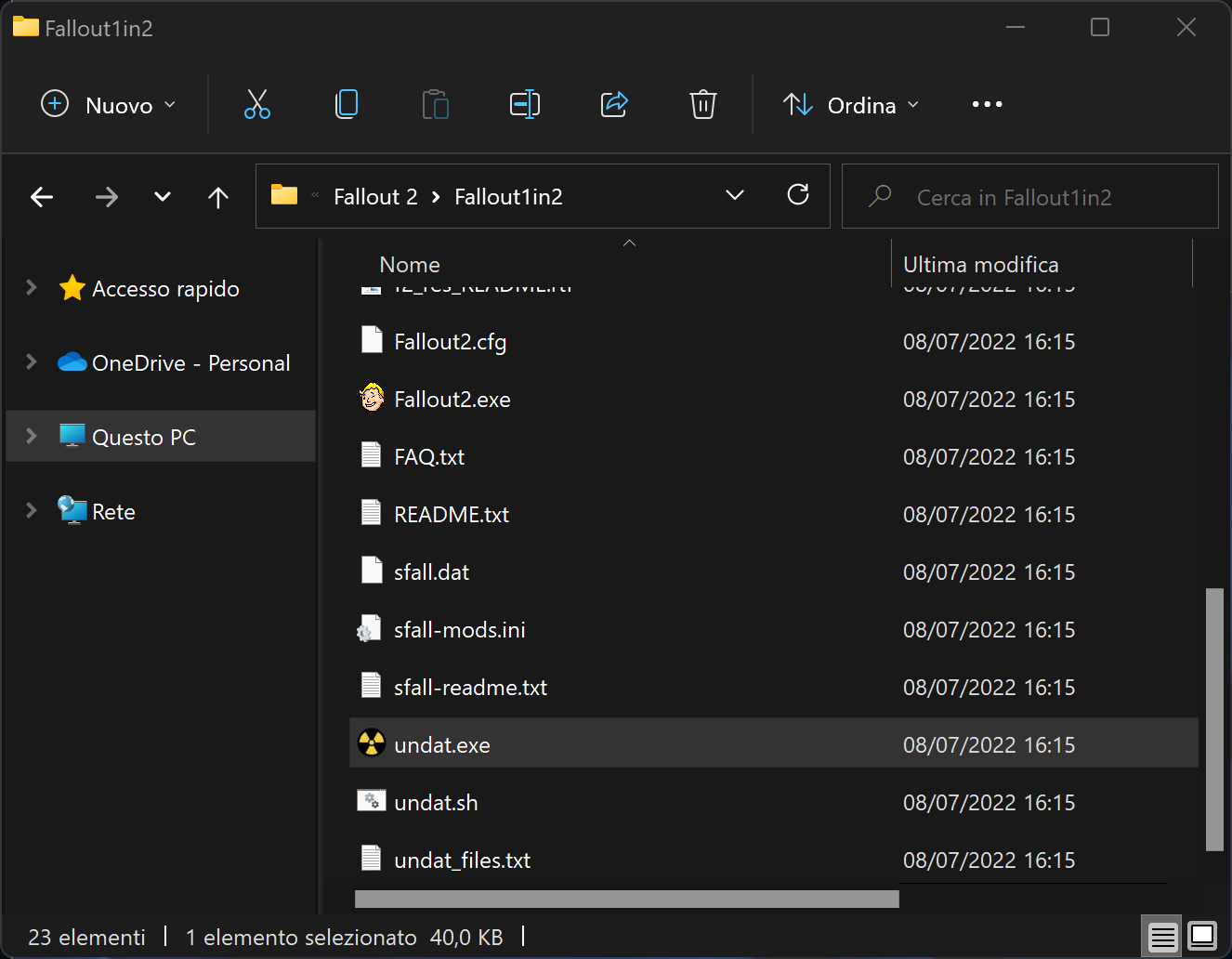
- Unpack Fallout1in2 into Fallout 2 installation folder.
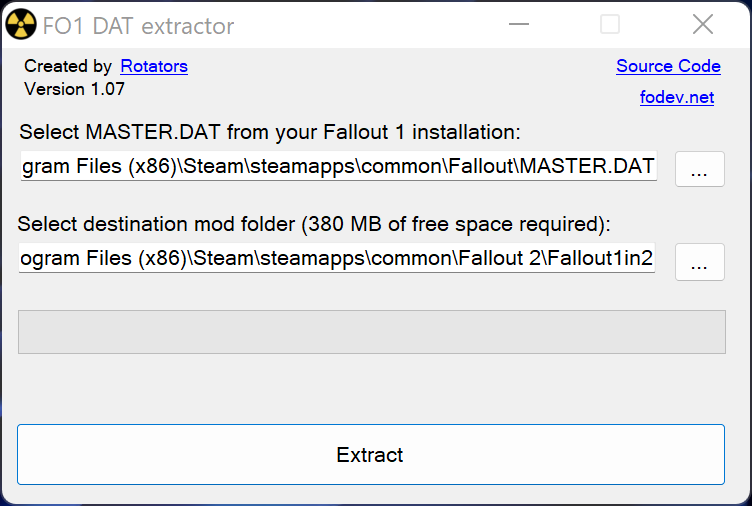
- Run "Fallout2\Fallout1in2\undat.exe" and select `MASTER.DAT` file from Fallout 1 installation directory. For Linux you can use undat.sh (requires WINE).
- Select the "Fallout2\Fallout1in2\" folder as extraction target. Click on Extract
Configuration
Main mod configuration can be found in "Fallout2\Fallout1in2\config\fo1_settings.ini". It is recommended to check and/or tweak settings in this file before starting a new game. Changing settings mid-game have a chance to corrupt savegames or introduce undefined behavior.
Other interesting files:
- ddraw.ini (sfall configuration)
- f2_res.ini (high resolution patch configuration)
- sfall-mods.ini, config/ directory (sfall modifications configuration)
Launch Fallout1in2 as Steam game
→ Download the Latest SteamDetour[github.com] (~ 5 KiB)
Using Fallout1in2 requires to manually run the game directly from the mod directory outside of Steam. To launch the game through Steam and re-enable some useful features (Play Time, Screenshots...), you'll have to use SteamDetour as a workaround:
- Unpack SteamDetour anywhere.
- Open Steam -> Library -> Fallout -> (right click) Properties -> General
- In Launch options (advanced), use the following, {PATH_TO} is the path where Steam Detour resides, and {STEAM_DIR} is the path to your Steam installation: "{PATH_TO}\SteamDetour.exe" "{STEAM_DIR}\steamapps\common\Fallout2\Fallout1in2\Fallout2.exe" %command%
- Run the game via Steam
Fallout 2 High Resolution Patch
Now available the High Resolution guide for Fallout 2.
You can find it here:
http://steamcommunity.com/sharedfiles/filedetails/?id=194992741
You can find it here:
http://steamcommunity.com/sharedfiles/filedetails/?id=194992741
More Fallout guides
- Полный русификатор Fallout (текст, озвучка, интерфейс)★ 5 (1.2k)49k views1.7k ♥1 minRussianUpdated Dec 20, 2024
- Fallout | Keyboard Controls w/ Screenshots★ 5 (519)47k views920 ♥3 minUpdated Oct 28, 2016
- Fallout 1 Wasteland Survival Guide (All Quests)★ 5 (1.3k)45k views3.3k ♥47 minUpdated Oct 5, 2018
- Mastering Fallout 1 Guide★ 5 (1.2k)39k views3.2k ♥43 minUpdated Jun 26, 2017
- Русификатор Fallout 1 (1C)★ 5 (351)31k views565 ♥1 minRussianUpdated May 18, 2023
- Character Creation Guide (Video Included)★ 5 (539)31k views1.2k ♥16 minUpdated May 3, 2024





This guide was created by its original author on the Steam Community. Are you the author and want it removed? Request removal.