Widescreen fix without any files
Widescreen Fix
1)Right click the Just Cause in the Steam Library.
2)Click Properties.
3)Then paste this to the Launch Option: /width=1920 /height=1080.
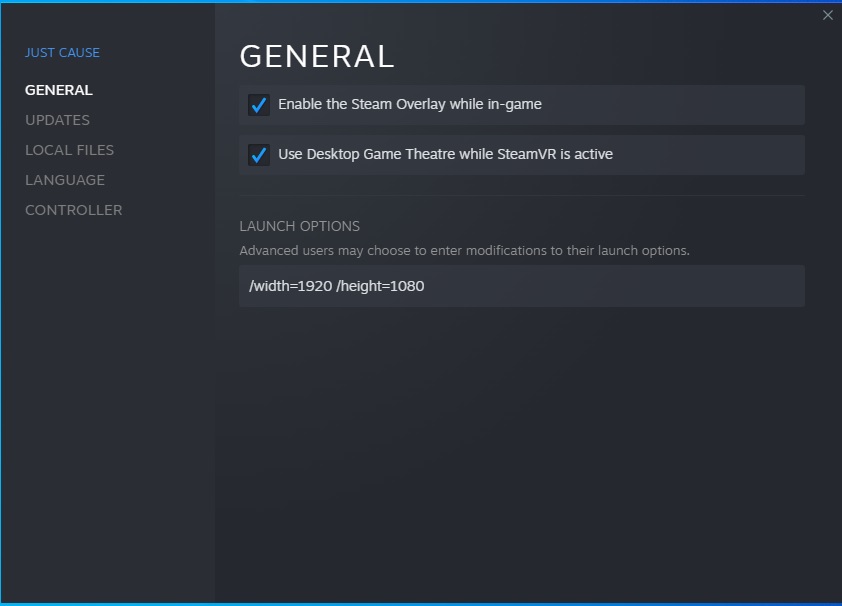
2)Click Properties.
3)Then paste this to the Launch Option: /width=1920 /height=1080.
More Just Cause guides
- How to change the language★ 5 (279)9.4k views157 ♥8 minUpdated Apr 12, 2021
- Русификатор Just Cause★ 4 (69)5.6k views50 ♥1 minRussianUpdated Jun 19, 2015
- Принудительная установка широкоформатных разрешений экрана.★ 4 (75)5.1k views65 ♥1 minRussianUpdated Aug 4, 2023
- Jugar Just Cause 1 totalmente en español y a 1080p. SOLUCIÓN AQUÍ★ 5 (203)4.7k views146 ♥2 minSpanishUpdated Sep 13, 2023
- Русификация игры Just Cause★ 4 (61)3.9k views68 ♥1 minRussianUpdated Jun 14, 2018
- Just Cause; русификатор и несколько фиксов★ 3 (44)3.1k views50 ♥2 minUpdated Jul 8, 2022





This guide was created by its original author on the Steam Community. Are you the author and want it removed? Request removal.