Wildlands Low FPS / Stuttering Fix
In Game Settings
1) Open the Options.
2) Go to Video settings.
3) Change the Window Mode to "Fullscreen".
4) Change the Resolution Scale to "0,80".
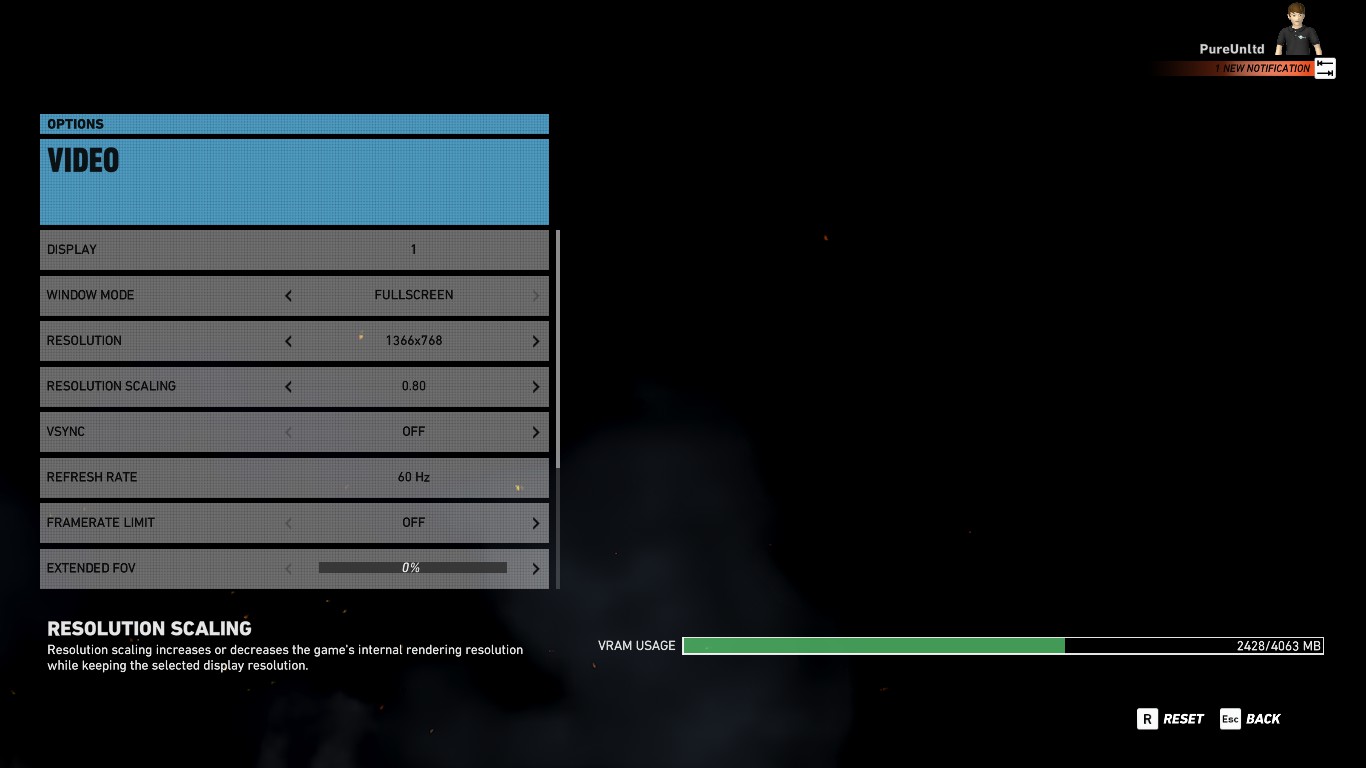
5) Now go to the Graphic settings.
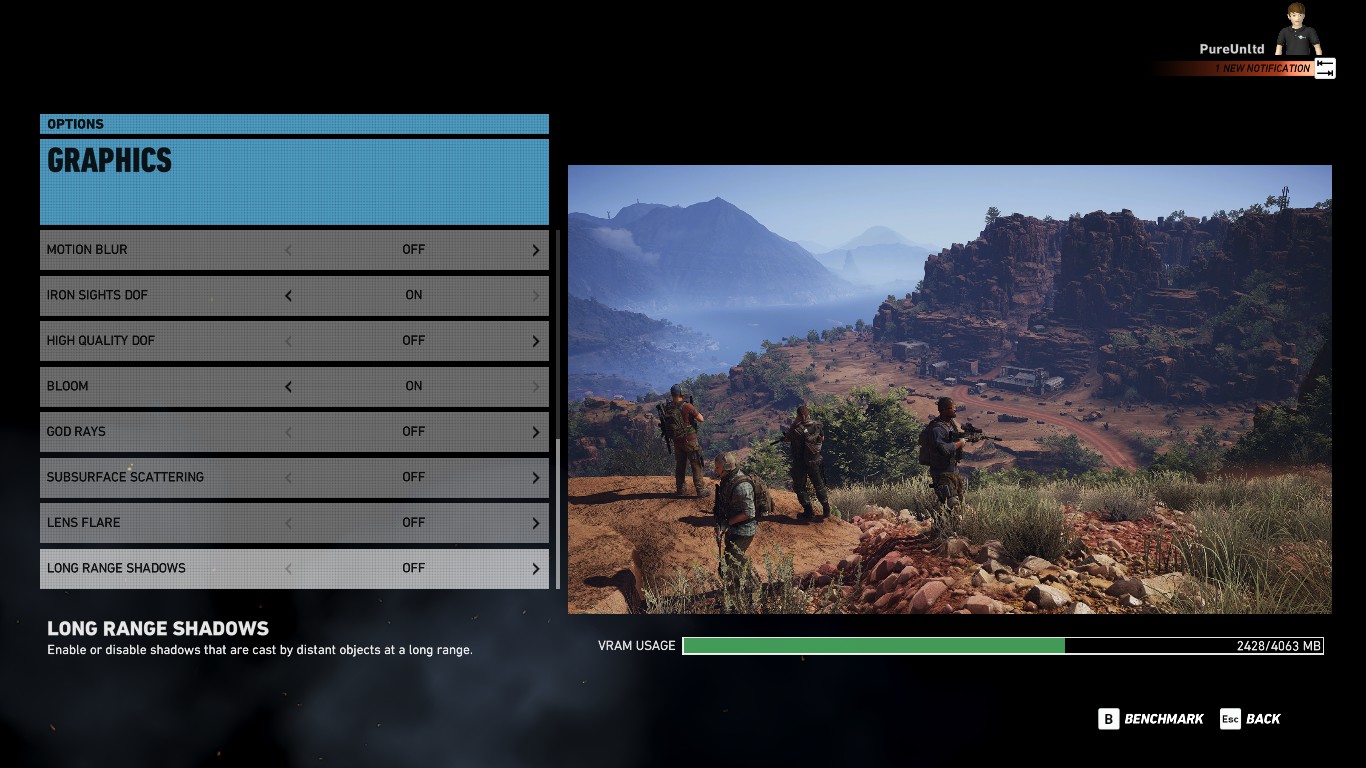
6) Set the Long Range Shadows "Off".
2) Go to Video settings.
3) Change the Window Mode to "Fullscreen".
4) Change the Resolution Scale to "0,80".
5) Now go to the Graphic settings.
6) Set the Long Range Shadows "Off".
Task Manager
1) Open the Task Manager. (CTRL+ALT+DEL)
2) Go to Details.
3) Set the GRW.exe process on priority "High".
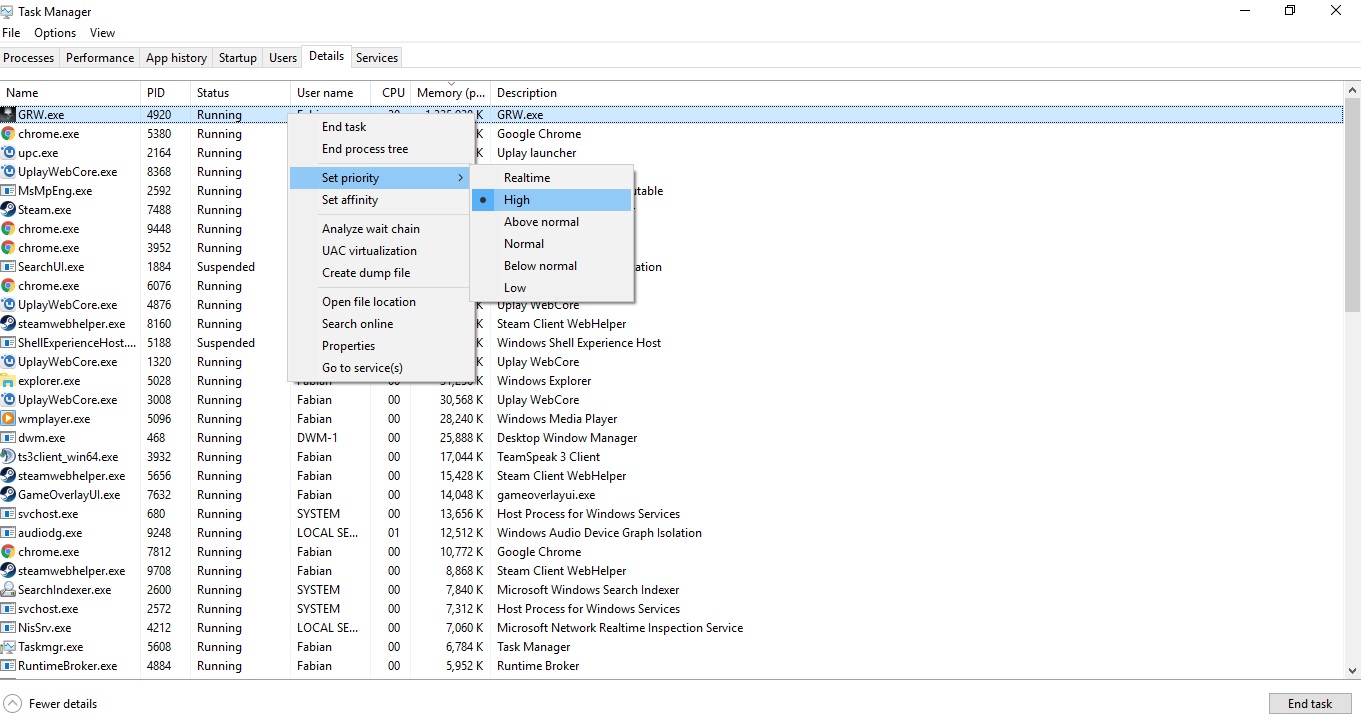
4) Set the Nvidia processes on "High".
(for me it's only "nvxdsync.exe" and "NVDisplay.Container.exe")
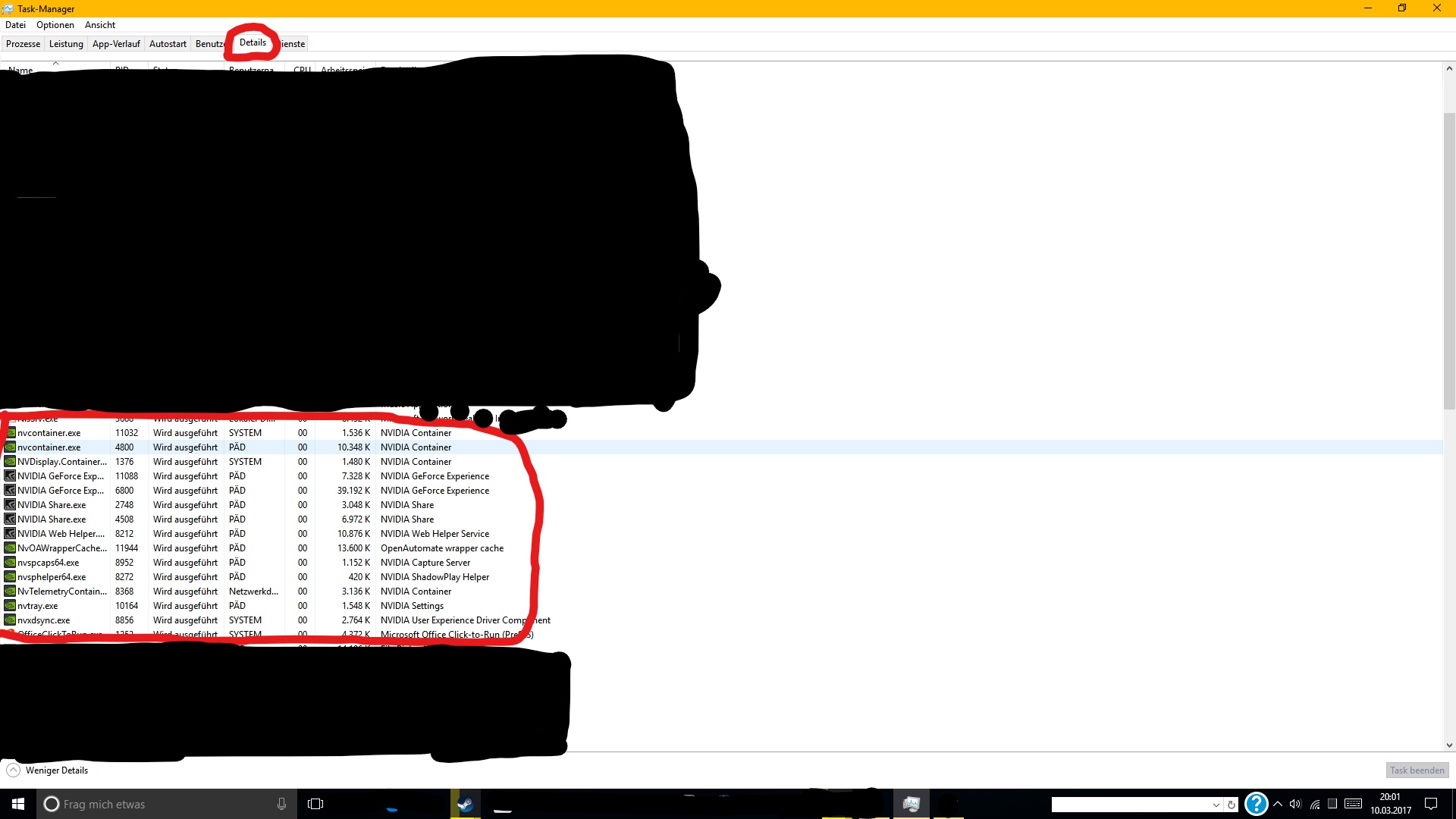
Picture by [GER]NaahLand
5) Set the UPlay processes on "Below normal".
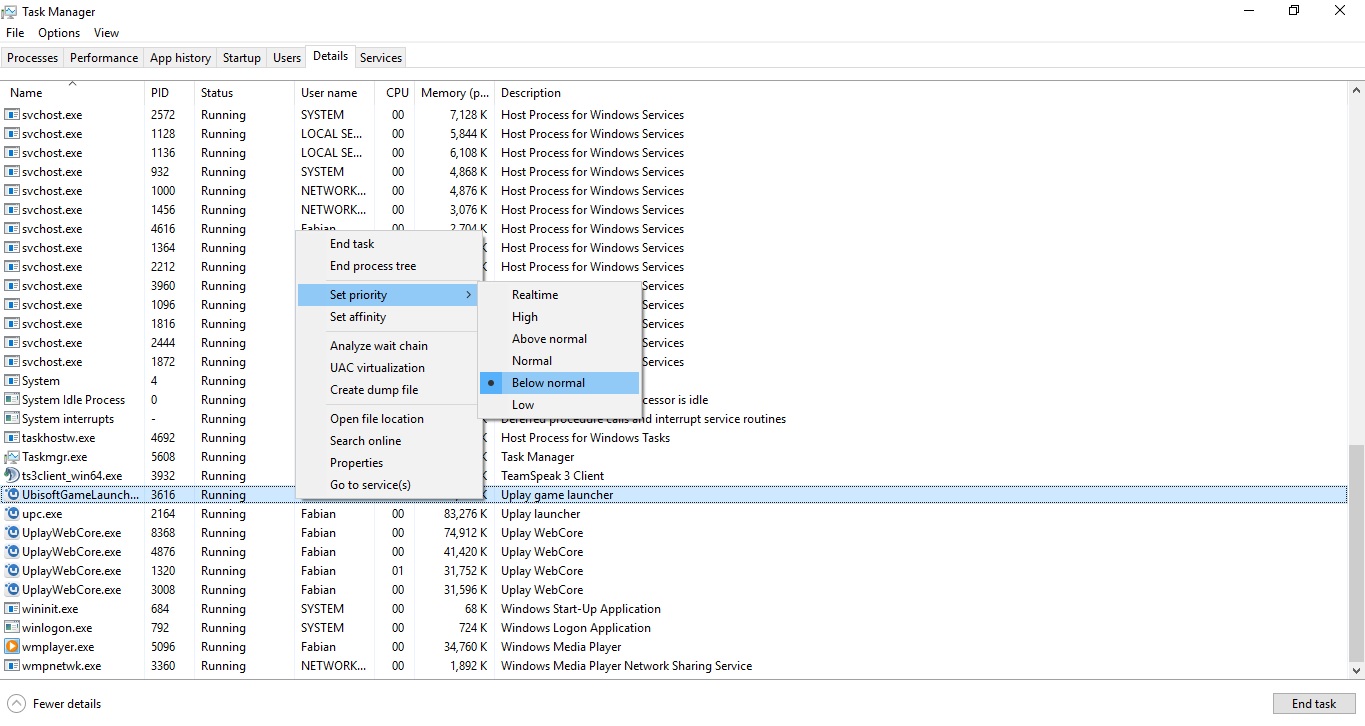
(you can also create a ".bat" shortcut for permanent procces priority.
as example:
start "GRW" /High "C:\Program Files (x86)\Steam\steamapps\common\Wildlands\GRW.exe"
or
C:WINDOWS\system32\cmd.exe /c start "GRW" /high "C:\Program Files (x86)\Steam\steamapps\common\Wildlands\GRW.exe".)
2) Go to Details.
3) Set the GRW.exe process on priority "High".
4) Set the Nvidia processes on "High".
(for me it's only "nvxdsync.exe" and "NVDisplay.Container.exe")
Picture by [GER]NaahLand
5) Set the UPlay processes on "Below normal".
(you can also create a ".bat" shortcut for permanent procces priority.
as example:
start "GRW" /High "C:\Program Files (x86)\Steam\steamapps\common\Wildlands\GRW.exe"
or
C:WINDOWS\system32\cmd.exe /c start "GRW" /high "C:\Program Files (x86)\Steam\steamapps\common\Wildlands\GRW.exe".)
Nvidia Control Panel
1) Set Power Management Mode to "Prefer maximum Performance".
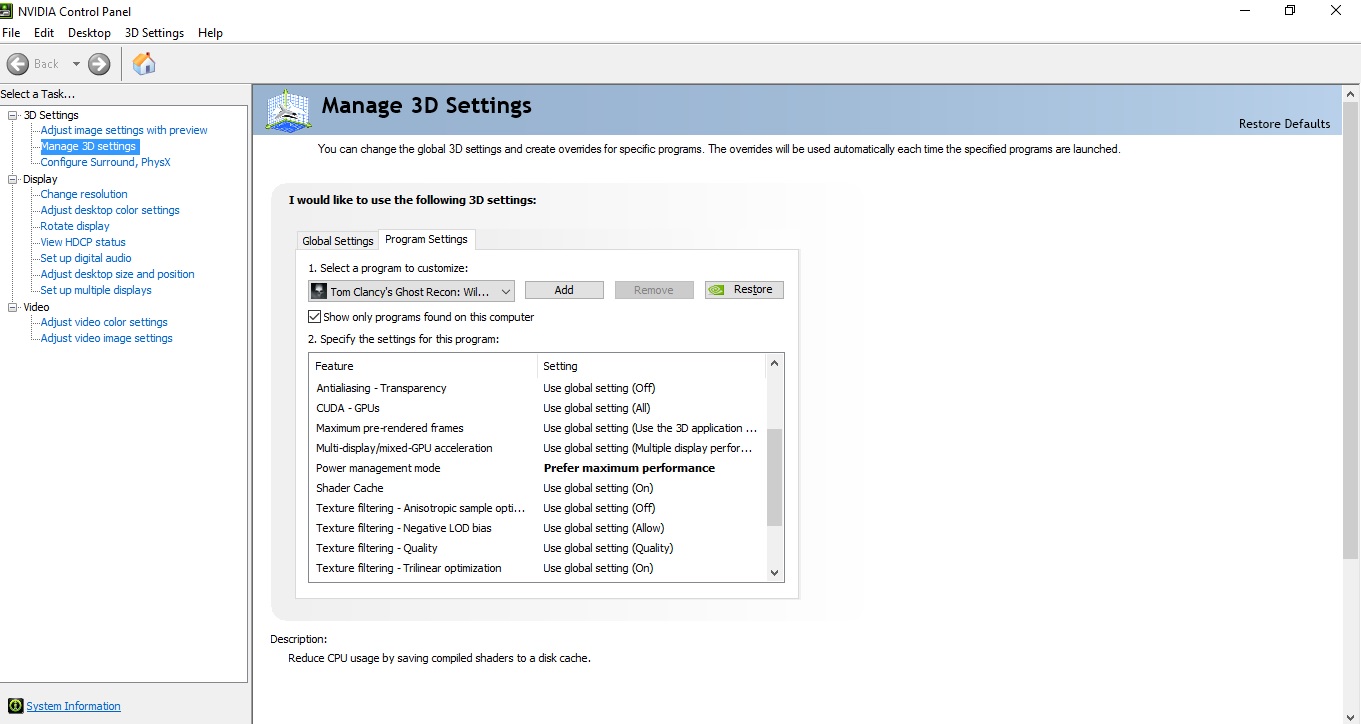
My Settings
This is my Configuration for the Gtx 7xx series.
You don't need to apply my settings, find your own.
Antialising : Temporal AA
Ambient Occlusion : SSBC
Draw Distance: Medium
Level of Detail : High
Texture Quality : High
Anisotropic Filtering : 4
Shadow Quality : Medium
Terrain Quality : High
Vegetation Quality : High
Turf Effects : Off
Motion Blur : Off
Iron Sights Dof : On
High Quality Dof : Off
Bloom : On
God Rays : Off
Subsurface Scattering : Off
Lens Flare : Off
Long Range Shadows : Off
You don't need to apply my settings, find your own.
Antialising : Temporal AA
Ambient Occlusion : SSBC
Draw Distance: Medium
Level of Detail : High
Texture Quality : High
Anisotropic Filtering : 4
Shadow Quality : Medium
Terrain Quality : High
Vegetation Quality : High
Turf Effects : Off
Motion Blur : Off
Iron Sights Dof : On
High Quality Dof : Off
Bloom : On
God Rays : Off
Subsurface Scattering : Off
Lens Flare : Off
Long Range Shadows : Off
More Tom Clancy's Ghost Recon® Wildlands guides
- Playstyle Titles★ 5 (591)56k views521 ♥1 minBulgarianUpdated Mar 11, 2017
- Weapon, Accessory, Medals and Skill Points locations★ 5 (994)45k views1.9k ♥6 minUpdated Mar 27, 2017
- Just started? Here's best gun(s) you can get right away!★ 5 (275)39k views389 ♥7 minUpdated Jan 8, 2024
- Which Countries Use Each Weapon?★ 5 (482)39k views735 ♥22 minUpdated Nov 16, 2021
- A guide to using the sniper rifles★ 5 (359)36k views470 ♥10 minUpdated Apr 23, 2017
- ALL HINTS★ 5 (525)36k views244 ♥1 minUpdated May 18



This guide was created by its original author on the Steam Community. Are you the author and want it removed? Request removal.