[2026] Online Fix – How to Enable Multiplayer & Get Online Achievements
Before you start
- This guide is focused on Watch Dogs (2014), not Watch Dogs 2 or Legion.
- You must have Ubisoft Connect installed and fully updated.
- NAT type, firewall settings, or closed ports can prevent matchmaking, even if the game launches normally.
This guide is intended for players who:
- Cannot access online modes
- Cannot connect with other players
- Want to unlock online achievements
- Are playing the Steam version
NOTE: Ubisoft servers are unstable and may only work partially at times. Patience and proper configuration are key.
---ONLINE FIX---
To fix this, you need to activate the online services once using Ubisoft Connect.
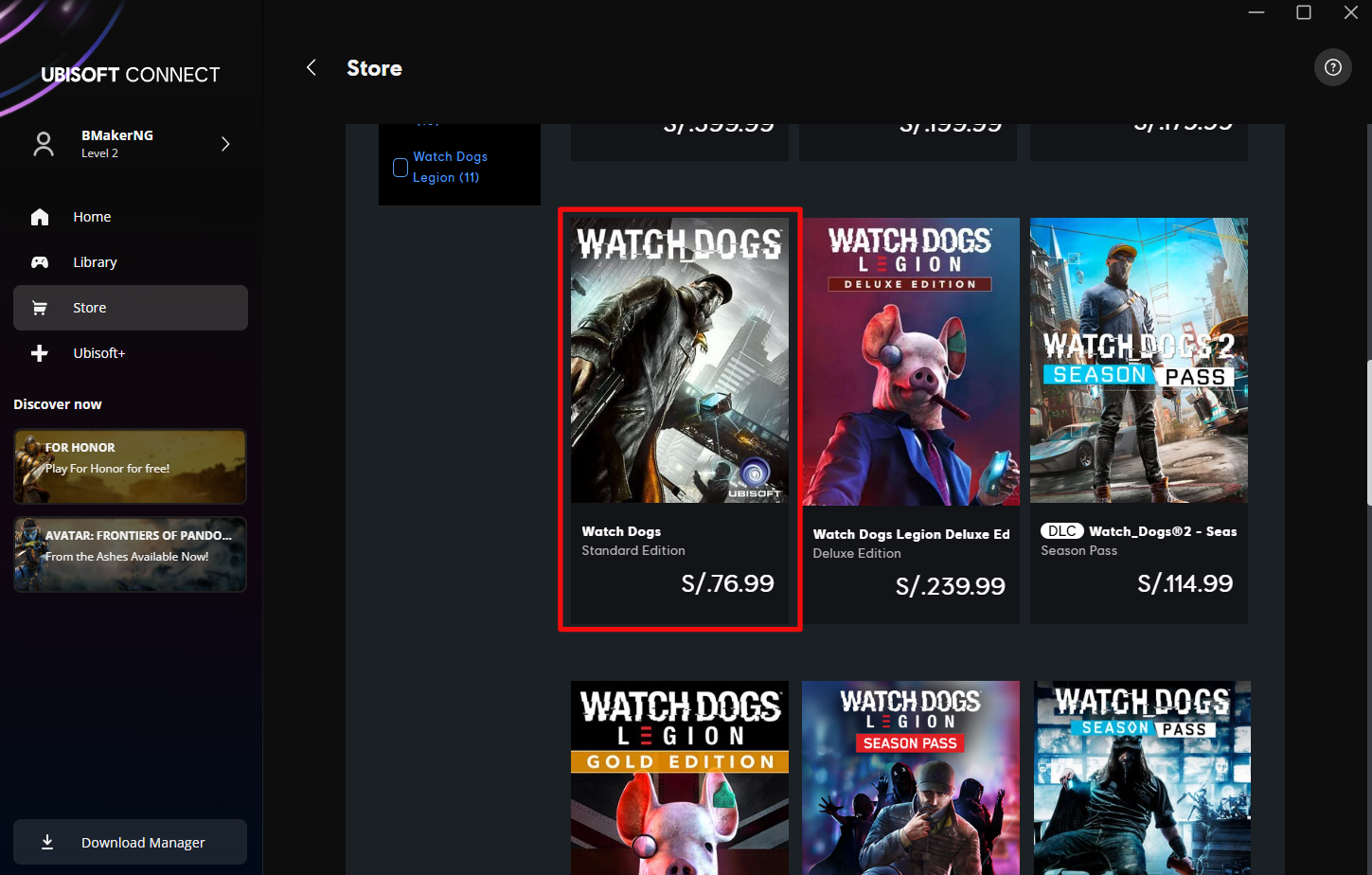
1. Buy a Copy on Ubisoft Connect (You Will Refund It – Don’t Worry)
If you already own Bad Blood DLC or just the Standard Edition on Steam, you do NOT need to buy the complete edition on Ubisoft Connect.
You only need the Standard Edition to activate the online services once so Ubisoft recognizes your account.
I strongly recommend buying it directly from the Ubisoft Connect app, not from the website.
The Ubisoft website may fail depending on your browser or region and sometimes does not allow purchases correctly.
You must have both versions registered in your Ubisoft account. You can confirm this in Ubisoft Connect. You can check that you have both versions because one will have the text “Steam” and the other will not.
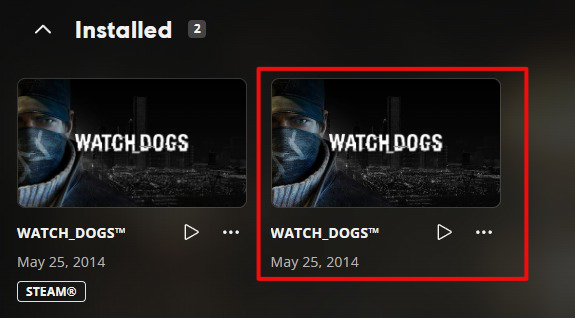
If you already have the Steam version installed, it is recommended to uninstall it first.
(Save files will NOT be lost if Steam Cloud is enabled.)
2. Play the Ubisoft Connect Version for 10–20 Minutes
Install the Ubisoft Connect version only (without the Steam version installed).
Launch the game and play for at least 10–20 minutes (Completing the tutorial is enough).
This step allows Ubisoft servers to properly activate online access on your account.
3. Install the Steam Version and Check Online Access
You can now install the Steam version. You can uninstall the Ubisoft Connect version, as long as online mode has already been activated.
Launch the game from Steam. Open the in-game phone and check your online profile.
If everything worked correctly:- Online profile should load
- You should be able to search for online sessions
- Multiplayer modes should be available
4. Refund the Ubisoft Connect Version
You can request a refund directly from the Ubisoft Connect app:
Profile icon → Account Management → Payment & Subscriptions → Orders and Refunds
You can also request the refund from the Ubisoft website if you prefer.
❗❗❗Remember that the refund policy is that you cannot play for more than 2 hours and a maximum of 14 days from the date of purchase in order for it to be valid. I completed the online achievements in 3 days and then requested a refund. I don't know of anyone who has had their online access blocked after requesting a refund, but just in case, don't put that as the reason for the refund in case they look at your account in the future.
NOTE: Refund time depends on your country and payment method. In my case, the refund took 4 days.
---ONLINE ACHIEVEMENTS---
Stealth Cookie
 Stealth Cookie
Complete an Online Tailing without being detected
Just enter online tailing mode and make sure the person you are tracking does not find you.
Piggyback
 Piggyback
Invade and successfully follow 10 enemy Fixers to gather information
same as above but 10 times
Traced
 Traced
Get tailed 5 times
To achieve this, it would be advisable for someone who also has the game to invade your world from their friends list. (if you or your friend don't see the player's name on your friends list but there is a space where their name should be and you can click on it, that's normal (just make sure you're not in a shootout or event, otherwise you'll get a message saying that your friend is busy or in a menu).
Note: You need to be in online tailing mode, not hacking mode.
Hackification
 Hackification
Invade and successfully hack 10 enemy Fixers
This is in Online Hacking mode. It's preferable to do it with a friend because, unlike the other mode, this one takes a little longer to find a game.
Superhighway
 Superhighway
Complete 10 Online Races
I would say that if you really need another person to do it, you can spend hours trying to find a match, and if you find one and the other person leaves, you have to start searching again.
NOTE: it must be in a public game; you just need to search for a game at the same time.
Tag Team
 Tag Team
Complete 10 co-op missions
This one is also difficult to find people for, since both players must have the DLC. Find a friend and complete the 10 missions. You don't need to do the optional objectives; just finish the missions.
Thanks & Credits
Don't forget to rate and like it.

Beat Watch_Dogs's achievements?
Flex it — let your friends know you pulled it off.
- Watch_Dogs — Improve Graphics + Performance★ 5 (370)28k views574 ♥1 minUpdated May 28, 2014
- Повышаем фпс и графон \ Lets UP FPS and Graphics★ 4 (252)18k views393 ♥1 min
- Watch Dogs - ALL easter eggs!★ 5 (194)13k views206 ♥5 minBulgarian
- Все достижения в Watch_Dogs (Uplay)★ 5 (199)9.3k views585 ♥7 minRussianUpdated 1 Nov, 2019
- Как убрать лаги/фризы★ 3 (71)8.4k views48 ♥2 minBulgarianUpdated 8 Apr, 2020
- Always Win Shell Game★ 5 (175)8.2k views143 ♥1 minUpdated 25 Jun, 2020






- Upgrading to PremiumTeam Fortress 2★ 5 (20k)1441k views11k ♥6 minUpdated May 11, 2022
- No More Room in Hell Official ManualNo More Room in Hell★ 5 (2.8k)569k views2.1k ♥29 minUpdated Apr 22, 2019
- NMRiH Community Hosting GuidesNo More Room in Hell★ 5 (526)351k views653 ♥1 minUpdated Aug 10, 2022
- ULTIMATE GUIDE FOR GAME DEV TYCOONGame Dev Tycoon★ 5 (5.8k)326k views10k ♥4 minUpdated 23 Jan, 2014
- How to 'Git Gud' Soon™MORDHAU★ 5 (2k)318k views3k ♥68 minUpdated Nov 16, 2024
- Лучшие кооперативные игры SteamPAYDAY 2★ 5 (1.5k)315k views2.1k ♥56 minRussianUpdated Apr 27, 2025






This guide was created by its original author on the Steam Community. Are you the author and want it removed? Request removal.