Achieving the 'Jumped In' & 'Saintified' Achievements in 2024(+)
DISCLAIMER
This is just a disclaimer that the mod that I use in this guide is in no way, shape, or form, written by, or contributed to by me. I am simply writing up a guide that uses this mod to allow people to unlock the two achievements, and be able to use the save character function once again.
All credit for the mod goes to 'Minimaul' from saintsrowmods.com. whose profile is:
https://saintsrowmods.com/forum/members/minimaul.1/
Now, that that is out of the way we can get on with activating the character save feature, and unlocking the two achievements!
All credit for the mod goes to 'Minimaul' from saintsrowmods.com. whose profile is:
https://saintsrowmods.com/forum/members/minimaul.1/
Now, that that is out of the way we can get on with activating the character save feature, and unlocking the two achievements!
Starting off
The main reason I decided to write up this guide is to help the countless people I have seen who have posted about getting this achievement, but have not yet been able to find a solution. Of course there is always the use of SAM, but I personally want to avoid using SAM if there are other ways to get the achievement. Plus, with this method, you are actually able to use the 'upload character' function in the game to save your characters (to use later on if you wish). So here is how you can do this.
To get started, you will need to check out the following link, which contains a mod made by Minimaul, that allows you to trick the game into thinking it is connecting to the SR character server, but in reality saves the character files on your computer:
https://saintsrowmods.com/forum/threads/my-steelport-emulator.17361/
Now, you can either follow the instructions on there, (which are pretty much identical to the ones in this guide), or come back here and follow the instructions from this guide.
To get started, you will need to check out the following link, which contains a mod made by Minimaul, that allows you to trick the game into thinking it is connecting to the SR character server, but in reality saves the character files on your computer:
https://saintsrowmods.com/forum/threads/my-steelport-emulator.17361/
Now, you can either follow the instructions on there, (which are pretty much identical to the ones in this guide), or come back here and follow the instructions from this guide.
Setting it up
Remember, you can either go over to: https://saintsrowmods.com/forum/threads/my-steelport-emulator.17361/ and follow the instructions there, or just continue on with this guide, the instructions are mostly the same.
By going through this process you also now have back some of the games functionality that was lost when the servers went down. You can now save and load characters (and even share them across devices)!
- The first thing you want to do is go over to: https://saintsrowmods.com/forum/threads/my-steelport-emulator.17361/ , and download the most recent version 'MySteelportEmulator', that is an attached file to the bottom of the post.
- After you've downloaded the file, you want to extract the contents of the file anywhere (doesn't matter where it is extracted to).
- After that's done, you want to trick the game into thinking that the Saints Row Character servers are in fact up. And redirect the game to your own local machine. You can do this as follows:
- Open up notepad as administrator by clicking on it (either in your start menu, or otherwise) and clicking 'run as administrator'.
- Go to file > open, then navigate over to your OS drive, (Usually the C: drive), and go to: C: > Windows > System32 > drivers > etc
- Open up the 'hosts' file (You may need to switch the file type from '.txt' to 'All Files' if you do not see a 'hosts' file).
- You will need to check whether there are already any lines with 'sr3.hydra.agoragames.com' in it, if there is then make sure to delete it.
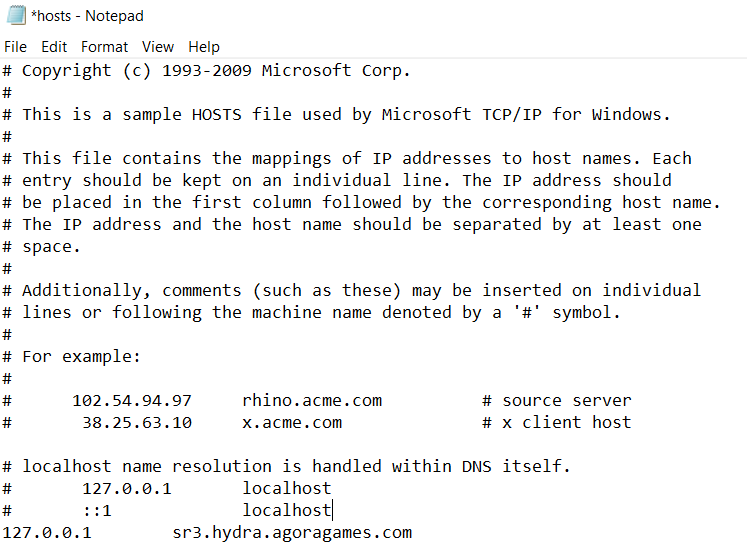
- Then you have to add the following line to the very bottom of your hosts file:127.0.0.1 sr3.hydra.agoragames.com
Your 'hosts' file should now look something like this:
- Open up notepad as administrator by clicking on it (either in your start menu, or otherwise) and clicking 'run as administrator'.
- After that's all done, all that's left to do is run the 'MySteelportEmulator' exe file that you extracted earlier, a command window will open up, and should display the version, the link to the post the mod was downloaded from, and text that says 'Ready for connections'.
- All that's left to do is just run Saints Row: The Third (or IV, depending on which achievement you want/ what game you want to use it for).
- When you are in the main menu, you should see text scroll through at the bottom of the screen that says:
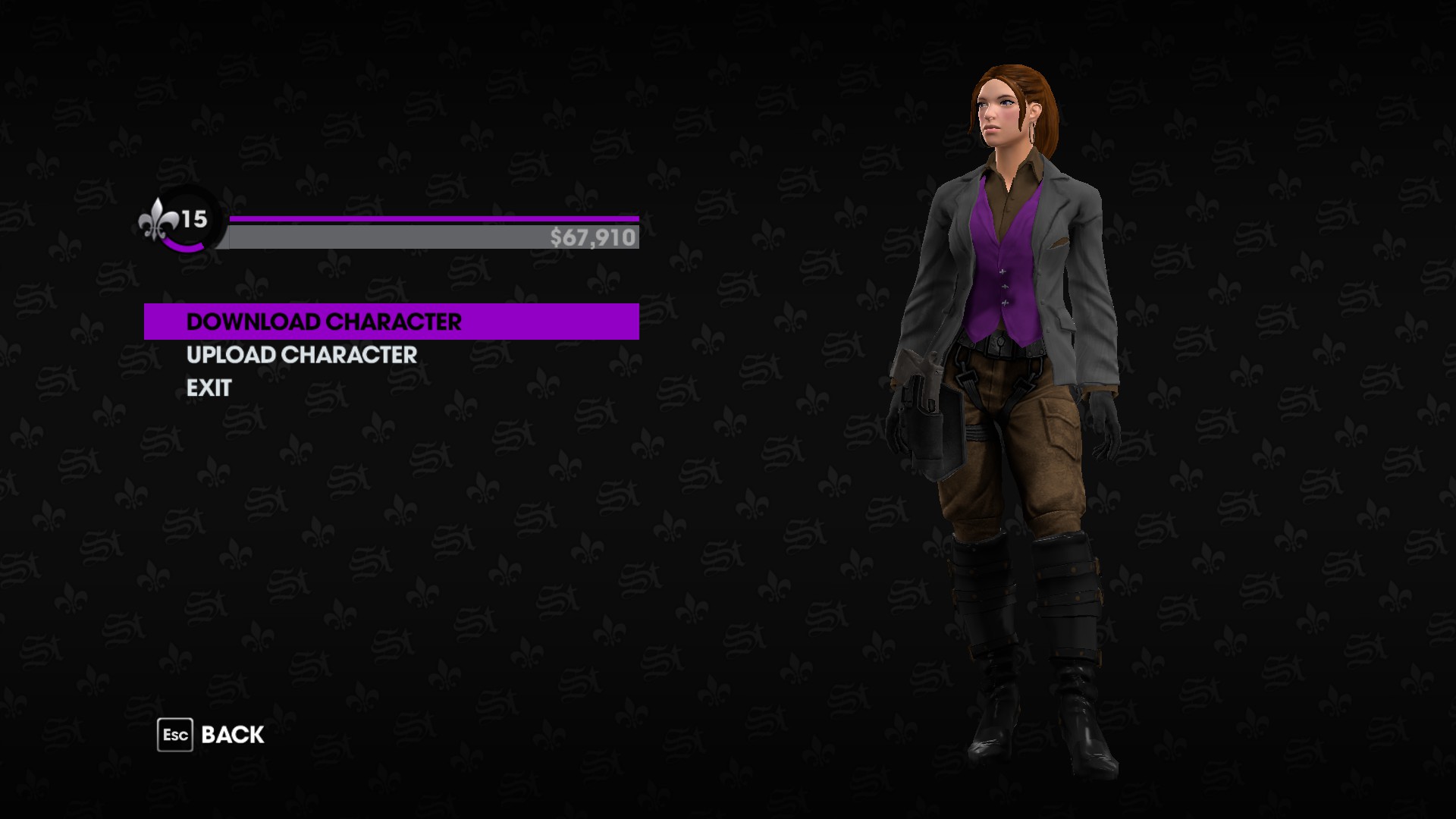
'Connected to My Steelport Emulator, Login with any user name and password' - After you have seen that text, you can use the character gallery as if you were online. You can do this either in character creation, or at any store by clicking the 'Character Gallery' button. It will ask you to enter a username and password, you can enter whatever you want for these, they do not actually matter. After that you will be taken to the character gallery screen (such as can be seen below)
- To get the achievement, you simply need to go to the 'Character Gallery', and upload any character, this will trigger the achievement.
And there you go! You've now gotten the unachievable achievement, without cheating it in, while restoring some of the games functionality.
By going through this process you also now have back some of the games functionality that was lost when the servers went down. You can now save and load characters (and even share them across devices)!
Closing Remarks
Once again, I just want to reiterate, I in no way contributed to the making of this mod, I simply used it to obtain the achievement and restore the save/ load character functionality to the game. All credit goes to Minimaul on saintsrowmods.com for the fantastic and (literally!) game changing mod!
The reason I decided to make this guide is due to the amount of posts I stumbled across without any solutions regarding this achievement while researching how to get the achievement myself (as I am against use of programs such as SAM, even when the achievement is 'broken'). And it took me a while to find a solution to this as well. So Hopefully this guide can help someone out in achieving the achievement 'Jumping In' in SR3 and/ or the achievement 'Saintified' in SRIV.
Thanks!
The reason I decided to make this guide is due to the amount of posts I stumbled across without any solutions regarding this achievement while researching how to get the achievement myself (as I am against use of programs such as SAM, even when the achievement is 'broken'). And it took me a while to find a solution to this as well. So Hopefully this guide can help someone out in achieving the achievement 'Jumping In' in SR3 and/ or the achievement 'Saintified' in SRIV.
Thanks!
🏆
Beat Saints Row: The Third's achievements?
Flex it — let your friends know you pulled it off.
More Saints Row: The Third guides
- Получаем 950 000 $ бесплатно.★ 5 (581)42k views669 ♥1 minRussianUpdated Jan 11, 2016
- Saints Row: The Third — Гайд по достижениям★ 5 (2k)37k views2.3k ♥13 minRussianUpdated Jun 25, 2013
- Customizing Non-Customizable Vehicles★ 5 (789)36k views1k ♥3 minUpdated Jan 15, 2023
- Map of Locations★ 5 (1.1k)29k views1.3k ♥3 minUpdated Jan 26, 2015
- Saints Row: The Third. Убийства★ 5 (934)25k views1k ♥16 minRussianUpdated Sep 26, 2016
- All Choices and Their Outcomes (+Which Ones to Do)★ 5 (531)24k views789 ♥8 minUpdated Mar 24, 2017


This guide was created by its original author on the Steam Community. Are you the author and want it removed? Request removal.