Boosting and Fixing FPS
About DXVK
DXVK is an open-source project that translates Direct3D 9, 10, and 11 calls to the Vulkan API, enabling Direct3D applications to run on systems that use the Vulkan graphics API. This is particularly useful for running Windows games and applications on Linux systems via compatibility layers like Wine or Proton. And it works on Windows too!
By leveraging Vulkan's capabilities, DXVK can provide improved performance and graphical fidelity compared to older translation layers or native Direct3D implementations on non-Windows platforms.
By leveraging Vulkan's capabilities, DXVK can provide improved performance and graphical fidelity compared to older translation layers or native Direct3D implementations on non-Windows platforms.
Requirements
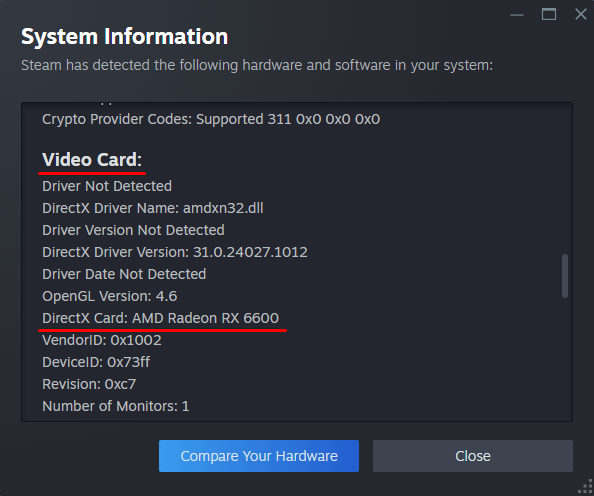
DXVK requires the latest version of your GPU drivers, so check driver updates for your GPU on your manufacturer's website(AMD, NVIDIA or Intel). You can check your GPU name using Steam. Press Help on top left of the Steam window, after that click on System Information and go to Video Card Section.
Downloading and installing DXVK
We will be downloading the DXVK version with a patch that will speed up the compilation of shaders to prevent lags and stutters in the future.
Go to GitLab Repository website - https://gitlab.com/Ph42oN/dxvk-gplasync/-/releases
And download latest available tar.gz archive DXVK Release in Packages section, for me its - dxvk-gplasync-v2.3.1-1.tar.gz
Open it using your archive program(7-Zip or WinRAR), go to x32 folder, copy d3d9.dll from archive and paste it to the game folder, for me its - G:\SteamLibrary\steamapps\common\Call of Duty Black Ops.
DXVK gains very good performance, i boosted my fps from 150-160 on empty map with highest settings, to 360-380 fps.
BIG NOTE!
The game will stutter for the first time (about 1 hour) because of shader compiling process, depending on how you play - aggressively or passively. If passive, then a couple of hours, if aggressive, then about 1 hour. After compiling the shaders, the game will not stutter in the future, even after restarting the game and Windows
Go to GitLab Repository website - https://gitlab.com/Ph42oN/dxvk-gplasync/-/releases
And download latest available tar.gz archive DXVK Release in Packages section, for me its - dxvk-gplasync-v2.3.1-1.tar.gz
Open it using your archive program(7-Zip or WinRAR), go to x32 folder, copy d3d9.dll from archive and paste it to the game folder, for me its - G:\SteamLibrary\steamapps\common\Call of Duty Black Ops.
DXVK gains very good performance, i boosted my fps from 150-160 on empty map with highest settings, to 360-380 fps.
BIG NOTE!
The game will stutter for the first time (about 1 hour) because of shader compiling process, depending on how you play - aggressively or passively. If passive, then a couple of hours, if aggressive, then about 1 hour. After compiling the shaders, the game will not stutter in the future, even after restarting the game and Windows
More Call of Duty: Black Ops - Multiplayer guides
- Black Ops config★ 5 (246)24k views387 ♥5 minUpdated Dec 5, 2019
- How to change the color of your custom classes.★ 5 (270)19k views218 ♥1 minUpdated Jul 17, 2019
- How to be a great sniper Engl/Fre/Ger/Rus★ 4 (223)13k views52 ♥2 minUpdated Feb 12, 2016
- How to not get banned on servers 101★ 5 (236)11k views58 ♥1 minUpdated Oct 8, 2020
- possible Rank reset fix★ 4 (102)11k views59 ♥1 minBulgarianUpdated Jun 30
- Black ops 1 Smooth L96a1★ 4 (155)8.8k views155 ♥5 minUpdated Jan 2, 2017



This guide was created by its original author on the Steam Community. Are you the author and want it removed? Request removal.