Смена языка озвучки на английский/Change voice language for English
Инструкция (Rus)
1. И так, для начала зайдем в steam и найдем Dishonored 2 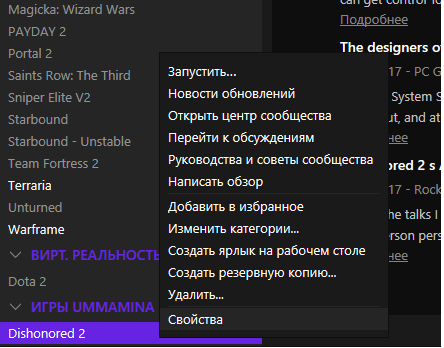 2. Теперь зайдем в свойства и в вкладке "общее" выбираем "Установить параметры запуска".
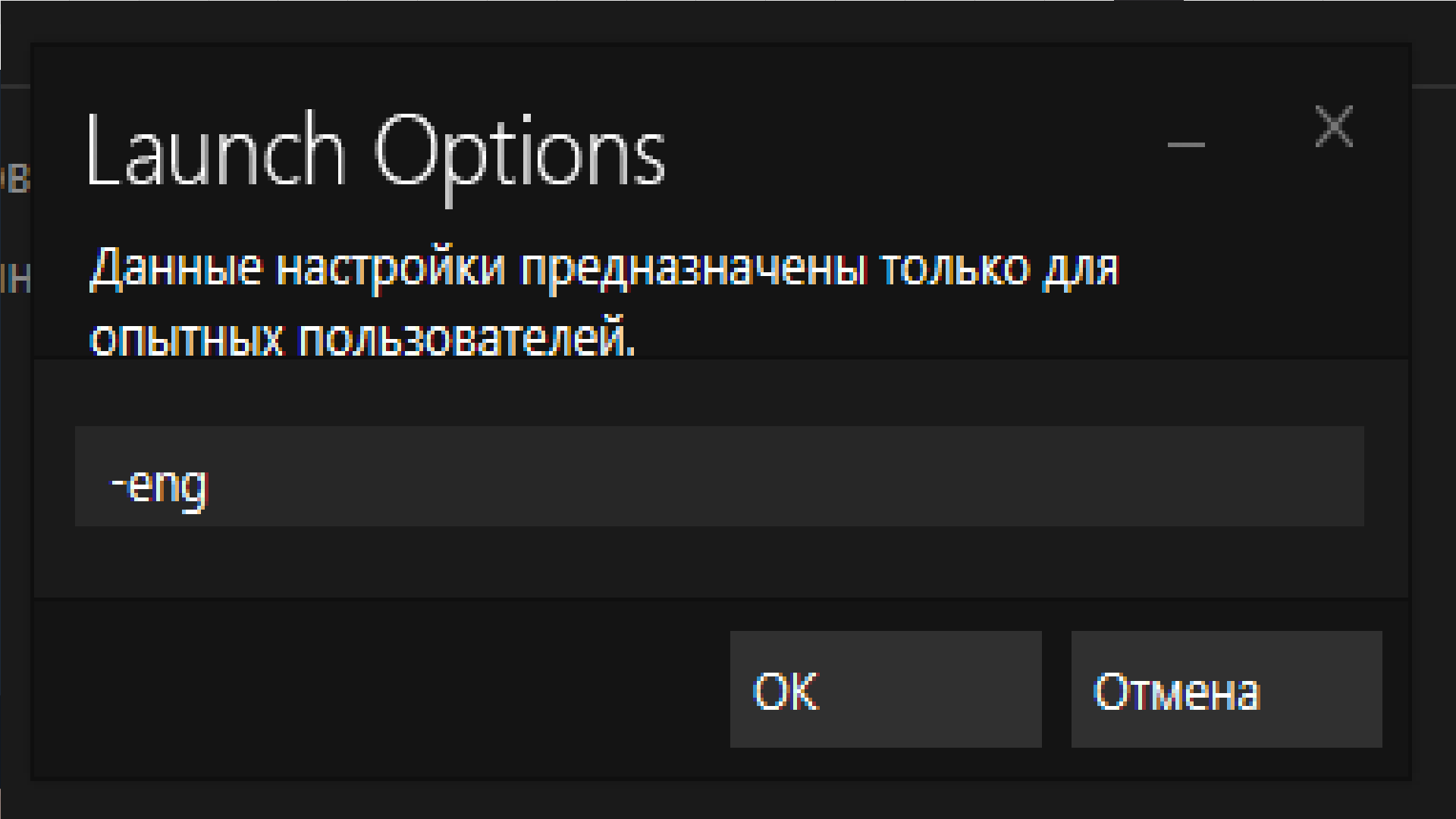
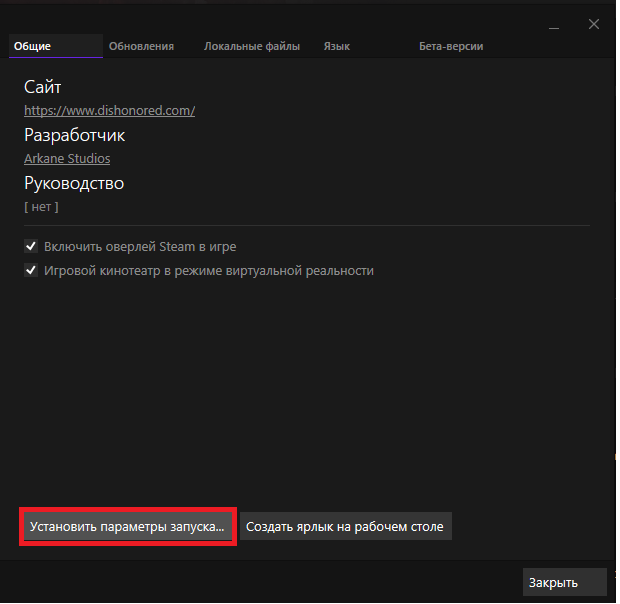 3. В появившемся окне вводим "-eng", как это показано на скриншоте.
  4. Теперь заходим в игру и видим новый пункт в настройках звука.
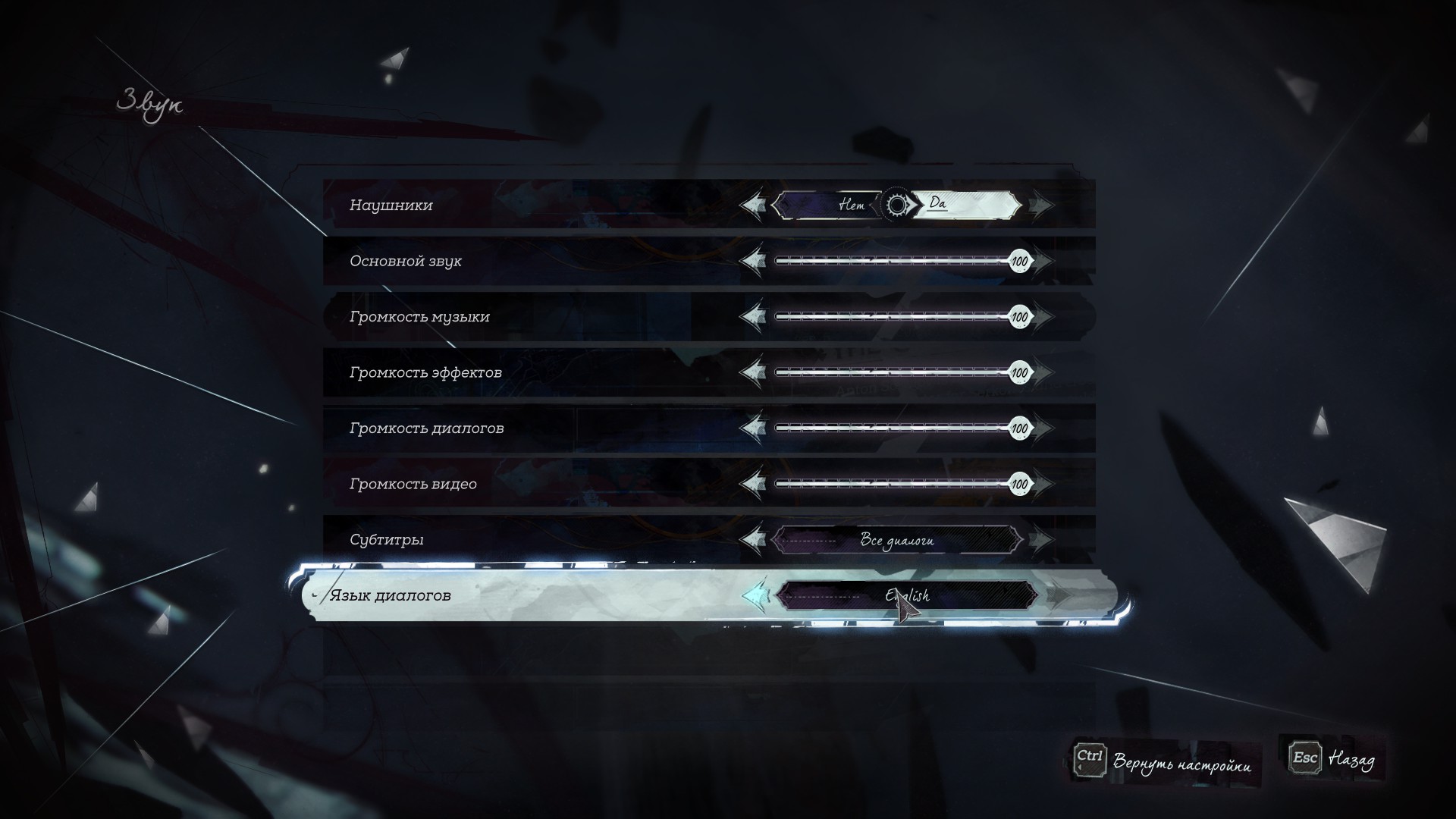
2. Теперь зайдем в свойства и в вкладке "общее" выбираем "Установить параметры запуска".
3. В появившемся окне вводим "-eng", как это показано на скриншоте.
4. Теперь заходим в игру и видим новый пункт в настройках звука.
- Меняем язык и наслаждаемся игрой!
Manual (Eng)
1. And so, to begin, go into steam and find Dishonored 2
2. Now go to properties and in the General tab select "Set launch options".
3. In the window that appears enter "-eng" as shown in the screenshot.
4. Now go into game and see a new item in the sound settings.
2. Now go to properties and in the General tab select "Set launch options".
3. In the window that appears enter "-eng" as shown in the screenshot.
4. Now go into game and see a new item in the sound settings.
- Change the language and enjoy the game!
Конец/End
Rus:
Если это руководство помогло вам, прошу зайти в профиль и оставить там что-нибудь, а с вами был ЛюкП*здюк, всем удачи и пока!
Eng:
If this guide helped you, please go to my profile and leave something there, and you were LukePezduke, good luck and bye!
In this guide i use Yandex Translater, sorry for my bad eng)
Если это руководство помогло вам, прошу зайти в профиль и оставить там что-нибудь, а с вами был ЛюкП*здюк, всем удачи и пока!
Eng:
If this guide helped you, please go to my profile and leave something there, and you were LukePezduke, good luck and bye!
In this guide i use Yandex Translater, sorry for my bad eng)
More Dishonored 2 guides
- Why You Have a Kill or Detection Listed in Your Dishonored 2 Stats Even Though You Didn’t Kill or be Detected by Anybody★ 5 (536)51k views516 ♥8 minUpdated Aug 10, 2020
- Dishonored 2 - Complete Achievement Guide★ 5 (1.3k)39k views2.8k ♥22 minUpdated 19 May
- Solving the Jindosh Riddle★ 5 (441)38k views483 ♥1 minUpdated Dec 29, 2016
- Safe Locations / Codes★ 5 (677)38k views1.9k ♥1 minUpdated Mar 21, 2017
- Dishonored 2: All Canonical Choices! - What did Emily do?★ 5 (523)36k views839 ♥8 minUpdated 25 Apr, 2023
- Достижения Dishonored 2★ 5 (2k)33k views3.2k ♥9 minRussianUpdated 19 May




🔥 Popular guides
- Upgrading to PremiumTeam Fortress 2★ 5 (20k)1441k views11k ♥6 minUpdated May 11, 2022
- No More Room in Hell Official ManualNo More Room in Hell★ 5 (2.8k)569k views2.1k ♥29 minUpdated Apr 22, 2019
- NMRiH Community Hosting GuidesNo More Room in Hell★ 5 (526)351k views653 ♥1 minUpdated Aug 10, 2022
- ULTIMATE GUIDE FOR GAME DEV TYCOONGame Dev Tycoon★ 5 (5.8k)326k views10k ♥4 minUpdated 23 Jan, 2014
- How to 'Git Gud' Soon™MORDHAU★ 5 (2k)318k views3k ♥68 minUpdated Nov 16, 2024
- Лучшие кооперативные игры SteamPAYDAY 2★ 5 (1.5k)315k views2.1k ♥56 minRussianUpdated Apr 27, 2025






This guide was created by its original author on the Steam Community. Are you the author and want it removed? Request removal.