Crash Reporting 101
Introduction
The Crash
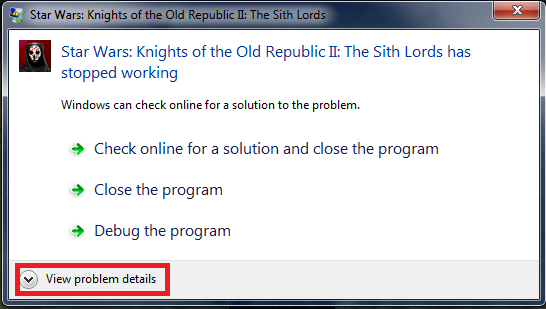
So first thing you should do is click on the "View Problem Details" button.
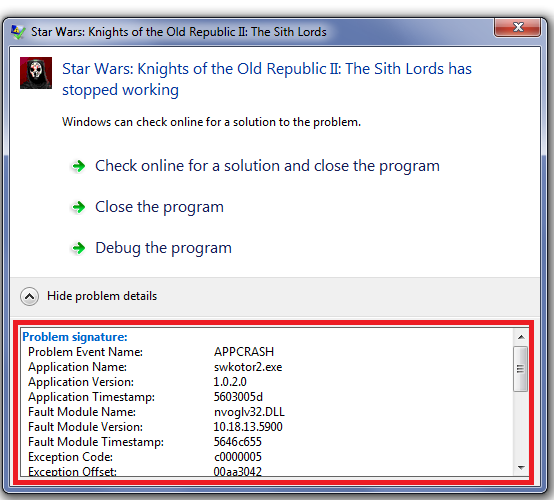
Next is select and copy the contents of it, you'll need this for later, so drop it in notepad. It'll look something like this.
Problem Event Name: APPCRASH
Application Name: swkotor2.exe
Application Version: 1.0.2.0
Application Timestamp: 5603005d
Fault Module Name: StackHash_0a9e
Fault Module Version: 0.0.0.0
Fault Module Timestamp: 00000000
Exception Code: c0000005
Exception Offset: 00000000
OS Version: 6.1.7601.2.1.0.256.48
Locale ID: 1033
Additional Information 1: 0a9e
Additional Information 2: 0a9e372d3b4ad19135b953a78882e789
Additional Information 3: 0a9e
Additional Information 4: 0a9e372d3b4ad19135b953a78882e789
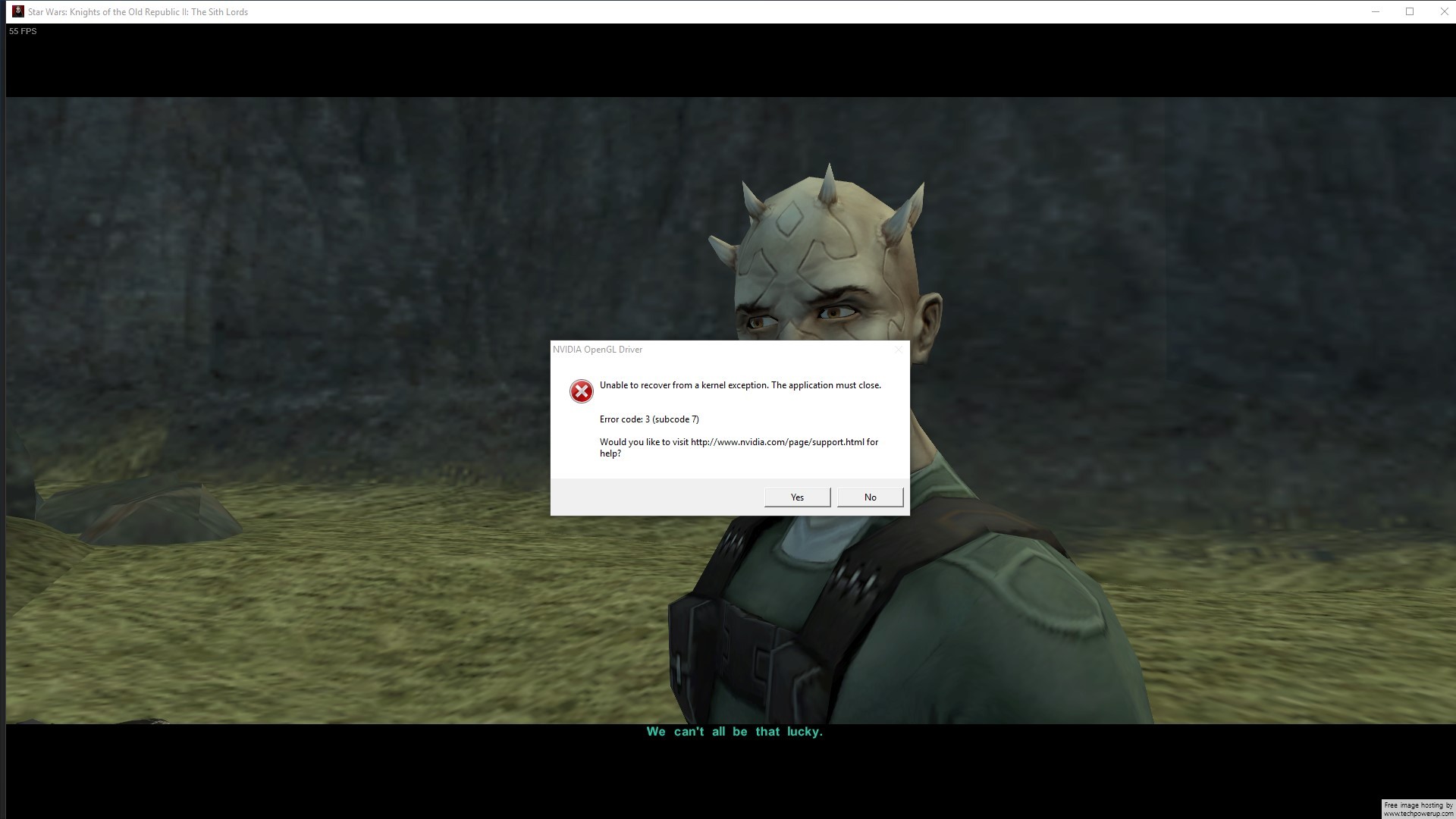
(Source: https://steamcommunity.com/app/208580/discussions/1/458604254470127410/)
Try To Replicate the Crash
If you can't replicate it, then you don't need to report anything. (Unless ofc. it happens again in another playthrough)
Example Case:
I'm having a crash on Telos after I've borded the shuttle to the surface. The cutscenes and movies run fine until the shuttle has crashed. My character gets up and the camera shows Bao-Dur's face, I'm able to select maybe 1 or 2 conversation options before the game hangs, then crashes. Sometimes the game crashes immediately upon seeing Bao-Dur.
Look for Fixes
Alternatively you can take a look at these fixes:
- http://steamcommunity.com/sharedfiles/filedetails/?id=326836697 (also read the comments section, has a few fixes in there too)
- http://www.lucasforums.com/showthread.php?t=194296 (Look at section 13 if you're having issues with ATI/AMD cards)
- http://pcgamingwiki.com/wiki/Star_Wars:_Knights_of_the_Old_Republic_II_%E2%80%93_The_Sith_Lords (Quite a long list of fixes)
- http://deadlystream.com/forum/topic/1545-nvidia-gfx-guide/?&pid=16526 (More specialised Stability improvements for Nvidia Cards, which I think might be able to help with vsync related issues)
Or if you're having Startup Crashes, try out my swkotor2.ini: http://pastebin.com/6CavZTEL (has the fixes already added, you may need to manually change the height and width to your screen resolution however, as it defaults to 1920x1080)
DxDiag/System Specifications
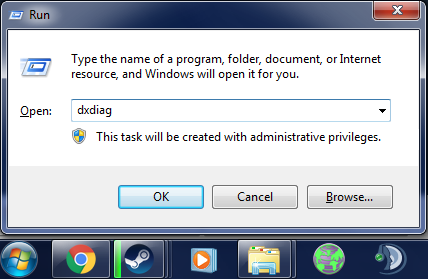 Hit enter and you'll get a DirectX Diagnostic Tool window popping up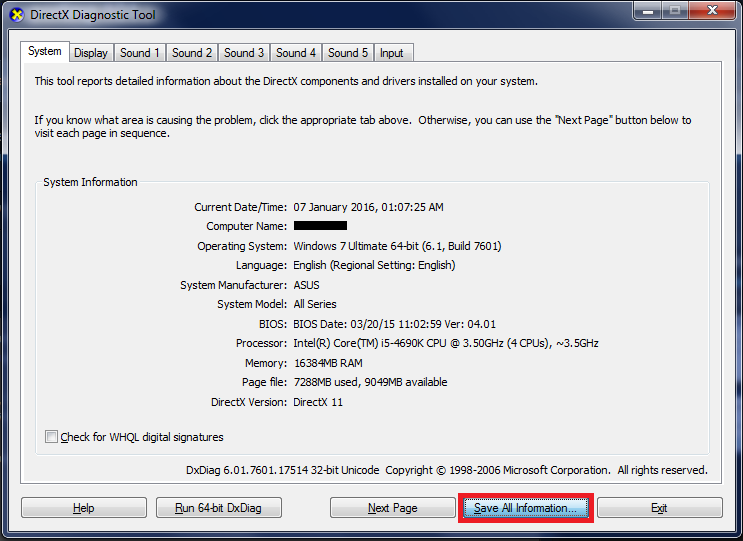
Click Save All Information... and save the file somewhere accessible. You can then open the DxDiag.txt file, and post it's information either on a pastebin or the discussion page itself. (Could be messy, but it's better than nothing) Use Pastebin[www.pastebin.com], steam has 18 000 character limit
But before you only post your dxdiag, you should read the next section on putting it all together.
- Operating System
- CPU
- Graphics Card (GPU)
- RAM
OS: Windows 7 Ultimate SP1 64bit
CPU: Intel i5-4690k
GPU: Palit Nvidia GeForce GTX 660 Ti 2GB
RAM: 16GB
Putting it all together
Formatting it right makes it really easy to read, and understand. Anyone looking to help doesn't have to read over it a few times to figure out what the hell is going on.
Note: this is just personal preference, go ahead and format it anyway you like, I'm not saying mine is the only way, or the best way to format it.
- Short, and to the point, For Example: Telos Shuttle to Surface Crash
- Don't ask for help in the title, you've posted on the Tech Support board because you need help.
- Steer clear of mentioning System Specifications in the Title, especially if you were originally going with only the OS name as your title.
- Brief description you came up with in the Try To Replicate the Crash section.
- Leave a line.
- The Evidence you found in the The Crash section.
- Leave a line.
- Your DxDiag/System Specifications/Link to DxDiag on pastebin.
- Leave a line.
- List any Mods you have installed.
- Leave a line.
- List the fixes you've tried.
- Leave a line.
- Closing Comments. (Maybe you have a feeling it has to do with the openGL libraries you have, or have another suggestion as to the nature of the problem)
While most probably won't use this format, I can dream right? Example Post: (Title: Telos Shuttle to Surface Crash)
I'm having a crash on Telos after I've borded the shuttle to the surface. The cutscenes and movies run fine until the shuttle has crashed. My character gets up and the camera shows Bao-Dur's face, I'm able to select maybe 1 or 2 conversation options before the game hangs, then crashes. Sometimes the game crashes immediately upon seeing Bao-Dur.Here's the error I get:
http://images.akamai.steamusercontent.com/ugc/365155921117814908/767E360E3B1D57F7D0D2691495F56B486B247B89/My DxDiag:
http://pastebin.com/TVnhmZ2sMods Installed:
-TSLRCM (Workshop)
-Handmaiden 4 Females Disciple 4 Males (Not Workshop)
-Canon Exile (Workshop)I've tried a variety of ini fixes
I've tried to run the game using this ini: http://pastebin.com/6CavZTEL
I'm running the exe in admin mode, and in compatability mode for Windows XP SP2It's a hard gfx card crash so I'm guessing it's openGL related, but nothing convincing came up on my search, anybody got an idea on how to fix?
Conclusion
Posting on mod issues (still pretty relevant): http://deadlystream.com/forum/topic/2390-read-me-second-information-for-those-posting-errors-glitches/
- KotOR II Cheat Codes★ 5 (1.6k)116k views4.4k ♥17 minUpdated Jul 20, 2017
- KOTOR II: The Sith Lords - Go-To Essential Mods★ 5 (768)56k views2.2k ♥13 minUpdated Feb 28
- Character and Party Optimizing Guide - Archival★ 5 (1.1k)56k views2.7k ♥51 minUpdated Apr 24, 2024
- KotOR II Steam Workshop Modding Guide★ 5 (499)46k views1.1k ♥9 minUpdated Dec 20, 2015
- KOTOR: Tips and Tricks★ 5 (386)42k views756 ♥5 minUpdated Jun 12, 2023
- Ultima Pearl (Code)★ 5 (329)32k views749 ♥1 minUpdated Nov 25, 2025


- Upgrading to PremiumTeam Fortress 2★ 5 (20k)1441k views11k ♥6 minUpdated May 11, 2022
- No More Room in Hell Official ManualNo More Room in Hell★ 5 (2.8k)569k views2.1k ♥29 minUpdated Apr 22, 2019
- NMRiH Community Hosting GuidesNo More Room in Hell★ 5 (526)351k views653 ♥1 minUpdated Aug 10, 2022
- ULTIMATE GUIDE FOR GAME DEV TYCOONGame Dev Tycoon★ 5 (5.8k)326k views10k ♥4 minUpdated 23 Jan, 2014
- How to 'Git Gud' Soon™MORDHAU★ 5 (2k)318k views3k ♥68 minUpdated Nov 16, 2024
- Лучшие кооперативные игры SteamPAYDAY 2★ 5 (1.5k)315k views2.1k ♥56 minRussianUpdated Apr 27, 2025






This guide was created by its original author on the Steam Community. Are you the author and want it removed? Request removal.