Disabling Intro Videos: One Command
Introduction
Dishonored 2 supports commands created by the developers that will run when launching the game. This one will completely disable the intro videos, putting you straight into the main menu. Below is the command, and further down I explain how to enable it if you don't know
The Command
+com_showLoadingScreen 0
How to Enable the Command
1.
a. Make sure you have copied the command above
b. Navigate to your Steam Library and right-click on "Dishonored 2"
c. Select "Properties..." in the drop-down menu
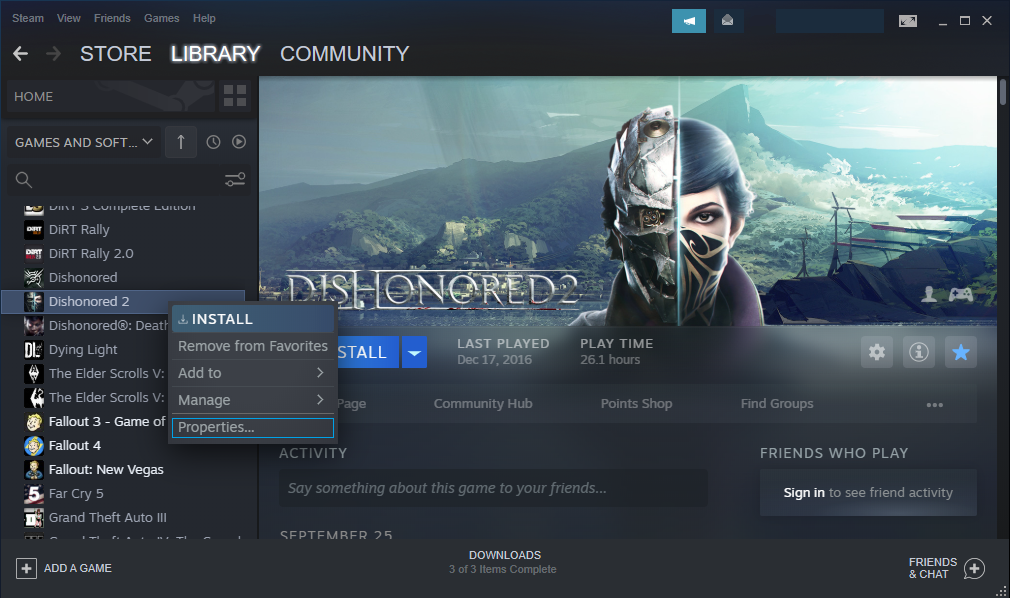
2.
a. Right-click in the Launch Options box
b. Select Paste
c. Close the window
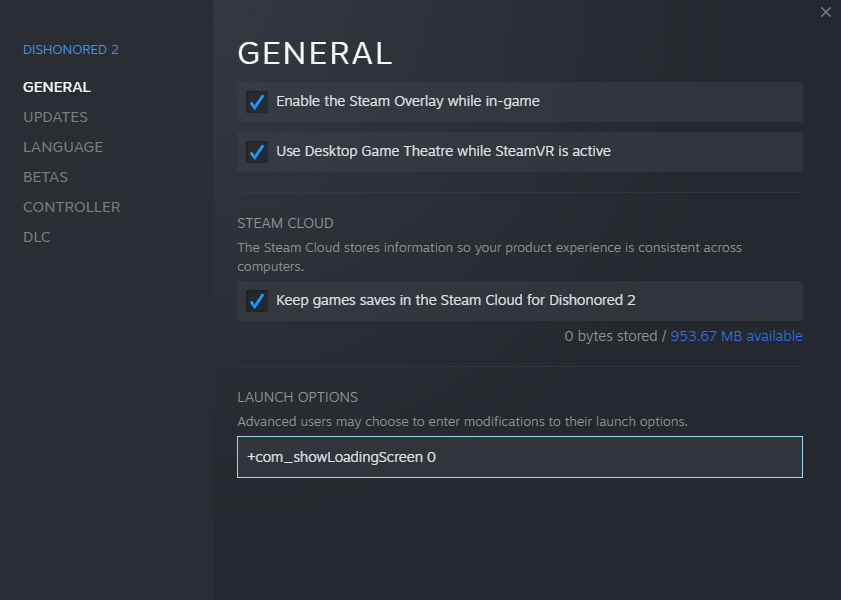
Done
You can now play the game with no more intro videos
Miscellaneous
Thanks
Credit to Frypolar on Reddit for sharing this command[redd.it]
Change Log
2019: Removed [color] tag due to it no longer working.
2020: Removed Capitalisation In Every Word Of Every Sentence.
2021: Added new guide images, reworded guide content, formatted titles, and removed full stops
Credit to Frypolar on Reddit for sharing this command[redd.it]
Change Log
2019: Removed [color] tag due to it no longer working.
2020: Removed Capitalisation In Every Word Of Every Sentence.
2021: Added new guide images, reworded guide content, formatted titles, and removed full stops
More Dishonored 2 guides
- Why You Have a Kill or Detection Listed in Your Dishonored 2 Stats Even Though You Didn’t Kill or be Detected by Anybody★ 5 (536)50k views516 ♥8 minUpdated 10 Aug, 2020
- Dishonored 2 - Complete Achievement Guide★ 5 (1.3k)39k views2.8k ♥22 minUpdated 19 May
- Solving the Jindosh Riddle★ 5 (441)38k views483 ♥1 minUpdated 29 Dec, 2016
- Safe Locations / Codes★ 5 (677)38k views1.9k ♥1 minUpdated 21 Mar, 2017
- Dishonored 2: All Canonical Choices! - What did Emily do?★ 5 (523)36k views839 ♥8 minUpdated 25 Apr, 2023
- Достижения Dishonored 2★ 5 (2k)33k views3.2k ♥9 minRussianUpdated 19 May





🔥 Popular guides
- Upgrading to PremiumTeam Fortress 2★ 5 (20k)1441k views11k ♥6 minUpdated May 11, 2022
- No More Room in Hell Official ManualNo More Room in Hell★ 5 (2.8k)569k views2.1k ♥29 minUpdated Apr 22, 2019
- NMRiH Community Hosting GuidesNo More Room in Hell★ 5 (526)351k views653 ♥1 minUpdated Aug 10, 2022
- How to 'Git Gud' Soon™MORDHAU★ 5 (2k)318k views3k ♥68 minUpdated Nov 16, 2024
- Лучшие кооперативные игры SteamPAYDAY 2★ 5 (1.5k)315k views2.1k ♥56 minRussianUpdated Apr 27, 2025
- Desert Eagle Heat Treated | Blue GemCounter-Strike 2★ 5 (1.6k)293k views1.5k ♥2 minUpdated Jan 16





This guide was created by its original author on the Steam Community. Are you the author and want it removed? Request removal.