Far Cry 2 Restoration Guide (original guide by Burnedfood)
Introduction
Far Cry 2 is truly a rough diamond, but with a few mods and tweaks the core game can really shine and show the beautiful, yet harsh landscape of Africa.
Goal
My aim with this guide is to show you how to create the experience that I believe, the developer's wanted. This means fixing some bugs, and making the gameplay more refined and balanced.
Prerequisites
- A fresh installation or unmodded installation of Far Cry 2.
- Notepad ++[notepad-plus-plus.org] (A free alternative to Windows' Notepad, that's miles better.)
- 7-Zip[www.7-zip.org] or WinRAR[www.win-rar.com]
IMPORTANT NOTE
Make all changes to the options menu before you start making changes to the configuration file (GamerProfile.xml)! This is just to prevent some future headaches with changing any options in the future. This is further explained in the Last Step for GamerProfile.xml (Setting the File to Read-Only) section of this guide.
Disabling Mouse Acceleration [GamerProfile.xml Tweaks]
- Navigate to: Documents\My Games\Far Cry 2
- Right-click GamerProfile.xml and left-click Edit with Notepad++
- Press Ctrl+F
- Find and set the following:
UseMouseSmooth="0"
Smoothness="0"
Smoothness_Ironsight="0"
- Save the file.
Fullscreen Resolution Fix [GamerProfile.xml Tweaks]
- Navigate to: Documents\My Games\Far Cry 2
- Right-click GamerProfile.xml and left-click Edit with Notepad++
- Press Ctrl+F
- Find and set the following:
ResolutionX="1920"
ResolutionY="1080"
Fullscreen="1"
Maximized="1"
ForceWidescreen="1"
WidescreenFOV="1"
- Replace ResolutionX and ResolutionY with your desired resolution.
- Save the file.
Field of View (FOV) and a Couple of Bug Fixes
Far Cry 2 MultiFixer Download:
Download from Github[github.com]
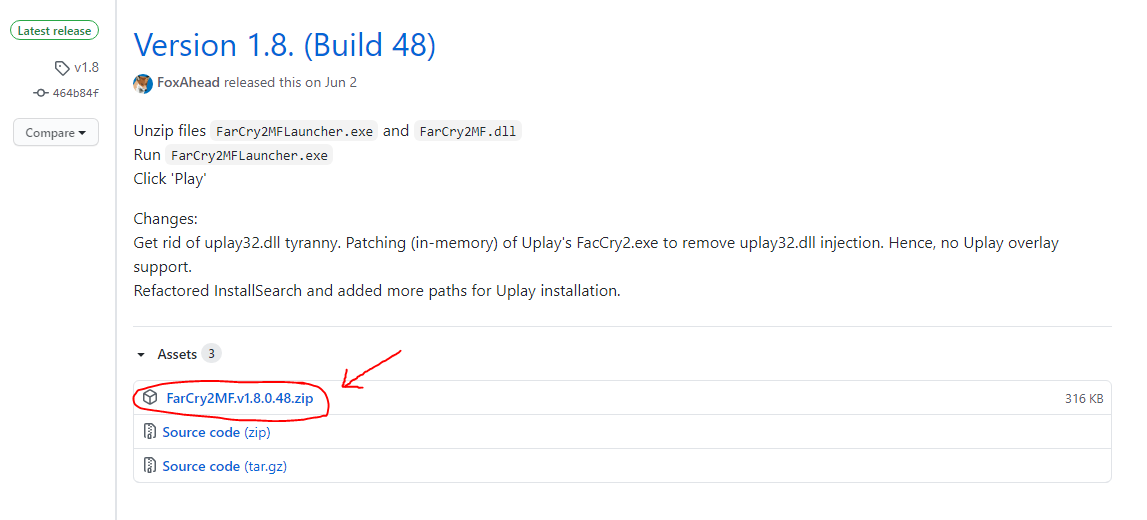
Installation:
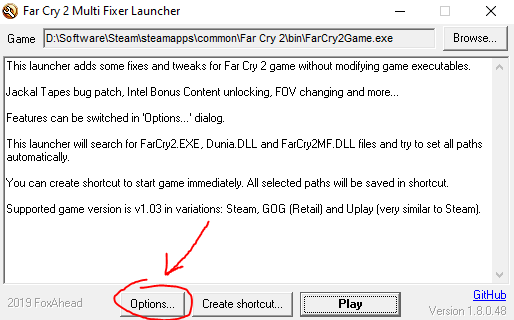
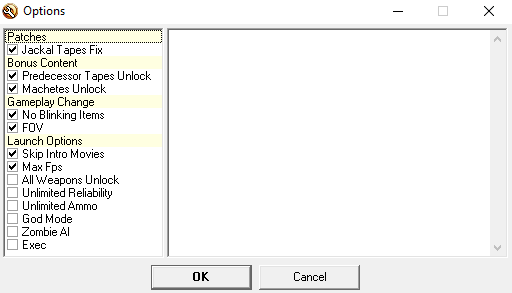
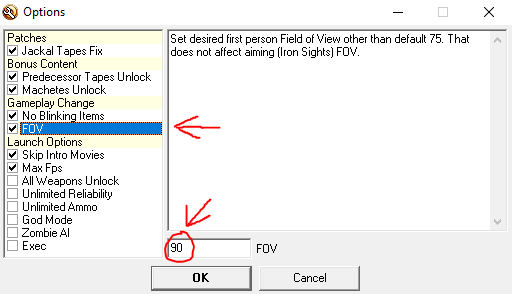
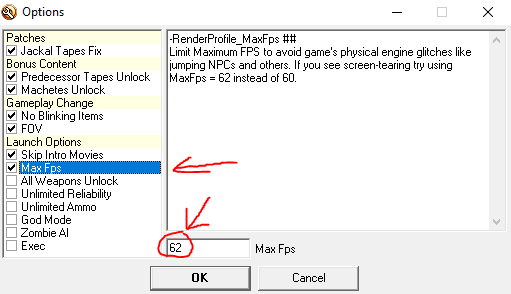
It's important that you set the Max Fps to 62 or else you'll experience bouncing NPCs and other issues.
If you don't want to go through the launcher every time you launch the game:
Now you can launch the game without going through the launcher while still having the fixes enabled!
All credit goes to the developer of this essential piece of software. Wouldn't be able to play the game without it!
Download from Github[github.com]
Installation:
- Right-click and open the downloaded file with 7-zip or WinRAR.
- Extract the contents to \Steam\steamapps\common\Far Cry 2\bin
- Rename FarCry2.exe to FarCry2Game.exe
(It may just be called FarCry2 - Don't worry if you don't see the .exe) - Rename FarCry2MFLauncher.exe to FarCry2.exe
(Again, it may just be called FarCry2MFLauncher) - Launch the game through Steam.
- Do the following:
It's important that you set the Max Fps to 62 or else you'll experience bouncing NPCs and other issues.
- Set the FOV to whatever you'd like.
- Left-click OK and left-click Play
If you don't want to go through the launcher every time you launch the game:
- Right-click Far Cry 2 in your Steam library.
- Left-click Properties
- Left-click Set Launch Options...
- Insert the following:
-play
- Left-click OK.
- Left-click OK again.
Now you can launch the game without going through the launcher while still having the fixes enabled!
All credit goes to the developer of this essential piece of software. Wouldn't be able to play the game without it!
Balancing Mods With More Bug Fixes
Only use one of these mods, since they are not compatible.
Vanilla+ (Tom's Mod):
Download from Nexus Mods[www.nexusmods.com]
Download from Moddb
This mod balances the vanilla gameplay and makes it much more fun. But unfortunately, it still leaves the frustration of the AI respawning. If you want an experience that's the closest to vanilla/unmodded Far Cry 2, then this mod is the one you want!
Installation:
Dylan's Far Cry 2 Realism Mod:
Download from Moddb
This mod offers the optimal experience, in my opinion. The AI respawns aren't nearly as frustrating since they don't commit to chase as much, so you can blast through an outpost. The mod makes combat a lot more lethal and fun. If you don't mind more of a change from vanilla/unmodded Far Cry 2 and/or wish for a more lethal experience (or if the outpost AI respawns really frustrate you, like they did I), then this mod is the one you want!
Installation:
DISCLAIMER: Neither of these mods will completely fix the ridiculous respawn time of the enemies but Dylan's Realism Mod will make it a lot less annoying.
All credit goes to the developers of these amazing and essential mods.
Vanilla+ (Tom's Mod):
Download from Nexus Mods[www.nexusmods.com]
Download from Moddb
This mod balances the vanilla gameplay and makes it much more fun. But unfortunately, it still leaves the frustration of the AI respawning. If you want an experience that's the closest to vanilla/unmodded Far Cry 2, then this mod is the one you want!
Installation:
- Open the downloaded file with either 7-zip or WinRAR.
- Open the folder in the archive.
- Open the Main Files folder.
- Choose what you'd like to have as a gadget, and open that folder. I chose IED Gadget.
- Choose whether you'd like to be able to save anywhere or if you have to use save stations, and open the folder you choose. I chose Save Anywhere.
- Extract these two folder (bin and Data_Win32) to \Steam\steamapps\common\Far Cry 2
- Merge and overwrite when asked.
- Done!
Dylan's Far Cry 2 Realism Mod:
Download from Moddb
This mod offers the optimal experience, in my opinion. The AI respawns aren't nearly as frustrating since they don't commit to chase as much, so you can blast through an outpost. The mod makes combat a lot more lethal and fun. If you don't mind more of a change from vanilla/unmodded Far Cry 2 and/or wish for a more lethal experience (or if the outpost AI respawns really frustrate you, like they did I), then this mod is the one you want!
Installation:
- Open the downloaded file with either 7-zip or WinRAR.
- Open the folder in the archive.
- Open the FC2 Steam Fortunes Pack folder.
- Extract patch.dat and patch.fat to \Steam\steamapps\common\Far Cry 2\Data_Win32
- Overwrite when asked.
- Done!
DISCLAIMER: Neither of these mods will completely fix the ridiculous respawn time of the enemies but Dylan's Realism Mod will make it a lot less annoying.
All credit goes to the developers of these amazing and essential mods.
Graphical Improvements [GamerProfile.xml Tweaks]
I recommend running the game in DirectX 9 instead of DirectX 10. I don't really see any improvements from running it in DirectX 10 and DirectX 9 is a requirement for the Vanilla+ (Tom's Mod) mod.
Shadow Quality and Geometry Quality must be set to Ultra High for these changes to work!
- Navigate to \Documents\My Games\Far Cry 2\
- Right-click GamerProfile.xml and left-click Edit with Notepad++
- Copy the following:
<Geometry>
<quality LodScale="0" id="ultrahigh" />
</Geometry>
<Shadow>
<quality SunShadowRange1="60" id="ultrahigh" />
<quality SunShadowRange0="30" id="ultrahigh" />
<quality SunShadowRange2="160" id="ultrahigh" />
</Shadow>
- And paste it between </CustomQuality> and </RenderProfile>
- The config file should look something like this:
- Save the file.
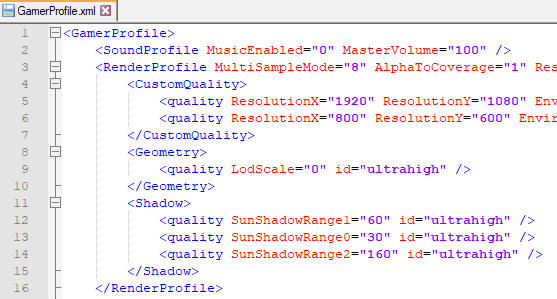
Shadow Quality and Geometry Quality must be set to Ultra High for these changes to work!
Disabling Depth of Field (DOF) & Motion Blur [GamerProfile.xml Tweaks]
- Navigate to \Documents\My Games\Far Cry 2\
- Right-click GamerProfile.xml and left-click Edit with Notepad++
- Copy the following:
<Post>
<quality GameDepthOfField="0" CinematicDepthOfField="0" MotionBlur="0" id="ultrahigh" />
</Post>
- And paste it between </CustomQuality> and </RenderProfile>
- The config file should look something like this:
- Save the file.
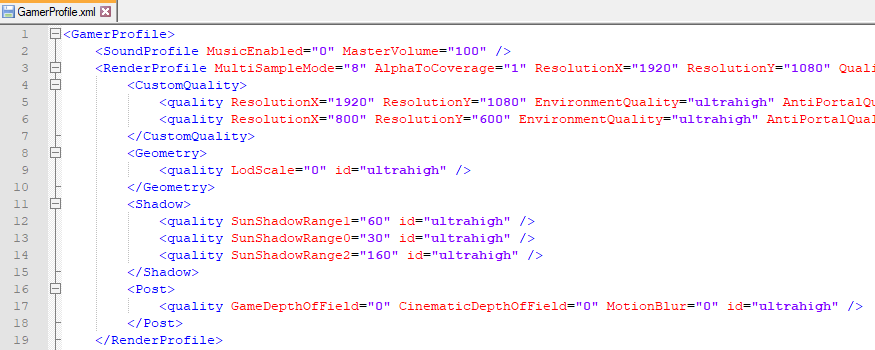
Post Quality must be set to Ultra High for these changes to work!
DISCLAIMER: This will not disable the blur when you sprint or aim. I have yet to find a fix for that.
Last Step for GamerProfile.xml [Setting the File to Read-Only]
After you've changed everything you wish in GamerProfile.xml do the following:
This step is important as the game will likely reset all of your custom changes, when you play Far Cry 2 again.
NOTE: Setting the file to read-only means that the game can not make any changes to the file (neither can you, unless you uncheck read-only), so if you wish to make any changes to the options in-game; you can either uncheck read-only and do it manually in the file or you can uncheck read-only and do it in-game but that does mean that you may have to make all of the custom changes again!
- Navigate to: \Documents\My Games\Far Cry 2
- Right-click GamerProfile.xml and left-click Properties
- Check read-only.
- Left-click Apply and OK
- Done!
This step is important as the game will likely reset all of your custom changes, when you play Far Cry 2 again.
NOTE: Setting the file to read-only means that the game can not make any changes to the file (neither can you, unless you uncheck read-only), so if you wish to make any changes to the options in-game; you can either uncheck read-only and do it manually in the file or you can uncheck read-only and do it in-game but that does mean that you may have to make all of the custom changes again!
ReShade
- Download ReShade[reshade.me]
- Launch the downloaded executable.
- Do the following:
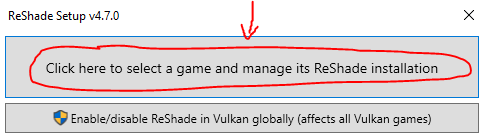
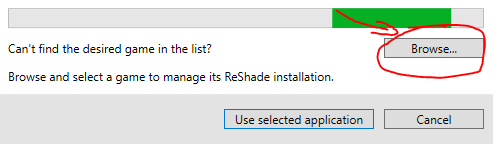
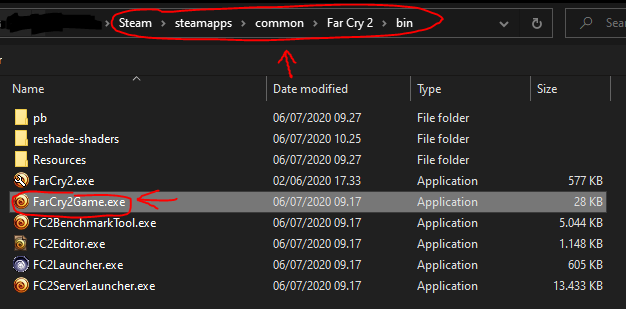
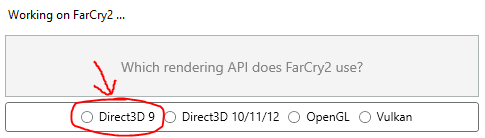
- Make sure the following options are checked:
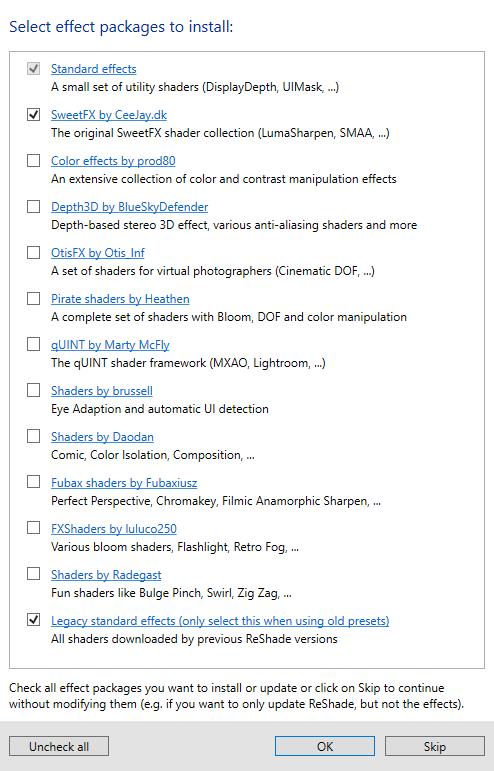
- Click OK
- Make sure all of the following options are unchecked:
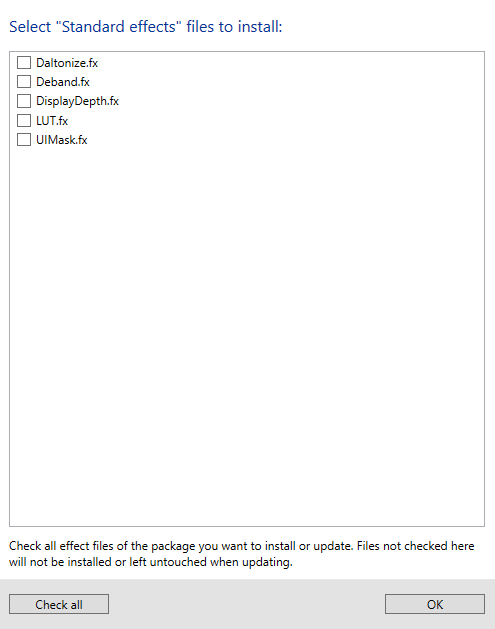
- Click OK
- Make sure the following options are checked:
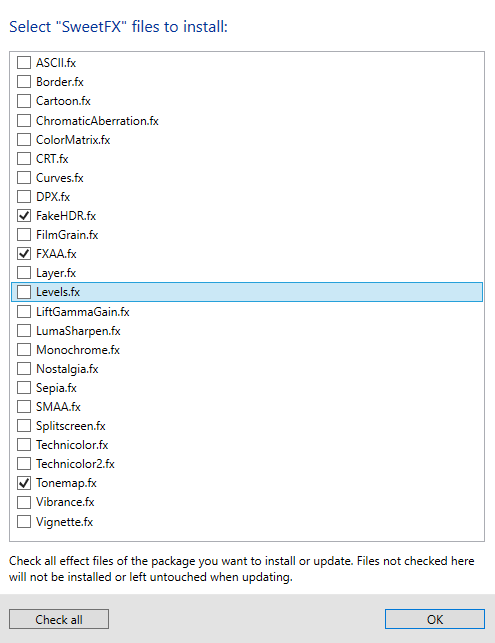
- Make sure only the two following options are checked:
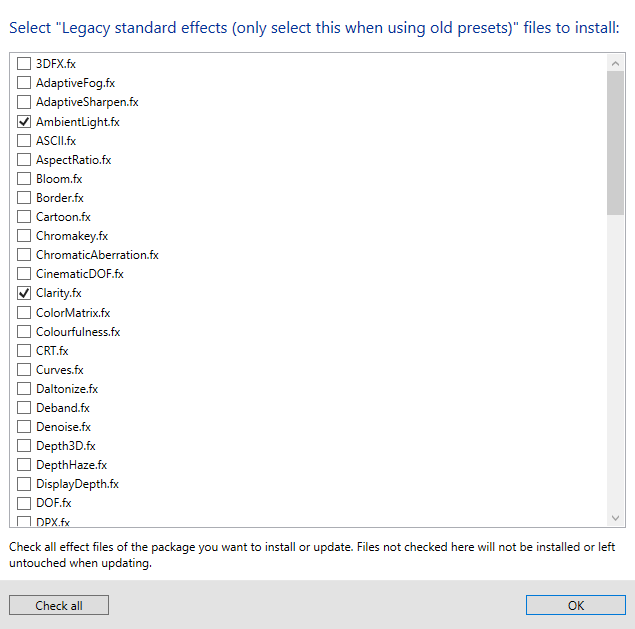
- Click OK
- Close ReShade.
- Download my personal preset:
Download from Moddb
If you wish to use another preset then you'll have to download many more effects. I only showed you the effects you need to use my preset.
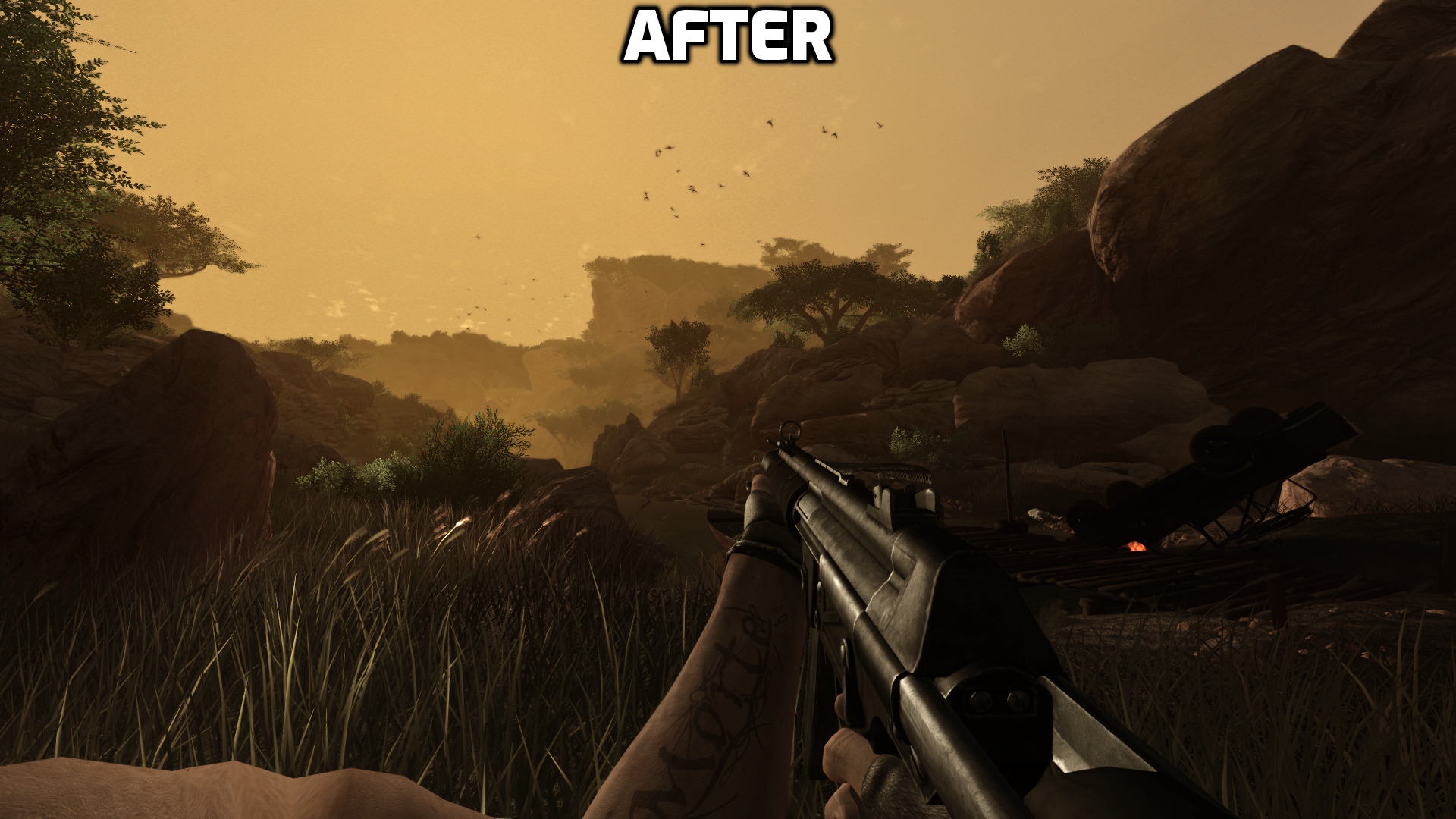
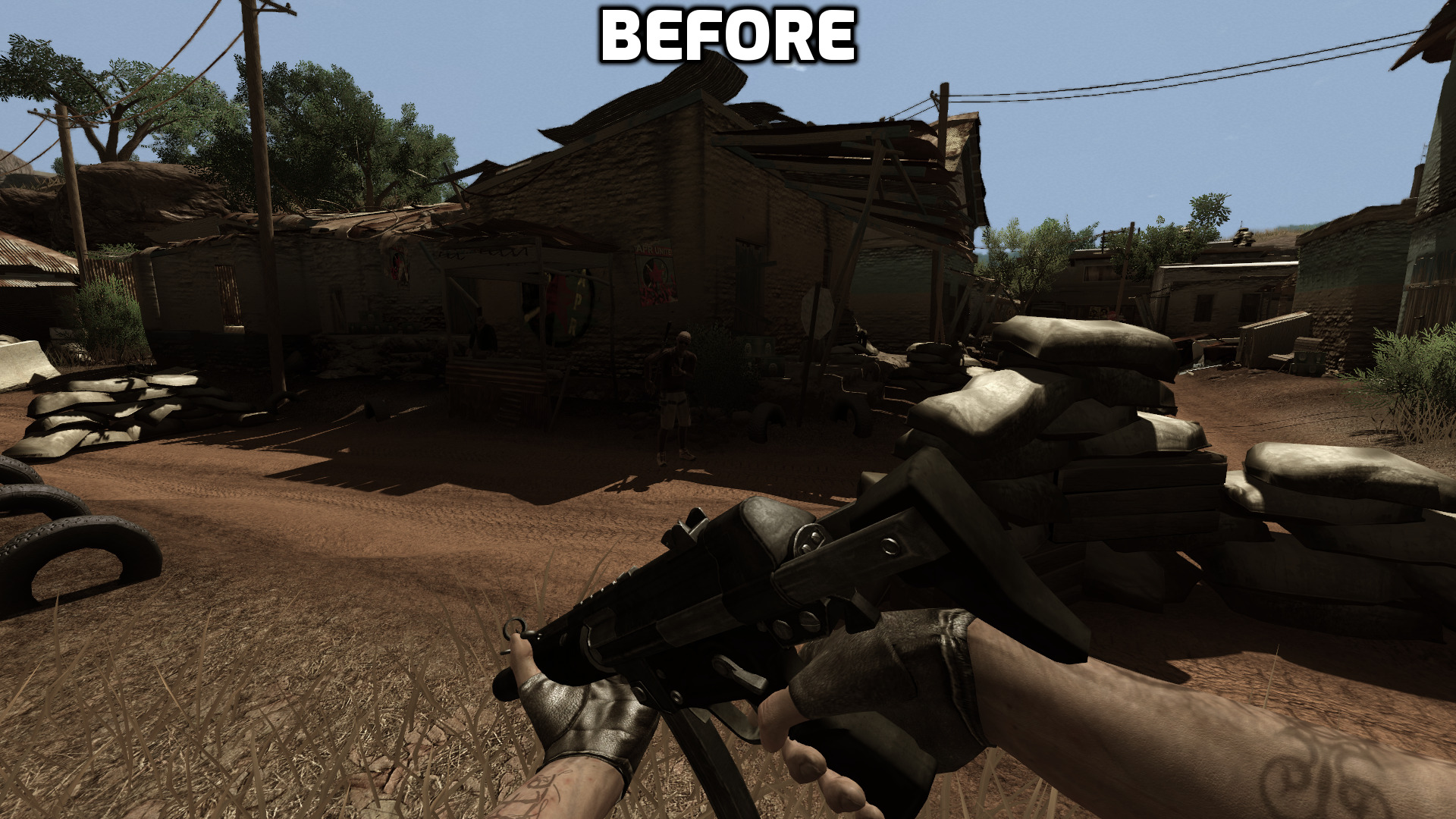
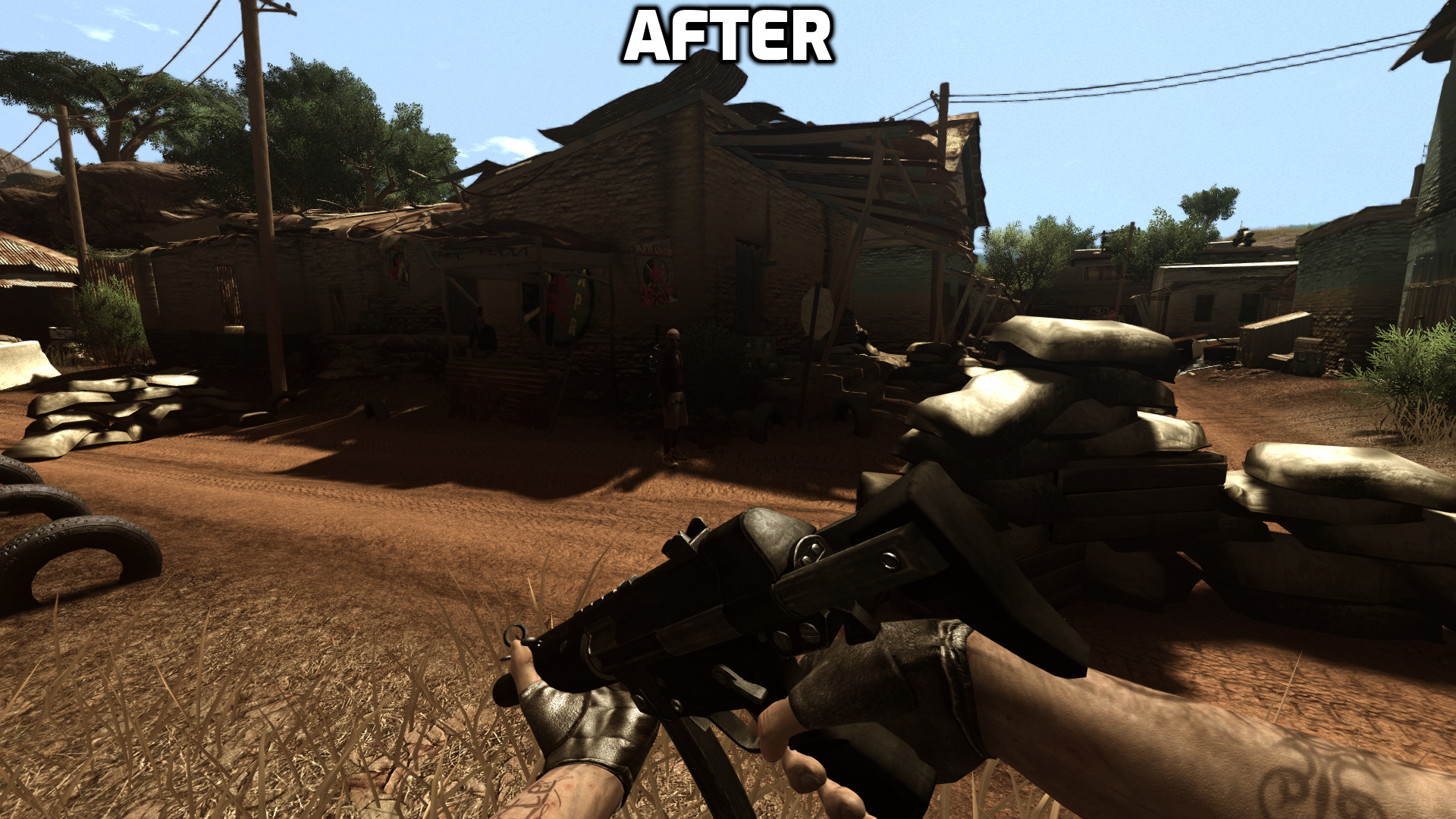
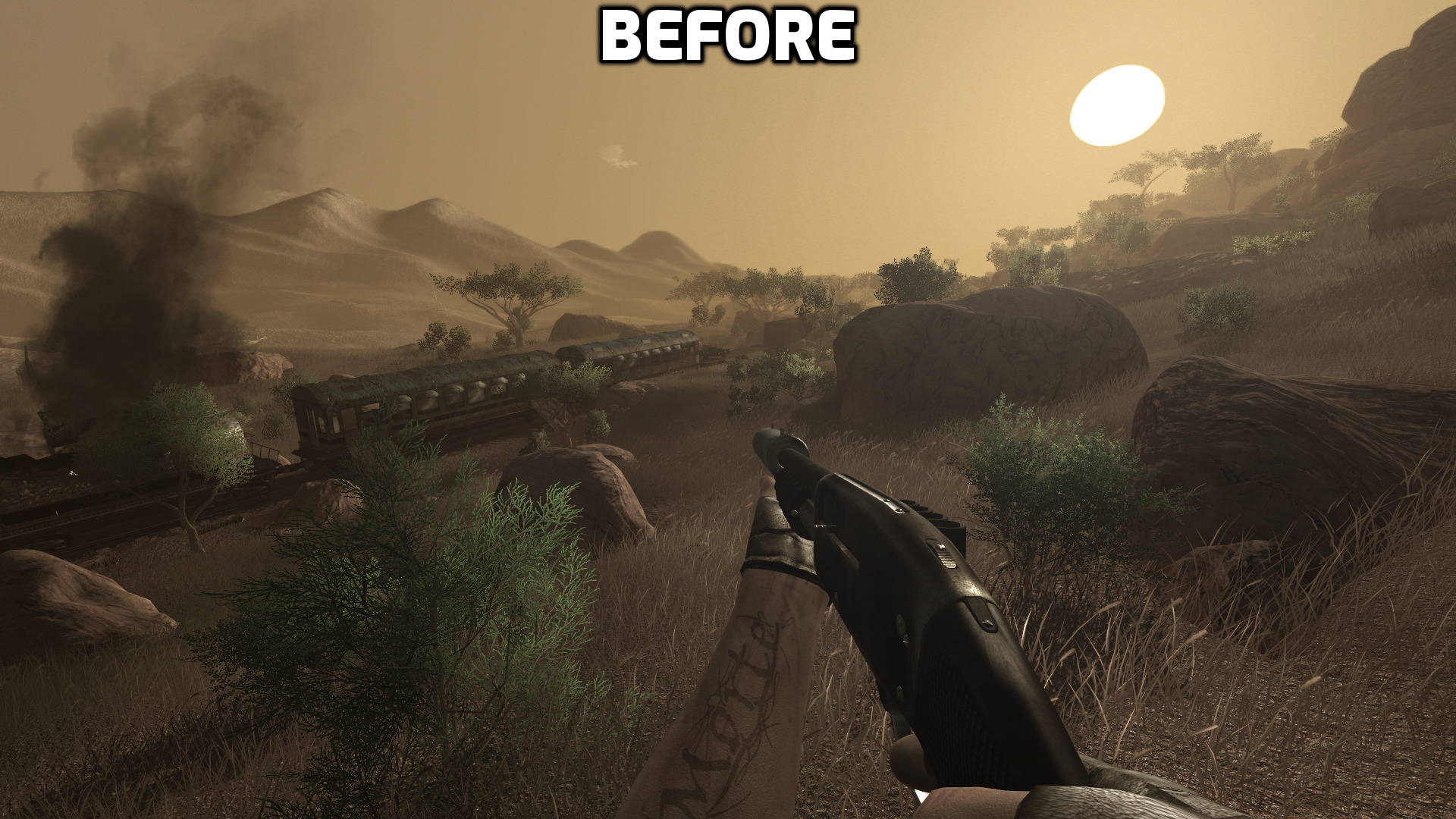
Before & After
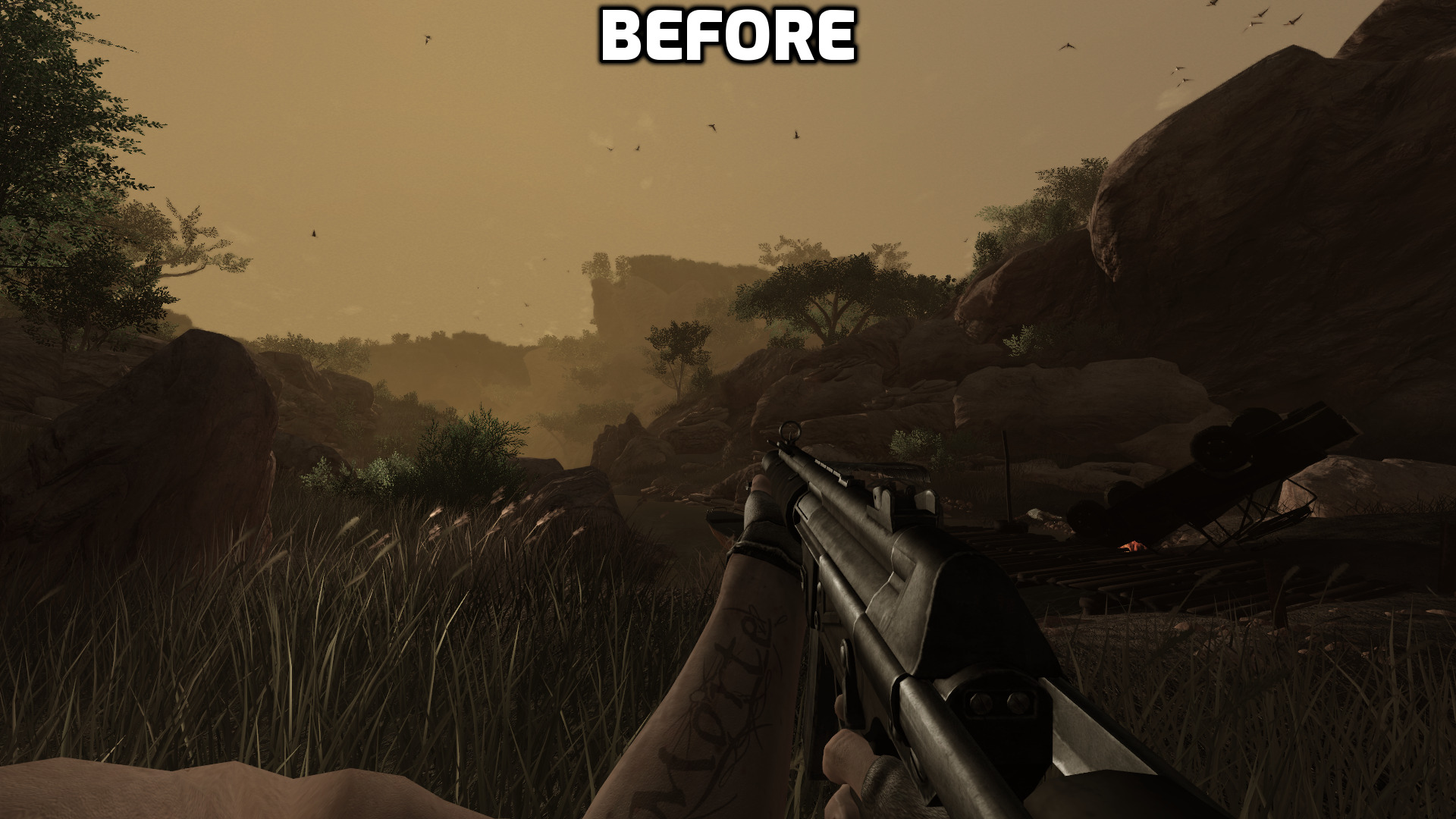
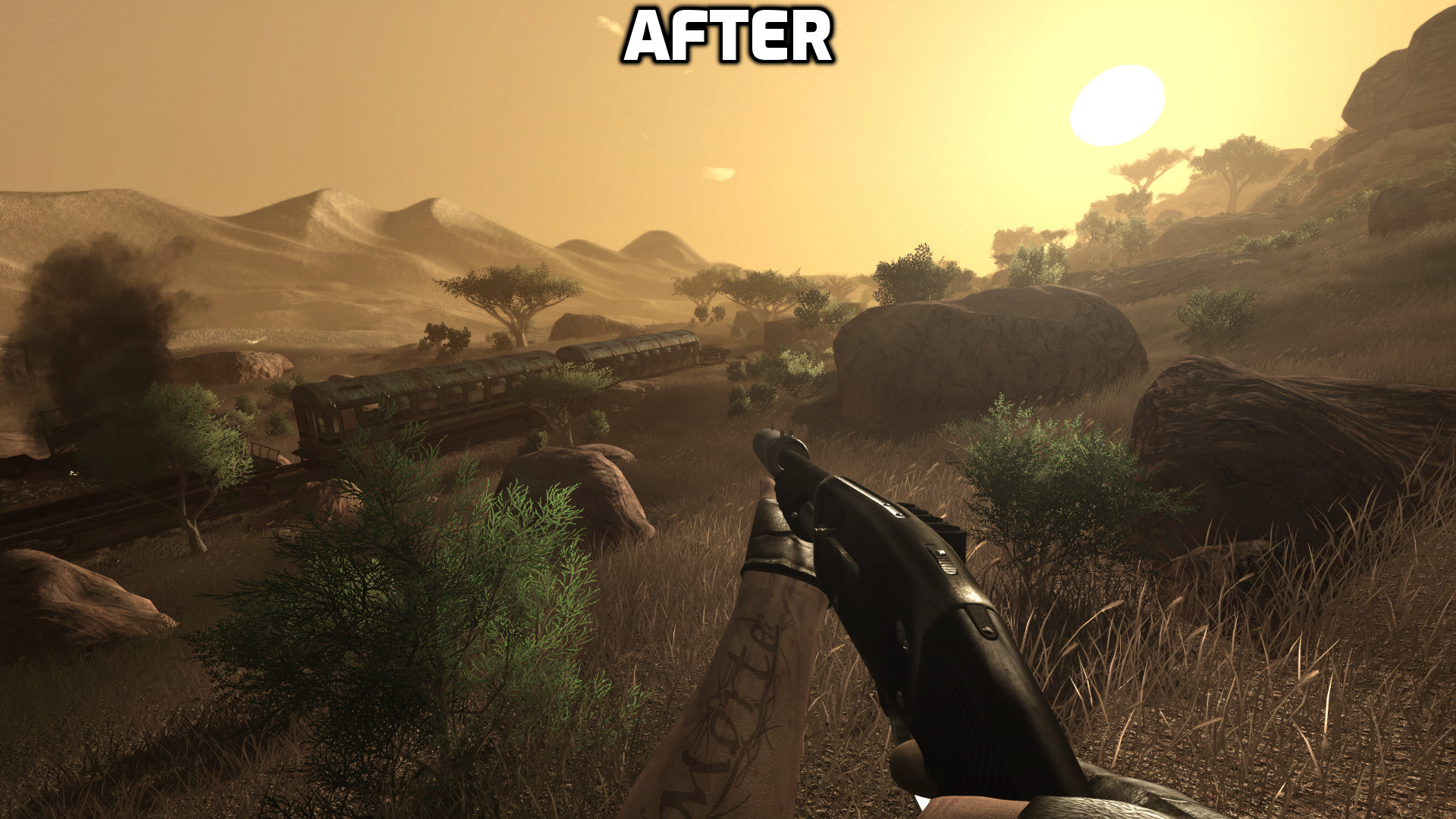
Credits
A great thank you to the creator of the following guide:
https://steamcommunity.com/sharedfiles/filedetails/?id=819645832
https://steamcommunity.com/sharedfiles/filedetails/?id=819645832
Final Notes
Thank you so much for reading my guide. I hope you found it helpful. If you have any questions or feedback then please let me know in the comments!
There are two things I am still trying to find a fix for. One, the mouse sensitivity in the menu being incredibly slow when playing at a low(er) sensitivity in-game. Two, the ridiculous respawn rate of enemy posts. Fixed in Realism+Redux and Scubrah's Patch Mods!
There are two things I am still trying to find a fix for. One, the mouse sensitivity in the menu being incredibly slow when playing at a low(er) sensitivity in-game. Two, the ridiculous respawn rate of enemy posts. Fixed in Realism+Redux and Scubrah's Patch Mods!
More Far Cry 2 guides
- Revisiting Farcry 2 [complete / bug-fix]★ 5 (650)35k views1.4k ♥42 minUpdated Feb 13
- Русификатор для "Far Cry 2"★ 5 (2.9k)33k views952 ♥1 minRussianUpdated May 23, 2017
- Far Cry 2 Multi Fixer (ENG)★ 5 (480)31k views875 ♥6 minUpdated Dec 12, 2025
- Far Cry 2 Cheats★ 5 (227)19k views463 ♥1 minUpdated Nov 7, 2017
- Far Cry 2 Cheats: Cheat Codes, Cheats★ 5 (202)19k views359 ♥1 minUpdated Sep 3, 2014
- Know your enemy (stealth mechanics and the tactical approach)★ 5 (425)16k views421 ♥14 minUpdated Jul 20, 2019


This guide was created by its original author on the Steam Community. Are you the author and want it removed? Request removal.