Final Fantasy XV - Graphics & Optimisations
Introduction

Final Fantasy XV remains a personal, heartfelt favourite of mine. I am still finding so much joy across Console and PC, and I wanted to ensure everybody else has the best opportunity to enjoy this game to the fullest.
For PC gamers, graphics are the juiciest, but most troublesome settings...
With this guide, the goal is not to achieve Ultra Graphical Fidelity where you can see Noctis' pores & sweat;
These graphical settings aim to achieve a smooth experience, while preserving the intended art style.
These graphics settings are either from my own extensive comparisons, or are a compilation from other sources, but this guide aims to be a loose assistance to hopefully support you on your adventure~!


Summary of Settings
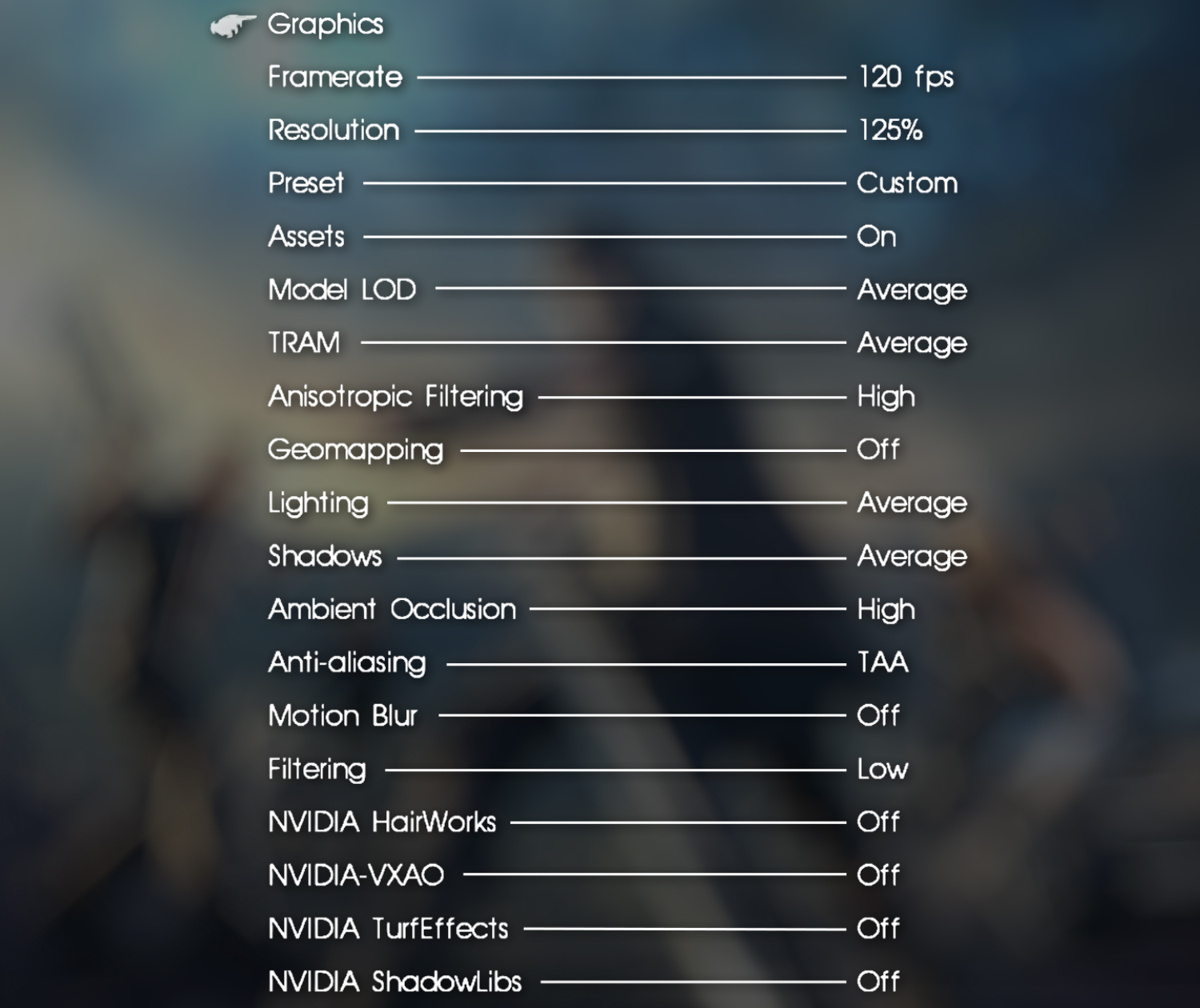
Graphics Settings
If you are happy with the settings above, you don't need to read fruther.
Everything below here goes into further and greater detail for the choices made, and what each setting does.
The higher the FPS, the smoother the visual experience will be, at the expense of having to render more frames.
The lower the FPS, the less frames your GPU has to render, and can focus on other tasks, prioritising a more stable experience.
The maximum frame rate your game will show, will depend on what monitor you have.
If you do not see 120FPS or 144FPS, you may have a lower refresh rate monitor not capable of these speeds.
The higher you set it, the sharper, crisper, cleaner details & textures will be, with setting it lower having the opposite effect.
If you set it high, this can be a massive resource drain. If you set it lower, it will save a lot of processing power, at the expense of quality.
Each preset is so well-tuned, we couldn’t improve on them.
Assets is all about user choice. It's a huge download, and doesn't just improve the quality of textures, but changes the art style of many.
The higher Model LOD is set, the distance objects will be rendered in the distance will increase.
The lower Model LOD is set, the distance objects will be rendered in the distance will decrease.
TRAM (Texture RAM) directly effects the quality of the textures by allocating more or less memory to texture capacity/quality. The higher TRAM is set, the better the textures will look, but at a significant performance loss.
Across many surfaces, the visual differences are minimal. The most notable change/improvement will be on beaches, with the sand having significantly better depth and definition.
However, when set to low, Screen Space Reflections are disabled across surfaces like water, and the Regalia.
Higher settings merely increase the sharpness & clarity of shadows, where lower settings soften the shadows.
FXAA is a low performance option, smoothing out a lot, without a huge performance loss, but not as good looking as TAA.
TAA (Temporal Anti-Aliasing) is a higher performance option, providing the best smoothing, but at the expense of more performance loss.
TAA can cause the game to appear blurry when playing at lower resolutions. (1080p or below)
A lot of the visual elements were designed with this feature in mind, such as the hair. At a lower resolution, TAA can look somewhat unsatisfactory and blurry. However, playing at higher resolutions, TAA works even better.
NVIDIA Graphic Settings
The implementation of NVIDIA Graphics Features is arguably not great.
The performance penalty to enable certain features can be unpredictable.
These settings are all about user preference.
For NVIDIA Graphics settings, especiallyTurfEffects and ShadowLibs settings, I think this is a similar situation to Assets, where it's entirely up to the user.
While the implementation introduces more style, depth, and physics to the fur, it can come with a performance decrease when enabled, with it worsening depending on how many creatures are on screen.
NVIDIA has shown TurfEffects technology to deform and move around characters, but in Final Fantasy XV, this is not entirely the case.
SteamDeck
SteamDeck Optimisations are in-progress. These are the currently deployed settings, and may change.Final Fantasy XV on the SteamDeck can be enjoyable, but not without some sacrifice.
If the developers still existed, I'm sure they would make further optimisations, but alas, we have to figure it out for ourselves!
Our biggest enemy? The battery! Final Fantasy XV is a battery drainer.
With the settings below, at a 50% charge, 2 hours of playtime could be expected!


Steam Deck Performance Settings:
Per-game Profile: On
Frame Limit: 30 FPS
TDP Limit: 12 Watts
GPU Clock: 1200 MHz
Ingame Settings:
Framerate: 30FPS
Resolution: 125%
Preset: Low
NVIDIA Features: Off
Strangely, locking the Screen Refresh Rate & In-Game FPS to 30fps looks smoother than only locking the In-Game FPS to 30fps...
Further Optimisations...
Extra!
Conclusion

Final Fantasy XV can be troublesome to optimise, but I hope you find a rewarding experience in this adventure.
- The "Don't sell these treasures" list! --Spoilers--★ 5 (821)49k views1.9k ♥1 minUpdated Mar 19, 2018
- "Chronological" story order for Final Fantasy XV (and some extras)★ 5 (843)48k views1.4k ♥2 minUpdated Apr 16
- How to Obtain the Real Power of Lucis Kingdom★ 5 (348)30k views783 ♥2 min
- 100% Achievement Guide + DLC (by THN)★ 5 (1k)30k views2.1k ♥40 minUpdated Jan 7, 2021
- FFXV Completionist Guide★ 5 (489)27k views1.4k ♥30 minUpdated Jul 24, 2018
- Random gameplay facts this game doesn't tell you★ 5 (571)25k views664 ♥7 minUpdated Jan 15, 2023





- Upgrading to PremiumTeam Fortress 2★ 5 (20k)1441k views11k ♥6 minUpdated May 11, 2022
- No More Room in Hell Official ManualNo More Room in Hell★ 5 (2.8k)569k views2.1k ♥29 minUpdated Apr 22, 2019
- NMRiH Community Hosting GuidesNo More Room in Hell★ 5 (526)351k views653 ♥1 minUpdated Aug 10, 2022
- How to 'Git Gud' Soon™MORDHAU★ 5 (2k)318k views3k ♥68 minUpdated Nov 16, 2024
- Лучшие кооперативные игры SteamPAYDAY 2★ 5 (1.5k)315k views2.1k ♥56 minRussianUpdated Apr 27, 2025
- Desert Eagle Heat Treated | Blue GemCounter-Strike 2★ 5 (1.6k)292k views1.5k ♥2 minUpdated Jan 16





This guide was created by its original author on the Steam Community. Are you the author and want it removed? Request removal.