First Person View, Console Commands and Promotion Stars Overview
How to play with FPS view
To play in first person you must be playing practice (single player) or multiplayer with sv_cheats set to 1 (disables achievements).
Console:
Go to your steam library, right click on Alien Swarm and open properties -> "Set launch options".
Type in "-console" (without quotes). If you now start the game you should see the console, I would advice to bind the console to a key, like F11. Type in the console "bind F11 toggleconsole"
Enter these commands into console:
"firstperson" (change view to first-person)
"asw_hide_marine 1" (makes you invisible to yourself so you can see properly)
"asw_controls 0" (Changes controls to more FPS style of controls)

FPS View
Notes:
Console:
Go to your steam library, right click on Alien Swarm and open properties -> "Set launch options".
Type in "-console" (without quotes). If you now start the game you should see the console, I would advice to bind the console to a key, like F11. Type in the console "bind F11 toggleconsole"
Enter these commands into console:
"firstperson" (change view to first-person)
"asw_hide_marine 1" (makes you invisible to yourself so you can see properly)
"asw_controls 0" (Changes controls to more FPS style of controls)
FPS View
Notes:
- Can't hack in first person (asw_controls back to 1 to hack)
- Can't jump
- Grenades are broken
- "thirdperson" (Snaps view back to third-person)
Toggle button
Paste the following into your config.cfg (stored in Steam\steamapps\common\alien swarm\swarm\cfg) at the bottom, then your are able to use F11 to toggle first and third person views.
This way you can easily change the view between FPS and third-person view.
Code:
alias "FPSView" "fpsview1"
alias "fpsview1" "firstperson;asw_hide_marine 1;asw_controls 0; alias FPSView fpsview2"
alias "fpsview2" "thirdperson;asw_hide_marine 0;asw_controls 1; alias FPSView fpsview1"
bind "F11" "FPSView"
This way you can easily change the view between FPS and third-person view.
Code:
alias "FPSView" "fpsview1"
alias "fpsview1" "firstperson;asw_hide_marine 1;asw_controls 0; alias FPSView fpsview2"
alias "fpsview2" "thirdperson;asw_hide_marine 0;asw_controls 1; alias FPSView fpsview1"
bind "F11" "FPSView"
Console Commands
Effect
Code
Disable auto-reload
asw_auto_reload 0
Enable The Director
asw_horde_override 1
Enables 360 controller support
exec 360_controller_pc.cfg
Full ammo (all weapons)
asw_gimme_ammo
Full health
asw_gimme_health
God mode
asw_god 1
Let's you play in first person view
firstperson
Open the level tile-based generator
asw_tilegen
Open the server browser
openserverbrowser
Enable cheats
sv_cheats 1
Promotion Stars
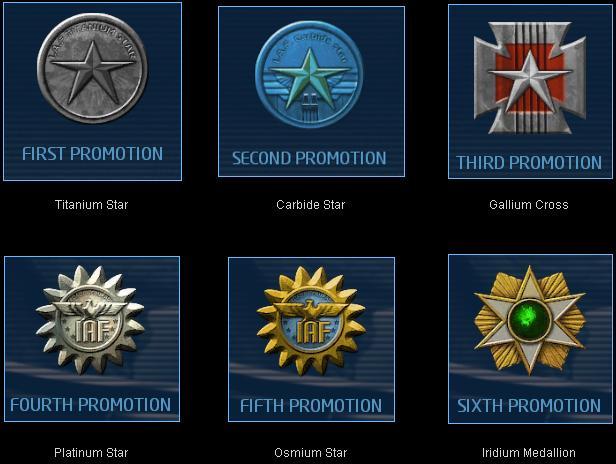
To unlock the promotion stars reach level 27 and hit promote. It will reset your levels, but you will have the promotion stars.
Reviews, more Guides and YouTube Channel
To see my reviews, please feel free to follow me and/or my curator group:
http://steamcommunity.com/id/Ov3RT4K3R/myworkshopfiles/?section=guides
http://steamcommunity.com/groups/orcollective#curation
Also feel free to check out my YouTube Channel:
https://www.youtube.com/channel/UC83DYCmrWfl9ttrhX54jmWA
http://steamcommunity.com/id/Ov3RT4K3R/myworkshopfiles/?section=guides
http://steamcommunity.com/groups/orcollective#curation
Also feel free to check out my YouTube Channel:
https://www.youtube.com/channel/UC83DYCmrWfl9ttrhX54jmWA
More Alien Swarm guides
- First Person Playing Mode (Original game!)★ 5 (166)12k views200 ♥2 minUpdated Jul 29, 2016
- Playing with Bots★ 5 (358)9.4k views480 ♥2 minUpdated Sep 7, 2015
- Руководство по получению достижений★ 5 (431)8.5k views368 ♥11 minRussianUpdated Mar 12, 2016
- Achievements guide★ 5 (268)8.2k views303 ♥25 minUpdated Apr 15, 2015
- MOD / DLC & Русификатор для Alien Swarm★ 4 (149)6.8k views170 ♥1 minBulgarianUpdated Jul 13, 2017
- Being credit to team: a PROGUIDE★ 4 (190)6.5k views170 ♥19 minUpdated Oct 28, 2015



This guide was created by its original author on the Steam Community. Are you the author and want it removed? Request removal.