Fix black screen freeze at launch
Black screen fix at launch
The issue
As of today (Sep 2023, NVidia drivers 536.99 SD WHQL, Windows 11 22H2) the game on some systems has some problems opening in full screen exclusive with v-sync and g-sync at launch. The result is a black screen with mouse pointer only and loading not proceeding.As a simple workaround you can LALT+TAB and then LALT+SHIFT+TAB back to the game, and this will "resume" loading as expected, but of course this is a very annoying minor issue we need to fix...
Solution
Use Microsoft Compatibility Administrator 32bit (the game exe is 32bit):- download the .sdb fix for the game from my OneDrive: https://1drv.ms/u/s!ApMUGr0cuN39gtBElEIcCEGYktN05w?e=AeBOnW
- download the Windows ADK[learn.microsoft.com] and launch the small installer...
Select just MS ACT (Application Compatibility Tools) from the list of installable tools (should be less than ~10MB, you don't neet to install the whole ADK of 6.4GB!!) - after installation, open "Compatibility Administrator (32-bit)"
- from menu File > Open... and install the .sdb file containing the fix (.sdb is a Microsoft format and nothing to be worried about containing just the fix that will go in your Registry... Safely ignore any AV warning for false positive file detection!)
- right click on the loaded DB (data base) down in the tree list, under "Custom database", and Save + Install it. It will appear in the list of OS installed applications so will be easy to uninstall just in case...
You don't need to reinstall this patch in your OS if in the future you'll reinstall the game as the fix will stay in your Windows Registry. You can even remove the whole Microsoft Compatibility Administrator tools if you want (the fix in the Registry won't be touched). As mentioned above you can also uninstall the patch, if you want to, from your OS list of installed programs.
These are the fixes applied to DDDA.exe:
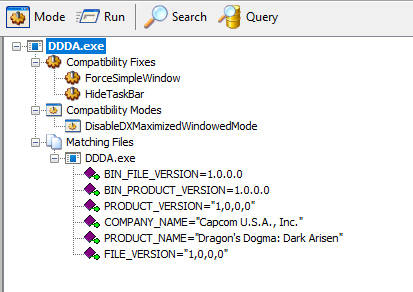
Enjoy the game starting without black screen freeze at launch anymore (and vote for this guide)!
For paranoids, VirusTotal results:
https://www.virustotal.com/gui/file/0d6fc78d2c8d3327afb2433db4efd06e5a30126d96cb87093ee23f71a77d21f5?nocache=1
Windows 11 24H2 NVidia 566.14
With new Windows and drivers it seems this fix is now no longer necessary and can instead cause black screen crash! 😮
Just uninstall the patch in case.
Just uninstall the patch in case.
More Dragon's Dogma: Dark Arisen guides
- Hero Achievement and Missable Quests Guide★ 5 (3.5k)58k views7.1k ♥30 minUpdated Aug 2, 2016
- Dragon's Dogma: Dark Arisen. Getting started 101 and "did you know's?"★ 5 (918)53k views1.1k ♥17 minUpdated Jan 20, 2016
- The Arisen's Handbook: A Guide to Adventuring in Gransys★ 5 (1.7k)42k views3.4k ♥91 minUpdated Oct 8, 2023
- The Guide to Vocations and Skills★ 5 (806)42k views1.9k ♥86 minUpdated Jan 1, 2020
- Chronological Quest Guide for dd:da★ 5 (779)33k views2k ♥54 minUpdated Jul 5, 2023
- Vocations, Strengths and Weaknesses, all Part of a Whole - Writings of an Aged Arisen★ 5 (575)32k views873 ♥33 minUpdated Jan 3, 2021



🔥 Popular guides
- Upgrading to PremiumTeam Fortress 2★ 5 (20k)1441k views11k ♥6 minUpdated May 11, 2022
- No More Room in Hell Official ManualNo More Room in Hell★ 5 (2.8k)569k views2.1k ♥29 minUpdated Apr 22, 2019
- NMRiH Community Hosting GuidesNo More Room in Hell★ 5 (526)351k views653 ♥1 minUpdated Aug 10, 2022
- ULTIMATE GUIDE FOR GAME DEV TYCOONGame Dev Tycoon★ 5 (5.8k)326k views10k ♥4 minUpdated 23 Jan, 2014
- How to 'Git Gud' Soon™MORDHAU★ 5 (2k)318k views3k ♥68 minUpdated Nov 16, 2024
- Лучшие кооперативные игры SteamPAYDAY 2★ 5 (1.5k)315k views2.1k ♥56 minRussianUpdated Apr 27, 2025






This guide was created by its original author on the Steam Community. Are you the author and want it removed? Request removal.