Fix Game Crashes
Check/Validate Local Game Files
- From the Library section, right-click on the game and select Properties from the menu.
- Select the Local files tab and click the Verify integrity of game files... button.
- Steam will verify the game's files - this process may take several minutes.
Update Video Card Drivers
Check DirectX installation
CPU/GPU Overclocking
If you are Overclocking or Turbo Boosting a component in your computer, we strongly recommend resetting the component or components to chipset manufacturer specifications, as doing so may prevent any crashes from occurring in the future.
If you’re using ‘Intel Turbo Booster’, please disable this feature, which is typically found in your computer's BIOS settings (contact the system or motherboard manufacturer for information regarding the BIOS and options within).
NvCamera64.dll Faulting Module
Disable Nvidia Ansel
Go to C:\Program Files\NVIDIA Corporation\Ansel\Tools and find NvCameraConfiguration.exe. Open that and a new window is displayed.
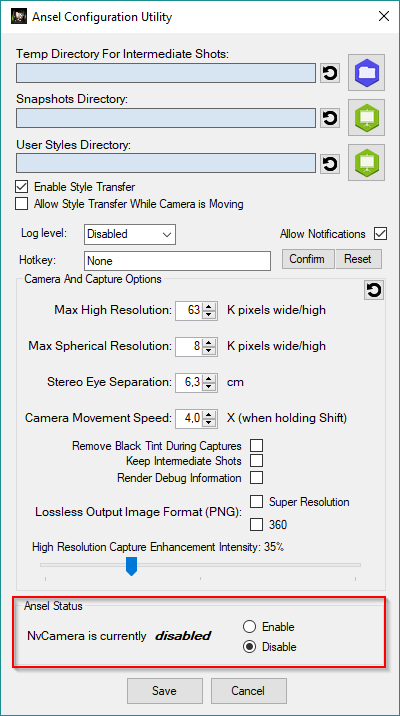
At the bottom of this window you can find a section called "Ansel Status". Select "Disable" and and click "Save" to apply the changes.
AMD Phenom II Processor
This issue should be fixed by the latest hotfix.
If you want to just play Hitman 2 on AMD Phenom II then here is a workaround that just might work. The reason why the game doesn’t support the AMD Phenom II is the lack of SSE4 instructions.
Install the Intel Software Development Emulator[software.intel.com] which will emulate the missing Instruction set and will allow you to play Hitman 2. Just follow the steps described in this guide and you might be able to get the game working. Source Website[segmentnext.com]
Virutal Memory
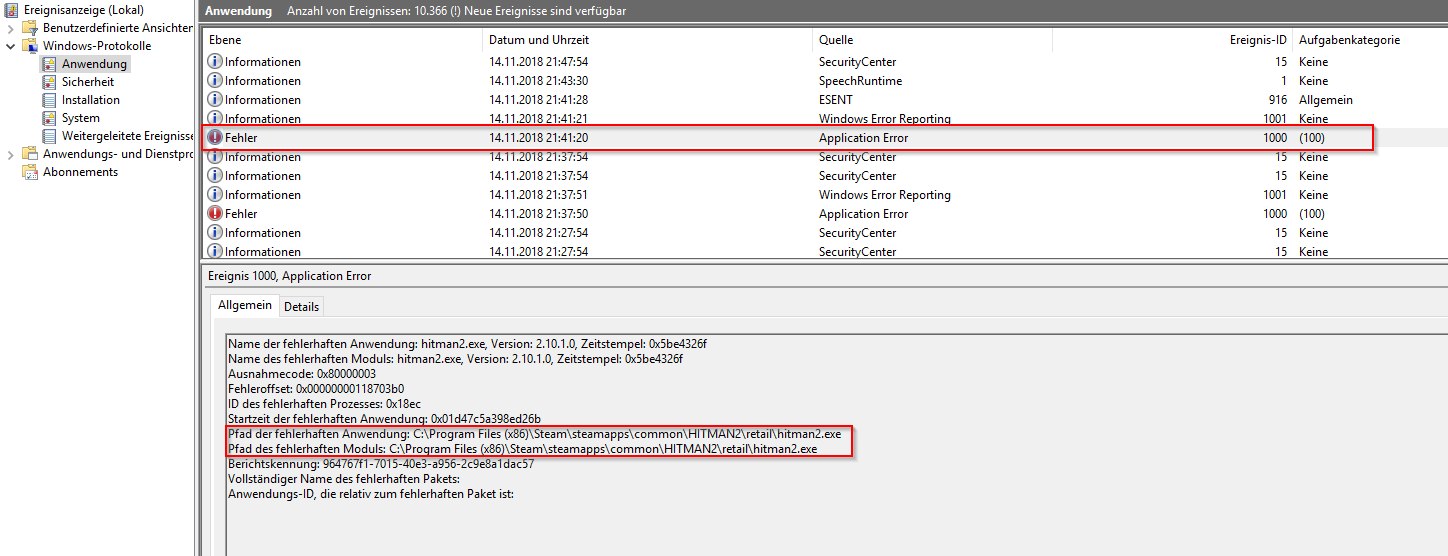
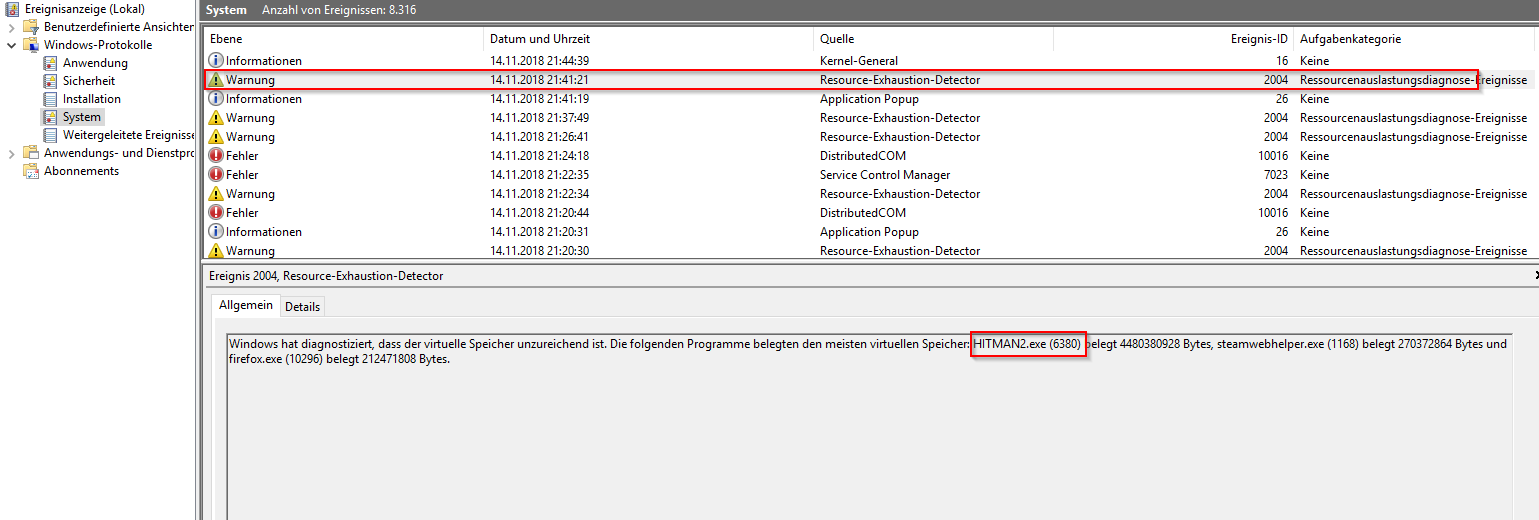
While checking the windows event monitor directly after a game crash occured I found an entry which points to an issue with the virtual memory size of the system. If you want to verify if that is also an issue on your pc follow the next steps. You can also jump to Change Default Virtual Memory Size on Windows 10
Setting up the virtual memory size manually also helps if the game doesn't start at all.- Press [Windows] + [R]
- Type "eventvwr" and click OK
- Open section "Windows-Logs" and select "Application"
- Find the error entry for Hitman2.exe and remember the time stamp
- Select "System" and scroll to time stamp from the step before
- If you see an entry like in the screenshot above you need to increase the virtual memory size
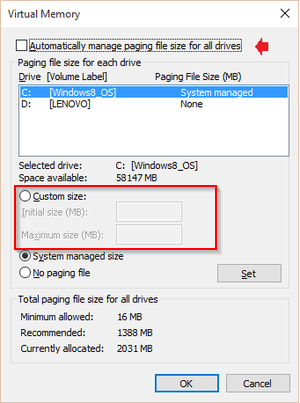 Click Start > File Explorer. Right-click on This PC, then left-click on Properties > Advanced System Settings > Advanced tab > Performance. Select Advanced tab > Virtual Memory.
Select "Custom size" and enter values for initial and maximum size. Make sure to click the "Set" button to apply the changes.
My settings: 4096 (initial) and 16386 (maximum)
Black Screen Fix
- The first one is quite simple if the game’s default resolution is just higher than your monitor’s resolution. Start the game and when the Black Screen appears press “Alt+Enter”.
This will put the game into Windowed mode and you will get the display. Now go to the video settings and change the resolution to your monitor’s native resolution and you will be able to play in fullscreen mode.
- Another reason for the back screen could be the usage of outdated GPU drivers. Update your GPU drivers and the issue should resolve.
- Also, make sure you haven’t overclocked your GPU if you have then just reverted back to GPU’s default settings and the Hitman 2 black screen issue would resolve.
- Another reason for the black screen is the broker HDR. If you play the game with HDR enabled it just turns the screen to black.
Just disable the HDR and if you aren’t able to then just press “Alt+Enter” and the game will go into windowed mode and the HDR will disable. Just go to the settings and turn-off HDR. Or you can just disable the HDR from Windows.
- External Sound Card is also a reason for the Black Screen. Just start the game with internal Sound card set as default and when the black screen appears just press “Alt+Tab” and change the audio output to your external Sound Card and the game will run just fine.
3rd Party Programms
Hitman 2 Technical Support
- Versions, Legacy and DLC explained (Store Guide)★ 5 (808)50k views643 ♥36 minUpdated Feb 24, 2023
- Hitman 2 Item & Unlock List ~ And What to Get First★ 5 (738)30k views1.4k ♥53 minUpdated Feb 24, 2023
- HITMAN™ 2 - Гайд по достижениям и испытаниям★ 5 (1.3k)27k views2.2k ♥104 minRussianUpdated Jan 24, 2023
- HITMAN 2 | Chameleon | All Disguises★ 5 (196)19k views377 ♥7 minUpdated Mar 8, 2020
- HITMAN™ 2 Achievement Guide★ 5 (721)18k views1.1k ♥9 minUpdated Jan 29, 2022
- HAVEN Island, Last Resort - Challenges, Achievements & Walkthroughs★ 4 (127)14k views165 ♥11 minUpdated Sep 30, 2019




- Upgrading to PremiumTeam Fortress 2★ 5 (20k)1441k views11k ♥6 minUpdated May 11, 2022
- No More Room in Hell Official ManualNo More Room in Hell★ 5 (2.8k)569k views2.1k ♥29 minUpdated Apr 22, 2019
- NMRiH Community Hosting GuidesNo More Room in Hell★ 5 (526)351k views653 ♥1 minUpdated Aug 10, 2022
- ULTIMATE GUIDE FOR GAME DEV TYCOONGame Dev Tycoon★ 5 (5.8k)326k views10k ♥4 minUpdated 23 Jan, 2014
- How to 'Git Gud' Soon™MORDHAU★ 5 (2k)318k views3k ♥68 minUpdated Nov 16, 2024
- Лучшие кооперативные игры SteamPAYDAY 2★ 5 (1.5k)315k views2.1k ♥56 minRussianUpdated Apr 27, 2025






This guide was created by its original author on the Steam Community. Are you the author and want it removed? Request removal.