Fix your Resolution and Mousesensitivity
Custom Resolution
Setting a custom resolution can be achieved by entering the game to open your console (US: ~ EU: ^ ) and using this command:
setres heigthXwidth
For example my resolution is 1920x1200 I will enter this:
setres 1920x1200
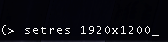
By default, this should also fix your mouse sensitivity but if not go to the second section of this guide.
PS.: To toggle fullscreenmode, use this command:
togglefullscreen
setres heigthXwidth
For example my resolution is 1920x1200 I will enter this:
setres 1920x1200
By default, this should also fix your mouse sensitivity but if not go to the second section of this guide.
PS.: To toggle fullscreenmode, use this command:
togglefullscreen
Custom MouseSensitivity
Here I show you how to fix/set a custom mousesensitivity for your game. As above open your console and use this command:
setmousesensitivity <floatvalue>
As Im always playing on 0.5 Im using it this way:
setmousesensitivity 0.5

setmousesensitivity <floatvalue>
As Im always playing on 0.5 Im using it this way:
setmousesensitivity 0.5
Graphics Mod
If you want to make the game's graphics better, take a look at this mod from Leon.
https://github.com/Leon280698/CT/releases
Need more help or interested in modding? Join our Discord: https://discord.gg/3u69jMa
https://github.com/Leon280698/CT/releases
Need more help or interested in modding? Join our Discord: https://discord.gg/3u69jMa
More STAR WARS™ Republic Commando guides
- Complete Fix/ HD EDITION★ 5 (785)58k views1.4k ♥1 minUpdated Jan 3, 2021
- Republic Commando Remastered★ 5 (792)53k views593 ♥1 minUpdated Aug 29, 2018
- Make Star Wars RC Great [looking] Again!★ 5 (357)44k views876 ♥1 minUpdated May 21, 2025
- Cheats & Console Commands★ 5 (546)25k views1k ♥2 minUpdated Dec 8, 2013
- [2024] Texture and Gameplay Fix + Joystick + Ultrawide (mouse sensibility fix Included)★ 5 (368)19k views769 ♥6 minUpdated May 4, 2024
- Star Wars Republic Commando Fix или как с комфортом играть в SWRC★ 5 (375)14k views487 ♥2 minRussianUpdated Sep 15, 2022




This guide was created by its original author on the Steam Community. Are you the author and want it removed? Request removal.