Fixing SR2 on PC + DLC: A Comprehensive Guide.
Cutscene Character / Object Sync / Speedup / Framerate / Multiplayer Issues
So first off, as you may notice Cut scenes are jank as all hell. the higher and more unstable your fps is the less sync the objects and characters will have in Cut scenes. I've managed to hit a sweet spot in capping my fps to where its stable and smooth as butter. I currently have my game fps set to 55 by NVIDIA Control Panel. I also have DXVK (x32) installed so the fps is as stable as can be. What i can recommend dearly is to first install DXVK (x32) make sure it IS infact the 32 bit version as that is the version SR2 needs. What i would then recommend is trying to find your FPS capping sweet spot. To cap your fps, use MSI Afterburner [www.msi.com], NVIDIA Control Panel or your AMD Driver Software. Any one of these should get the job done and they should provide documentation on how to cap game fps in any game, otherwise there should be easy to follow tutorials on how to do so online. once you find your sweet spot for cut scene sync-age, you are golden. Mine is 55 FPS, yours could be too. its all trial and error.
Download JUICED Patch[drive.google.com]
Juiced Patch is a patch for the Saints Row 2 PC Port running off of the Monkey Patch Framework by Scanti that adds better windowed mode support, Borderless Windowed replacement for windowed, Fixed FPS by the use of the SleepHack option (Note: this option heavily increases CPU usage.), An Uncap FPS Toggle, Slightly Extended Render Distance and Fixed Cutscene/Object Syncage.
Download JUICED Patch[drive.google.com]
Juiced Patch is a patch for the Saints Row 2 PC Port running off of the Monkey Patch Framework by Scanti that adds better windowed mode support, Borderless Windowed replacement for windowed, Fixed FPS by the use of the SleepHack option (Note: this option heavily increases CPU usage.), An Uncap FPS Toggle, Slightly Extended Render Distance and Fixed Cutscene/Object Syncage.
Hair and Other Transparency Issues
Turn your games Anti-aliasing ON. Any setting works. You may notice that on SR2 pc the Transparency on character hair is all types of bad. THIS IS THE REASON WHY. i genuinely didn't understand why transparency blending is connected to anti aliasing but there's the fix. i have my anti aliasing on 2x.
Hair Transparency with Anti-Aliasing off
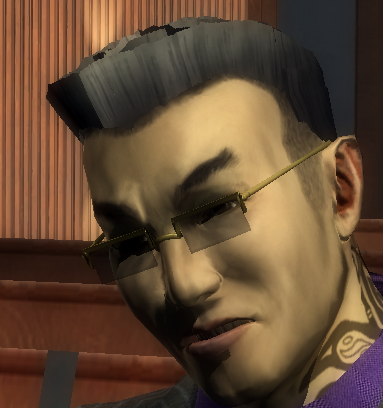
Hair Transparency with Anti-Aliasing on
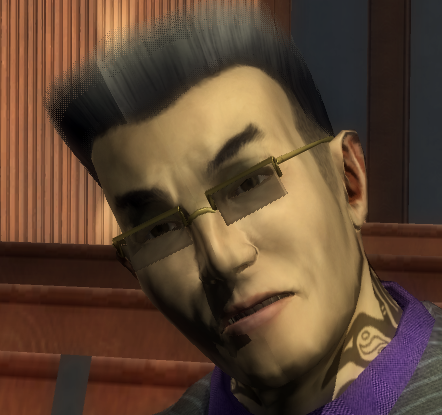
this even affects the boss' hair.
Hair Transparency with Anti-Aliasing off
Hair Transparency with Anti-Aliasing on
this even affects the boss' hair.
Addressing Bad Audio Quality
You'll also tend to notice that Audio sounds really really reeeeaaaalllyy bad. There are two amazing mods to fix this, Though they don't fix absolutely every sound in the game, they fix A LOT of them and makes the playing experience less painful. both of them are: SR2 Improved Audio [www.saintsrowmods.com] & High Quality Radio Mod [www.saintsrowmods.com]
MOD AND SOFTWARE RAW LINKS
DXVK: https://github.com/doitsujin/dxvk (alternatively use DXVK Async if you're having stutter issues.)
JUICED Patch: https://kobraworks.com/juiced
DXVK ASync: https://github.com/Sporif/dxvk-async
HQ Radio Mod: https://www.saintsrowmods.com/forum/threads/high-quality-radio-mod.9515/
SR2 PC DLC Mod: https://kobraworks.com/sr2pcdlc
JUICED Patch: https://kobraworks.com/juiced
DXVK ASync: https://github.com/Sporif/dxvk-async
HQ Radio Mod: https://www.saintsrowmods.com/forum/threads/high-quality-radio-mod.9515/
SR2 PC DLC Mod: https://kobraworks.com/sr2pcdlc
More Saints Row 2 guides
- Prevent Crashes And Fix FPS In Saints Row 2 (2025 Update)★ 5 (1.3k)76k views2.4k ♥12 minUpdated Apr 10
- 2025 Saints Row 2 PC Fix (Performance, Crashes)★ 5 (790)54k views1.7k ♥3 minUpdated Jun 1
- Доведение до ума (русификатор, баг фиксы)★ 5 (649)21k views724 ♥2 minRussianUpdated Aug 27, 2021
- Unlockables for the Gentlemen of the Row★ 5 (219)17k views514 ♥6 minUpdated Jun 3, 2024
- How To Fast Travel (Hidden gameplay mechanic)★ 5 (260)15k views326 ♥1 minUpdated Dec 30, 2025
- Phone Numbers Guide★ 5 (273)14k views526 ♥1 min


This guide was created by its original author on the Steam Community. Are you the author and want it removed? Request removal.