FIxing the multiplayer (very wacky way)
DEV FIXED IT <3
STEP 1 - Setup
x's denotes where you will have personal data
To access the appdata folder press windows + R and type in appdata, I think you will easly navigate from there
X:\SteamLibrary\steamapps\common\Scrap Mechanic\Survival\Scripts\game
we are looking for a script named: survival_spawns.lua
!!!CREATE BACKUP OF THIS FILE!!!
DBbeaver download link[dbeaver.io]
STEP 2 - Reset the tick counter
Now on to the hard part, where my fellow mechanics will enjoy screenshots in language they do not understand but will surley recognise
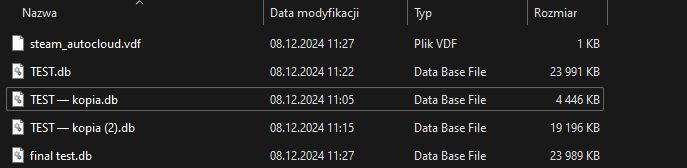
create copy of your file, it will be needed if we mess up big time. As you can see in the image above, you can do it in a messy way, we do not care at this point. You can copy the db file to some location you can easly access
- New connection
- Select sqlite
- Select save that you want to edit
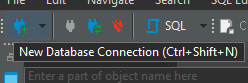
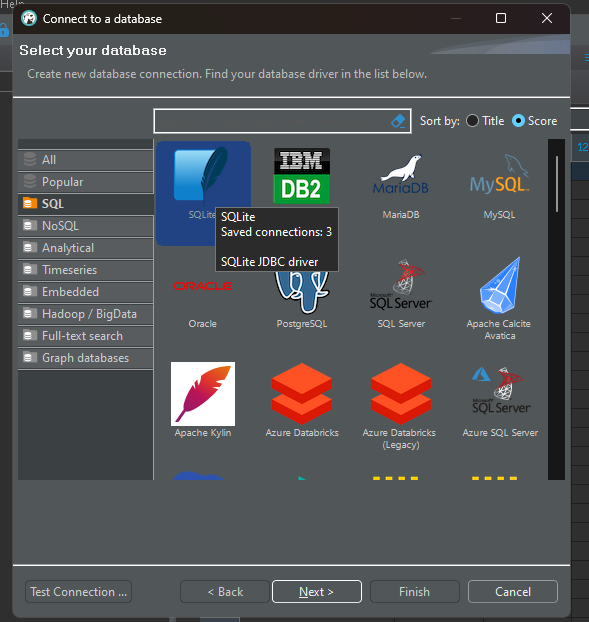
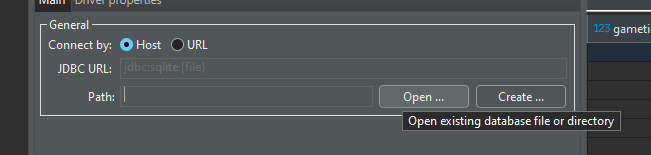

Press ctrl+s to save the file. Put the file back into your saves folder so we can launch it.
DONT LAUNCH THE FILE JUST YET
STEP 3 - the wacky time :3
Now that we ruined our save file synchronization issues it will work in multiplayer without any desync
BUT WAVES WILL NOT SPAWN - let's fix that!
This step will reset the spawn timers of creats and creatures, will not remove the ones you already have, but just FYI
Now we need to edit the LUA file we have located earlier. Please please just do backup of it just in case. Copy it somewhere or rename it, idc, just do a copy of it.
If you feel lazy you can just replace contents of your script with this pastebin: Feet pics[pastebin.com]
You can open it in notepad if you are a masochist, notepad++ if you fill fancy or any other text editor. I recommend any editor with line counter, as I will provide the line no. for ease of navigation.
We will need to copy the sweet script below (without the lines at the start and end):
----------------------------------------------------------------------------------
for x = -64, 63 do
for y = -48, 47 do
-- Create a cell object for the current (x, y)
local cell = { x = x, y = y, worldId = 1 } -- Add the appropriate worldId if necessary
local cellKey = CellKey(cell.x, cell.y)
local spawnDesc = SpawnDescriptions[tag]
-- Assert the existence of the spawn description
assert(spawnDesc, "No spawn description attached to this tag!")
-- Skip processing if respawn is nil
if spawnDesc.respawn == nil then
goto continue
end
-- Get the current tick
local currentTick = sm.game.getCurrentTick()
local loaded = { tick = currentTick } -- Replace this with the actual loaded logic if necessary
-- Ensure currentTick is valid
assert(spawnDesc.ticksBetweenRespawns, "Missing ticksBetweenRespawns in spawnDesc!")
-- Save the spawn state in storage
sm.storage.save({ spawnDesc.channel, cell.worldId, cellKey }, { tick = currentTick, storage = storage })
print('cell ', x, y, ' reloaded')
end
end
--------------------------------------------------------------
We paste it in two places (overkill but it makes sure the things are done):
LINE 477
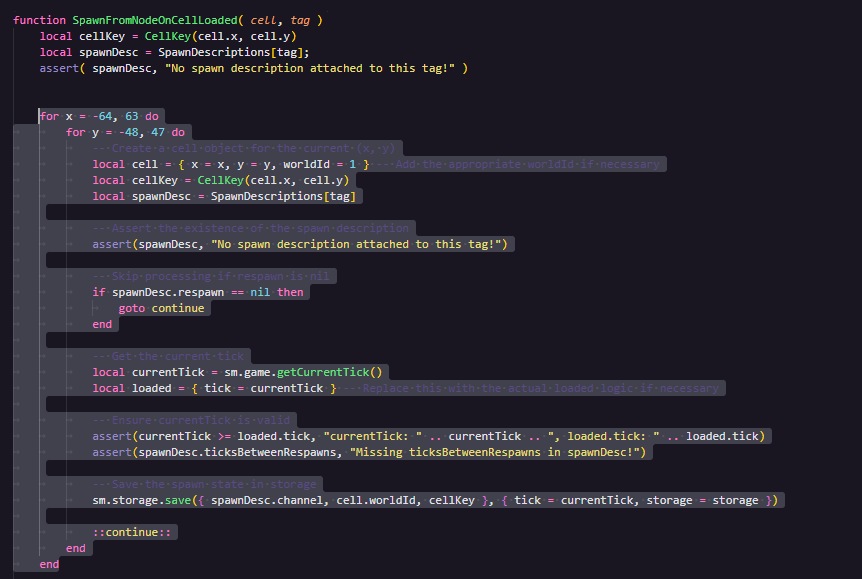
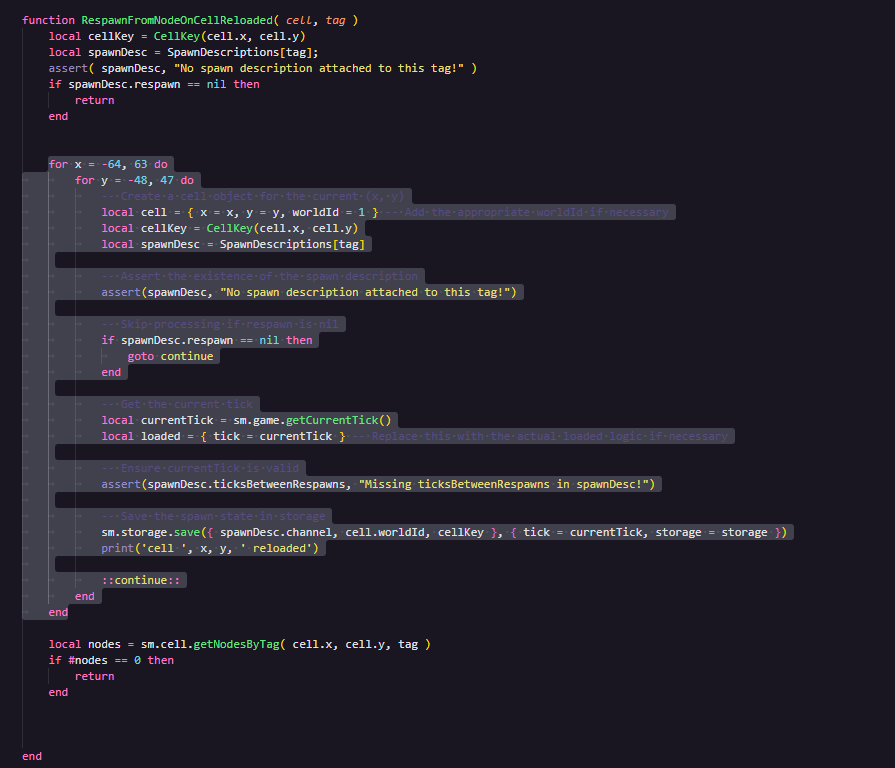
LINE ~540
FROM RESPAWN FUNCTION ALSO REMOVE LINES TO MATCH SCREENSHOTS ABOVE PLESE
Now save your file
STEP 4 - Scawy time :O
THIS STEP IS THE WORST, JUST BEARE WITH ME
Before we launch our save, just a disclaimer. Chat GPT script My script will cause your game to crash. That is expected. Just embrace the junk.
STEP 5 - Clean up
CHECKSUM PROBLEM
If during other players joning game throws out a error with checksum of our file, just reinstall the game.
It is recommended that you reinstall anyways. Just to be sure.
Why all that?
HOWEVER the spawn rates are hard stored in the game and are storred in the sql database in a format I cannot be bothered to decode. Because how the code handles things, any cell that is loaded with low tick value in place that was previously looted with high tick value will cause the cell to become "corrupt". The game uses dict to store all the loaeded cell, and code that is responsible for that just trhows exception and does not add our cell to the dict. This dict is being used by other parts of code, mainly the Wave spawn calculations. Beacuse of that we need to fix that ourselves, so the script resets the saved tick value for every cell on the map just to be sure .
KNOWN ISSUES
- My day counter is stuck at 0Yeah that is the problem. Maybe somebody less burned out from trying to figure out this game can fix that
- How raids actually work (Version 0.5.1)★ 5 (550)19k views867 ♥3 minUpdated 7 Apr, 2021
- Как пройти выживание?★ 5 (448)18k views700 ♥25 minRussianUpdated 12 Aug, 2020
- Все команды для скрап механик★ 5 (259)15k views475 ♥1 minRussianUpdated 1 Dec, 2023
- How Does Fuel Consumption Work? Which Engine Is the Most Efficient?★ 5 (182)10k views152 ♥3 minUpdated 16 Oct, 2020
- Robots and weapons concept proposal★ 5 (421)10k views182 ♥3 minUpdated 1 Apr, 2022
- Русификатор для Scrap Mechanic by Pro100DarkTV (v2.5)★ 5 (317)9.9k views516 ♥1 minRussianUpdated 19 Jun, 2021




- Upgrading to PremiumTeam Fortress 2★ 5 (20k)1441k views11k ♥6 minUpdated May 11, 2022
- No More Room in Hell Official ManualNo More Room in Hell★ 5 (2.8k)569k views2.1k ♥29 minUpdated Apr 22, 2019
- NMRiH Community Hosting GuidesNo More Room in Hell★ 5 (526)351k views653 ♥1 minUpdated Aug 10, 2022
- Лучшие кооперативные игры SteamPAYDAY 2★ 5 (1.5k)315k views2.1k ♥56 minRussianUpdated Apr 27, 2025
- Desert Eagle Heat Treated | Blue GemCounter-Strike 2★ 5 (1.6k)292k views1.5k ♥2 minUpdated Jan 16
- Treasure Hunt Puzzle SolutionsTotal War: WARHAMMER II★ 5 (6.9k)281k views15k ♥3 minUpdated Aug 19, 2021






This guide was created by its original author on the Steam Community. Are you the author and want it removed? Request removal.