FPS BOOST [ALL MACHINES] (Remastered)
Disclaimer
Mods
If you have a bunch of mods-enabled, your performance will go down! and there is no question about that. I personally run the game with probably around 350 mods or so counting the ones I've made, since they don't show up in the subscribed items list, and my performance is fine enough, but to many that would be a major issue. Even if it doesn't seem to be a problem, performance will tank as time progresses in-game due to a memory leak. Ravenfield seems to eat up 21 gigs of my RAM first starting out and can climb higher over time.
Certain Ravenfield mods, such as weapons or vehicles, take a very hefty toll on performance. To fix this, follow the steps below; but first, disable all mods in the mod menu, this can take a long while - if no boost is gained skip this step entirely. If you have a bunch of small mods, you may not experience a huge hit; but even single mods can be huge - the Urban Warfare pack or the WW2 Collection are both sizeable mods that can take up a decent chunk of your hard drive space if you don't have a large drive.
If mods are an issue, it is always recommended to give bots standard weapons, those which you did not get from the Workshop. The best weapons to allow bots are:
- Quicksilver
- RK-44
- M1 Garret
- S-IND7 [SUP]
- .357 Condor
- Scalpel
- SLAM-R
- Medic Bag
- Ammo Bag
Tri Count
Modders sometimes don't take into account the amount of detail in their mods, especially with vehicles. There is no proper way to determine what vehicle is best, as one can never really know without asking the modder specifically. The most important things about performance are both texture size and tri count. Many modders put huge amounts of tris, which are triangles making up the model; you may have seen pictures of wireframe game models which show you a bunch of polygons, triangles, ngons, etc. For instance; here's one of my models for the WW2 Collection:
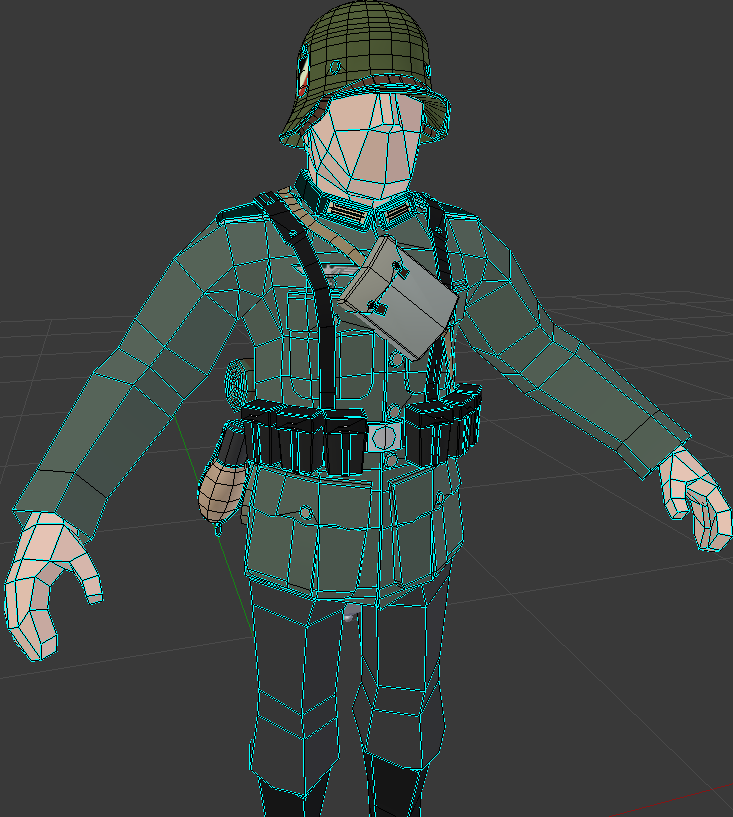
Ignore the blue and black lines, I manually sharpen and smooth my edges and that's all those colors mean. But otherwise, as you can see, the character is divided into a bunch of different parts. A skin like this won't run as well as a more simplified skin - though with skins the more important aspect about them is texture size. Majority of my skins use a pixel color grid which measures 8x32 or 16x32, thus allowing for the smallest compression Unity offers. Textures
Few mods are more infamous for performance hits by textures than the Urban Warfare series, the models themselves are generally very optimized, being from professional game studios who usually like keeping tri counts low; however the textures are extremely demanding, being 4k. Textures are a flat image which houses all of the color and details for the character, you can have various types of textures. Obviously the main texture file, and alongside that you can have things such as normal/bump maps which can add a bit more 3d pop to a model without there actually being something modelled there. There are various types of texture files, and suffice to say; the higher res they are, the more demanding they will get - both in performance and file size. I used to make 4K textures on my old HARP series, and those files had massive sizes. For Ravenfield, if I ever do make textures (which is rare!), I use either 1k or 2k. hey sui plz can we have 32k textures
As I said previously, there's no real way to determine how intense a mod is without asking the modder, but if things look like they have intense textures or the models look too detailed, you might be able to infer from this that they may not run as well.
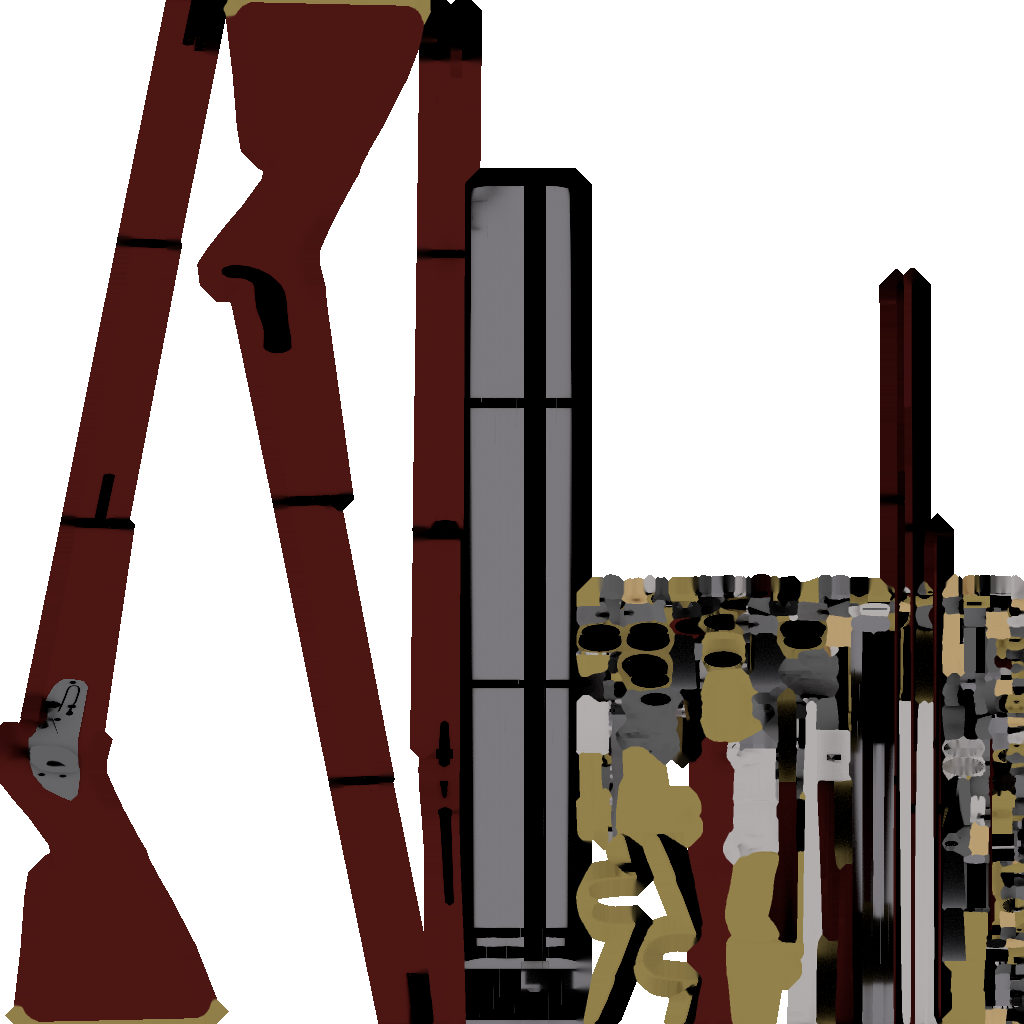
This texture is far from the greatest, there is ample space in the texture that could've been used to optimize it, however; this should hopefully be a basic idea of a texture. If the description of the mod says it has baked AO, you can assume it uses a texture. Not all mods that use textures will say this, however.
Another thing that can impact your game are mods with multiple materials. All models in Unity can support a ton of different materials, for instance, that German I posted above has materials for his insignia, zelt, and his main body. Most of my mods will use 1-2 materials, though camouflage usually calls for a whole new material to be added. As krev explained in his skinning guide, the game has to render each material and keep track of it. So one skin with six materials may not be bad, but then two skins means twelve materials, three to eighteen, and so on. This multiplies the amount it has to render significantly and thus can reduce performance.
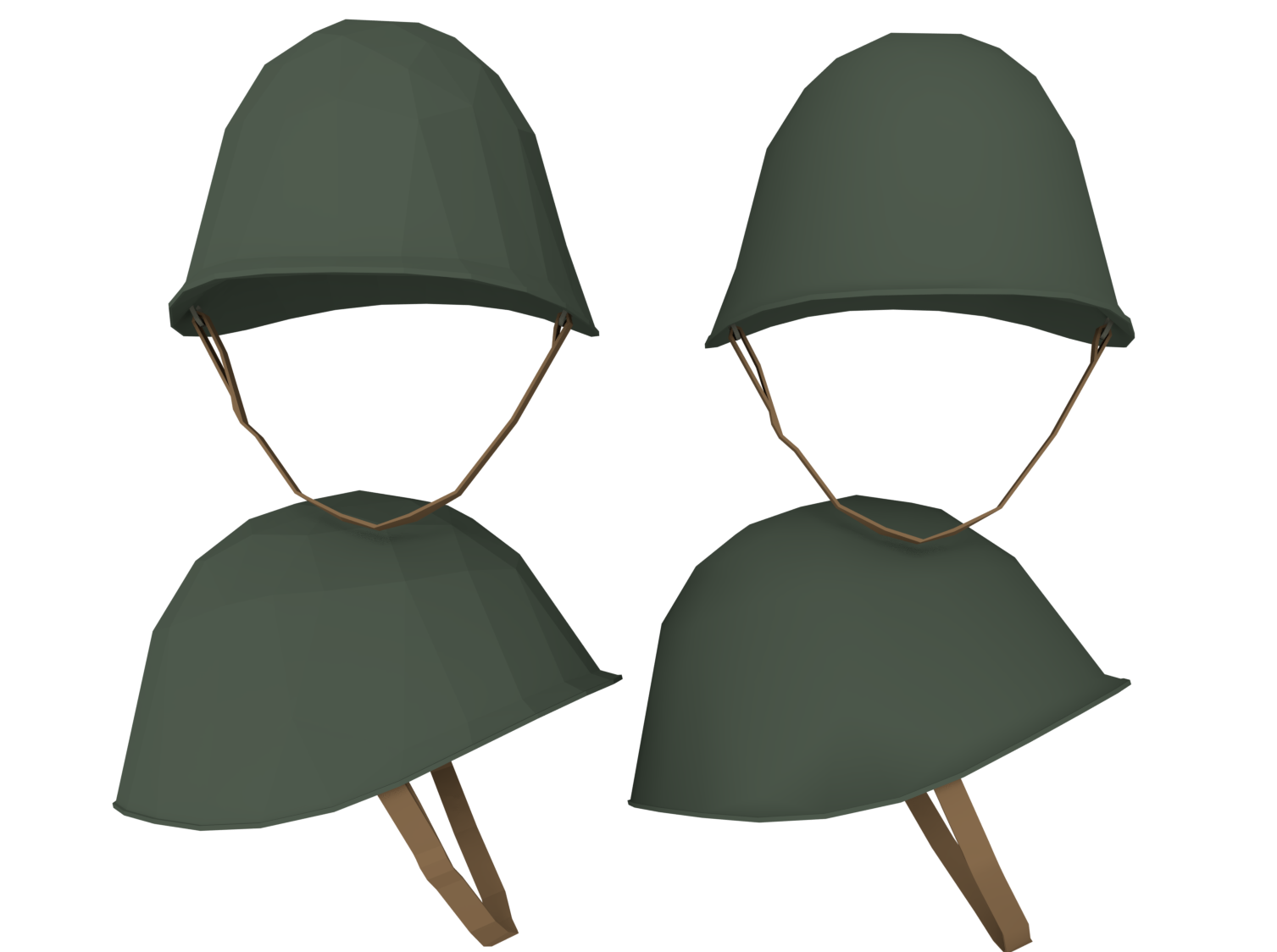
Here is the helmet from my recent Italian skin from the WW2 Collection; the one on the left is flat shaded and the one on the right is smooth shaded (for the most part); as you can see, it's the same model and all that changes is the shading, which gets blended together.
Do not judge a mod based on smooth or flat shade
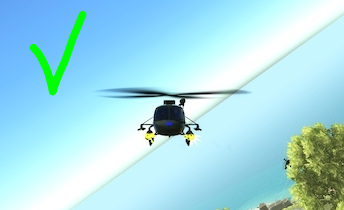
Left: As you can see, this whirleybird has some real fancy-smancy textures on it which may negatively impact performance.
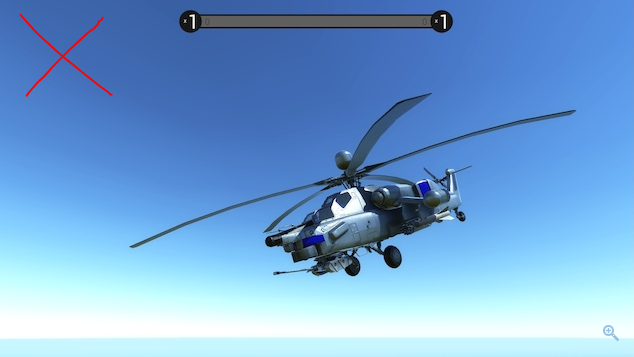
Right: This one seems to be much simpler in terms of textures, though the tri count may be higher. With vehicles, tris don't matter too much since you won't be seeing a hundred of them.
Both look just fine, but for performance's sake, it would be best to choose the less-detailed version unless you believe your computer can handle the more detailed and performance-intensive mods.
Bots
According to King_CreepaLot:
"The Biggest Performance Impacts is Bot Count, I generally play with around 100 but even then it's not super speedy depending on the conditions and what's going on."
Which Got Me Thinking!
Try to play the game with pre-set bots by the game every time you select Original Maps or Modded Maps, if not, skip this step. If bots are an issue, I recommended playing with 25 to 35 bots, just about the lowest numbers that your computer will handle.
Pre-Set Bots by the Map
The Rest is just also being Pre-Set by the game every time you select a map
Settings
Your settings may be the culprit, here's the fix
Full screen: (Always on, every game)- In general, you will almost always run games better this way
'Simple Graphics' or put it on Fastest, according to the game
- The graphics will go down, but since this is Ravenfield, it won't look all too different from maximum settings due to the game's relatively simple art style.
Field of View: 70 FOV
- Less objects being rendered will improve performance (and make you more likely to puke from motion sickness 30% of the time)
Weather Effects:
- Off - like you're really staring at nature in the midst of a battle.
Color Correction: (Leave it on, I get worse FPS with it off.)
- Generally this has little to no performance impact and more-so just changes the color palette.
Cloth Physics: (Off, for a minor benefit but it adds up.)
- This will disable such things as the capturable flags waving around
Muzzle Flash Lights: (Turn that off, unless if you want Muzzle Flash, Put it on Low intensity.)
- Makes Default Guns or modded guns Light up, and Improved Performance when its off
Bloom: (Again, off for a minor change, but do as you will.)
- Makes objects appear to glow
V-Sync (Frame Limit): Please keep it off, if it's on, turn it back off! if you don't know what is V-Sync, it synchronizes the frame rate of a graphics card with the refresh rate of a monitor, because V-Sync is designed to Remove Screen Tear and lock the FPS according to your refresh rate of the monitor. (this will also hinder your performance) That is why when V-Sync is off your FPS will be high but you will experience Screen Cracks or Screen Tear sometimes, not all people will.
Anti-Aliasing: If you don't know what is that. Click here to learn More[en.wikipedia.org] putting the Anti-Aliasing on full settings is not a good idea only for potato computers like yours, if you want more FPS, it's a good idea to turn it off. Besides, you will see pixels at the side of any texture, text box, etc.
Ambient occlusion: Put that on Low but it depends on your computer, idk it cost a lot of graphics Card to do that Click here to Learn about that[en.wikipedia.org].
High Dynamic Range (HDR): This Setting is Optional High Dynamic Range is the latest and best thing in video right now. In theory, HDR gaming is very similar to HDR video. The idea is that you get better contrast and a wider range of colour and brightness, which should make the picture more realistic and immersive. (If you're using AMD graphics cards, it's even better with the fast response times and less input lag and Nvidia Graphics card G-sync is the maximum for gaming experience.)
Resolution:
Change this if you really need to. Drop down to 1280×720 for the most FPS boost with little visual change. Further, drop to 640 × 480 for the absolute best increase.
Beta Branch
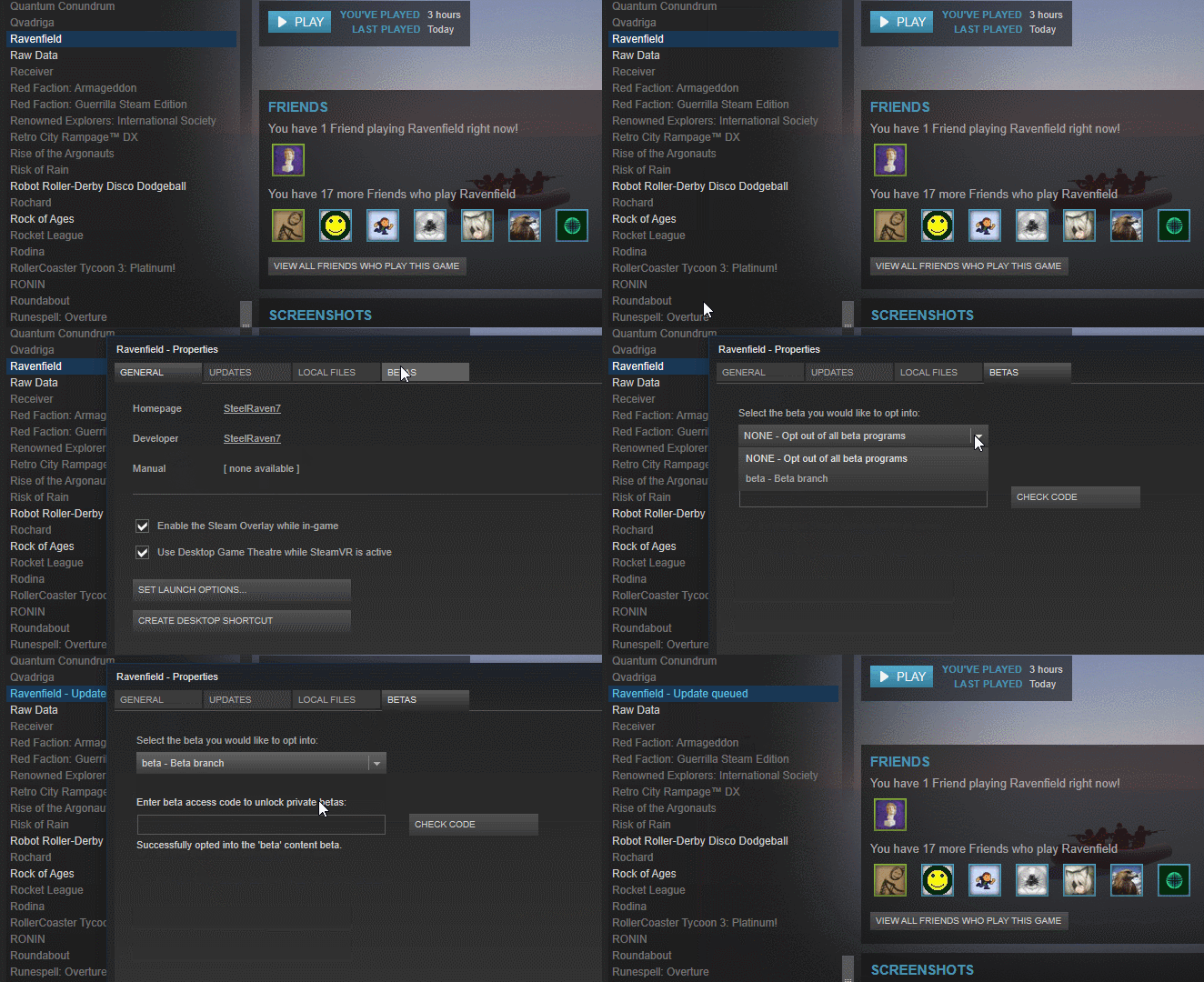 The Beta Branch is a good place to test upcoming content with the game. This comes with its ups and downs. Some mods may not work, such as multiskin and some weapon mods, however the overall performance increase is quite significant alongside gaining access to new features such as landscape hole volumes and some graphical enhancements. Just be aware that your results may differ from others'.
- I should note that the Beta Branch may or may not improve performance, depending on whatever is being added. -King_CreepaLot
Option 2
Upgrade your PC, this will cost money, but in your defense, if you want a Gaming PC, go buy one, idc. Besides, they're usually faster than your standard run-of-the-mill office desktop. If you have spare time, learning to build one can also be a cost-effective alternative which can usually save you some cash.
Note: If you have good RAM, a good graphics card, and most importantly a strong processor, you will have better FPS to all games, so of course Ravenfield is included. The game is CPU demanding mostly from the fact that it purely relies on a single core. If you get a processor with better per-core power, it should help with this game.
Unless you're King's friend, where apparently Half-Life 2 overheats it. Waste of $1400, if you ask me.
Bonus
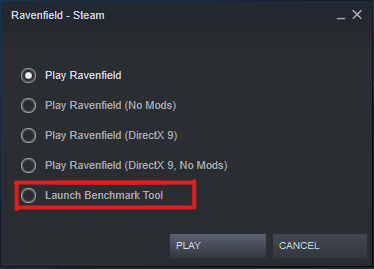 SteelRaven7 has created a game benchmark tool to test your the performance of your computer in-game.
The Commands are a bit Complicated but you will understand the first command in the list, and you have to insert it here
SteelRaven7 has created a game benchmark tool to test your the performance of your computer in-game.
The Commands are a bit Complicated but you will understand the first command in the list, and you have to insert it here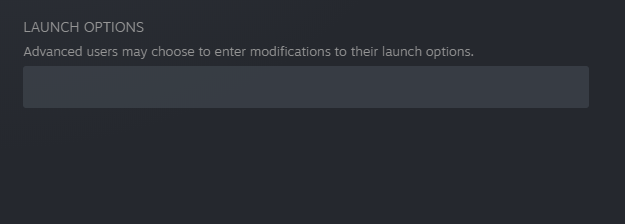 .
.
it can be found on the properties general
Click here[www.pcgamebenchmark.com], it's free, no virus, and it doesn't require a large amount of space to store it.
- Note from me, King:
- Depending on your PC, you may not even need a program like that to checks whatcha' need. For instance, I can just open up the command console (Windows Key + R) and from there, type:msinfo32Obviously, if you own a Macintosh, this command won't work. You're not running a Windows machine, silly! End of note
- Depending on your PC, you may not even need a program like that to checks whatcha' need. For instance, I can just open up the command console (Windows Key + R) and from there, type:
Follow These 3 Simple Steps:
- Download the test app
- Click the app that you downloaded
- See your results
Just to make sure if it passes the requirements or the minimum PC specs that Ravenfield needs.
Ravenfield's Minimum Specifications:
- If you're using mods, devote several more gigs to it. They add up quickly!
Note: That means you will determine what type of computer parts you're using and what should you do, but it's all up to you:D. If you're using Linux or Apple, look at the following requirements at the bottom of the store page of Ravenfield
Footnotes
Hey, King here, I went ahead and did some edits to the grammar as well as some general formatting, alongside a few footnotes here and there. I don't really worry about frames since my computer can handle it just fine maxed out, but I know what attracts a lot of the people to this game is its simplicity and ease of use to run (alongside its bountiful modding community). If you have an Nvidia card, you can try out the GeForce Experience which can automatically adjust settings to fit your computer. It may not always work (I generally just manually tweak my games), but if you're unwilling to spend the time, it does a decent-enough job of it. Hopefully, you find what Crucialcap wrote useful!
This is my first ever guide on Steam, please consider a rating if it helped you out; and also if the guide is outdated overtime, go ahead to DM me on Discord [REDACTED] if something is new or needs to be tweaked. Thank you and good luck on the Ravenfield!
- [Official] Creating custom maps for Ravenfield★ 5 (855)59k views1.4k ♥28 minUpdated May 17, 2022
- Ravenfield PvE Missions★ 5 (697)27k views1.4k ♥19 minUpdated Nov 18, 2022
- Need Something To Do?★ 5 (275)13k views534 ♥5 minUpdated Jan 9, 2018
- RAVENFIELD — Руководство | Manual [RU].★ 5 (207)13k views289 ♥17 minRussianUpdated Oct 19, 2021
- Is Eagle the aggressor? (Fan theory)★ 5 (231)12k views193 ♥5 minUpdated Jan 31
- Birds of War: Vanilla+ Interpretation★ 5 (335)11k views662 ♥29 minUpdated Dec 4, 2021




- Upgrading to PremiumTeam Fortress 2★ 5 (20k)1441k views11k ♥6 minUpdated May 11, 2022
- No More Room in Hell Official ManualNo More Room in Hell★ 5 (2.8k)569k views2.1k ♥29 minUpdated Apr 22, 2019
- NMRiH Community Hosting GuidesNo More Room in Hell★ 5 (526)351k views653 ♥1 minUpdated Aug 10, 2022
- Лучшие кооперативные игры SteamPAYDAY 2★ 5 (1.5k)315k views2.1k ♥56 minRussianUpdated Apr 27, 2025
- Desert Eagle Heat Treated | Blue GemCounter-Strike 2★ 5 (1.6k)292k views1.5k ♥2 minUpdated Jan 16
- Treasure Hunt Puzzle SolutionsTotal War: WARHAMMER II★ 5 (6.9k)281k views15k ♥3 minUpdated Aug 19, 2021






This guide was created by its original author on the Steam Community. Are you the author and want it removed? Request removal.