FPS BOOST R:SoR 2025
In Game Settings
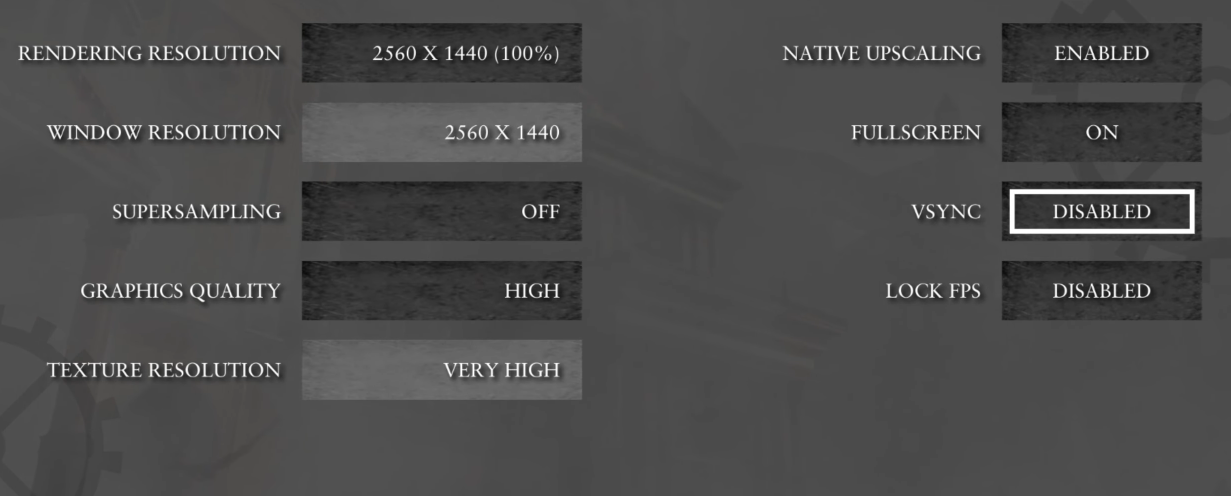
Go to GRAPHICS, find NATIVE UPSCALING and set ENABLED,
where RENDERING RESOLUTION set 100%
VSYNC and LOCK FPS set DISABLED
NVIDIA Control Panel
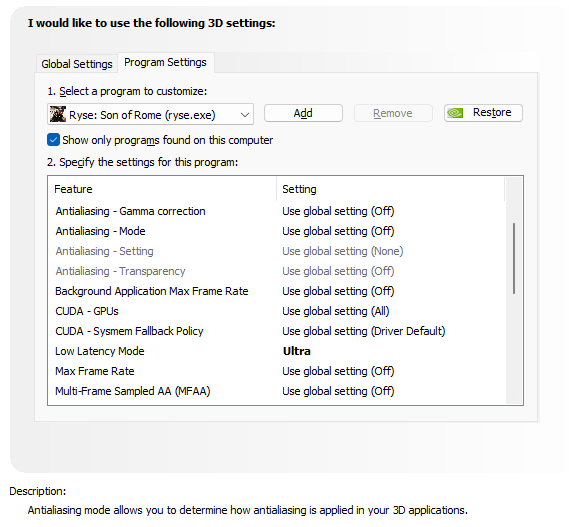
In Manage 3D Settings choose Program Settings,
Select a program to customize and select Ryse: Son of Rome (ryse.exe)
Low Latency Mode - Ultra
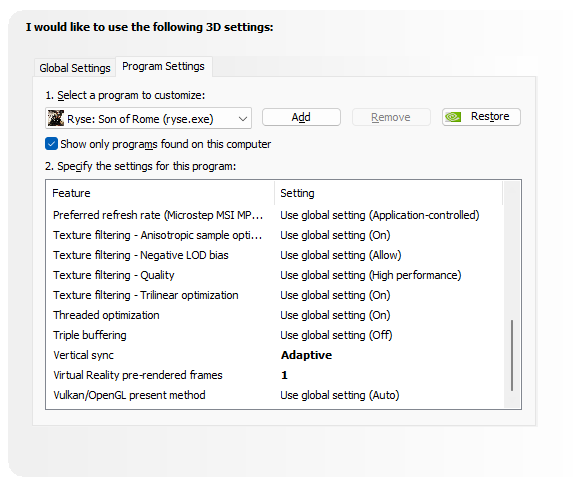
Vertical Sync - Adaptive
Virtual Reality pre-render frames - 1
More Ryse: Son of Rome guides
- [Решение/Fix] Как убрать лимит в 30 fps(FPS limit)★ 5 (317)20k views320 ♥1 minUpdated 4 Aug, 2025
- Путеводитель по достижениям в игре★ 5 (796)18k views785 ♥3 minRussianUpdated 29 Oct, 2014
- May help increase performance with Nvidia cards★ 5 (320)18k views348 ♥1 minUpdated 23 Feb, 2022
- Всем тем у кого лагает или фризит на топовых ПК★ 5 (283)14k views217 ♥1 minRussian
- No more Stutter or FPS drop.★ 4 (131)13k views86 ♥1 minUpdated 24 May
- Ryse: Son of Rome - руководство по сетевым достижениям★ 5 (356)10k views397 ♥10 minRussianUpdated 30 Sep, 2023


🔥 Popular guides
- Upgrading to PremiumTeam Fortress 2★ 5 (20k)1441k views11k ♥6 minUpdated May 11, 2022
- No More Room in Hell Official ManualNo More Room in Hell★ 5 (2.8k)569k views2.1k ♥29 minUpdated Apr 22, 2019
- NMRiH Community Hosting GuidesNo More Room in Hell★ 5 (526)351k views653 ♥1 minUpdated Aug 10, 2022
- How to 'Git Gud' Soon™MORDHAU★ 5 (2k)318k views3k ♥68 minUpdated Nov 16, 2024
- Лучшие кооперативные игры SteamPAYDAY 2★ 5 (1.5k)315k views2.1k ♥56 minRussianUpdated Apr 27, 2025
- Desert Eagle Heat Treated | Blue GemCounter-Strike 2★ 5 (1.6k)292k views1.5k ♥2 minUpdated Jan 16





This guide was created by its original author on the Steam Community. Are you the author and want it removed? Request removal.